
Status: Works great and is in daily use without any known bugs. Status2: I just added the package to PyPI and updated the usage instructions. Please report any issues :) Let Claude be your database expert! MCP Alchemy connects Claude Desktop directly to your databases, allowing it to: - Help you explore and understand your database structure - Assist in writing and validating SQL queries - Display
npx mdskills install runekaagaard/mcp-alchemyRelated
@runekaagaard? Sign in with GitHub to claim this listing.Comprehensive database MCP server with excellent multi-dialect support and clear tool descriptions
1# MCP Alchemy23<a href="https://www.pulsemcp.com/servers/runekaagaard-alchemy"><img src="https://www.pulsemcp.com/badge/top-pick/runekaagaard-alchemy" width="400" alt="PulseMCP Badge"></a>45**Status: Works great and is in daily use without any known bugs.**67**Status2: I just added the package to PyPI and updated the usage instructions. Please report any issues :)**89Let Claude be your database expert! MCP Alchemy connects Claude Desktop directly to your databases, allowing it to:1011- Help you explore and understand your database structure12- Assist in writing and validating SQL queries13- Displays relationships between tables14- Analyze large datasets and create reports15- Claude Desktop Can analyse and create artifacts for very large datasets using [claude-local-files](https://github.com/runekaagaard/claude-local-files).1617Works with PostgreSQL, MySQL, MariaDB, SQLite, Oracle, MS SQL Server, CrateDB, Vertica,18and a host of other [SQLAlchemy-compatible](https://docs.sqlalchemy.org/en/20/dialects/) databases.1920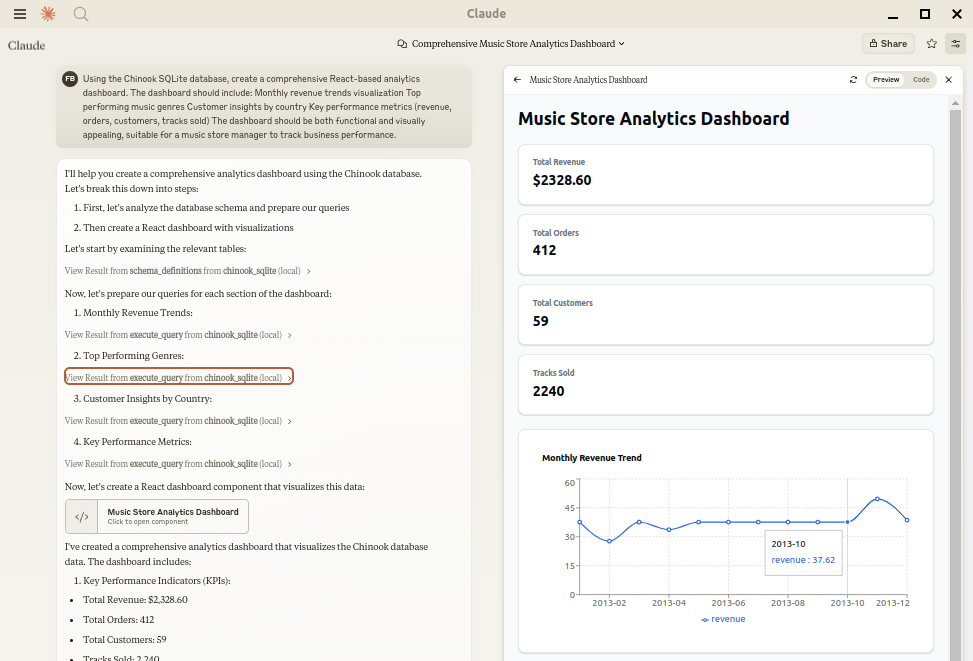2122## Installation2324Ensure you have uv installed:25```bash26# Install uv if you haven't already27curl -LsSf https://astral.sh/uv/install.sh | sh28```2930## Usage with Claude Desktop3132Add to your `claude_desktop_config.json`. You need to add the appropriate database driver in the ``--with`` parameter.3334_Note: After a new version release there might be a period of up to 600 seconds while the cache clears locally35cached causing uv to raise a versioning error. Restarting the MCP client once again solves the error._3637### SQLite (built into Python)38```json39{40 "mcpServers": {41 "my_sqlite_db": {42 "command": "uvx",43 "args": ["--from", "mcp-alchemy==2025.8.15.91819",44 "--refresh-package", "mcp-alchemy", "mcp-alchemy"],45 "env": {46 "DB_URL": "sqlite:////absolute/path/to/database.db"47 }48 }49 }50}51```5253### PostgreSQL54```json55{56 "mcpServers": {57 "my_postgres_db": {58 "command": "uvx",59 "args": ["--from", "mcp-alchemy==2025.8.15.91819", "--with", "psycopg2-binary",60 "--refresh-package", "mcp-alchemy", "mcp-alchemy"],61 "env": {62 "DB_URL": "postgresql://user:password@localhost/dbname"63 }64 }65 }66}67```6869### MySQL/MariaDB70```json71{72 "mcpServers": {73 "my_mysql_db": {74 "command": "uvx",75 "args": ["--from", "mcp-alchemy==2025.8.15.91819", "--with", "pymysql",76 "--refresh-package", "mcp-alchemy", "mcp-alchemy"],77 "env": {78 "DB_URL": "mysql+pymysql://user:password@localhost/dbname"79 }80 }81 }82}83```8485### Microsoft SQL Server86```json87{88 "mcpServers": {89 "my_mssql_db": {90 "command": "uvx",91 "args": ["--from", "mcp-alchemy==2025.8.15.91819", "--with", "pymssql",92 "--refresh-package", "mcp-alchemy", "mcp-alchemy"],93 "env": {94 "DB_URL": "mssql+pymssql://user:password@localhost/dbname"95 }96 }97 }98}99```100101### Oracle102```json103{104 "mcpServers": {105 "my_oracle_db": {106 "command": "uvx",107 "args": ["--from", "mcp-alchemy==2025.8.15.91819", "--with", "oracledb",108 "--refresh-package", "mcp-alchemy", "mcp-alchemy"],109 "env": {110 "DB_URL": "oracle+oracledb://user:password@localhost/dbname"111 }112 }113 }114}115```116117### CrateDB118```json119{120 "mcpServers": {121 "my_cratedb": {122 "command": "uvx",123 "args": ["--from", "mcp-alchemy==2025.8.15.91819", "--with", "sqlalchemy-cratedb>=0.42.0.dev1",124 "--refresh-package", "mcp-alchemy", "mcp-alchemy"],125 "env": {126 "DB_URL": "crate://user:password@localhost:4200/?schema=testdrive"127 }128 }129 }130}131```132For connecting to CrateDB Cloud, use a URL like133`crate://user:password@example.aks1.westeurope.azure.cratedb.net:4200?ssl=true`.134135### Vertica136```json137{138 "mcpServers": {139 "my_vertica_db": {140 "command": "uvx",141 "args": ["--from", "mcp-alchemy==2025.8.15.91819", "--with", "vertica-python",142 "--refresh-package", "mcp-alchemy", "mcp-alchemy"],143 "env": {144 "DB_URL": "vertica+vertica_python://user:password@localhost:5433/dbname",145 "DB_ENGINE_OPTIONS": "{\"connect_args\": {\"ssl\": false}}"146 }147 }148 }149}150```151152## Environment Variables153154- `DB_URL`: SQLAlchemy [database URL](https://docs.sqlalchemy.org/en/20/core/engines.html#database-urls) (required)155- `CLAUDE_LOCAL_FILES_PATH`: Directory for full result sets (optional)156- `EXECUTE_QUERY_MAX_CHARS`: Maximum output length (optional, default 4000)157- `DB_ENGINE_OPTIONS`: JSON string containing additional SQLAlchemy engine options (optional)158159## Connection Pooling160161MCP Alchemy uses connection pooling optimized for long-running MCP servers. The default settings are:162163- `pool_pre_ping=True`: Tests connections before use to handle database timeouts and network issues164- `pool_size=1`: Maintains 1 persistent connection (MCP servers typically handle one request at a time)165- `max_overflow=2`: Allows up to 2 additional connections for burst capacity166- `pool_recycle=3600`: Refreshes connections older than 1 hour (prevents timeout issues)167- `isolation_level='AUTOCOMMIT'`: Ensures each query commits automatically168169These defaults work well for most databases, but you can override them via `DB_ENGINE_OPTIONS`:170171```json172{173 "DB_ENGINE_OPTIONS": "{\"pool_size\": 5, \"max_overflow\": 10, \"pool_recycle\": 1800}"174}175```176177For databases with aggressive timeout settings (like MySQL's 8-hour default), the combination of `pool_pre_ping` and `pool_recycle` ensures reliable connections.178179## API180181### Tools182183- **all_table_names**184 - Return all table names in the database185 - No input required186 - Returns comma-separated list of tables187 ```188 users, orders, products, categories189 ```190191- **filter_table_names**192 - Find tables matching a substring193 - Input: `q` (string)194 - Returns matching table names195 ```196 Input: "user"197 Returns: "users, user_roles, user_permissions"198 ```199200- **schema_definitions**201 - Get detailed schema for specified tables202 - Input: `table_names` (string[])203 - Returns table definitions including:204 - Column names and types205 - Primary keys206 - Foreign key relationships207 - Nullable flags208 ```209 users:210 id: INTEGER, primary key, autoincrement211 email: VARCHAR(255), nullable212 created_at: DATETIME213214 Relationships:215 id -> orders.user_id216 ```217218- **execute_query**219 - Execute SQL query with vertical output format220 - Inputs:221 - `query` (string): SQL query222 - `params` (object, optional): Query parameters223 - Returns results in clean vertical format:224 ```225 1. row226 id: 123227 name: John Doe228 created_at: 2024-03-15T14:30:00229 email: NULL230231 Result: 1 rows232 ```233 - Features:234 - Smart truncation of large results235 - Full result set access via [claude-local-files](https://github.com/runekaagaard/claude-local-files) integration236 - Clean NULL value display237 - ISO formatted dates238 - Clear row separation239240## Claude Local Files241242When [claude-local-files](https://github.com/runekaagaard/claude-local-files) is configured:243244- Access complete result sets beyond Claude's context window245- Generate detailed reports and visualizations246- Perform deep analysis on large datasets247- Export results for further processing248249The integration automatically activates when `CLAUDE_LOCAL_FILES_PATH` is set.250251## Developing252253First clone the github repository, install the dependencies and your database driver(s) of choice:254255```256git clone git@github.com:runekaagaard/mcp-alchemy.git257cd mcp-alchemy258uv sync259uv pip install psycopg2-binary260```261262Then set this in claude_desktop_config.json:263264```265...266"command": "uv",267"args": ["run", "--directory", "/path/to/mcp-alchemy", "-m", "mcp_alchemy.server", "main"],268...269```270271## My Other LLM Projects272273- **[MCP Redmine](https://github.com/runekaagaard/mcp-redmine)** - Let Claude Desktop manage your Redmine projects and issues.274- **[MCP Notmuch Sendmail](https://github.com/runekaagaard/mcp-notmuch-sendmail)** - Email assistant for Claude Desktop using notmuch.275- **[Diffpilot](https://github.com/runekaagaard/diffpilot)** - Multi-column git diff viewer with file grouping and tagging.276- **[Claude Local Files](https://github.com/runekaagaard/claude-local-files)** - Access local files in Claude Desktop artifacts.277278## MCP Directory Listings279280MCP Alchemy is listed in the following MCP directory sites and repositories:281282- [PulseMCP](https://www.pulsemcp.com/servers/runekaagaard-alchemy)283- [Glama](https://glama.ai/mcp/servers/@runekaagaard/mcp-alchemy)284- [MCP.so](https://mcp.so/server/mcp-alchemy)285- [MCP Archive](https://mcp-archive.com/server/mcp-alchemy)286- [Playbooks MCP](https://playbooks.com/mcp/runekaagaard-alchemy)287- [Awesome MCP Servers](https://github.com/punkpeye/awesome-mcp-servers)288289## Contributing290291Contributions are warmly welcomed! Whether it's bug reports, feature requests, documentation improvements, or code contributions - all input is valuable. Feel free to:292293- Open an issue to report bugs or suggest features294- Submit pull requests with improvements295- Enhance documentation or share your usage examples296- Ask questions and share your experiences297298The goal is to make database interaction with Claude even better, and your insights and contributions help achieve that.299300## License301302Mozilla Public License Version 2.0303
Full transparency — inspect the skill content before installing.