
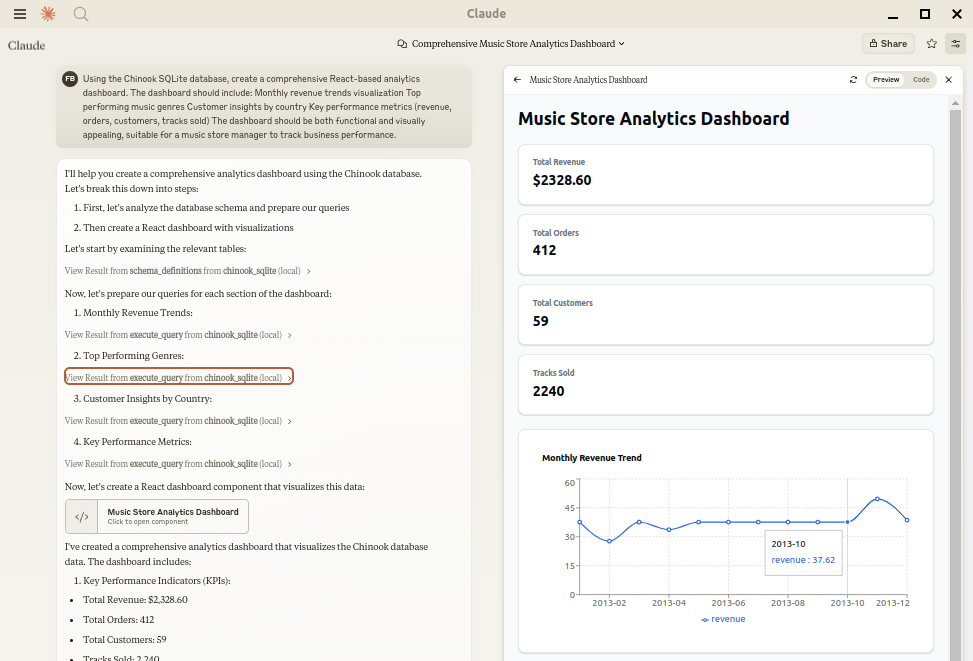
Status: Works great and is in daily use without any known bugs. Status2: I just added the package to PyPI and updated the usage instructions. Please report any issues :) Let Claude be your database expert! MCP Alchemy connects Claude Desktop directly to your databases, allowing it to: - Help you explore and understand your database structure - Assist in writing and validating SQL queries - Display
npx mdskills install runekaagaard/mcp-alchemyRelated
@runekaagaard? Sign in with GitHub to claim this listing.Comprehensive database MCP server with excellent multi-dialect support and clear tool descriptions
Status: Works great and is in daily use without any known bugs.
Status2: I just added the package to PyPI and updated the usage instructions. Please report any issues :)
Let Claude be your database expert! MCP Alchemy connects Claude Desktop directly to your databases, allowing it to:
Works with PostgreSQL, MySQL, MariaDB, SQLite, Oracle, MS SQL Server, CrateDB, Vertica, and a host of other SQLAlchemy-compatible databases.
Ensure you have uv installed:
# Install uv if you haven't already
curl -LsSf https://astral.sh/uv/install.sh | sh
Add to your claude_desktop_config.json. You need to add the appropriate database driver in the --with parameter.
Note: After a new version release there might be a period of up to 600 seconds while the cache clears locally cached causing uv to raise a versioning error. Restarting the MCP client once again solves the error.
{
  "mcpServers": {
    "my_sqlite_db": {
      "command": "uvx",
      "args": ["--from", "mcp-alchemy==2025.8.15.91819",
               "--refresh-package", "mcp-alchemy", "mcp-alchemy"],
      "env": {
        "DB_URL": "sqlite:////absolute/path/to/database.db"
      }
    }
  }
}
{
  "mcpServers": {
    "my_postgres_db": {
      "command": "uvx",
      "args": ["--from", "mcp-alchemy==2025.8.15.91819", "--with", "psycopg2-binary",
               "--refresh-package", "mcp-alchemy", "mcp-alchemy"],
      "env": {
        "DB_URL": "postgresql://user:password@localhost/dbname"
      }
    }
  }
}
{
  "mcpServers": {
    "my_mysql_db": {
      "command": "uvx",
      "args": ["--from", "mcp-alchemy==2025.8.15.91819", "--with", "pymysql",
               "--refresh-package", "mcp-alchemy", "mcp-alchemy"],
      "env": {
        "DB_URL": "mysql+pymysql://user:password@localhost/dbname"
      }
    }
  }
}
{
  "mcpServers": {
    "my_mssql_db": {
      "command": "uvx",
      "args": ["--from", "mcp-alchemy==2025.8.15.91819", "--with", "pymssql",
               "--refresh-package", "mcp-alchemy", "mcp-alchemy"],
      "env": {
        "DB_URL": "mssql+pymssql://user:password@localhost/dbname"
      }
    }
  }
}
{
  "mcpServers": {
    "my_oracle_db": {
      "command": "uvx",
      "args": ["--from", "mcp-alchemy==2025.8.15.91819", "--with", "oracledb",
               "--refresh-package", "mcp-alchemy", "mcp-alchemy"],
      "env": {
        "DB_URL": "oracle+oracledb://user:password@localhost/dbname"
      }
    }
  }
}
{
  "mcpServers": {
    "my_cratedb": {
      "command": "uvx",
      "args": ["--from", "mcp-alchemy==2025.8.15.91819", "--with", "sqlalchemy-cratedb>=0.42.0.dev1",
               "--refresh-package", "mcp-alchemy", "mcp-alchemy"],
      "env": {
        "DB_URL": "crate://user:password@localhost:4200/?schema=testdrive"
      }
    }
  }
}
For connecting to CrateDB Cloud, use a URL like
crate://user:password@example.aks1.westeurope.azure.cratedb.net:4200?ssl=true.
{
  "mcpServers": {
    "my_vertica_db": {
      "command": "uvx",
      "args": ["--from", "mcp-alchemy==2025.8.15.91819", "--with", "vertica-python",
               "--refresh-package", "mcp-alchemy", "mcp-alchemy"],
      "env": {
        "DB_URL": "vertica+vertica_python://user:password@localhost:5433/dbname",
        "DB_ENGINE_OPTIONS": "{\"connect_args\": {\"ssl\": false}}"
      }
    }
  }
}
DB_URL: SQLAlchemy database URL (required)CLAUDE_LOCAL_FILES_PATH: Directory for full result sets (optional)EXECUTE_QUERY_MAX_CHARS: Maximum output length (optional, default 4000)DB_ENGINE_OPTIONS: JSON string containing additional SQLAlchemy engine options (optional)MCP Alchemy uses connection pooling optimized for long-running MCP servers. The default settings are:
pool_pre_ping=True: Tests connections before use to handle database timeouts and network issuespool_size=1: Maintains 1 persistent connection (MCP servers typically handle one request at a time)max_overflow=2: Allows up to 2 additional connections for burst capacitypool_recycle=3600: Refreshes connections older than 1 hour (prevents timeout issues)isolation_level='AUTOCOMMIT': Ensures each query commits automaticallyThese defaults work well for most databases, but you can override them via DB_ENGINE_OPTIONS:
{
  "DB_ENGINE_OPTIONS": "{\"pool_size\": 5, \"max_overflow\": 10, \"pool_recycle\": 1800}"
}
For databases with aggressive timeout settings (like MySQL's 8-hour default), the combination of pool_pre_ping and pool_recycle ensures reliable connections.
all_table_names
users, orders, products, categories
filter_table_names
q (string)Input: "user"
Returns: "users, user_roles, user_permissions"
schema_definitions
table_names (string[])users:
id: INTEGER, primary key, autoincrement
email: VARCHAR(255), nullable
created_at: DATETIME
Relationships:
id -> orders.user_id
execute_query
query (string): SQL queryparams (object, optional): Query parameters1. row
id: 123
name: John Doe
created_at: 2024-03-15T14:30:00
email: NULL
Result: 1 rows
When claude-local-files is configured:
The integration automatically activates when CLAUDE_LOCAL_FILES_PATH is set.
First clone the github repository, install the dependencies and your database driver(s) of choice:
git clone git@github.com:runekaagaard/mcp-alchemy.git
cd mcp-alchemy
uv sync
uv pip install psycopg2-binary
Then set this in claude_desktop_config.json:
...
"command": "uv",
"args": ["run", "--directory", "/path/to/mcp-alchemy", "-m", "mcp_alchemy.server", "main"],
...
MCP Alchemy is listed in the following MCP directory sites and repositories:
Contributions are warmly welcomed! Whether it's bug reports, feature requests, documentation improvements, or code contributions - all input is valuable. Feel free to:
The goal is to make database interaction with Claude even better, and your insights and contributions help achieve that.
Mozilla Public License Version 2.0
Install via CLI
npx mdskills install runekaagaard/mcp-alchemyMCP Alchemy is a free, open-source AI agent skill. Status: Works great and is in daily use without any known bugs. Status2: I just added the package to PyPI and updated the usage instructions. Please report any issues :) Let Claude be your database expert! MCP Alchemy connects Claude Desktop directly to your databases, allowing it to: - Help you explore and understand your database structure - Assist in writing and validating SQL queries - Display
Install MCP Alchemy with a single command:
npx mdskills install runekaagaard/mcp-alchemyThis downloads the skill files into your project and your AI agent picks them up automatically.
MCP Alchemy works with Claude Code, Claude Desktop, Cursor, Vscode Copilot, Windsurf, Continue Dev, Gemini Cli, Amp, Roo Code, Goose. Skills use the open SKILL.md format which is compatible with any AI coding agent that reads markdown instructions.