
operative.sh's MCP Server launches a browser-use powered agent to autonomously execute and debug web apps directly in your code editor. - 🌐 Navigate your webapp using BrowserUse (2x faster with operative backend) - 📊 Capture network traffic - requests are intelligently filtered and returned into the context window - 🚨 Collect console errors - captures logs & errors - 🤖 Autonomous debugging - t
npx mdskills install Operative-Sh/web-eval-agentRelated
@Operative-Sh? Sign in with GitHub to claim this listing.Project has been discontinued; automated browser testing and debugging capabilities no longer maintained
1# ⚠️ PROJECT HAS BEEN SUNSET ⚠️23## This project has been discontinued. We're building something new at [withrefresh.com](https://withrefresh.com)45---67# 🚀 operative.sh web-eval-agent MCP Server89> *Let the coding agent debug itself, you've got better things to do.*101112131415## 🔥 Supercharge Your Debugging1617[operative.sh](https://www.operative.sh/mcp)'s MCP Server launches a browser-use powered agent to autonomously execute and debug web apps directly in your code editor.1819## ⚡ Features2021- 🌐 **Navigate your webapp** using BrowserUse (2x faster with operative backend)22- 📊 **Capture network traffic** - requests are intelligently filtered and returned into the context window23- 🚨 **Collect console errors** - captures logs & errors24- 🤖 **Autonomous debugging** - the Cursor agent calls the web QA agent mcp server to test if the code it wrote works as epected end-to-end.2526## 🧰 MCP Tool Reference2728| Tool | Purpose |29|------|---------|30| `web_eval_agent` | 🤖 Automated UX evaluator that drives the browser, captures screenshots, console & network logs, and returns a rich UX report. |31| `setup_browser_state` | 🔒 Opens an interactive (non-headless) browser so you can sign in once; the saved cookies/local-storage are reused by subsequent `web_eval_agent` runs. |3233**Key arguments**3435* `web_eval_agent`36 * `url` **(required)** – address of the running app (e.g. `http://localhost:3000`)37 * `task` **(required)** – natural-language description of what to test ("run through the signup flow and note any UX issues")38 * `headless_browser` *(optional, default `false`)* – set to `true` to hide the browser window3940* `setup_browser_state`41 * `url` *(optional)* – page to open first (handy to land directly on a login screen)4243You can trigger these tools straight from your IDE chat, for example:4445```bash46Evaluate my app at http://localhost:3000 – run web_eval_agent with the task "Try the full signup flow and report UX issues".47```4849## 🏁 Quick Start5051### Easy Setup with One-Click Integration521. [Get your API key (free)](https://www.operative.sh/mcp) - when you create your API key, you'll see:53 - **"Add to Cursor"** button with a deeplink for instant Cursor installation54 - **Prefilled Claude Code command** with your API key automatically included5556### Manual Setup (macOS/Linux)57581. Pre-requisites (typically not needed):59 - brew: `/bin/bash -c "$(curl -fsSL https://raw.githubusercontent.com/Homebrew/install/HEAD/install.sh)"`60 - npm: (`brew install npm`)61 - jq: `brew install jq`622. Run the installer after [getting an api key (free)](https://www.operative.sh/mcp)63 - Installs [playwright](https://github.com/microsoft/playwright)64 - [Installs uv](https://astral.sh/)65 - Inserts JSON into your code editor (Cursor/Cline/Windsurf) for you!66```bash67curl -LSf https://operative.sh/install.sh -o install.sh && bash install.sh && rm install.sh68```693. Visit your favorite IDE and restart to apply the changes704. Send a prompt in chat mode to call the web eval agent tool! e.g.71```bash72Test my app on http://localhost:3000. Use web-eval-agent.73```7475## 🛠️ Manual Installation761. Get your API key at operative.sh/mcp772. [Install uv](https://docs.astral.sh/uv/#highlights)7879```bash80curl -LsSf https://astral.sh/uv/install.sh | sh81```82833. Source environment variables after installing UV8485Mac86```87source ~/.zshrc88```8990Linux91```92source ~/.bashrc93```944. Install playwright:9596```bash97npm install -g chromium playwright && uvx --with playwright playwright install --with-deps98```995. Add below JSON to your relevant code editor with api key1006. Restart your code editor101102## 🔃 Updating103- `uv cache clean`104- refresh MCP server105106```json107 "web-eval-agent": {108 "command": "uvx",109 "args": [110 "--refresh-package",111 "webEvalAgent",112 "--from",113 "git+https://github.com/Operative-Sh/web-eval-agent.git",114 "webEvalAgent"115 ],116 "env": {117 "OPERATIVE_API_KEY": "<YOUR_KEY>"118 }119 }120```121## [Operative Discord Server](https://discord.gg/ryjCnf9myb)122123## 🛠️ Manual Installation (Mac + Cursor/Cline/Windsurf)1241. Get your API key at operative.sh/mcp1252. [Install uv](https://docs.astral.sh/uv/#highlights)126```bash127curl -LsSf https://astral.sh/uv/install.sh | sh)128```1293. Install playwright:130```bash131npm install -g chromium playwright && uvx --with playwright playwright install --with-deps132```1334. Add below JSON to your relevant code editor with api key1345. Restart your code editor135136## Manual Installation (Windows + Cursor/Cline/Windsurf)137138We're refining this, please open an issue if you have any issues!1391. Do all this in your code editor terminal1402. `curl -LSf https://operative.sh/install.sh -o install.sh && bash install.sh && rm install.sh`1413. Get your API key at operative.sh/mcp1424. Install uv `(curl -LsSf https://astral.sh/uv/install.sh | sh)`1435. `uvx --from git+https://github.com/Operative-Sh/web-eval-agent.git playwright install`1446. Restart code editor145146147## 🚨 Issues148- Updates aren't being received in code editors, update or reinstall for latest version: Run `uv cache clean` for latest149- Any issues feel free to open an Issue on this repo or in the discord!150- 5/5 - static apps without changes weren't screencasting, fixed! `uv clean` + restart to get fix151152## Changelog153- 4/29 - Agent overlay update - pause/play/stop agent run in the browser154155## 📋 Example MCP Server Output Report156157```text158📊 Web Evaluation Report for http://localhost:5173 complete!159📝 Task: Test the API-key deletion flow by navigating to the API Keys section, deleting a key, and judging the UX.160161🔍 Agent Steps162 📍 1. Navigate → http://localhost:5173163 📍 2. Click "Login" (button index 2)164 📍 3. Click "API Keys" (button index 4)165 📍 4. Click "Create Key" (button index 9)166 📍 5. Type "Test API Key" (input index 2)167 📍 6. Click "Done" (button index 3)168 📍 7. Click "Delete" (button index 10)169 📍 8. Click "Delete" (confirm index 3)170🏁 Flow tested successfully – UX felt smooth and intuitive.171172🖥️ Console Logs (10)173 1. [debug] [vite] connecting…174 2. [debug] [vite] connected.175 3. [info] Download the React DevTools …176 …177178🌐 Network Requests (10)179 1. GET /src/pages/SleepingMasks.tsx 304180 2. GET /src/pages/MCPRegistryRegistry.tsx 304181 …182183⏱️ Chronological Timeline184 01:16:23.293 🖥️ Console [debug] [vite] connecting…185 01:16:23.303 🖥️ Console [debug] [vite] connected.186 01:16:23.312 ➡️ GET /src/pages/SleepingMasks.tsx187 01:16:23.318 ⬅️ 304 /src/pages/SleepingMasks.tsx188 …189 01:17:45.038 🤖 🏁 Flow finished – deletion verified190 01:17:47.038 🤖 📋 Conclusion repeated above191👁️ See the "Operative Control Center" dashboard for live logs.192```193194## Star History195196[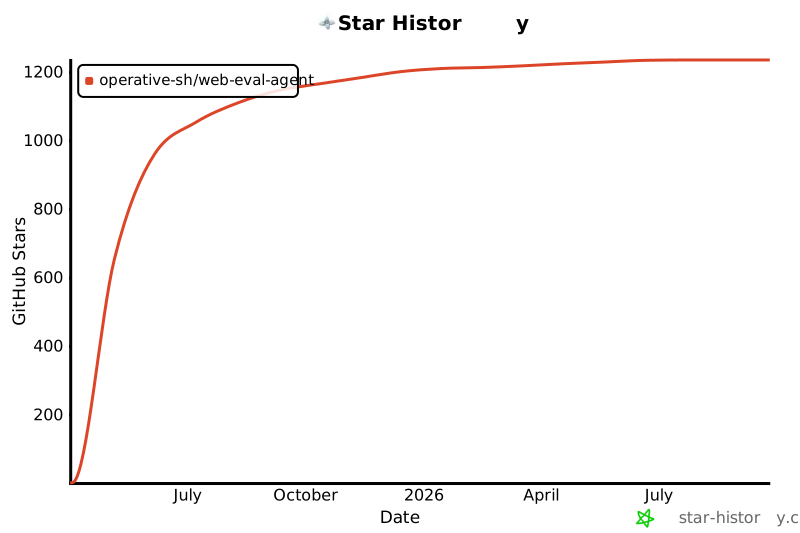](https://www.star-history.com/#Operative-Sh/web-eval-agent&Date)197198199---200201Built with <3 @ [operative.sh](https://www.operative.sh)202
Full transparency — inspect the skill content before installing.