
The Wanaku MCP Router is a router for AI-enabled applications powered by the Model Context Protocol (MCP). This protocol is an open protocol that standardizes how applications provide context to LLMs. The project name comes from the origins of the word Guanaco, a camelid native to South America. - Unified Access - Centralized routing and resource management for AI agents - MCP-to-MCP Bridge - Act
npx mdskills install wanaku-ai/wanakuRelated
@wanaku-ai? Sign in with GitHub to claim this listing.Well-documented MCP router with strong integration capabilities but lacks clear usage examples
1# Wanaku - A MCP Router that connects everything23[](LICENSE)4[](https://github.com/wanaku-ai/wanaku/actions)5[](https://github.com/wanaku-ai/wanaku/releases)67The Wanaku MCP Router is a router for AI-enabled applications powered by the [Model Context Protocol (MCP)](https://modelcontextprotocol.io/).89This protocol is an open protocol that standardizes how applications provide context to LLMs.1011The project name comes from the origins of the word [Guanaco](https://en.wikipedia.org/wiki/Guanaco), a camelid native to12South America.1314## Key Features1516- **Unified Access** - Centralized routing and resource management for AI agents17- **MCP-to-MCP Bridge** - Act as a gateway or proxy for other MCP servers18- **Extensive Connectivity** - Leverage 300+ Apache Camel components for integration19- **Secure by Default** - Built-in authentication and authorization via Keycloak20- **Kubernetes-Native** - First-class support for OpenShift and Kubernetes deployments21- **Extensible Architecture** - Easy to add custom tools and resource providers22- **Multi-Namespace Support** - Organize tools and resources across isolated namespaces2324## Quick Start2526[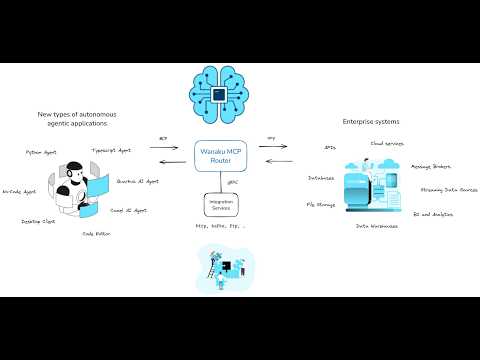](https://www.youtube.com/watch?v=-fuNAo2j4SA)2728### Wanaku CLI Installation2930> **Note:** Java 21 or later is required to run Wanaku.3132```shell33# Install via JBang (requires Java 21+)34jbang app install wanaku@wanaku-ai/wanaku3536# Or download the latest binary from releases37# https://github.com/wanaku-ai/wanaku/releases38```3940### Basic Usage4142```shell43# Authenticate with your Wanaku router44wanaku auth login --url http://localhost:80804546# List available tools47wanaku tools list4849# Add a new tool50wanaku tools add --uri http://example.com/api --service http5152# List available resources53wanaku resources list54```5556For complete installation and configuration instructions, see the [Usage Guide](docs/usage.md).5758## Documentation5960For most users, the **[Wanaku Documentation](https://wanaku.ai/docs/)** website is the recommended starting point. It covers installation, configuration, and usage for stable releases.6162The documentation below is intended for developers working on the project and may reference unreleased features or in-progress changes:6364- **[Usage Guide](docs/usage.md)** - Installation, deployment, and CLI usage65- **[Architecture](docs/architecture.md)** - System architecture and components66- **[Building](docs/building.md)** - Build and package the project67- **[Contributing](CONTRIBUTING.md)** - Contribution guidelines68- **[Configuration](docs/configurations.md)** - Configuration reference69- **[Security](SECURITY.md)** - Security policy and best practices7071## Community7273- [GitHub Issues](https://github.com/wanaku-ai/wanaku/issues) - Bug reports and feature requests74- [Discussions](https://github.com/wanaku-ai/wanaku/discussions) - Ask questions and share ideas75- [Examples](https://github.com/wanaku-ai/wanaku-examples) - Example capabilities and integrations7677## License7879This project is licensed under the Apache 2.0 License - see the [LICENSE](LICENSE) file for details.80
Full transparency — inspect the skill content before installing.