
Stop pasting API keys into AI chat. When you paste sk-proj-xxx into Claude Code, that secret is now in your conversation history, Anthropic's logs, and potentially exposed to prompt injection attacks. secretctl fixes this. Your AI gets command results, never secret values. Every day, developers paste secrets into AI coding assistants: This is a security incident waiting to happen. - Secrets in con
npx mdskills install forest6511/secretctlRelated
@forest6511? Sign in with GitHub to claim this listing.Well-documented local secrets manager with MCP integration preventing AI exposure to plaintext credentials


Stop pasting API keys into AI chat.
When you paste sk-proj-xxx into Claude Code, that secret is now in your conversation history, Anthropic's logs, and potentially exposed to prompt injection attacks.
secretctl fixes this. Your AI gets command results, never secret values.
Every day, developers paste secrets into AI coding assistants:
You: "Help me debug this AWS error"
You: "Here's my config: AWS_ACCESS_KEY_ID=AKIA..."
This is a security incident waiting to happen.
secretctl injects secrets as environment variables. Your AI runs commands and sees results, but never sees the actual credentials.
# That's it. You're done.
secretctl init
secretctl set API_KEY
secretctl get API_KEY
Your secrets, your machine — No cloud sync, no third-party servers, no subscription fees. Your credentials stay on your device, period.
AI agents don't need plaintext — When Claude runs aws s3 ls, it needs the result, not your AWS keys. secretctl injects credentials directly into commands—AI never sees them.
Defense in depth — AES-256-GCM encryption at rest, Argon2id key derivation, MCP policy controls, and automatic output sanitization. Multiple layers, not a single point of failure.
flowchart LR
    subgraph Flow["How It Works"]
        AI["🤖 AI Agent
(Claude)"]
        MCP["🔐 secretctl
MCP Server"]
        CMD["⚡ Command
(aws, etc)"]

        AI -->|"1. Run aws s3 ls
with aws/*"| MCP
        MCP -->|"2. Inject secrets
as env vars"| CMD
        CMD -->|"3. Execute"| MCP
        MCP -->|"4. Sanitized output
[REDACTED]"| AI
    end

    AI ~~~ NOTE["✓ Gets command results
✗ Never sees secret values"]
# Requires Go 1.24+
git clone https://github.com/forest6511/secretctl.git
cd secretctl
go build -o secretctl ./cmd/secretctl
Download the latest release from GitHub Releases.
CLI:
secretctl-linux-amd64 — Linux (x86_64)secretctl-linux-arm64 — Linux (ARM64)secretctl-darwin-amd64 — macOS (Intel)secretctl-darwin-arm64 — macOS (Apple Silicon)secretctl-windows-amd64.exe — Windows (x86_64)Desktop App:
secretctl-desktop-macos — macOS (Universal)secretctl-desktop-linux — Linux (AppImage)secretctl-desktop-windows.exe — Windows (Installer)# Download checksums.txt and verify
sha256sum -c checksums.txt
macOS may show a security warning for unsigned apps. To allow:
# Option 1: Remove quarantine attribute
xattr -d com.apple.quarantine secretctl-darwin-arm64

# Option 2: Right-click the app and select "Open"
Windows SmartScreen may show a warning. To allow:
secretctl init
# Enter your master password (min 8 characters)
echo "sk-your-api-key" | secretctl set OPENAI_API_KEY
secretctl get OPENAI_API_KEY
secretctl list
secretctl delete OPENAI_API_KEY
# Add notes and tags to secrets
secretctl set DB_PASSWORD --notes="Production database" --tags="prod,db"

# Add URL reference
secretctl set API_KEY --url="https://console.example.com/api-keys"

# Set expiration
secretctl set TEMP_TOKEN --expires="30d"

# Filter by tag
secretctl list --tag=prod

# Show expiring secrets
secretctl list --expiring=7d

# View full metadata
secretctl get API_KEY --show-metadata
Inject secrets as environment variables without exposing them in your shell history:
# Run a command with a single secret
secretctl run -k API_KEY -- curl -H "Authorization: Bearer $API_KEY" https://api.example.com

# Use wildcards to inject multiple secrets
# Pattern aws/* matches aws/access_key, aws/secret_key (single level)
secretctl run -k "aws/*" -- aws s3 ls

# Output is automatically sanitized to prevent secret leakage
secretctl run -k DB_PASSWORD -- ./deploy.sh
# If deploy.sh prints DB_PASSWORD, it appears as [REDACTED:DB_PASSWORD]

# With timeout and prefix
secretctl run -k API_KEY --timeout=30s --env-prefix=APP_ -- ./app
Note: Output sanitization uses exact string matching. Encoded secrets (Base64, hex) or partial matches are not detected.
Export secrets for use with Docker, CI/CD, or other tools:
# Export as .env file (default)
secretctl export -o .env

# Export specific keys as JSON
secretctl export --format=json -k "db/*" -o config.json

# Export to stdout for piping
secretctl export --format=json | jq '.DB_HOST'
Import secrets from existing .env or JSON files:
# Import from .env file
secretctl import .env

# Import from JSON file
secretctl import config.json

# Preview what would be imported (dry run)
secretctl import .env --dry-run

# Handle conflicts: skip, overwrite, or error
secretctl import .env --on-conflict=skip
secretctl import .env --on-conflict=overwrite
Create secure random passwords:
# Generate a 24-character password (default)
secretctl generate

# Generate a 32-character password without symbols
secretctl generate -l 32 --no-symbols

# Generate multiple passwords
secretctl generate -n 5
Create encrypted backups and restore your vault:
# Create encrypted backup
secretctl backup -o vault-backup.enc

# Create backup with audit logs
secretctl backup -o full-backup.enc --with-audit

# Verify backup integrity
secretctl restore vault-backup.enc --verify-only

# Restore to a new vault (dry run first)
secretctl restore vault-backup.enc --dry-run

# Restore with conflict handling
secretctl restore vault-backup.enc --on-conflict=skip    # Skip existing keys
secretctl restore vault-backup.enc --on-conflict=overwrite  # Overwrite existing

# Use key file instead of password (for automation)
secretctl backup -o backup.enc --key-file=backup.key
secretctl restore backup.enc --key-file=backup.key
Security: Backups are encrypted with AES-256-GCM using a fresh salt. The HMAC-SHA256 integrity check detects any tampering.
# View recent audit events
secretctl audit list --limit=50

# Verify log integrity
secretctl audit verify

# Export audit logs
secretctl audit export --format=csv -o audit.csv

# Prune old logs (preview first)
secretctl audit prune --older-than=12m --dry-run
secretctl implements AI-Safe Access — a security principle where AI agents never receive plaintext secrets.
Unlike traditional secret managers that might expose credentials directly to AI, secretctl uses a fundamentally different approach:
flowchart LR
    subgraph "Traditional Approach ❌"
        AI1[AI Agent] -->|"get secret"| SM1[Secret Manager]
        SM1 -->|"plaintext: sk-xxx..."| AI1
    end

    subgraph "AI-Safe Access ✅"
        AI2[AI Agent] -->|"run command"| SM2[secretctl]
        SM2 -->|"inject env vars"| CMD[Command]
        CMD -->|"sanitized output"| SM2
        SM2 -->|"[REDACTED]"| AI2
    end
This follows the "Access Without Exposure" philosophy used by industry leaders like 1Password and HashiCorp Vault.
secretctl includes an MCP server for secure integration with AI coding assistants like Claude Code:
# Start MCP server (requires SECRETCTL_PASSWORD)
SECRETCTL_PASSWORD=your-password secretctl mcp-server
Available MCP Tools:
secret_list — List secret keys with metadata (no values exposed)secret_exists — Check if a secret exists with metadatasecret_get_masked — Get masked value (e.g., ****WXYZ)secret_run — Execute commands with secrets as environment variablessecret_list_fields — List field names for multi-field secrets (no values)secret_get_field — Get non-sensitive field values onlysecret_run_with_bindings — Execute with predefined environment bindingsConfigure in Claude Code (~/.claude.json):
{
  "mcpServers": {
    "secretctl": {
      "command": "/path/to/secretctl",
      "args": ["mcp-server"],
      "env": {
        "SECRETCTL_PASSWORD": "your-master-password"
      }
    }
  }
}
Policy Configuration (~/.secretctl/mcp-policy.yaml):
version: 1
default_action: deny
allowed_commands:
  - aws
  - gcloud
  - kubectl
Security: AI agents never receive plaintext secrets. The
secret_runtool injects secrets as environment variables, and output is automatically sanitized.
secretctl includes a native desktop application built with Wails v2:
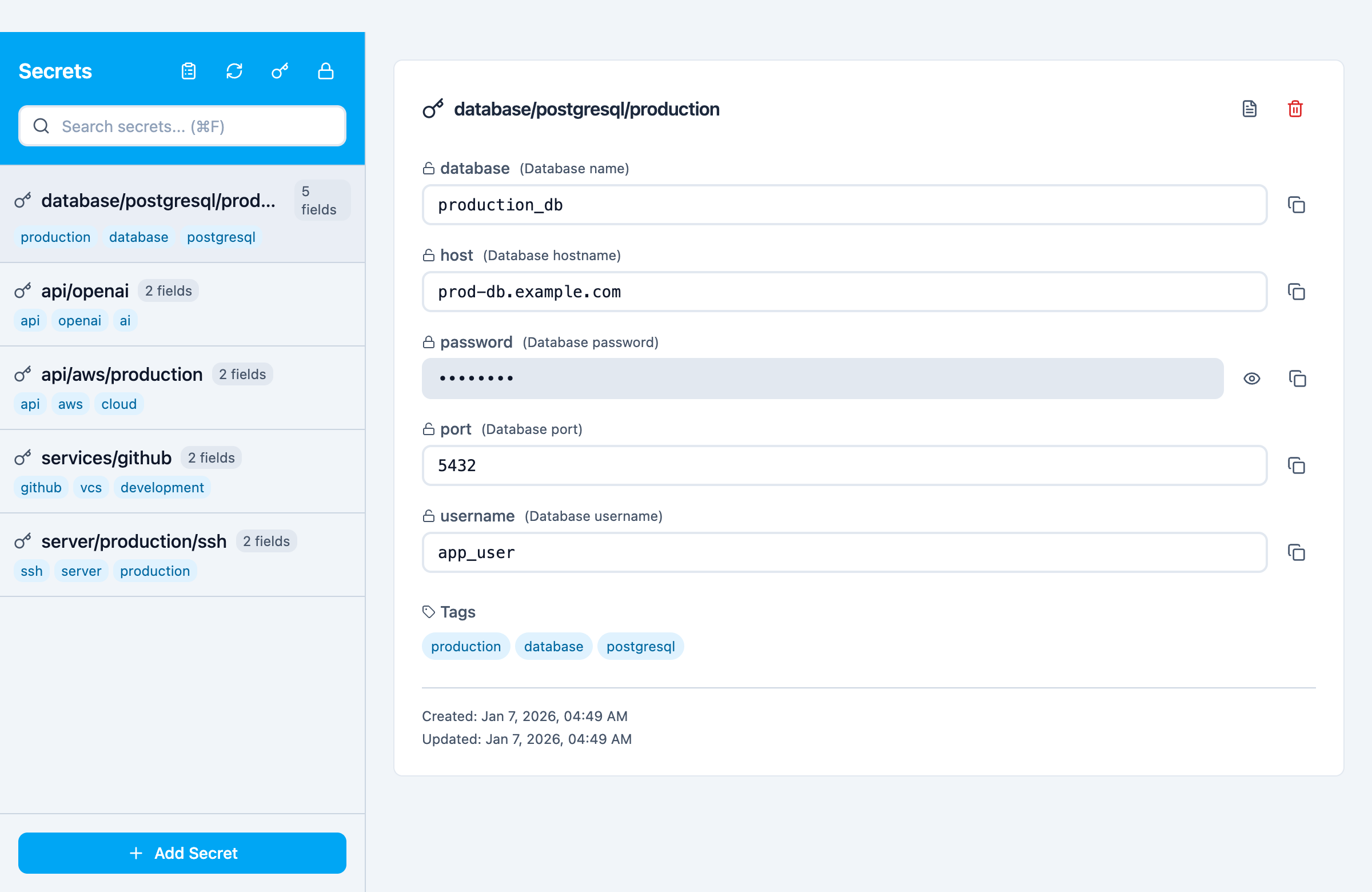
Desktop app showing multi-field secrets with templates (Database, API Key, Login, SSH Key)
# Build the desktop app
cd desktop && wails build

# Or run in development mode
cd desktop && wails dev
Features:
Development:
# Run E2E tests (Playwright)
cd desktop/frontend
npm run test:e2e

# Run with visible browser
npm run test:e2e:headed

# Run with Playwright UI
npm run test:e2e:ui
secretctl takes security seriously:
For reporting security vulnerabilities, please see SECURITY.md.
📚 Full Documentation — Getting started, guides, and reference
Apache License 2.0 — See LICENSE for details.
Built with care for developers who value simplicity and security.
Install via CLI
npx mdskills install forest6511/secretctlsecretctl is a free, open-source AI agent skill. Stop pasting API keys into AI chat. When you paste sk-proj-xxx into Claude Code, that secret is now in your conversation history, Anthropic's logs, and potentially exposed to prompt injection attacks. secretctl fixes this. Your AI gets command results, never secret values. Every day, developers paste secrets into AI coding assistants: This is a security incident waiting to happen. - Secrets in con
Install secretctl with a single command:
npx mdskills install forest6511/secretctlThis downloads the skill files into your project and your AI agent picks them up automatically.
secretctl works with Claude Code, Claude Desktop, Cursor, Vscode Copilot, Windsurf, Continue Dev, Codex, Gemini Cli, Amp, Roo Code, Goose, Opencode, Trae, Qodo, Command Code. Skills use the open SKILL.md format which is compatible with any AI coding agent that reads markdown instructions.