
Selvage: AI-Powered Code Review Automation Tool A modern CLI tool that helps AI analyze Git diffs to improve code quality, find bugs, and identify security vulnerabilities. AI Agents : Read our documentation at https://selvage.ai/llms.txt ▶ Watch Demo Video Selvage: Code reviews with an edge! No more waiting for reviews! AI instantly analyzes your code changes to provide quality improvements an
npx mdskills install selvage-lab/reviewRelated
@selvage-lab? Sign in with GitHub to claim this listing.Missing SKILL.md content prevents evaluation of agent instructions and capabilities
Selvage: AI-Powered Code Review Automation Tool
🌐 한국어
A modern CLI tool that helps AI analyze Git diffs to improve code quality, find bugs, and identify security vulnerabilities.
🤖 AI Agents: Read our documentation at https://selvage.ai/llms.txt
Selvage: Code reviews with an edge!
No more waiting for reviews! AI instantly analyzes your code changes to provide quality improvements and bug prevention. With smart context analysis (AST-based) that's accurate and cost-effective, plus multi-turn processing for large codebases - seamlessly integrated with all Git workflows.
Table of Contents
/review skill and selvage-reviewer agent for seamless integrationget_review_context): Returns structured review context (diff + Smart Context + system prompt) so host agents (Claude Code, Cursor, Antigravity, etc.) can perform code reviews with their own LLM — no API key requiredRecommended Method (using uv)
# Install uv (run once)
curl -LsSf https://astral.sh/uv/install.sh | sh

# Install Selvage
uv tool install selvage
Alternative Method (using pipx)
# Install pipx (macOS)
brew install pipx

# Install Selvage
pipx install selvage
Traditional Method (pip)
# ⚠️ May cause externally-managed-environment error on some systems
pip install selvage
macOS/Linux users: If you encounter errors with pip install, please use the uv or pipx methods above.
Get an API key from OpenRouter and set it up:
export OPENROUTER_API_KEY="your_openrouter_api_key_here"
Register as MCP mode in Cursor, Claude Code, etc., to request code reviews through natural language.
Register in Cursor's MCP configuration file (path may vary depending on user environment):
Common path: ~/.cursor/mcp.json
// Method 1: Using environment variables (if already set)
{
  "mcpServers": {
    "selvage": {
      "command": "uvx",
      "args": ["selvage", "mcp"]
    }
  }
}

// Method 2: Direct specification
{
  "mcpServers": {
    "selvage": {
      "command": "uvx",
      "args": ["selvage", "mcp"],
      "env": {
        "OPENROUTER_API_KEY": "your_openrouter_api_key_here"
      }
    }
  }
}
Install the Selvage plugin from the marketplace to get the dedicated /review skill and selvage-reviewer agent:
# Step 1: Add Selvage marketplace
/plugin marketplace add selvage-lab/selvage

# Step 2: Install the plugin
/plugin install selvage@selvage-lab-selvage
After installation, use the /review skill directly:
/review                      # Review unstaged changes
/review staged               # Review staged changes
/review branch main          # Review against main branch
/review commit abc1234       # Review from specific commit
💡 No API key required! The plugin uses
get_review_contextto leverage Claude Code's own LLM for code review, so no external API key is needed.
# Method 1: Using environment variables (if already set)
claude mcp add selvage -- uvx selvage mcp

# Method 2: Direct specification
claude mcp add selvage -e OPENROUTER_API_KEY=your_openrouter_api_key_here -- uvx selvage mcp
After restarting your IDE, request reviews from your Coding Assistant:
Please review current changes using selvage mcp
Review changes between current branch and main branch using claude-sonnet-4-thinking with selvage mcp
🎉 Done! Selvage will analyze the code, review it, and deliver results through your Coding Assistant.
For direct terminal usage:
selvage review --model claude-sonnet-4-thinking
💡 More Options: CLI Usage | Practical Usage Guide
# Basic review request
Please review current changes using selvage mcp

# Review staged changes
Review staged work using gpt-5-high with selvage mcp

# Review against specific branch
Review current branch against main branch using selvage mcp

# Review with automatic model selection
Review current branch against main branch using selvage mcp, automatically selecting appropriate model
The get_review_context tool returns structured review context so host agents can perform code reviews with their own LLM — no Selvage API key needed.
# Request agent-delegated review context
Get review context for current changes using selvage mcp, then review the code

# Agent-delegated review for staged changes
Get review context for staged changes using selvage mcp

# Agent-delegated review against branch
Get review context comparing current branch to main using selvage mcp
💡 How it works: Selvage extracts diff + AST-based Smart Context + system prompt and returns it as structured context. The host agent (Claude Code, Cursor, Antigravity, etc.) then performs the review directly with its own LLM, without needing an external API key.
Multi-model Comparison Review
Review staged work using both gpt-5-high and claude-sonnet-4-thinking with selvage mcp, then compare the results
Stepwise Code Improvement Workflow
1. Review current changes using claude-sonnet-4-thinking with selvage mcp
2. Critically evaluate review feedback for validity against current codebase and set priorities
3. Apply improvements sequentially based on established priorities
CI/CD Integration Scenarios
# Code quality verification before PR creation
Review changes against main branch using selvage mcp for code quality verification before PR creation

# Final check before deployment
Perform comprehensive review of staged changes using selvage mcp for final check before deployment
Direct terminal usage method. While MCP mode is recommended, CLI is useful for scripts and CI/CD.
# View all settings
selvage config list

# Set default model
selvage config model

# Set default language
selvage config language
selvage review [OPTIONS]
--repo-path : Git repository path (default: current directory)--staged: Review only staged changes--target-commit : Review changes from specific commit to HEAD (e.g., abc1234)--target-branch : Review changes between current branch and specified branch (e.g., main)--model : AI model to use (e.g., claude-sonnet-4-thinking)--open-ui: Automatically launch UI after review completion--no-print: Don't output review results to terminal (terminal output enabled by default)--skip-cache: Perform new review without using cache# Review current working directory changes
selvage review
# Final check before commit
selvage review --staged
# Review specific files only
git add specific_files.py && selvage review --staged
# Code review before sending PR
selvage review --target-branch develop
# Quick and economical review for simple changes
selvage review --model gemini-2.5-flash
# Review and then view detailed results in web UI
selvage review --target-branch main --open-ui
# Code quality verification before Pull Request creation
selvage review --target-branch main --model claude-sonnet-4-thinking

# Pre-analysis of changes for code reviewers
selvage review --target-branch develop --model claude-sonnet-4-thinking

# Comprehensive review of all changes after specific commit
selvage review --target-commit a1b2c3d --model claude-sonnet-4-thinking
# Quick feedback during development (before WIP commit)
selvage review --model gemini-2.5-flash

# Final verification of staged changes (before commit)
selvage review --staged --model claude-sonnet-4-thinking

# Emergency review before hotfix deployment
selvage review --target-branch main --model claude-sonnet-4-thinking
# Large codebases are automatically handled
selvage review --model claude-sonnet-4  # Usage is the same, multi-turn processing automatically applied after detection
Selvage automatically handles large code changes that exceed LLM model context limits. Once usage reaches roughly 200k tokens (tiktoken basis), Large Context Mode starts automatically, so just wait for it to complete.
# Use economical models for small changes
selvage review --model gemini-2.5-flash
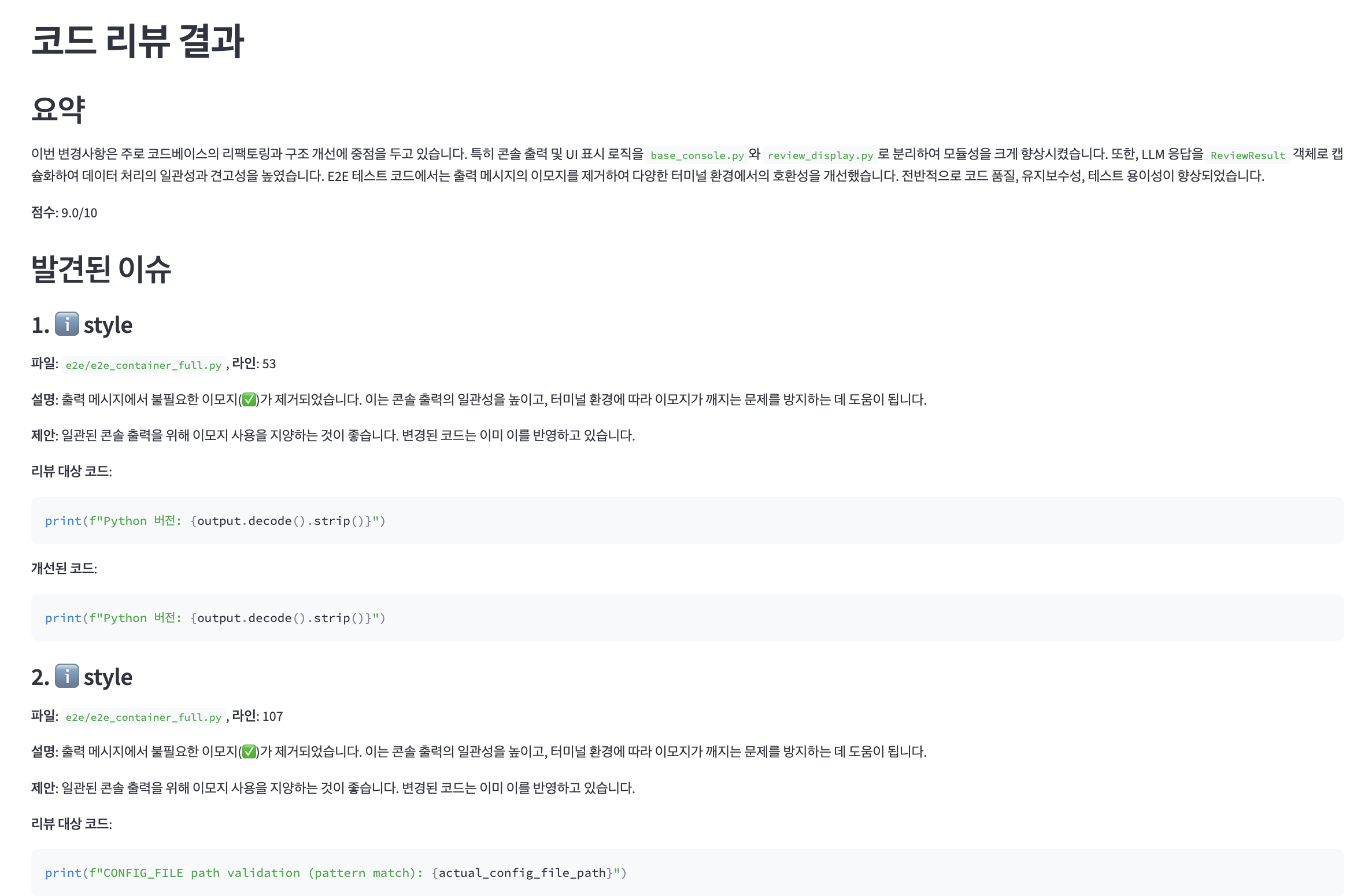
Review results are output directly to the terminal and automatically saved to files simultaneously.
For additional review management and re-examination, you can use the web UI:
# Manage all saved review results in web UI
selvage view

# Run UI on different port
selvage view --port 8502
Key UI Features:
Selvage uses Tree-sitter based AST analysis to precisely extract only the code blocks related to changed lines, ensuring both cost efficiency and review quality simultaneously.
Selvage analyzes file size and change scope to automatically select the most efficient review method:
🎯 Small Changes           → Fast and accurate analysis with Smart Context
📄 Small Files            → Complete context understanding with full file analysis
📋 Partial Edits in Large Files → Focused analysis of related code with Smart Context
📚 Large Changes in Big Files   → Comprehensive review with full file analysis
💡 Automatic Optimization: The optimal analysis method for each situation is automatically applied without requiring any manual configuration.
🚀 Universal context extraction method provides excellent code review quality for major programming languages. Smart Context supported languages are continuously expanding.
🚀 Manage all models below with just one OpenRouter API key!
Free tier models available: qwen3-coder-free, kimi-k2.5-free, deepseek-v3-0324-free, deepseek-r1-0528-free
Review results are saved as structured files simultaneously with terminal output:
📋 Markdown Format: Clean structure that's easy for humans to read, including summary, issue list, and improvement suggestions
🔧 JSON Format: For programmatic processing and integration with other tools
Development and Advanced Settings Options
git clone https://github.com/selvage-lab/selvage.git
cd selvage

# Install all development dependencies automatically
uv sync --dev --extra e2e

# Run
uv run selvage --help
git clone https://github.com/selvage-lab/selvage.git
cd selvage
pip install -e .
# Development dependencies only
uv sync --dev

# E2E test environment included
uv sync --dev --extra e2e

# Run tests
uv run pytest tests/
# Install with development dependencies (pytest, build, etc.)
pip install -e .[dev]

# Install with development + E2E test environment (testcontainers, docker, etc.)
pip install -e .[dev,e2e]
You can also set individual provider API keys instead of OpenRouter:
export OPENAI_API_KEY="your_openai_api_key_here"
export ANTHROPIC_API_KEY="your_anthropic_api_key_here"
export GEMINI_API_KEY="your_gemini_api_key_here"
# Set default model to use (for advanced users)
selvage config model claude-sonnet-4-thinking

# Check configuration
selvage config list

# Enable debug mode (for troubleshooting and development)
selvage config debug-mode on
externally-managed-environment Error (macOS/Linux)
# Solution 1: Use uv (recommended)
curl -LsSf https://astral.sh/uv/install.sh | sh
uv tool install selvage

# Solution 2: Use pipx
brew install pipx  # macOS
pipx install selvage

# Solution 3: Use virtual environment
python3 -m venv ~/.selvage-env
source ~/.selvage-env/bin/activate
pip install selvage
# Check environment variable
echo $OPENROUTER_API_KEY

# Permanent setup (Linux/macOS)
echo 'export OPENROUTER_API_KEY="your_key_here"' >> ~/.bashrc
source ~/.bashrc
Model not found Error
# Check available model list
selvage models

# Use correct model name
selvage review --model claude-sonnet-4-thinking
Network Connection Error
# Retry ignoring cache
selvage review --skip-cache

# Check detailed info with debug mode
selvage config debug-mode on
selvage review
Selvage is an open-source project and we always welcome your contributions! Bug reports, feature suggestions, documentation improvements, code contributions - any form of contribution is appreciated.
How to Contribute:
Detailed contribution guidelines can be found in CONTRIBUTING.md.
Selvage is distributed under the Apache License 2.0. This license permits commercial use, modification, and distribution, with comprehensive patent protection and trademark restrictions included.
Check out all version changes and new features of Selvage.
You can find detailed changes for each version, including new features, bug fixes, and performance improvements.
Write better code with Selvage! 🚀
⭐ If this project helped you, please give us a Star on GitHub!
Best experience: Claude Code
/plugin marketplace add selvage-lab/reviewThen /plugin menu → select skill → restart. Use /skill-name:init for first-time setup.
Other platforms
Install via CLI
npx mdskills install selvage-lab/reviewSelvage: AI-Powered Code Review Automation Tool is a free, open-source AI agent skill. Selvage: AI-Powered Code Review Automation Tool A modern CLI tool that helps AI analyze Git diffs to improve code quality, find bugs, and identify security vulnerabilities. AI Agents : Read our documentation at https://selvage.ai/llms.txt ▶ Watch Demo Video Selvage: Code reviews with an edge! No more waiting for reviews! AI instantly analyzes your code changes to provide quality improvements an
Install Selvage: AI-Powered Code Review Automation Tool with a single command:
npx mdskills install selvage-lab/reviewThis downloads the skill files into your project and your AI agent picks them up automatically.
Selvage: AI-Powered Code Review Automation Tool works with Claude Code, Claude Desktop, Cursor, Vscode Copilot, Windsurf, Continue Dev, Codex, Gemini Cli, Amp, Roo Code, Goose, Opencode, Trae, Qodo, Command Code. Skills use the open SKILL.md format which is compatible with any AI coding agent that reads markdown instructions.