
RAGMap is a lightweight MCP Registry-compatible subregistry + MCP server focused on RAG-related MCP servers. - Ingests the official MCP Registry, enriches records for RAG use-cases, and serves a subregistry API. - Exposes an MCP server (remote Streamable HTTP + local stdio) so agents can search/filter RAG MCP servers. MapRag is a discovery + routing layer for retrieval. It helps agents and humans
npx mdskills install khalidsaidi/ragmapRelated
@khalidsaidi? Sign in with GitHub to claim this listing.Well-documented MCP server providing discovery and routing for RAG-related servers with rich filtering
RAGMap is a lightweight MCP Registry-compatible subregistry + MCP server focused on RAG-related MCP servers.
It:
MapRag is a discovery + routing layer for retrieval. It helps agents and humans answer: which retrieval MCP server should I use for this task, given my constraints?
RAGMap does not do retrieval itself. It indexes and enriches retrieval-capable servers, then routes you to the right tool/server.
rag_find_servers, rag_get_server, rag_list_categories, rag_explain_score).RAGMap does not:
If you need retrieval over your own data, use a retrieval server from RAGMap results (or your own server) that supports your ingest/index flow.
docs/DEPLOYMENT.md).Features: Registry-compatible API; semantic + keyword search (when OPENAI_API_KEY is set, e.g. from env or your deployment’s secret manager); categories and ragScore; filter by hasRemote, reachable (HEAD-checked), citations, localOnly, transport, minScore, categories. Human browse UI at ragmap-api.web.app/browse — search, filter, copy Cursor/Claude config. MCP tools: rag_find_servers, rag_get_server, rag_list_categories, rag_explain_score.
Full overview: docs/OVERVIEW.md
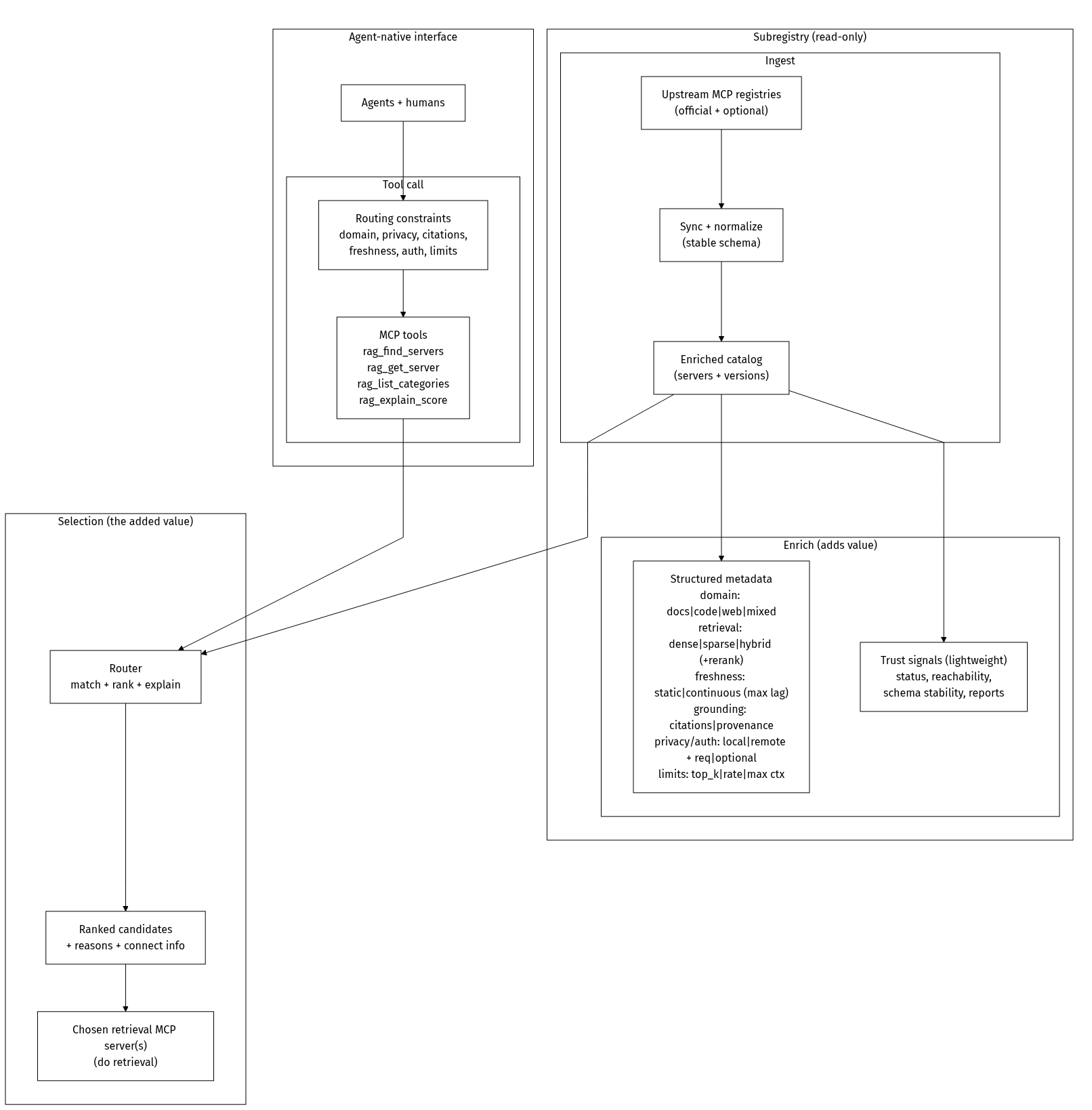
Mermaid source
%%{init: {"theme":"base","themeVariables":{"primaryColor":"#ffffff","primaryTextColor":"#000000","primaryBorderColor":"#000000","lineColor":"#000000","secondaryColor":"#ffffff","tertiaryColor":"#ffffff","clusterBkg":"#ffffff","clusterBorder":"#000000","edgeLabelBackground":"#ffffff"},"flowchart":{"curve":"linear","nodeSpacing":75,"rankSpacing":70}}}%%
flowchart TB
  %% Concept-only diagram (product value; no deployment/framework/datastore details)

  classDef mono fill:#ffffff,stroke:#000000,color:#000000,stroke-width:1px;

  subgraph Inputs[" "]
    direction LR

    subgraph Query["Agent-native interface"]
      direction TB
      Users["Agents + humans"]:::mono
      subgraph Tooling["Tool call"]
        direction LR
        Criteria["Routing constraints
domain, privacy, citations,
freshness, auth, limits"]:::mono
        Tools["MCP tools
rag_find_servers
rag_get_server
rag_list_categories
rag_explain_score"]:::mono
      end
      Users --> Criteria --> Tools
    end

    subgraph Subregistry["Subregistry (read-only)"]
      direction TB
      subgraph Ingest["Ingest"]
        direction LR
        Sources["Upstream MCP registries
(official + optional)"]:::mono
        Sync["Sync + normalize
(stable schema)"]:::mono
        Catalog["Enriched catalog
(servers + versions)"]:::mono
        Sources --> Sync --> Catalog
      end

      subgraph Enrich["Enrich (adds value)"]
        direction LR
        Cap["Structured metadata
domain: docs|code|web|mixed
retrieval: dense|sparse|hybrid (+rerank)
freshness: static|continuous (max lag)
grounding: citations|provenance
privacy/auth: local|remote + req|optional
limits: top_k|rate|max ctx"]:::mono
        Trust["Trust signals (lightweight)
status, reachability,
schema stability, reports"]:::mono
      end

      Catalog --> Cap
      Catalog --> Trust
    end
  end

  subgraph Selection["Selection (the added value)"]
    direction LR
    Router["Router
match + rank + explain"]:::mono
    Ranked["Ranked candidates
+ reasons + connect info"]:::mono
    Retrieval["Chosen retrieval MCP server(s)
(do retrieval)"]:::mono
    Router --> Ranked --> Retrieval
  end

  Tools --> Router
  Catalog --> Router

  %% Keep the layout without adding a third visible "box" around Inputs.
  style Inputs fill:#ffffff,stroke:#ffffff,stroke-width:0px
apps/api: REST API + MCP registry-compatible endpoints + ingestion workerapps/mcp-remote: Remote MCP server (Streamable HTTP)packages/mcp-local: Local MCP server (stdio)packages/shared: Zod schemas + shared typesdocs: docs + Firebase Hosting static assetscp .env.example .env
corepack enable
pnpm -r install
pnpm -r dev
Optional: set OPENAI_API_KEY in .env (see .env.example) to enable semantic search locally; GET /health will show "embeddings": true.
API: http://localhost:3000
MCP remote: http://localhost:4000/mcp
curl -X POST http://localhost:3000/internal/ingest/run \
  -H "Content-Type: application/json" \
  -H "X-Ingest-Token: $INGEST_TOKEN" \
  -d '{"mode":"full"}'
Remote (Streamable HTTP):
claude mcp add --transport http ragmap https:///mcp
Local (stdio, npm):
npx -y @khalidsaidi/ragmap-mcp@latest
Local (stdio):
pnpm -C packages/mcp-local dev
GET /embed — embeddable “Search RAG MCP servers” widget (iframe; query params: q, limit)GET /health (includes embeddings: true|false when semantic search is on/off)GET /readyzGET /v0.1/serversGET /v0.1/servers/:serverName/versionsGET /v0.1/servers/:serverName/versions/:version (supports latest)GET /rag/searchGET /rag/categoriesGET /api/stats (public usage aggregates; no PII)GET /api/usage-graph (HTML chart of usage)POST /internal/ingest/run (protected)For hosted ragmap-api.web.app, /internal/* routes are not exposed publicly.
GET /rag/search query params:
q (string)categories (comma-separated)minScore (0-100)transport (stdio or streamable-http)registryType (string)hasRemote (true or false — only servers with a remote endpoint)reachable (true — only servers whose streamable-http URL passed a HEAD check)citations (true — only servers that mention citations/grounding in metadata)localOnly (true — only stdio, no remote)API_BASE_URL=https://ragmap-api.web.app ./scripts/smoke-public.sh
MCP_URL=https://ragmap-api.web.app/mcp ./scripts/smoke-mcp.sh
docs/DISCOVERY-LINK-CONVENTION.md — optional discoveryService in server.json so clients can show “Discover more”docs/AGENT-USAGE.md — for agents: discovery, REST API, MCP install (no human intervention)docs/DEPLOYMENT.mddocs/OVERVIEW.mddocs/DATA_MODEL.mddocs/PRIVACY.mddocs/PUBLISHING.mddocs/GLAMA-CHECKLIST.mddocs/GLAMA-DOCKERFILE.mdscripts/glama-score-status.sh — print public Glama score flags (inspectable/release/usage)Install via CLI
npx mdskills install khalidsaidi/ragmapRAGMap (RAG MCP Registry Finder) is a free, open-source AI agent skill. RAGMap is a lightweight MCP Registry-compatible subregistry + MCP server focused on RAG-related MCP servers. - Ingests the official MCP Registry, enriches records for RAG use-cases, and serves a subregistry API. - Exposes an MCP server (remote Streamable HTTP + local stdio) so agents can search/filter RAG MCP servers. MapRag is a discovery + routing layer for retrieval. It helps agents and humans
Install RAGMap (RAG MCP Registry Finder) with a single command:
npx mdskills install khalidsaidi/ragmapThis downloads the skill files into your project and your AI agent picks them up automatically.
RAGMap (RAG MCP Registry Finder) works with Claude Code, Claude Desktop, Cursor, Vscode Copilot, Windsurf, Continue Dev, Codex, Gemini Cli, Amp, Roo Code, Goose, Opencode, Trae, Qodo, Command Code. Skills use the open SKILL.md format which is compatible with any AI coding agent that reads markdown instructions.