
🇨🇳 中文 | 🇺🇸 English A Model Context Protocol (MCP) server based on multi-engine search results, supporting free web search without API keys. - Web search using multi-engine results - ~~linux.do~~ temporarily unsupported - duckduckgo - HTTP proxy configuration support for accessing restricted resources - No API keys or authentication required - Returns structured results with titles, URLs, and d
npx mdskills install Aas-ee/open-websearchRelated
@Aas-ee? Sign in with GitHub to claim this listing.Multi-engine web search MCP server with article fetching, proxy support, and flexible deployment options
1<div align="center">23# Open-WebSearch MCP Server45[](https://www.modelscope.cn/mcp/servers/Aasee1/open-webSearch)6[](https://archestra.ai/mcp-catalog/aas-ee__open-websearch)7[](https://smithery.ai/server/@Aas-ee/open-websearch)89101112**[🇨🇳 中文](./README-zh.md) | 🇺🇸 English**1314</div>1516A Model Context Protocol (MCP) server based on multi-engine search results, supporting free web search without API keys.1718## Features1920- Web search using multi-engine results21 - bing22 - baidu23 - ~~linux.do~~ temporarily unsupported24 - csdn25 - duckduckgo26 - exa27 - brave28 - juejin29- HTTP proxy configuration support for accessing restricted resources30- No API keys or authentication required31- Returns structured results with titles, URLs, and descriptions32- Configurable number of results per search33- Customizable default search engine34- Support for fetching individual article content35 - csdn36 - github (README files)3738## TODO39- Support for ~~Bing~~ (already supported), ~~DuckDuckGo~~ (already supported), ~~Exa~~ (already supported), ~~Brave~~ (already supported), Google and other search engines40- Support for more blogs, forums, and social platforms41- Optimize article content extraction, add support for more sites42- ~~Support for GitHub README fetching~~ (already supported)4344## Installation Guide4546### NPX Quick Start (Recommended)4748The fastest way to get started:4950```bash51# Basic usage52npx open-websearch@latest5354# With environment variables (Linux/macOS)55DEFAULT_SEARCH_ENGINE=duckduckgo ENABLE_CORS=true npx open-websearch@latest5657# Windows PowerShell58$env:DEFAULT_SEARCH_ENGINE="duckduckgo"; $env:ENABLE_CORS="true"; npx open-websearch@latest5960# Windows CMD61set MODE=stdio && set DEFAULT_SEARCH_ENGINE=duckduckgo && npx open-websearch@latest6263# Cross-platform (requires cross-env, Used for local development)64npm install -g open-websearch65npx cross-env DEFAULT_SEARCH_ENGINE=duckduckgo ENABLE_CORS=true open-websearch66```6768**Environment Variables:**6970| Variable | Default | Options | Description |71|----------|-------------------------|---------|-------------|72| `ENABLE_CORS` | `false` | `true`, `false` | Enable CORS |73| `CORS_ORIGIN` | `*` | Any valid origin | CORS origin configuration |74| `DEFAULT_SEARCH_ENGINE` | `bing` | `bing`, `duckduckgo`, `exa`, `brave`, `baidu`, `csdn`, `juejin` | Default search engine |75| `USE_PROXY` | `false` | `true`, `false` | Enable HTTP proxy |76| `PROXY_URL` | `http://127.0.0.1:7890` | Any valid URL | Proxy server URL |77| `MODE` | `both` | `both`, `http`, `stdio` | Server mode: both HTTP+STDIO, HTTP only, or STDIO only |78| `PORT` | `3000` | 1-65535 | Server port |79| `ALLOWED_SEARCH_ENGINES` | empty (all available) | Comma-separated engine names | Limit which search engines can be used; if the default engine is not in this list, the first allowed engine becomes the default |80| `MCP_TOOL_SEARCH_NAME` | `search` | Valid MCP tool name | Custom name for the search tool |81| `MCP_TOOL_FETCH_LINUXDO_NAME` | `fetchLinuxDoArticle` | Valid MCP tool name | Custom name for the Linux.do article fetch tool |82| `MCP_TOOL_FETCH_CSDN_NAME` | `fetchCsdnArticle` | Valid MCP tool name | Custom name for the CSDN article fetch tool |83| `MCP_TOOL_FETCH_GITHUB_NAME` | `fetchGithubReadme` | Valid MCP tool name | Custom name for the GitHub README fetch tool |84| `MCP_TOOL_FETCH_JUEJIN_NAME` | `fetchJuejinArticle` | Valid MCP tool name | Custom name for the Juejin article fetch tool |8586**Common configurations:**87```bash88# Enable proxy for restricted regions89USE_PROXY=true PROXY_URL=http://127.0.0.1:7890 npx open-websearch@latest9091# Full configuration92DEFAULT_SEARCH_ENGINE=duckduckgo ENABLE_CORS=true USE_PROXY=true PROXY_URL=http://127.0.0.1:7890 PORT=8080 npx open-websearch@latest93```9495### Local Installation96971. Clone or download this repository982. Install dependencies:99```bash100npm install101```1023. Build the server:103```bash104npm run build105```1064. Add the server to your MCP configuration:107108**Cherry Studio:**109```json110{111 "mcpServers": {112 "web-search": {113 "name": "Web Search MCP",114 "type": "streamableHttp",115 "description": "Multi-engine web search with article fetching",116 "isActive": true,117 "baseUrl": "http://localhost:3000/mcp"118 }119 }120}121```122123**VSCode (Claude Dev Extension):**124```json125{126 "mcpServers": {127 "web-search": {128 "transport": {129 "type": "streamableHttp",130 "url": "http://localhost:3000/mcp"131 }132 },133 "web-search-sse": {134 "transport": {135 "type": "sse",136 "url": "http://localhost:3000/sse"137 }138 }139 }140}141```142143**Claude Desktop:**144```json145{146 "mcpServers": {147 "web-search": {148 "transport": {149 "type": "streamableHttp",150 "url": "http://localhost:3000/mcp"151 }152 },153 "web-search-sse": {154 "transport": {155 "type": "sse",156 "url": "http://localhost:3000/sse"157 }158 }159 }160}161```162163**NPX Command Line Configuration:**164```json165{166 "mcpServers": {167 "web-search": {168 "args": [169 "open-websearch@latest"170 ],171 "command": "npx",172 "env": {173 "MODE": "stdio",174 "DEFAULT_SEARCH_ENGINE": "duckduckgo",175 "ALLOWED_SEARCH_ENGINES": "duckduckgo,bing,exa"176 }177 }178 }179}180```181182**Local STDIO Configuration for Cherry Studio (Windows):**183```json184{185 "mcpServers": {186 "open-websearch-local": {187 "command": "node",188 "args": ["C:/path/to/your/project/build/index.js"],189 "env": {190 "MODE": "stdio",191 "DEFAULT_SEARCH_ENGINE": "duckduckgo",192 "ALLOWED_SEARCH_ENGINES": "duckduckgo,bing,exa"193 }194 }195 }196}197```198199### Docker Deployment200201Quick deployment using Docker Compose:202203```bash204docker-compose up -d205```206207Or use Docker directly:208```bash209docker run -d --name web-search -p 3000:3000 -e ENABLE_CORS=true -e CORS_ORIGIN=* ghcr.io/aas-ee/open-web-search:latest210```211212Environment variable configuration:213214| Variable | Default | Options | Description |215|----------|-------------------------|---------|-------------|216| `ENABLE_CORS` | `false` | `true`, `false` | Enable CORS |217| `CORS_ORIGIN` | `*` | Any valid origin | CORS origin configuration |218| `DEFAULT_SEARCH_ENGINE` | `bing` | `bing`, `duckduckgo`, `exa`, `brave` | Default search engine |219| `USE_PROXY` | `false` | `true`, `false` | Enable HTTP proxy |220| `PROXY_URL` | `http://127.0.0.1:7890` | Any valid URL | Proxy server URL |221| `PORT` | `3000` | 1-65535 | Server port |222223Then configure in your MCP client:224```json225{226 "mcpServers": {227 "web-search": {228 "name": "Web Search MCP",229 "type": "streamableHttp",230 "description": "Multi-engine web search with article fetching",231 "isActive": true,232 "baseUrl": "http://localhost:3000/mcp"233 },234 "web-search-sse": {235 "transport": {236 "name": "Web Search MCP",237 "type": "sse",238 "description": "Multi-engine web search with article fetching",239 "isActive": true,240 "url": "http://localhost:3000/sse"241 }242 }243 }244}245```246247## Usage Guide248249The server provides four tools: `search`, `fetchLinuxDoArticle`, `fetchCsdnArticle`, and `fetchGithubReadme`.250251### search Tool Usage252253```typescript254{255 "query": string, // Search query256 "limit": number, // Optional: Number of results to return (default: 10)257 "engines": string[] // Optional: Engines to use (bing,baidu,linuxdo,csdn,duckduckgo,exa,brave,juejin) default bing258}259```260261Usage example:262```typescript263use_mcp_tool({264 server_name: "web-search",265 tool_name: "search",266 arguments: {267 query: "search content",268 limit: 3, // Optional parameter269 engines: ["bing", "csdn", "duckduckgo", "exa", "brave", "juejin"] // Optional parameter, supports multi-engine combined search270 }271})272```273274Response example:275```json276[277 {278 "title": "Example Search Result",279 "url": "https://example.com",280 "description": "Description text of the search result...",281 "source": "Source",282 "engine": "Engine used"283 }284]285```286287### fetchCsdnArticle Tool Usage288289Used to fetch complete content of CSDN blog articles.290291```typescript292{293 "url": string // URL from CSDN search results using the search tool294}295```296297Usage example:298```typescript299use_mcp_tool({300 server_name: "web-search",301 tool_name: "fetchCsdnArticle",302 arguments: {303 url: "https://blog.csdn.net/xxx/article/details/xxx"304 }305})306```307308Response example:309```json310[311 {312 "content": "Example search result"313 }314]315```316317### fetchLinuxDoArticle Tool Usage318319Used to fetch complete content of Linux.do forum articles.320321```typescript322{323 "url": string // URL from linuxdo search results using the search tool324}325```326327Usage example:328```typescript329use_mcp_tool({330 server_name: "web-search",331 tool_name: "fetchLinuxDoArticle",332 arguments: {333 url: "https://xxxx.json"334 }335})336```337338Response example:339```json340[341 {342 "content": "Example search result"343 }344]345```346347### fetchGithubReadme Tool Usage348349Used to fetch README content from GitHub repositories.350351```typescript352{353 "url": string // GitHub repository URL (supports HTTPS, SSH formats)354}355```356357Usage example:358```typescript359use_mcp_tool({360 server_name: "web-search",361 tool_name: "fetchGithubReadme",362 arguments: {363 url: "https://github.com/Aas-ee/open-webSearch"364 }365})366```367368Supported URL formats:369- HTTPS: `https://github.com/owner/repo`370- HTTPS with .git: `https://github.com/owner/repo.git`371- SSH: `git@github.com:owner/repo.git`372- URLs with parameters: `https://github.com/owner/repo?tab=readme`373374Response example:375```json376[377 {378 "content": "<div align=\"center\">\n\n# Open-WebSearch MCP Server..."379 }380]381```382383### fetchJuejinArticle Tool Usage384385Used to fetch complete content of Juejin articles.386387```typescript388{389 "url": string // Juejin article URL from search results390}391```392393Usage example:394```typescript395use_mcp_tool({396 server_name: "web-search",397 tool_name: "fetchJuejinArticle",398 arguments: {399 url: "https://juejin.cn/post/7520959840199360563"400 }401})402```403404Supported URL format:405- `https://juejin.cn/post/{article_id}`406407Response example:408```json409[410 {411 "content": "🚀 开源 AI 联网搜索工具:Open-WebSearch MCP 全新升级,支持多引擎 + 流式响应..."412 }413]414```415416## Usage Limitations417418Since this tool works by scraping multi-engine search results, please note the following important limitations:4194201. **Rate Limiting**:421 - Too many searches in a short time may cause the used engines to temporarily block requests422 - Recommendations:423 - Maintain reasonable search frequency424 - Use the limit parameter judiciously425 - Add delays between searches when necessary4264272. **Result Accuracy**:428 - Depends on the HTML structure of corresponding engines, may fail when engines update429 - Some results may lack metadata like descriptions430 - Complex search operators may not work as expected4314323. **Legal Terms**:433 - This tool is for personal use only434 - Please comply with the terms of service of corresponding engines435 - Implement appropriate rate limiting based on your actual use case4364374. **Search Engine Configuration**:438 - Default search engine can be set via the `DEFAULT_SEARCH_ENGINE` environment variable439 - Supported engines: bing, duckduckgo, exa, brave440 - The default engine is used when searching specific websites4414425. **Proxy Configuration**:443 - HTTP proxy can be configured when certain search engines are unavailable in specific regions444 - Enable proxy with environment variable `USE_PROXY=true`445 - Configure proxy server address with `PROXY_URL`446447## Contributing448449Welcome to submit issue reports and feature improvement suggestions!450451### Contributor Guide452453If you want to fork this repository and publish your own Docker image, you need to make the following configurations:454455#### GitHub Secrets Configuration456457To enable automatic Docker image building and publishing, please add the following secrets in your GitHub repository settings (Settings → Secrets and variables → Actions):458459**Required Secrets:**460- `GITHUB_TOKEN`: Automatically provided by GitHub (no setup needed)461462**Optional Secrets (for Alibaba Cloud ACR):**463- `ACR_REGISTRY`: Your Alibaba Cloud Container Registry URL (e.g., `registry.cn-hangzhou.aliyuncs.com`)464- `ACR_USERNAME`: Your Alibaba Cloud ACR username465- `ACR_PASSWORD`: Your Alibaba Cloud ACR password466- `ACR_IMAGE_NAME`: Your image name in ACR (e.g., `your-namespace/open-web-search`)467468#### CI/CD Workflow469470The repository includes a GitHub Actions workflow (`.github/workflows/docker.yml`) that automatically:4714721. **Trigger Conditions**:473 - Push to `main` branch474 - Push version tags (`v*`)475 - Manual workflow trigger4764772. **Build and Push to**:478 - GitHub Container Registry (ghcr.io) - always enabled479 - Alibaba Cloud Container Registry - only enabled when ACR secrets are configured4804813. **Image Tags**:482 - `ghcr.io/your-username/open-web-search:latest`483 - `your-acr-address/your-image-name:latest` (if ACR is configured)484485#### Fork and Publish Steps:4864871. **Fork the repository** to your GitHub account4882. **Configure secrets** (if you need ACR publishing):489 - Go to Settings → Secrets and variables → Actions in your forked repository490 - Add the ACR-related secrets listed above4913. **Push changes** to the `main` branch or create version tags4924. **GitHub Actions will automatically build and push** your Docker image4935. **Use your image**, update the Docker command:494 ```bash495 docker run -d --name web-search -p 3000:3000 -e ENABLE_CORS=true -e CORS_ORIGIN=* ghcr.io/your-username/open-web-search:latest496 ```497498#### Notes:499- If you don't configure ACR secrets, the workflow will only publish to GitHub Container Registry500- Make sure your GitHub repository has Actions enabled501- The workflow will use your GitHub username (converted to lowercase) as the GHCR image name502503<div align="center">504505## Star History506If you find this project helpful, please consider giving it a ⭐ Star!507508[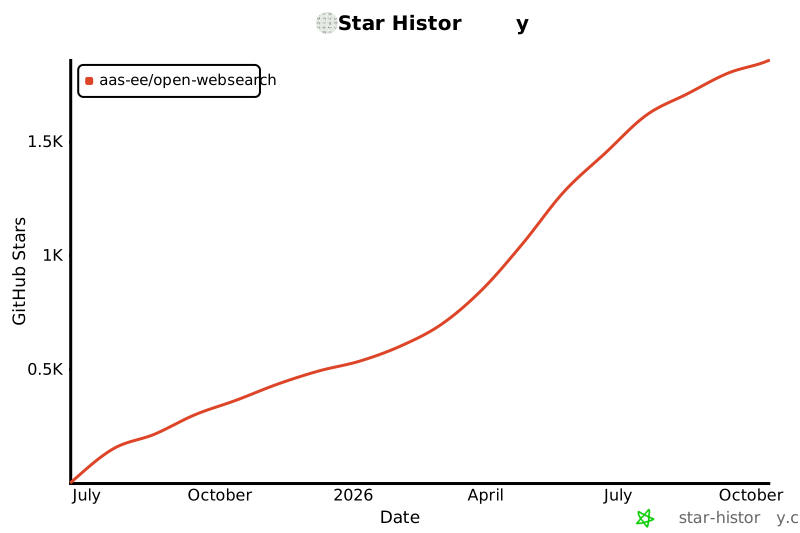](https://www.star-history.com/#Aas-ee/open-webSearch&Date)509510</div>511
Full transparency — inspect the skill content before installing.