
Your MCPs, supercharged. Find any tool instantly, execute with code mode, run on schedule, discover skills, load Photons, ready for any client. Smart loading saves tokens and energy. Instead of your AI juggling 50+ tools scattered across different MCPs, NCP gives it a single, unified interface with code mode execution, scheduling, skills discovery, and custom Photons. Your AI sees just 2-3 simple
npx mdskills install portel-dev/ncpRelated
@portel-dev? Sign in with GitHub to claim this listing.Unifies multiple MCPs into a single interface with semantic tool discovery and code execution
1 MCP to rule them all
Your MCPs, supercharged. Find any tool instantly, execute with code mode, run on schedule, discover skills, load Photons, ready for any client. Smart loading saves tokens and energy.
Instead of your AI juggling 50+ tools scattered across different MCPs, NCP gives it a single, unified interface with code mode execution, scheduling, skills discovery, and custom Photons.
Your AI sees just 2-3 simple tools:
find - Search for any tool, skill, or Photon: "I need to read a file" → finds the right tool automaticallycode - Execute TypeScript directly: await github.create_issue({...}) (code mode, enabled by default)run - Execute tools individually (when code mode is disabled)Behind the scenes, NCP manages all 50+ tools + skills + Photons: routing requests, discovering the right capability, executing code, scheduling tasks, managing health, and caching responses.
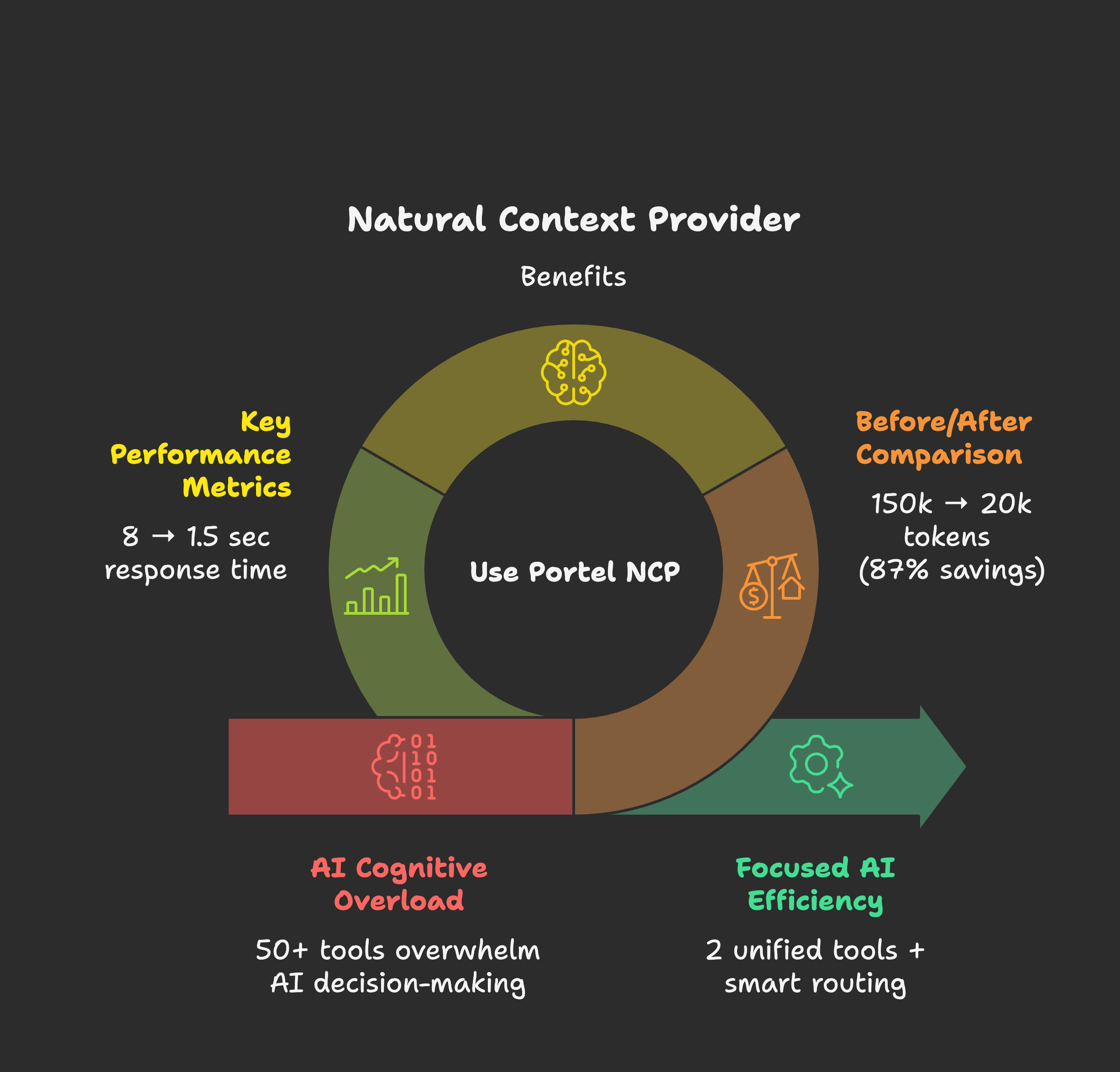
Why this matters:
🚀 NEW: Project-level configuration - each project can define its own MCPs automatically
What's MCP? The Model Context Protocol by Anthropic lets AI assistants connect to external tools and data sources. Think of MCPs as "plugins" that give your AI superpowers like file access, web search, databases, and more.
You gave your AI assistant 50 tools to be more capable. Instead, you got desperation:
read_file or get_file_content?")Think about it like this:
A child with one toy → Treasures it, masters it, creates endless games with it A child with 50 toys → Can't hold them all, gets overwhelmed, stops playing entirely
Your AI is that child. MCPs are the toys. More isn't always better.
The most creative people thrive with constraints, not infinite options. A poet given "write about anything" faces writer's block. Given "write a haiku about rain"? Instant inspiration.
Your AI is the same. Give it one perfect tool → Instant action. Give it 50 tools → Cognitive overload. NCP provides just-in-time tool discovery so your AI gets exactly what it needs, when it needs it.
When your AI assistant manages 50 tools directly:
🤖 AI Assistant Context:
├── Filesystem MCP (12 tools) ─ 15,000 tokens
├── Database MCP (8 tools) ─── 12,000 tokens
├── Web Search MCP (6 tools) ── 8,000 tokens
├── Email MCP (15 tools) ───── 18,000 tokens
├── Shell MCP (10 tools) ───── 14,000 tokens
├── GitHub MCP (20 tools) ──── 25,000 tokens
└── Slack MCP (9 tools) ────── 11,000 tokens

💀 Total: 80 tools = 103,000 tokens of schemas
What happens:
With NCP as Chief of Staff:
🤖 AI Assistant Context:
└── NCP (2 unified tools) ──── 2,500 tokens

🎯 Behind the scenes: NCP manages all 80 tools
📈 Context saved: 100,500 tokens (97% reduction!)
⚡ Decision time: Sub-second tool selection
🎪 AI behavior: Confident, focused, decisive
Real results from our testing:
| Your MCP Setup | Without NCP | With NCP | Token Savings |
|---|---|---|---|
| Small (5 MCPs, 25 tools) | 15,000 tokens | 8,000 tokens | 47% saved |
| Medium (15 MCPs, 75 tools) | 45,000 tokens | 12,000 tokens | 73% saved |
| Large (30 MCPs, 150 tools) | 90,000 tokens | 15,000 tokens | 83% saved |
| Enterprise (50+ MCPs, 250+ tools) | 150,000 tokens | 20,000 tokens | 87% saved |
Translation:
Choose your MCP client for setup instructions:
| Client | Description | Setup Guide |
|---|---|---|
| Claude Desktop | Anthropic's official desktop app. Best for NCP - one-click .dxt install with auto-sync | → Full Guide |
| Claude Code | Terminal-first AI workflow. Works out of the box! | Built-in support |
| VS Code | GitHub Copilot with Agent Mode. Use NCP for semantic tool discovery | → Setup |
| Cursor | AI-first code editor with Composer. Popular VS Code alternative | → Setup |
| Windsurf | Codeium's AI-native IDE with Cascade. Built on VS Code | → Setup |
| Cline | VS Code extension for AI-assisted development with MCP support | → Setup |
| Continue | VS Code AI assistant with Agent Mode and local LLM support | → Setup |
| Want more clients? | See the full list of MCP-compatible clients and tools | Official MCP Clients • Awesome MCP |
| Other Clients | Any MCP-compatible client via npm | Quick Start ↓ |
For advanced users or MCP clients not listed above:
Step 1: Install NCP
npm install -g @portel/ncp
Step 2: Import existing MCPs (optional)
ncp config import # Paste your config JSON when prompted
Step 3: Configure your MCP client
Add to your client's MCP configuration:
{
  "mcpServers": {
    "ncp": {
      "command": "ncp"
    }
  }
}
✅ Done! Your AI now sees just 2 tools instead of 50+.
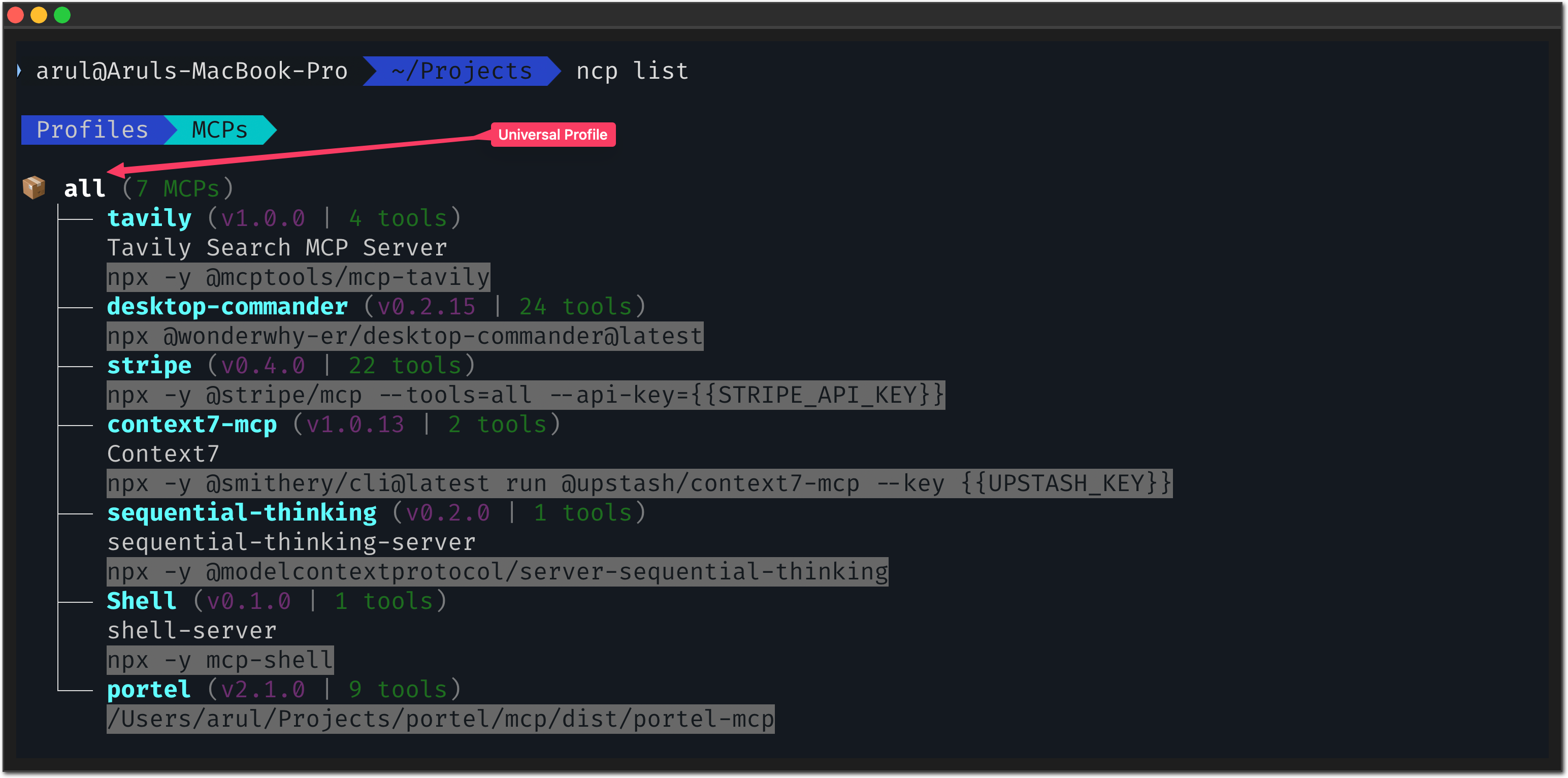
Want to experience what your AI experiences? NCP has a human-friendly CLI:
# Ask like your AI would ask:
ncp find "I need to read a file"
ncp find "help me send an email"
ncp find "search for something online"
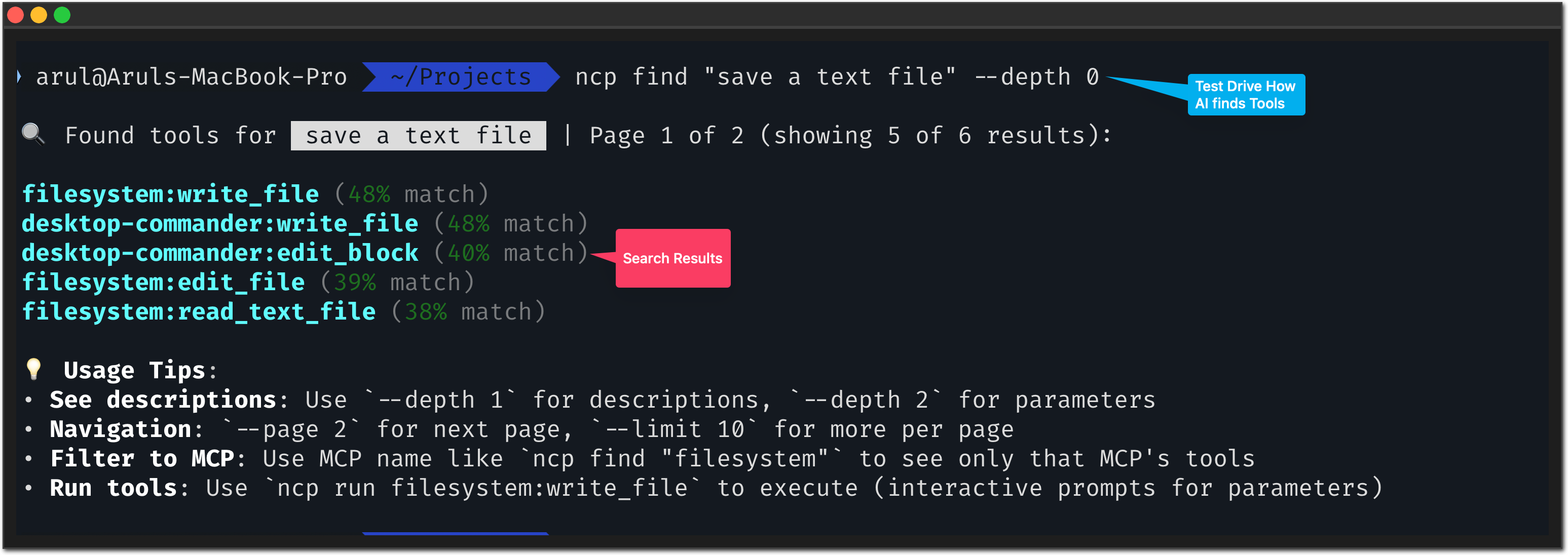
Notice: NCP understands intent, not just keywords. Just like your AI needs.
# See your complete MCP ecosystem:
ncp list --depth 2

# Get help anytime:
ncp --help
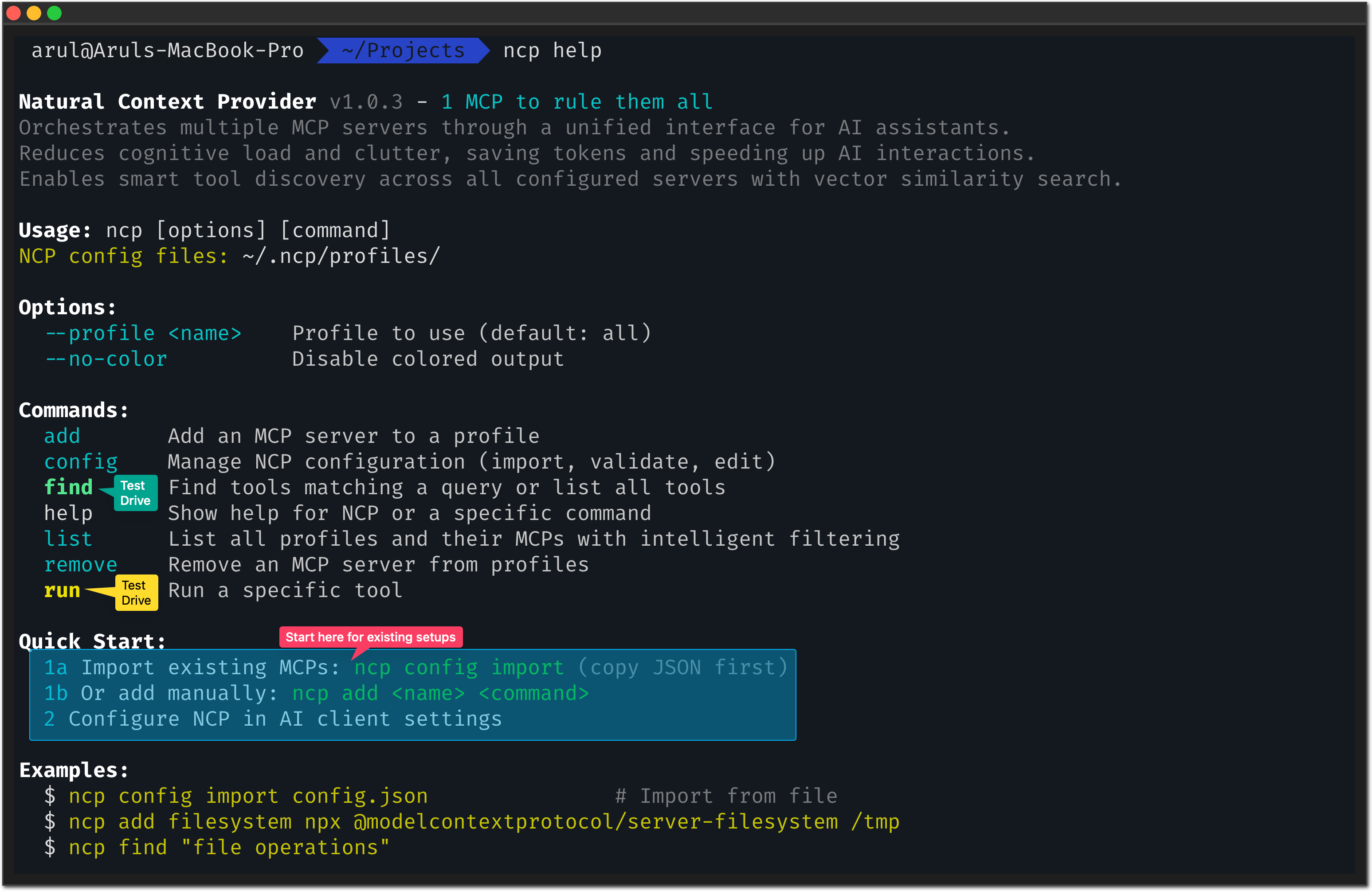
# Test any tool safely:
ncp run filesystem read_file --path "/tmp/test.txt"
Why this matters: You can debug and test tools directly, just like your AI would use them.
# 1. Check NCP is installed correctly
ncp --version

# 2. Confirm your MCPs are imported
ncp list

# 3. Test tool discovery
ncp find "file"

# 4. Test a simple tool (if you have filesystem MCP)
ncp run filesystem read_file --path "/tmp/test.txt" --dry-run
✅ Success indicators:
ncp list shows your imported MCPsncp find returns relevant toolsYou've seen find (discover tools) and code (execute TypeScript). Individually, they're useful. Together with scheduling, they become an automation powerhouse.
We wanted to stay on top of MCP-related conferences and workshops for an upcoming release. Instead of manually checking websites daily, we asked Claude:
"Set up a daily scraper that finds MCP conferences and saves them to a CSV file"
What Claude did:
Used code to write the automation:
// Search the web for MCP conferences
const results = await web.search({
  query: "Model Context Protocol conference 2025"
});

// Read each result and extract details
for (const url of results) {
  const content = await web.read({ url });
  // Extract title, deadline, description...
  // Save to ~/.ncp/mcp-conferences.csv
}
Used schedule to automate it:
ncp schedule create code:run "every day at 9am" \
  --name "MCP Conference Scraper" \
  --catchup-missed
How to set this up yourself:
First, install the web photon (provides search and read capabilities):
# Install from the official photons repo
ncp photon add https://raw.githubusercontent.com/portel-dev/photons/main/web.photon.ts
Then ask Claude to create the scraper - it will use the web photon automatically.
What happens now:
The insight: find and code let AI write automation. schedule makes it run forever. That's the powerhouse.
Bottom line: Your AI goes from desperate assistant to executive assistant.
Here's exactly how NCP empowers your MCPs:
| Feature | What It Does | Why It Matters |
|---|---|---|
| 🔍 Instant Tool Discovery | Semantic search understands intent ("read a file") not just keywords | Your AI finds the RIGHT tool in Note: Hibernation is a server-side feature. NCP's standard HTTP/SSE client automatically works with both traditional and hibernation-enabled servers without any special configuration. |
The TypeScript Photon runtime is enabled by default, but the toggle lives in different places depending on how you run NCP:
~/.ncp/settings.json (or run ncp config) and set enablePhotonRuntime: true or false. You can also override ad‑hoc with NCP_ENABLE_PHOTON_RUNTIME=true ncp find "photon".~/.ncp/settings.json. Configure photons by setting the env var inside the client config:{
"mcpServers": {
"ncp": {
"command": "ncp",
"env": {
"NCP_ENABLE_PHOTON_RUNTIME": "true"
}
}
}
}
If you disable the photon runtime, internal MCPs continue to work, but .photon.ts files are ignored until you re-enable the flag.
# From clipboard (any JSON config)
ncp config import

# From specific file
ncp config import "~/my-mcp-config.json"

# From Claude Desktop (auto-detected paths)
ncp config import
# Check what was imported
ncp list

# Validate health of imported MCPs
ncp config validate

# See detailed import logs
DEBUG=ncp:* ncp config import
ncp list (should show your MCPs)ncp find "your query"ncp command# Check MCP health (unhealthy MCPs slow everything down)
ncp list --depth 1
# Clear cache if needed
rm -rf ~/.ncp/cache
# Monitor with debug logs
DEBUG=ncp:* ncp find "test"
Like Yin and Yang, everything relies on the balance of things.
Compute gives us precision and certainty. AI gives us creativity and probability.
We believe breakthrough products emerge when you combine these forces in the right ratio.
How NCP embodies this balance:
| What NCP Does | AI (Creativity) | Compute (Precision) | The Balance |
|---|---|---|---|
| Tool Discovery | Understands "read a file" semantically | Routes to exact tool deterministically | Natural request → Precise execution |
| Orchestration | Flexible to your intent | Reliable tool execution | Natural flow → Certain outcomes |
| Health Monitoring | Adapts to patterns | Monitors connections, auto-failover | Smart adaptation → Reliable uptime |
Neither pure AI (too unpredictable) nor pure compute (too rigid).
Your AI stays creative. NCP handles the precision.
Want the technical details? Token analysis, architecture diagrams, and performance benchmarks:
Learn about:
Help make NCP even better:
Elastic License 2.0 - Full License
TLDR: Free for all use including commercial. Cannot be offered as a hosted service to third parties.
Install via CLI
npx mdskills install portel-dev/ncpNCP - Natural Context Provider is a free, open-source AI agent skill. Your MCPs, supercharged. Find any tool instantly, execute with code mode, run on schedule, discover skills, load Photons, ready for any client. Smart loading saves tokens and energy. Instead of your AI juggling 50+ tools scattered across different MCPs, NCP gives it a single, unified interface with code mode execution, scheduling, skills discovery, and custom Photons. Your AI sees just 2-3 simple
Install NCP - Natural Context Provider with a single command:
npx mdskills install portel-dev/ncpThis downloads the skill files into your project and your AI agent picks them up automatically.
NCP - Natural Context Provider works with Claude Code, Claude Desktop, Cursor, Vscode Copilot, Windsurf, Continue Dev, Codex, Gemini Cli, Amp, Roo Code, Goose, Opencode, Trae, Qodo, Command Code. Skills use the open SKILL.md format which is compatible with any AI coding agent that reads markdown instructions.