
MEMCORD v3.0.2 (mcp server) This privacy-first, self-hosted MCP server helps you organize chat history, summarize messages, search across past chats with AI — and keeps everything secure and fully under your control. Never Lose Context Again Transform your Claude conversations into a searchable, organized knowledge base that grows with you - Core Benefits - Prerequisites - Quick Start - IDE Config
npx mdskills install ukkit/memcordRelated
@ukkit? Sign in with GitHub to claim this listing.Comprehensive MCP server with rich conversation memory, search, and summarization features across multiple backends
1<div align="center">2 <img src="assets/image/memcord_1024.png" width="256">3 <h3>MEMCORD v3.0.2 (mcp server)</h3>4 <p>This privacy-first, self-hosted MCP server helps you organize chat history, summarize messages, search across past chats with AI — and keeps everything secure and fully under your control.</p>5</div>67<p align="center">8 <a href="https://github.com/modelcontextprotocol"><img src="https://img.shields.io/badge/MCP-Server-blue" alt="MCP Server"></a>9 <a href="https://docs.anthropic.com/claude/docs/claude-code"><img src="https://img.shields.io/badge/Claude-Code-purple" alt="Claude Code"></a>10 <a href="https://claude.ai/desktop"><img src="https://img.shields.io/badge/Claude-Desktop-orange" alt="Claude Desktop"></a>11 <a href="https://code.visualstudio.com/"><img src="https://img.shields.io/badge/Visual_Studio-Code-orange" alt="VSCode"></a>12 <a href="https://antigravity.google"><img src="https://img.shields.io/badge/Google-Antigravity-4285F4" alt="Google Antigravity"></a>13 <a href="https://python.org"><img src="https://img.shields.io/badge/Python-3.10+-green" alt="Python"></a>14 <a href="LICENSE"><img src="https://img.shields.io/badge/License-MIT-yellow" alt="License"></a>15 <a href="https://buymeacoffee.com/ukkit"><img src="https://img.shields.io/badge/Buy%20Me%20A-Coffee-white" alt="Buy Me a Coffee"></a>16</p>1718<h2 align="center">Never Lose Context Again</h2>19<p align="center"><em>Transform your Claude conversations into a searchable, organized knowledge base that grows with you</em></p>2021> **[What's new in v3.0.2](docs/versions.md#v302---remove-unsupported-sessionend-hook)** — Removes the broken `SessionEnd` agent hook. Re-run `generate-config.py --install-hooks` to clean it from existing installs automatically.2223## Table of Contents2425- [Core Benefits](#core-benefits)26- [Prerequisites](#prerequisites)27- [Quick Start](#quick-start)28- [Demo](#demo)29- [IDE Configuration](#ide-configuration)30- [Keeping Memcord Updated](#keeping-memcord-updated)31- [Using Memcord in a Project](#using-memcord-in-a-project)32- [Basic Usage](#basic-usage)33- [Summarizer Backends](#summarizer-backends)34- [Documentation](#documentation)3536## Core Benefits3738* **Infinite Memory** - Claude remembers everything across unlimited conversations with intelligent auto-summarization39* **Your Data, Your Control** - 100% local storage with zero cloud dependencies or privacy concerns40* **Effortless Organization** - Per-project memory slots with timeline navigation and smart tagging41* **Intelligent Merging** - Automatically combines related conversations while eliminating duplicates4243## Prerequisites4445<details>46<summary>Python 3.10+ and uv are required. The installer handles both — click to expand manual instructions.</summary>4748- **Python 3.10+** — [python.org](https://python.org)49- **uv** (Python package manager) — install with:5051 **macOS / Linux:**52 ```bash53 curl -LsSf https://astral.sh/uv/install.sh | sh54 ```55 **Windows (PowerShell):**56 ```powershell57 powershell -ExecutionPolicy ByPass -c "irm https://astral.sh/uv/install.ps1 | iex"58 ```5960</details>6162## Quick Start6364**macOS / Linux:**65```bash66curl -fsSL https://github.com/ukkit/memcord/raw/main/install.sh | bash67```6869**Windows (PowerShell):**70```powershell71irm https://github.com/ukkit/memcord/raw/main/install.ps1 | iex72```7374This will:75- ✅ Download and setup **memcord**76- ✅ Set up Python virtual environment using uv77- ✅ Generate platform-specific MCP configuration files78- ✅ Configure Claude Desktop, Claude Code, VSCode, and Antigravity IDE7980## Demo8182_A demo GIF or terminal recording will be added here. Contributions welcome!_8384## IDE Configuration8586The installer auto-configures all supported IDEs. For manual setup or troubleshooting, see the detailed guides:8788| IDE / Client | Guide |89|---|---|90| Claude Code CLI | [Installation Guide — Claude Code](docs/installation.md#claude-code-cli-recommended-) |91| Claude Desktop | [Installation Guide — Claude Desktop](docs/installation.md#claude-desktop) |92| VSCode + GitHub Copilot | [VSCode Setup Guide](docs/vscode-setup.md) |93| Google Antigravity | [Installation Guide — Other MCP Apps](docs/installation.md#other-mcp-applications) |94| Configuration templates | [`config-templates/`](config-templates/) ([README](config-templates/README.md)) |9596### Manual Installation9798```bash99git clone https://github.com/ukkit/memcord.git100cd memcord101uv venv && uv pip install -e .102uv run python scripts/generate-config.py103```104105See the **[Complete Installation Guide](docs/installation.md)** for updating, advanced options, and custom commands.106107## Keeping Memcord Updated108109```bash110cd /path/to/memcord111git pull112uv pip install -e .113uv run python scripts/generate-config.py # Regenerate configs114115# Optional: Enable auto-save hooks (new in v2.5.0)116uv run python scripts/generate-config.py --install-hooks117```118119The `--install-hooks` flag is idempotent — it merges into existing `.claude/settings.json` without overwriting other settings or hooks.120121<a id="using-memcord-in-a-project"></a>122123## Using Memcord in a Project124125### First-Time Setup (New Project)126127```bash128# 1. Once you are in claude code, initialize the project with a memory slot (one-time setup)129memcord_init "." "my-project-name"130# OR131memcord_init "my_project_name"132# Creates .memcord file containing "my-project-name"133134# 2. Start saving your conversations135/memcord-save-progress # Auto-detects slot from .memcord file136```137138### Subsequent Sessions (Returning to Project)139140```bash141# Just use slash commands - no slot name needed!142/memcord-read # Reads from bound slot automatically143144/memcord-save # Saves to bound slot automatically145/memcord-save-progress # Summarizes and saves automatically146```147148### Enable Auto-Save (Optional)149150```bash151uv run python scripts/generate-config.py --install-hooks152```153154Automatically saves conversation progress before context compaction and on session end. See [config-templates/README.md](config-templates/README.md#auto-save-hooks-optional) for details.155156### How Auto-Detection Works1571581. When you run `/memcord-read` (or save/save-progress) without arguments1592. Claude checks for `.memcord` file in the current working directory1603. If found, reads the slot name and uses it automatically1614. No need to remember or type slot names!162163## Basic Usage164165### Saving & Retrieving166167```bash168memcord_name "project_meeting" # Create or select a slot169memcord_save "Our discussion about..." # Save exact text170memcord_save_progress # Save a compressed summary171memcord_read # Read the slot172```173174### Navigating & Searching175176```bash177memcord_select_entry "2 hours ago" # Jump to a point in the timeline178memcord_list # List all slots179memcord_search "API design" # Full-text search180memcord_query "What did we decide?" # Natural language query181```182183### Project & Privacy184185```bash186memcord_init "." "my-project" # Bind a memory slot to this directory187memcord_zero # Privacy mode — nothing gets saved188```189190See **[Complete Tools Reference](docs/tools-reference.md)** for all 23 tools with full parameters and examples.191192## Summarizer Backends193194Memcord supports four summarizer backends. New slots default to **sumy** (graph-based, no downloads required). Existing slots keep **nltk** to preserve prior behavior.195196| Backend | Type | Speed | Quality | Extra install |197|---|---|---|---|---|198| `nltk` | Extractive | Fast | Good | None (built-in) |199| `sumy` | Extractive (graph) | Fast | Better | None (built-in) |200| `semantic` | Extractive (embeddings) | Medium | Best extractive | `uv pip install "memcord[semantic]"` (~80 MB) |201| `transformers` | Abstractive (BART) | Slow | Best overall | `uv pip install "memcord[transformers]"` (~400 MB) |202203### Switching Backends204205Use `memcord_configure` to change the backend for any slot — no restart required:206207```bash208# Check current config209memcord_configure action="get"210211# Switch to the BART abstractive summarizer (best for conversations)212memcord_configure action="set" key="summarizer_backend" value="transformers"213214# Switch to embedding-based semantic summarizer215memcord_configure action="set" key="summarizer_backend" value="semantic"216217# Switch sumy algorithm (lexrank / lsa / edmundson)218memcord_configure action="set" key="sumy_algorithm" value="lsa"219220# Reset to defaults221memcord_configure action="reset"222```223224To apply one backend to **all slots** (e.g. in Docker or CI), set the environment variable:225226```bash227export MEMCORD_SUMMARIZER=transformers228```229230See **[Tools Reference — memcord_configure](docs/tools-reference.md)** for the full parameter list.231232## Documentation233234| Guide | Description |235|---|---|236| **[Installation Guide](docs/installation.md)** | Complete setup instructions for all MCP applications |237| **[Feature Guide](docs/features-guide.md)** | Complete list of features |238| **[Tools Reference](docs/tools-reference.md)** | Detailed documentation for all 23 tools |239| **[Import & Merge Guide](docs/import-and-merge.md)** | Comprehensive guide for Phase 3 features |240| **[Search & Query Guide](docs/search-and-query.md)** | Advanced search features and natural language queries |241| **[Usage Examples](docs/examples.md)** | Real-world workflows and practical use cases |242| **[Data Format Specification](docs/data-format.md)** | Technical details and file formats |243| **[Troubleshooting](docs/troubleshooting.md)** | Common issues and solutions |244| **[Version History](docs/versions.md)** | Changelog for all releases |245246---247248If you find this project helpful, consider:249250 - ⭐ Starring the repository on GitHub251 - ☕ [Support Development](https://buymeacoffee.com/ukkit)252 - 🐛 Reporting bugs and suggesting features253254---255256**MIT License** - see LICENSE file for details.257258---259260## Star History261262[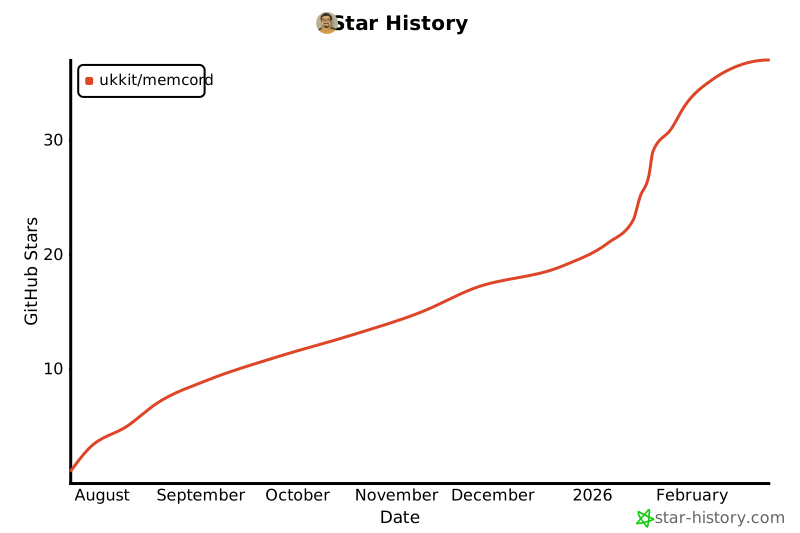](https://www.star-history.com/#ukkit/memcord&type=date&legend=top-left)263
Full transparency — inspect the skill content before installing.