
cognee‑mcp - Run cognee’s memory engine as a Model Context Protocol server Join Discord Join r/AIMemory Build memory for Agents and query from any client that speaks MCP – in your terminal or IDE. - Multiple transports – choose Streamable HTTP --transport http (recommended for web deployments), SSE --transport sse (real‑time streaming), or stdio (classic pipe, default) - API Mode – connect to an a
npx mdskills install topoteretes/cogneeRelated
@topoteretes? Sign in with GitHub to claim this listing.Well-documented memory MCP server with multiple transports, Docker support, and comprehensive setup
1<div align="center">2 <a href="https://github.com/topoteretes/cognee">3 <img src="https://raw.githubusercontent.com/topoteretes/cognee/refs/heads/dev/assets/cognee-logo-transparent.png" alt="Cognee Logo" height="60">4 </a>56 <br />78 cognee‑mcp - Run cognee’s memory engine as a Model Context Protocol server910 <p align="center">11 <a href="https://www.youtube.com/watch?v=1bezuvLwJmw&t=2s">Demo</a>12 .13 <a href="https://cognee.ai">Learn more</a>14 ·15 <a href="https://discord.gg/NQPKmU5CCg">Join Discord</a>16 ·17 <a href="https://www.reddit.com/r/AIMemory/">Join r/AIMemory</a>18 </p>192021 [](https://GitHub.com/topoteretes/cognee/network/)22 [](https://GitHub.com/topoteretes/cognee/stargazers/)23 [](https://GitHub.com/topoteretes/cognee/commit/)24 [](https://github.com/topoteretes/cognee/tags/)25 [](https://pepy.tech/project/cognee)26 [](https://github.com/topoteretes/cognee/blob/main/LICENSE)27 [](https://github.com/topoteretes/cognee/graphs/contributors)2829<a href="https://www.producthunt.com/posts/cognee?embed=true&utm_source=badge-top-post-badge&utm_medium=badge&utm_souce=badge-cognee" target="_blank"><img src="https://api.producthunt.com/widgets/embed-image/v1/top-post-badge.svg?post_id=946346&theme=light&period=daily&t=1744472480704" alt="cognee - Memory for AI Agents  in 5 lines of code | Product Hunt" style="width: 250px; height: 54px;" width="250" height="54" /></a>3031<a href="https://trendshift.io/repositories/13955" target="_blank"><img src="https://trendshift.io/api/badge/repositories/13955" alt="topoteretes%2Fcognee | Trendshift" style="width: 250px; height: 55px;" width="250" height="55"/></a>323334Build memory for Agents and query from any client that speaks MCP – in your terminal or IDE.3536</div>3738## ✨ Features3940- Multiple transports – choose Streamable HTTP --transport http (recommended for web deployments), SSE --transport sse (real‑time streaming), or stdio (classic pipe, default)41- **API Mode** – connect to an already running Cognee FastAPI server instead of using cognee directly (see [API Mode](#-api-mode) below)42- Integrated logging – all actions written to a rotating file (see get_log_file_location()) and mirrored to console in dev43- Local file ingestion – feed .md, source files, Cursor rule‑sets, etc. straight from disk44- Background pipelines – long‑running cognify & codify jobs spawn off‑thread; check progress with status tools45- Developer rules bootstrap – one call indexes .cursorrules, .cursor/rules, AGENT.md, and friends into the developer_rules nodeset46- Prune & reset – wipe memory clean with a single prune call when you want to start fresh4748Please refer to our documentation [here](https://docs.cognee.ai/how-to-guides/deployment/mcp) for further information.4950## 🚀 Quick Start51521. Clone cognee repo53 ```54 git clone https://github.com/topoteretes/cognee.git55 ```562. Navigate to cognee-mcp subdirectory57 ```58 cd cognee/cognee-mcp59 ```603. Install uv if you don't have one61 ```62 pip install uv63 ```644. Install all the dependencies you need for cognee mcp server with uv65 ```66 uv sync --dev --all-extras --reinstall67 ```685. Activate the virtual environment in cognee mcp directory69 ```70 source .venv/bin/activate71 ```726. Set up your OpenAI API key in .env for a quick setup with the default cognee configurations73 ```74 LLM_API_KEY="YOUR_OPENAI_API_KEY"75 ```767. Run cognee mcp server with stdio (default)77 ```78 python src/server.py79 ```80 or stream responses over SSE81 ```82 python src/server.py --transport sse83 ```84 or run with Streamable HTTP transport (recommended for web deployments)85 ```86 python src/server.py --transport http --host 127.0.0.1 --port 8000 --path /mcp87 ```8889You can do more advanced configurations by creating .env file using our <a href="https://github.com/topoteretes/cognee/blob/main/.env.template">template.</a>90To use different LLM providers / database configurations, and for more info check out our <a href="https://docs.cognee.ai">documentation</a>.919293## 🐳 Docker Usage9495If you'd rather run cognee-mcp in a container, you have two options:96971. **Build locally**98 1. Make sure you are in /cognee root directory and have a fresh `.env` containing only your `LLM_API_KEY` (and your chosen settings).99 2. Remove any old image and rebuild:100 ```bash101 docker rmi cognee/cognee-mcp:main || true102 docker build --no-cache -f cognee-mcp/Dockerfile -t cognee/cognee-mcp:main .103 ```104 3. Run it:105 ```bash106 # For HTTP transport (recommended for web deployments)107 docker run -e TRANSPORT_MODE=http --env-file ./.env -p 8000:8000 --rm -it cognee/cognee-mcp:main108 # For SSE transport109 docker run -e TRANSPORT_MODE=sse --env-file ./.env -p 8000:8000 --rm -it cognee/cognee-mcp:main110 # For stdio transport (default)111 docker run -e TRANSPORT_MODE=stdio --env-file ./.env --rm -it cognee/cognee-mcp:main112 ```113114 **Installing optional dependencies at runtime:**115116 You can install optional dependencies when running the container by setting the `EXTRAS` environment variable:117 ```bash118 # Install a single optional dependency group at runtime119 docker run \120 -e TRANSPORT_MODE=http \121 -e EXTRAS=aws \122 --env-file ./.env \123 -p 8000:8000 \124 --rm -it cognee/cognee-mcp:main125126 # Install multiple optional dependency groups at runtime (comma-separated)127 docker run \128 -e TRANSPORT_MODE=sse \129 -e EXTRAS=aws,postgres,neo4j \130 --env-file ./.env \131 -p 8000:8000 \132 --rm -it cognee/cognee-mcp:main133 ```134135 **Available optional dependency groups:**136 - `aws` - S3 storage support137 - `postgres` / `postgres-binary` - PostgreSQL database support138 - `neo4j` - Neo4j graph database support139 - `neptune` - AWS Neptune support140 - `chromadb` - ChromaDB vector store support141 - `scraping` - Web scraping capabilities142 - `distributed` - Modal distributed execution143 - `langchain` - LangChain integration144 - `llama-index` - LlamaIndex integration145 - `anthropic` - Anthropic models146 - `groq` - Groq models147 - `mistral` - Mistral models148 - `ollama` / `huggingface` - Local model support149 - `docs` - Document processing150 - `codegraph` - Code analysis151 - `monitoring` - Sentry & Langfuse monitoring152 - `redis` - Redis support153 - And more (see [pyproject.toml](https://github.com/topoteretes/cognee/blob/main/pyproject.toml) for full list)1542. **Pull from Docker Hub** (no build required):155 ```bash156 # With HTTP transport (recommended for web deployments)157 docker run -e TRANSPORT_MODE=http --env-file ./.env -p 8000:8000 --rm -it cognee/cognee-mcp:main158 # With SSE transport159 docker run -e TRANSPORT_MODE=sse --env-file ./.env -p 8000:8000 --rm -it cognee/cognee-mcp:main160 # With stdio transport (default)161 docker run -e TRANSPORT_MODE=stdio --env-file ./.env --rm -it cognee/cognee-mcp:main162 ```163164 **With runtime installation of optional dependencies:**165 ```bash166 # Install optional dependencies from Docker Hub image167 docker run \168 -e TRANSPORT_MODE=http \169 -e EXTRAS=aws,postgres \170 --env-file ./.env \171 -p 8000:8000 \172 --rm -it cognee/cognee-mcp:main173 ```174175### **Important: Docker vs Direct Usage**176**Docker uses environment variables**, not command line arguments:177- ✅ Docker: `-e TRANSPORT_MODE=http`178- ❌ Docker: `--transport http` (won't work)179180**Direct Python usage** uses command line arguments:181- ✅ Direct: `python src/server.py --transport http`182- ❌ Direct: `-e TRANSPORT_MODE=http` (won't work)183184### **Docker API Mode**185186To connect the MCP Docker container to a Cognee API server running on your host machine:187188#### **Simple Usage (Automatic localhost handling):**189```bash190# Start your Cognee API server on the host191python -m cognee.api.client192193# Run MCP container in API mode - localhost is automatically converted!194docker run \195 -e TRANSPORT_MODE=sse \196 -e API_URL=http://localhost:8000 \197 -e API_TOKEN=your_auth_token \198 -p 8001:8000 \199 --rm -it cognee/cognee-mcp:main200```201**Note:** The container will automatically convert `localhost` to `host.docker.internal` on Mac/Windows/Docker Desktop. You'll see a message in the logs showing the conversion.202203#### **Explicit host.docker.internal (Mac/Windows):**204```bash205# Or explicitly use host.docker.internal206docker run \207 -e TRANSPORT_MODE=sse \208 -e API_URL=http://host.docker.internal:8000 \209 -e API_TOKEN=your_auth_token \210 -p 8001:8000 \211 --rm -it cognee/cognee-mcp:main212```213214#### **On Linux (use host network or container IP):**215```bash216# Option 1: Use host network (simplest)217docker run \218 --network host \219 -e TRANSPORT_MODE=sse \220 -e API_URL=http://localhost:8000 \221 -e API_TOKEN=your_auth_token \222 --rm -it cognee/cognee-mcp:main223224# Option 2: Use host IP address225# First, get your host IP: ip addr show docker0226docker run \227 -e TRANSPORT_MODE=sse \228 -e API_URL=http://172.17.0.1:8000 \229 -e API_TOKEN=your_auth_token \230 -p 8001:8000 \231 --rm -it cognee/cognee-mcp:main232```233234**Environment variables for API mode:**235- `API_URL`: URL of the running Cognee API server236- `API_TOKEN`: Authentication token (optional, required if API has authentication enabled)237238**Note:** When running in API mode:239- Database migrations are automatically skipped (API server handles its own DB)240- Some features are limited (see [API Mode Limitations](#-api-mode))241242243## 🔗 MCP Client Configuration244245After starting your Cognee MCP server with Docker, you need to configure your MCP client to connect to it.246247### **SSE Transport Configuration** (Recommended)248249**Start the server with SSE transport:**250```bash251docker run -e TRANSPORT_MODE=sse --env-file ./.env -p 8000:8000 --rm -it cognee/cognee-mcp:main252```253254**Configure your MCP client:**255256#### **Claude CLI (Easiest)**257```bash258claude mcp add cognee-sse -t sse http://localhost:8000/sse259```260261**Verify the connection:**262```bash263claude mcp list264```265266You should see your server connected:267```268Checking MCP server health...269270cognee-sse: http://localhost:8000/sse (SSE) - ✓ Connected271```272273#### **Manual Configuration**274275**Claude (`~/.claude.json`)**276```json277{278 "mcpServers": {279 "cognee": {280 "type": "sse",281 "url": "http://localhost:8000/sse"282 }283 }284}285```286287**Cursor (`~/.cursor/mcp.json`)**288```json289{290 "mcpServers": {291 "cognee-sse": {292 "url": "http://localhost:8000/sse"293 }294 }295}296```297298### **HTTP Transport Configuration** (Alternative)299300**Start the server with HTTP transport:**301```bash302docker run -e TRANSPORT_MODE=http --env-file ./.env -p 8000:8000 --rm -it cognee/cognee-mcp:main303```304305**Configure your MCP client:**306307#### **Claude CLI (Easiest)**308```bash309claude mcp add cognee-http -t http http://localhost:8000/mcp310```311312**Verify the connection:**313```bash314claude mcp list315```316317You should see your server connected:318```319Checking MCP server health...320321cognee-http: http://localhost:8000/mcp (HTTP) - ✓ Connected322```323324#### **Manual Configuration**325326**Claude (`~/.claude.json`)**327```json328{329 "mcpServers": {330 "cognee": {331 "type": "http",332 "url": "http://localhost:8000/mcp"333 }334 }335}336```337338**Cursor (`~/.cursor/mcp.json`)**339```json340{341 "mcpServers": {342 "cognee-http": {343 "url": "http://localhost:8000/mcp"344 }345 }346}347```348349### **Dual Configuration Example**350You can configure both transports simultaneously for testing:351352```json353{354 "mcpServers": {355 "cognee-sse": {356 "type": "sse",357 "url": "http://localhost:8000/sse"358 },359 "cognee-http": {360 "type": "http",361 "url": "http://localhost:8000/mcp"362 }363 }364}365```366367**Note:** Only enable the server you're actually running to avoid connection errors.368369## 🌐 API Mode370371The MCP server can operate in two modes:372373### **Direct Mode** (Default)374The MCP server directly imports and uses the cognee library. This is the default mode with full feature support.375376### **API Mode**377The MCP server connects to an already running Cognee FastAPI server via HTTP requests. This is useful when:378- You have a centralized Cognee API server running379- You want to separate the MCP server from the knowledge graph backend380- You need multiple MCP servers to share the same knowledge graph381382**Starting the MCP server in API mode:**383```bash384# Start your Cognee FastAPI server first (default port 8000)385cd /path/to/cognee386python -m cognee.api.client387388# Then start the MCP server in API mode389cd cognee-mcp390python src/server.py --api-url http://localhost:8000 --api-token YOUR_AUTH_TOKEN391```392393**API Mode with different transports:**394```bash395# With SSE transport396python src/server.py --transport sse --api-url http://localhost:8000 --api-token YOUR_TOKEN397398# With HTTP transport399python src/server.py --transport http --api-url http://localhost:8000 --api-token YOUR_TOKEN400```401402**API Mode with Docker:**403```bash404# On Mac/Windows (use host.docker.internal to access host)405docker run \406 -e TRANSPORT_MODE=sse \407 -e API_URL=http://host.docker.internal:8000 \408 -e API_TOKEN=YOUR_TOKEN \409 -p 8001:8000 \410 --rm -it cognee/cognee-mcp:main411412# On Linux (use host network)413docker run \414 --network host \415 -e TRANSPORT_MODE=sse \416 -e API_URL=http://localhost:8000 \417 -e API_TOKEN=YOUR_TOKEN \418 --rm -it cognee/cognee-mcp:main419```420421**Command-line arguments for API mode:**422- `--api-url`: Base URL of the running Cognee FastAPI server (e.g., `http://localhost:8000`)423- `--api-token`: Authentication token for the API (optional, required if API has authentication enabled)424425**Docker environment variables for API mode:**426- `API_URL`: Base URL of the running Cognee FastAPI server427- `API_TOKEN`: Authentication token (optional, required if API has authentication enabled)428429**API Mode limitations:**430Some features are only available in direct mode:431- `codify` (code graph pipeline)432- `cognify_status` / `codify_status` (pipeline status tracking)433- `prune` (data reset)434- `get_developer_rules` (developer rules retrieval)435- `list_data` with specific dataset_id (detailed data listing)436437Basic operations like `cognify`, `search`, `delete`, and `list_data` (all datasets) work in both modes.438439## 💻 Basic Usage440441The MCP server exposes its functionality through tools. Call them from any MCP client (Cursor, Claude Desktop, Cline, Roo and more).442443444### Available Tools445446- **cognify**: Turns your data into a structured knowledge graph and stores it in memory447448- **cognee_add_developer_rules**: Ingest core developer rule files into memory449450- **codify**: Analyse a code repository, build a code graph, stores it in memory451452- **delete**: Delete specific data from a dataset (supports soft/hard deletion modes)453454- **get_developer_rules**: Retrieve all developer rules that were generated based on previous interactions455456- **list_data**: List all datasets and their data items with IDs for deletion operations457458- **save_interaction**: Logs user-agent interactions and query-answer pairs459460- **prune**: Reset cognee for a fresh start (removes all data)461462- **search**: Query memory – supports GRAPH_COMPLETION, RAG_COMPLETION, CODE, CHUNKS, SUMMARIES, CYPHER, and FEELING_LUCKY463464- **cognify_status / codify_status**: Track pipeline progress465466**Data Management Examples:**467```bash468# List all available datasets and data items469list_data()470471# List data items in a specific dataset472list_data(dataset_id="your-dataset-id-here")473474# Delete specific data (soft deletion - safer, preserves shared entities)475delete(data_id="data-uuid", dataset_id="dataset-uuid", mode="soft")476477# Delete specific data (hard deletion - removes orphaned entities)478delete(data_id="data-uuid", dataset_id="dataset-uuid", mode="hard")479```480481482## Development and Debugging483484### Debugging485486To use debugger, run:487 ```bash488 mcp dev src/server.py489 ```490491Open inspector with timeout passed:492 ```493 http://localhost:5173?timeout=120000494 ```495496To apply new changes while developing cognee you need to do:4974981. Update dependencies in cognee folder if needed4992. `uv sync --dev --all-extras --reinstall`5003. `mcp dev src/server.py`501502### Development503504In order to use local cognee:5055061. Uncomment the following line in the cognee-mcp [`pyproject.toml`](pyproject.toml) file and set the cognee root path.507 ```508 #"cognee[postgres,codegraph,gemini,huggingface,docs,neo4j] @ file:/Users/<username>/Desktop/cognee"509 ```510 Remember to replace `file:/Users/<username>/Desktop/cognee` with your actual cognee root path.5115122. Install dependencies with uv in the mcp folder513 ```514 uv sync --reinstall515 ```516517## Code of Conduct518519We are committed to making open source an enjoyable and respectful experience for our community. See <a href="https://github.com/topoteretes/cognee/blob/main/CODE_OF_CONDUCT.md"><code>CODE_OF_CONDUCT</code></a> for more information.520521## 💫 Contributors522523<a href="https://github.com/topoteretes/cognee/graphs/contributors">524 <img alt="contributors" src="https://contrib.rocks/image?repo=topoteretes/cognee"/>525</a>526527528## Star History529530[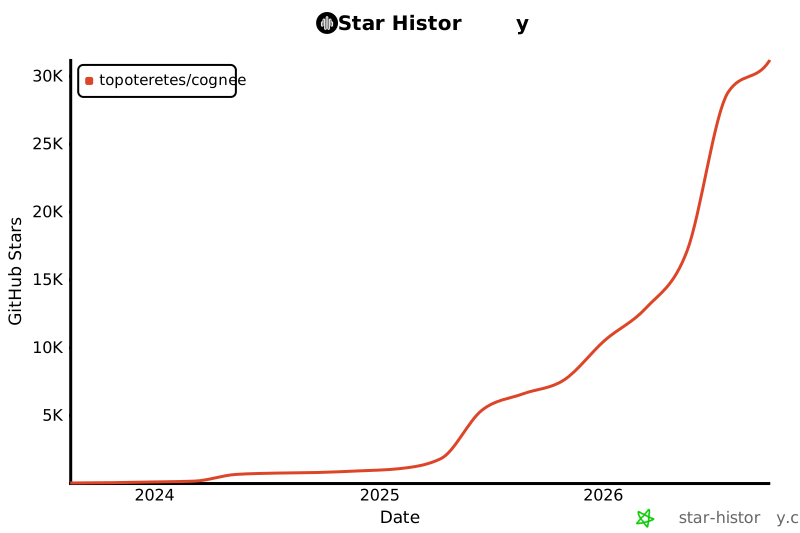](https://star-history.com/#topoteretes/cognee&Date)531
Full transparency — inspect the skill content before installing.