
Taskmaster : A task management system for AI-driven development, designed to work seamlessly with any AI chat. A task management system for AI-driven development with Claude, designed to work seamlessly with Cursor AI. 📚 View Full Documentation For detailed guides, API references, and comprehensive examples, visit our documentation site. The following documentation is also available in the docs d
npx mdskills install eyaltoledano/claude-task-masterRelated
@eyaltoledano? Sign in with GitHub to claim this listing.Comprehensive AI-driven task management with multi-provider support and excellent documentation
1<a name="readme-top"></a>23<div align='center'>4<a href="https://trendshift.io/repositories/13971" target="_blank"><img src="https://trendshift.io/api/badge/repositories/13971" alt="eyaltoledano%2Fclaude-task-master | Trendshift" style="width: 250px; height: 55px;" width="250" height="55"/></a>5</div>67<p align="center">8 <a href="https://task-master.dev"><img src="./images/logo.png?raw=true" alt="Taskmaster logo"></a>9</p>1011<p align="center">12<b>Taskmaster</b>: A task management system for AI-driven development, designed to work seamlessly with any AI chat.13</p>1415<p align="center">16 <a href="https://discord.gg/taskmasterai" target="_blank"><img src="https://dcbadge.limes.pink/api/server/https://discord.gg/taskmasterai?style=flat" alt="Discord"></a> |17 <a href="https://docs.task-master.dev" target="_blank">Docs</a>18</p>1920<p align="center">21 <a href="https://github.com/eyaltoledano/claude-task-master/actions/workflows/ci.yml"><img src="https://github.com/eyaltoledano/claude-task-master/actions/workflows/ci.yml/badge.svg" alt="CI"></a>22 <a href="https://github.com/eyaltoledano/claude-task-master/stargazers"><img src="https://img.shields.io/github/stars/eyaltoledano/claude-task-master?style=social" alt="GitHub stars"></a>23 <a href="https://badge.fury.io/js/task-master-ai"><img src="https://badge.fury.io/js/task-master-ai.svg" alt="npm version"></a>24 <a href="LICENSE"><img src="https://img.shields.io/badge/license-MIT%20with%20Commons%20Clause-blue.svg" alt="License"></a>25</p>2627<p align="center">28 <a href="https://www.npmjs.com/package/task-master-ai"><img src="https://img.shields.io/npm/d18m/task-master-ai?style=flat" alt="NPM Downloads"></a>29 <a href="https://www.npmjs.com/package/task-master-ai"><img src="https://img.shields.io/npm/dm/task-master-ai?style=flat" alt="NPM Downloads"></a>30 <a href="https://www.npmjs.com/package/task-master-ai"><img src="https://img.shields.io/npm/dw/task-master-ai?style=flat" alt="NPM Downloads"></a>31</p>3233## By [@eyaltoledano](https://x.com/eyaltoledano) & [@RalphEcom](https://x.com/RalphEcom)3435[](https://x.com/eyaltoledano)36[](https://x.com/RalphEcom)3738A task management system for AI-driven development with Claude, designed to work seamlessly with Cursor AI.3940## Documentation4142📚 **[View Full Documentation](https://docs.task-master.dev)**4344For detailed guides, API references, and comprehensive examples, visit our documentation site.4546### Quick Reference4748The following documentation is also available in the `docs` directory:4950- [Configuration Guide](docs/configuration.md) - Set up environment variables and customize Task Master51- [Tutorial](docs/tutorial.md) - Step-by-step guide to getting started with Task Master52- [Command Reference](docs/command-reference.md) - Complete list of all available commands53- [Task Structure](docs/task-structure.md) - Understanding the task format and features54- [Example Interactions](docs/examples.md) - Common Cursor AI interaction examples55- [Migration Guide](docs/migration-guide.md) - Guide to migrating to the new project structure5657#### Quick Install for Cursor 1.0+ (One-Click)5859[](https://cursor.com/en/install-mcp?name=task-master-ai&config=eyJjb21tYW5kIjoibnB4IC15IC0tcGFja2FnZT10YXNrLW1hc3Rlci1haSB0YXNrLW1hc3Rlci1haSIsImVudiI6eyJBTlRIUk9QSUNfQVBJX0tFWSI6IllPVVJfQU5USFJPUElDX0FQSV9LRVlfSEVSRSIsIlBFUlBMRVhJVFlfQVBJX0tFWSI6IllPVVJfUEVSUExFWElUWV9BUElfS0VZX0hFUkUiLCJPUEVOQUlfQVBJX0tFWSI6IllPVVJfT1BFTkFJX0tFWV9IRVJFIiwiR09PR0xFX0FQSV9LRVkiOiJZT1VSX0dPT0dMRV9LRVlfSEVSRSIsIk1JU1RSQUxfQVBJX0tFWSI6IllPVVJfTUlTVFJBTF9LRVlfSEVSRSIsIkdST1FfQVBJX0tFWSI6IllPVVJfR1JPUV9LRVlfSEVSRSIsIk9QRU5ST1VURVJfQVBJX0tFWSI6IllPVVJfT1BFTlJPVVRFUl9LRVlfSEVSRSIsIlhBSV9BUElfS0VZIjoiWU9VUl9YQUlfS0VZX0hFUkUiLCJBWlVSRV9PUEVOQUlfQVBJX0tFWSI6IllPVVJfQVpVUkVfS0VZX0hFUkUiLCJPTExBTUFfQVBJX0tFWSI6IllPVVJfT0xMQU1BX0FQSV9LRVlfSEVSRSJ9fQ%3D%3D)6061> **Note:** After clicking the link, you'll still need to add your API keys to the configuration. The link installs the MCP server with placeholder keys that you'll need to replace with your actual API keys.6263#### Claude Code Quick Install6465For Claude Code users:6667```bash68claude mcp add taskmaster-ai -- npx -y task-master-ai69```7071Don't forget to add your API keys to the configuration:72- in the root .env of your Project73- in the "env" section of your mcp config for taskmaster-ai747576## Requirements7778Taskmaster utilizes AI across several commands, and those require a separate API key. You can use a variety of models from different AI providers provided you add your API keys. For example, if you want to use Claude 3.7, you'll need an Anthropic API key.7980You can define 3 types of models to be used: the main model, the research model, and the fallback model (in case either the main or research fail). Whatever model you use, its provider API key must be present in either mcp.json or .env.8182At least one (1) of the following is required:8384- Anthropic API key (Claude API)85- OpenAI API key86- Google Gemini API key87- Perplexity API key (for research model)88- xAI API Key (for research or main model)89- OpenRouter API Key (for research or main model)90- Claude Code (no API key required - requires Claude Code CLI)91- Codex CLI (OAuth via ChatGPT subscription - requires Codex CLI)9293Using the research model is optional but highly recommended. You will need at least ONE API key (unless using Claude Code or Codex CLI with OAuth). Adding all API keys enables you to seamlessly switch between model providers at will.9495## Quick Start9697### Option 1: MCP (Recommended)9899MCP (Model Control Protocol) lets you run Task Master directly from your editor.100101#### 1. Add your MCP config at the following path depending on your editor102103| Editor | Scope | Linux/macOS Path | Windows Path | Key |104| ------------ | ------- | ------------------------------------- | ------------------------------------------------- | ------------ |105| **Cursor** | Global | `~/.cursor/mcp.json` | `%USERPROFILE%\.cursor\mcp.json` | `mcpServers` |106| | Project | `<project_folder>/.cursor/mcp.json` | `<project_folder>\.cursor\mcp.json` | `mcpServers` |107| **Windsurf** | Global | `~/.codeium/windsurf/mcp_config.json` | `%USERPROFILE%\.codeium\windsurf\mcp_config.json` | `mcpServers` |108| **VS Code** | Project | `<project_folder>/.vscode/mcp.json` | `<project_folder>\.vscode\mcp.json` | `servers` |109| **Q CLI** | Global | `~/.aws/amazonq/mcp.json` | | `mcpServers` |110111##### Manual Configuration112113###### Cursor & Windsurf & Q Developer CLI (`mcpServers`)114115```json116{117 "mcpServers": {118 "task-master-ai": {119 "command": "npx",120 "args": ["-y", "task-master-ai"],121 "env": {122 // "TASK_MASTER_TOOLS": "all", // Options: "all", "standard", "core", or comma-separated list of tools123 "ANTHROPIC_API_KEY": "YOUR_ANTHROPIC_API_KEY_HERE",124 "PERPLEXITY_API_KEY": "YOUR_PERPLEXITY_API_KEY_HERE",125 "OPENAI_API_KEY": "YOUR_OPENAI_KEY_HERE",126 "GOOGLE_API_KEY": "YOUR_GOOGLE_KEY_HERE",127 "MISTRAL_API_KEY": "YOUR_MISTRAL_KEY_HERE",128 "GROQ_API_KEY": "YOUR_GROQ_KEY_HERE",129 "OPENROUTER_API_KEY": "YOUR_OPENROUTER_KEY_HERE",130 "XAI_API_KEY": "YOUR_XAI_KEY_HERE",131 "AZURE_OPENAI_API_KEY": "YOUR_AZURE_KEY_HERE",132 "OLLAMA_API_KEY": "YOUR_OLLAMA_API_KEY_HERE"133 }134 }135 }136}137```138139> 🔑 Replace `YOUR_…_KEY_HERE` with your real API keys. You can remove keys you don't use.140141> **Note**: If you see `0 tools enabled` in the MCP settings, restart your editor and check that your API keys are correctly configured.142143###### VS Code (`servers` + `type`)144145```json146{147 "servers": {148 "task-master-ai": {149 "command": "npx",150 "args": ["-y", "task-master-ai"],151 "env": {152 // "TASK_MASTER_TOOLS": "all", // Options: "all", "standard", "core", or comma-separated list of tools153 "ANTHROPIC_API_KEY": "YOUR_ANTHROPIC_API_KEY_HERE",154 "PERPLEXITY_API_KEY": "YOUR_PERPLEXITY_API_KEY_HERE",155 "OPENAI_API_KEY": "YOUR_OPENAI_KEY_HERE",156 "GOOGLE_API_KEY": "YOUR_GOOGLE_KEY_HERE",157 "MISTRAL_API_KEY": "YOUR_MISTRAL_KEY_HERE",158 "GROQ_API_KEY": "YOUR_GROQ_KEY_HERE",159 "OPENROUTER_API_KEY": "YOUR_OPENROUTER_KEY_HERE",160 "XAI_API_KEY": "YOUR_XAI_KEY_HERE",161 "AZURE_OPENAI_API_KEY": "YOUR_AZURE_KEY_HERE",162 "OLLAMA_API_KEY": "YOUR_OLLAMA_API_KEY_HERE"163 },164 "type": "stdio"165 }166 }167}168```169170> 🔑 Replace `YOUR_…_KEY_HERE` with your real API keys. You can remove keys you don't use.171172#### 2. (Cursor-only) Enable Taskmaster MCP173174Open Cursor Settings (Ctrl+Shift+J) ➡ Click on MCP tab on the left ➡ Enable task-master-ai with the toggle175176#### 3. (Optional) Configure the models you want to use177178In your editor's AI chat pane, say:179180```txt181Change the main, research and fallback models to <model_name>, <model_name> and <model_name> respectively.182```183184For example, to use Claude Code (no API key required):185```txt186Change the main model to claude-code/sonnet187```188189[Table of available models](docs/models.md) | [Claude Code setup](docs/examples/claude-code-usage.md)190191#### 4. Initialize Task Master192193In your editor's AI chat pane, say:194195```txt196Initialize taskmaster-ai in my project197```198199#### 5. Make sure you have a PRD (Recommended)200201For **new projects**: Create your PRD at `.taskmaster/docs/prd.txt`.202For **existing projects**: You can use `scripts/prd.txt` or migrate with `task-master migrate`203204An example PRD template is available after initialization in `.taskmaster/templates/example_prd.txt`.205206> [!NOTE]207> While a PRD is recommended for complex projects, you can always create individual tasks by asking "Can you help me implement [description of what you want to do]?" in chat.208209**Always start with a detailed PRD.**210211The more detailed your PRD, the better the generated tasks will be.212213#### 6. Common Commands214215Use your AI assistant to:216217- Parse requirements: `Can you parse my PRD at scripts/prd.txt?`218- Plan next step: `What's the next task I should work on?`219- Implement a task: `Can you help me implement task 3?`220- View multiple tasks: `Can you show me tasks 1, 3, and 5?`221- Expand a task: `Can you help me expand task 4?`222- **Research fresh information**: `Research the latest best practices for implementing JWT authentication with Node.js`223- **Research with context**: `Research React Query v5 migration strategies for our current API implementation in src/api.js`224225[More examples on how to use Task Master in chat](docs/examples.md)226227### Option 2: Using Command Line228229#### Installation230231```bash232# Install globally233npm install -g task-master-ai234235# OR install locally within your project236npm install task-master-ai237```238239#### Initialize a new project240241```bash242# If installed globally243task-master init244245# If installed locally246npx task-master init247248# Initialize project with specific rules249task-master init --rules cursor,windsurf,vscode250```251252This will prompt you for project details and set up a new project with the necessary files and structure.253254#### Common Commands255256```bash257# Initialize a new project258task-master init259260# Parse a PRD and generate tasks261task-master parse-prd your-prd.txt262263# List all tasks264task-master list265266# Show the next task to work on267task-master next268269# Show specific task(s) - supports comma-separated IDs270task-master show 1,3,5271272# Research fresh information with project context273task-master research "What are the latest best practices for JWT authentication?"274275# Move tasks between tags (cross-tag movement)276task-master move --from=5 --from-tag=backlog --to-tag=in-progress277task-master move --from=5,6,7 --from-tag=backlog --to-tag=done --with-dependencies278task-master move --from=5 --from-tag=backlog --to-tag=in-progress --ignore-dependencies279280# Add rules after initialization281task-master rules add windsurf,roo,vscode282```283284## Tool Loading Configuration285286### Optimizing MCP Tool Loading287288Task Master's MCP server supports selective tool loading to reduce context window usage. By default, all 36 tools are loaded (~21,000 tokens) to maintain backward compatibility with existing installations.289290You can optimize performance by configuring the `TASK_MASTER_TOOLS` environment variable:291292### Available Modes293294| Mode | Tools | Context Usage | Use Case |295|------|-------|--------------|----------|296| `all` (default) | 36 | ~21,000 tokens | Complete feature set - all tools available |297| `standard` | 15 | ~10,000 tokens | Common task management operations |298| `core` (or `lean`) | 7 | ~5,000 tokens | Essential daily development workflow |299| `custom` | Variable | Variable | Comma-separated list of specific tools |300301### Configuration Methods302303#### Method 1: Environment Variable in MCP Configuration304305Add `TASK_MASTER_TOOLS` to your MCP configuration file's `env` section:306307```jsonc308{309 "mcpServers": { // or "servers" for VS Code310 "task-master-ai": {311 "command": "npx",312 "args": ["-y", "task-master-ai"],313 "env": {314 "TASK_MASTER_TOOLS": "standard", // Options: "all", "standard", "core", "lean", or comma-separated list315 "ANTHROPIC_API_KEY": "your-key-here",316 // ... other API keys317 }318 }319 }320}321```322323#### Method 2: Claude Code CLI (One-Time Setup)324325For Claude Code users, you can set the mode during installation:326327```bash328# Core mode example (~70% token reduction)329claude mcp add task-master-ai --scope user \330 --env TASK_MASTER_TOOLS="core" \331 -- npx -y task-master-ai@latest332333# Custom tools example334claude mcp add task-master-ai --scope user \335 --env TASK_MASTER_TOOLS="get_tasks,next_task,set_task_status" \336 -- npx -y task-master-ai@latest337```338339### Tool Sets Details340341**Core Tools (7):** `get_tasks`, `next_task`, `get_task`, `set_task_status`, `update_subtask`, `parse_prd`, `expand_task`342343**Standard Tools (15):** All core tools plus `initialize_project`, `analyze_project_complexity`, `expand_all`, `add_subtask`, `remove_task`, `generate`, `add_task`, `complexity_report`344345**All Tools (36):** Complete set including project setup, task management, analysis, dependencies, tags, research, and more346347### Recommendations348349- **New users**: Start with `"standard"` mode for a good balance350- **Large projects**: Use `"core"` mode to minimize token usage351- **Complex workflows**: Use `"all"` mode or custom selection352- **Backward compatibility**: If not specified, defaults to `"all"` mode353354## Claude Code Support355356Task Master now supports Claude models through the Claude Code CLI, which requires no API key:357358- **Models**: `claude-code/opus` and `claude-code/sonnet`359- **Requirements**: Claude Code CLI installed360- **Benefits**: No API key needed, uses your local Claude instance361362[Learn more about Claude Code setup](docs/examples/claude-code-usage.md)363364## Troubleshooting365366### If `task-master init` doesn't respond367368Try running it with Node directly:369370```bash371node node_modules/claude-task-master/scripts/init.js372```373374Or clone the repository and run:375376```bash377git clone https://github.com/eyaltoledano/claude-task-master.git378cd claude-task-master379node scripts/init.js380```381382## Join Our Team383384<a href="https://tryhamster.com" target="_blank">385 <img src="./images/hamster-hiring.png" alt="Join Hamster's founding team" />386</a>387388## Contributors389390<a href="https://github.com/eyaltoledano/claude-task-master/graphs/contributors">391 <img src="https://contrib.rocks/image?repo=eyaltoledano/claude-task-master" alt="Task Master project contributors" />392</a>393394## Star History395396[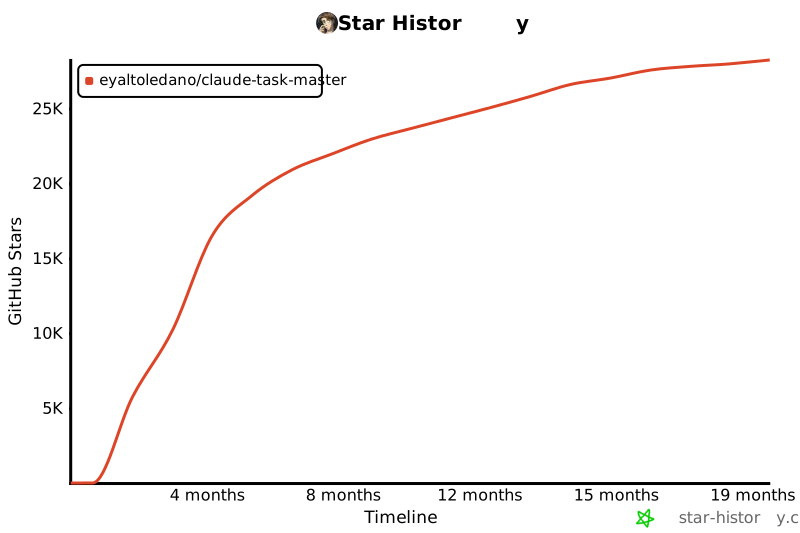](https://www.star-history.com/#eyaltoledano/claude-task-master&Timeline)397398## Licensing399400Task Master is licensed under the MIT License with Commons Clause. This means you can:401402✅ **Allowed**:403404- Use Task Master for any purpose (personal, commercial, academic)405- Modify the code406- Distribute copies407- Create and sell products built using Task Master408409❌ **Not Allowed**:410411- Sell Task Master itself412- Offer Task Master as a hosted service413- Create competing products based on Task Master414415See the [LICENSE](LICENSE) file for the complete license text and [licensing details](docs/licensing.md) for more information.416
Full transparency — inspect the skill content before installing.