
Please migrate to our new KnowledgeBase MCP Server, which provides enhanced capabilities and improved accuracy. Model Context Protocol (MCP) is a standardized protocol designed to manage context between large language models (LLMs) and external systems. The Chargebee MCP Server offers a robust set of tools to improve developer efficiency. It integrates with AI-powered code editors like Cursor, Win
npx mdskills install chargebee/agentkitRelated
@chargebee? Sign in with GitHub to claim this listing.Well-documented MCP server for Chargebee API integration with clear setup instructions across multiple IDEs
1# Chargebee Model Context Protocol (MCP) Server234[](https://www.npmjs.com/package/@chargebee/mcp)56> ⚠️ Deprecation Notice7>8> This package is deprecated and will no longer receive updates or support.9Please migrate to our new KnowledgeBase MCP Server, which provides enhanced capabilities and improved accuracy.10> Learn more and upgrade here: [Chargebee MCP Server Documentation](https://www.chargebee.com/docs/billing/2.0/ai-in-chargebee/chargebee-mcp)1112---1314Model Context Protocol (MCP) is a [standardized protocol](https://modelcontextprotocol.io/introduction) designed to manage context between large language models (LLMs) and external systems.1516The [Chargebee MCP Server](https://npmjs.com/package/@chargebee/mcp) offers a robust set of tools to improve developer efficiency. It integrates with AI-powered code editors like Cursor, Windsurf, and Cline, as well as general-purpose tools such as Claude Desktop. It is compatible with any MCP Client.1718With this MCP Server, you can:1920- Get immediate answers about the Chargebee products and API services.2122- Receive context-aware code snippets tailored to your integration needs.2324- Access Chargebee's knowledge base, including:25 - Documentation26 - FAQs27 - Release notes28 - And much more2930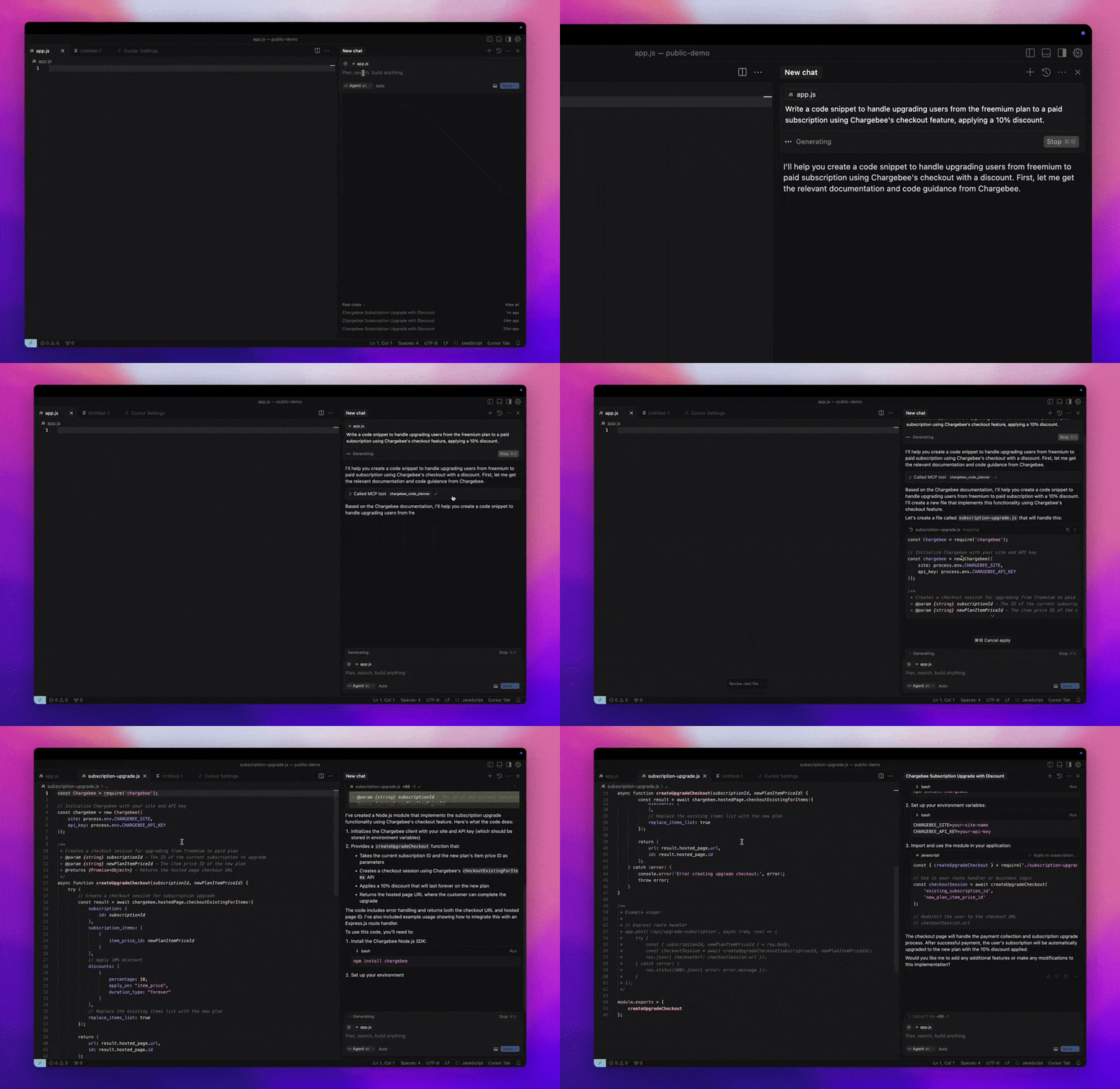3132## Prerequisites3334- [Node.js LTS](https://nodejs.org/en/download/) - The Chargebee MCP server requires the Node.js LTS version to function correctly.3536## Setup3738To run the Chargebee MCP server using [Node.js npx](https://docs.npmjs.com/cli/v10/commands/npx), execute the following command:3940```sh41npx -y @chargebee/mcp@latest42```4344## Available Tools4546| Tool | Description |47| -------------------------------------| -------------------------------------------------------------------------------------------------|48| `chargebee_documentation_search` | Search Chargebee's documentation to retrieve detailed information and usage guides. |49| `chargebee_code_planner` | Generate structured code outlines and sample code for integrating Chargebee's APIs and features. |5051## Installation5253### Cursor5455To add this server to Cursor IDE:56571. Navigate to `Cursor Settings` > `MCP`.582. Click `+ Add new Global MCP Server`.593. Add the following configuration to your global `.cursor/mcp.json` file:6061```json62{63 "mcpServers": {64 "chargebee": {65 "command": "npx",66 "args": [67 "-y",68 "@chargebee/mcp"69 ]70 }71 }72}73```7475Refer to the [Cursor documentation](https://docs.cursor.com/context/model-context-protocol) for additional details. Note: You can also add this to your project-specific Cursor configuration (supported in Cursor 0.46+).767778### Windsurf7980To set up MCP with Cascade:81821. Open Windsurf and navigate to `Settings` > `Advanced Settings` or use the Command Palette > `Open Windsurf Settings Page`.832. Scroll to the Cascade section to add a new server, view existing servers, or access the raw JSON config file at `mcp_config.json`.843. Click “Add custom server +” to include the Chargebee MCP server directly in `mcp_config.json`:8586```json87{88 "mcpServers": {89 "chargebee": {90 "command": "npx",91 "args": [92 "-y",93 "@chargebee/mcp"94 ]95 }96 }97}98```99100Refer to the [Windsurf documentation](https://docs.codeium.com/windsurf/mcp) for more information.101102103### VS Code104105Install the Chargebee MCP server in VS Code using one of these buttons:106107[<img alt="Install in VS Code Insiders" src="https://img.shields.io/badge/VS_Code_Insiders-VS_Code_Insiders?style=flat-square&label=Install%20Server&color=24bfa5">](https://insiders.vscode.dev/redirect?url=vscode%3Amcp%2Finstall%3F%257B%2522name%2522%253A%2522chargebee%2522%252C%2522command%2522%253A%2522npx%2522%252C%2522args%2522%253A%255B%2522-y%2522%252C%2522%2540chargebee%252Fmcp%2522%255D%257D)108109Alternatively, you can install the Chargebee MCP server using the VS Code CLI:110111```bash112# For VS Code113code --add-mcp '{"name":"chargebee","command":"npx","args":["-y","@chargebee/mcp"]}'114```115116```bash117# For VS Code Insiders118code-insiders --add-mcp '{"name":"chargebee","command":"npx","args":["-y","@chargebee/mcp"]}'119```120121After installation, the Chargebee MCP server will be available for use with your GitHub Copilot agent in VS Code.122123124### Claude125126Add the following configuration to your `claude_desktop_config.json` file. Refer to the [Claude Desktop documentation](https://modelcontextprotocol.io/quickstart/user) for more details:127128```json129{130 "mcpServers": {131 "chargebee": {132 "command": "npx",133 "args": [134 "-y",135 "@chargebee/mcp"136 ]137 }138 }139}140```141142### Cline143144Manually add the following JSON to your `cline_mcp_settings.json` file via the Cline MCP Server settings:145146```json147{148 "mcpServers": {149 "chargebee": {150 "command": "npx",151 "args": [152 "-y",153 "@chargebee/mcp"154 ]155 }156 }157}158```159160### Roo Code161162Access the MCP settings by selecting `Edit MCP Settings` in Roo Code settings or using the `Roo Code: Open MCP Config` command in the VS Code command palette:163164```json165{166 "mcpServers": {167 "chargebee": {168 "command": "npx",169 "args": [170 "-y",171 "@chargebee/mcp"172 ]173 }174 }175}176```177178## Contribution179180To contribute to this project, refer to the [contribution guide](CONTRIBUTING.md).181182## License183184[MIT](https://github.com/chargebee/agentkit/blob/main/LICENSE)185
Full transparency — inspect the skill content before installing.