
Scaffolds a new WebMCP tool component using useMcpTool with Zod schema, handler, annotations, and wires it into the WebMCPProvider tree. Use when the user wants to expose functionality as an MCP tool, make something callable by AI, add a new tool, or create an AI-accessible action.
npx mdskills install MCPCat/webmcp-add-toolRelated
@MCPCat? Sign in with GitHub to claim this listing.Comprehensive guide for adding WebMCP tools with clear templates, annotations, and integration patterns
React hooks for exposing typed tools on navigator.modelContext.
Experimental. WebMCP is still evolving, so small API and behavior changes should be expected.
npm install webmcp-react zod
Try it live: WebMCP Wordle Demo
A fully playable Wordle clone that showcases webmcp-react hooks. Tools dynamically register and unregister as the game moves through phases (idle, playing, won/lost), and guesses can be made via keyboard or through a connected MCP agent. Includes a DevPanel for inspecting tool state and an easy-mode toggle that enables a hint tool. Install the Chrome extension to bridge tools to AI clients like Claude and Cursor.
Wrap your app in `` and register tools with useMcpTool:
import { WebMCPProvider, useMcpTool } from "webmcp-react";
import { z } from "zod";

function SearchTool() {
  useMcpTool({
    name: "search",
    description: "Search the catalog",
    input: z.object({ query: z.string() }),
    handler: async ({ query }) => ({
      content: [{ type: "text", text: `Results for: ${query}` }],
    }),
  });
  return null;
}

export default function App() {
  return (


  );
}
That's it. The tool is registered on navigator.modelContext and can be called by WebMCP-compatible agents.
This repo ships with agent skills that can set up webmcp-react and scaffold tools for you. Install them with the skills CLI:
npx skills add mcpcat/webmcp-react
Works with Cursor, Claude Code, GitHub Copilot, Cline, and 18+ other agents.
WebMCP is an emerging web standard that adds navigator.modelContext to the browser, an API that lets any page expose typed, callable tools to AI agents. Native browser support is still experimental and may evolve quickly. Chrome recently released it in Early Preview.
This library provides React bindings for that API. `` installs a polyfill (skipped when native support exists), and each useMcpTool call registers a tool that agents can discover and execute.
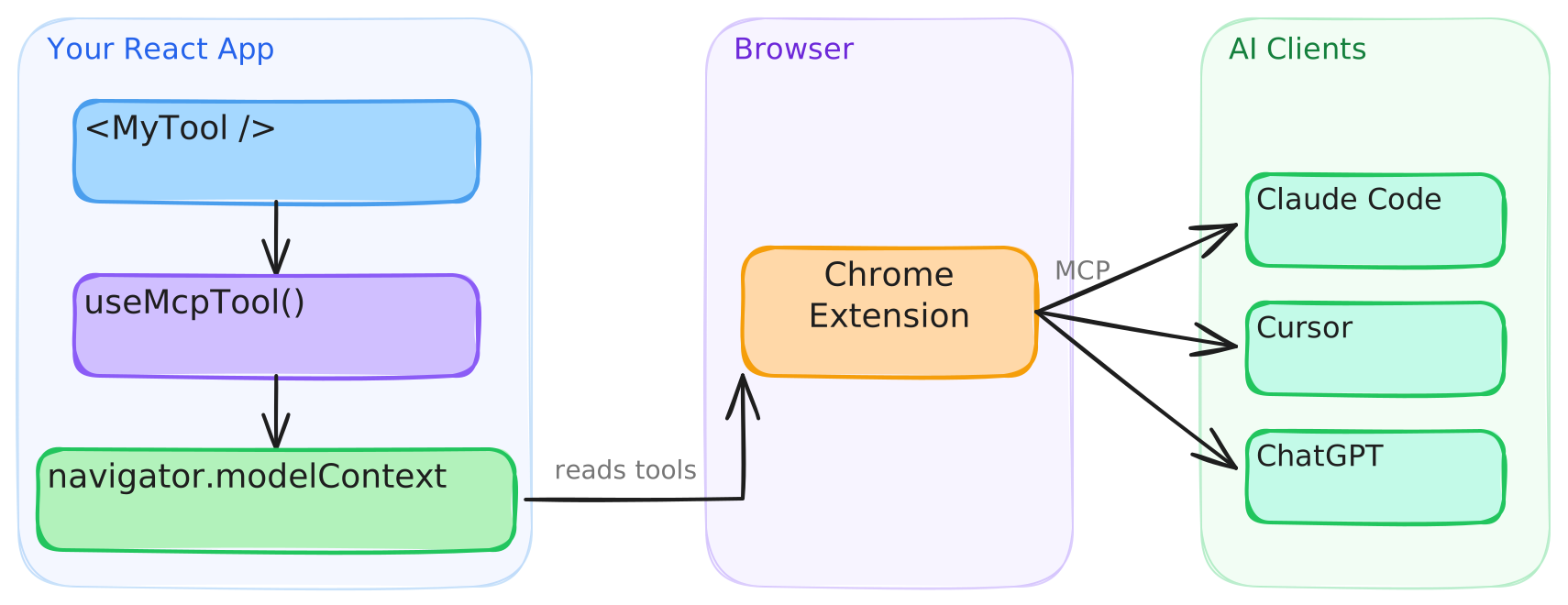
Desktop MCP clients like Claude Code and Cursor can't access navigator.modelContext directly. This repo includes a Chrome extension that connects your registered tools to any MCP client.
See the extension setup guide for build, install, and configuration instructions.
Once Chrome supports this bridging natively, I'll deprecate the extension.
useMcpTool returns reactive state you can use to build UI around tool execution:
function TranslateTool() {
  const { state, execute } = useMcpTool({
    name: "translate",
    description: "Translate text to Spanish",
    input: z.object({ text: z.string() }),
    handler: async ({ text }) => {
      const result = await translate(text, "es");
      return { content: [{ type: "text", text: result }] };
    },
  });

  return (

       execute({ text: "Hello" })} disabled={state.isExecuting}>
        {state.isExecuting ? "Translating..." : "Translate"}

      {state.lastResult && {state.lastResult.content[0].text}
}
      {state.error && {state.error.message}
}

  );
}
Hint AI agents about tool behavior with annotations (supports the full MCP annotation set):
useMcpTool({
  name: "delete_user",
  description: "Permanently delete a user account",
  input: z.object({ userId: z.string() }),
  annotations: {
    destructiveHint: true,
    idempotentHint: true,
  },
  handler: async ({ userId }) => { /* ... */ },
});
Tools register on mount and unregister on unmount. Conditionally render them like any React component:
function App({ user }) {
  return (


      {user.isAdmin && }

  );
}
Run side effects on success or failure:
useMcpTool({
  name: "checkout",
  description: "Complete a purchase",
  input: z.object({ cartId: z.string() }),
  handler: async ({ cartId }) => { /* ... */ },
  onSuccess: (result) => analytics.track("checkout_complete"),
  onError: (error) => toast.error(error.message),
});
Don't want Zod? Pass inputSchema directly:
useMcpTool({
  name: "calculate",
  description: "Basic arithmetic",
  inputSchema: {
    type: "object",
    properties: {
      a: { type: "number" },
      b: { type: "number" },
      op: { type: "string", enum: ["add", "subtract", "multiply", "divide"] },
    },
    required: ["a", "b", "op"],
  },
  handler: async (args) => {
    const { a, b, op } = args as { a: number; b: number; op: string };
    const result = { add: a + b, subtract: a - b, multiply: a * b, divide: a / b }[op];
    return { content: [{ type: "text", text: String(result) }] };
  },
});
Works with Next.js, Remix, and any server-rendering framework out of the box. The build includes a "use client" banner, so no extra configuration is needed.
See the full API reference.
Install via CLI
npx mdskills install MCPCat/webmcp-add-toolWebmcp Add Tool is a free, open-source AI agent skill. Scaffolds a new WebMCP tool component using useMcpTool with Zod schema, handler, annotations, and wires it into the WebMCPProvider tree. Use when the user wants to expose functionality as an MCP tool, make something callable by AI, add a new tool, or create an AI-accessible action.
Install Webmcp Add Tool with a single command:
npx mdskills install MCPCat/webmcp-add-toolThis downloads the skill files into your project and your AI agent picks them up automatically.
Webmcp Add Tool works with Claude Code, Claude Desktop, Cursor, Vscode Copilot, Windsurf, Continue Dev, Gemini Cli, Amp, Roo Code, Goose. Skills use the open SKILL.md format which is compatible with any AI coding agent that reads markdown instructions.