
A Model Context Protocol (MCP) server for integrating with the Tomba.io API. This server provides comprehensive email discovery, verification, and enrichment capabilities through a standardized MCP interface. - Domain Search: Find all email addresses associated with a domain - Email Finder: Generate likely email addresses from names and domains - Email Verifier: Verify email deliverability and che
npx mdskills install tomba-io/tomba-mcp-serverRelated
@tomba-io? Sign in with GitHub to claim this listing.Comprehensive email discovery and verification MCP server with extensive tooling and clear documentation
 Tomba.io MCP Server
A Model Context Protocol (MCP) server for integrating with the Tomba.io API. This server provides comprehensive email discovery, verification, and enrichment capabilities through a standardized MCP interface.
tomba://api/status - API status and account infotomba://domain/{domain} - Domain informationtomba://email/{email} - Email informationtomba://similar/{domain} - Similar domains analysistomba://technology/{domain} - Technology stack informationtomba://docs/api - API documentationtomba://docs/tools - Tools documentation| Filter | Available Values |
|---|---|
| Size | 1-10 (Micro), 11-50 (Small), 51-250 (Mid-sized), 251-1K (Medium-large), 1K-5K (Large), 5K-10K (Very large), 10K-50K (Enterprise), 50K-100K (Massive), 100K+ (Global) |
| Type | education, government, nonprofit, private, public, personal |
| Revenue | $0-$1M, $1M-$10M, $10M-$50M, $50M-$100M, $100M-$250M, $250M-$500M, $500M-$1B, $1B-$10B, $10B+ |
| Industry | Based on LinkedIn Industry Codes V2 (140+ industries including Computer Software, Financial Services, Hospital & Health Care, etc.) |
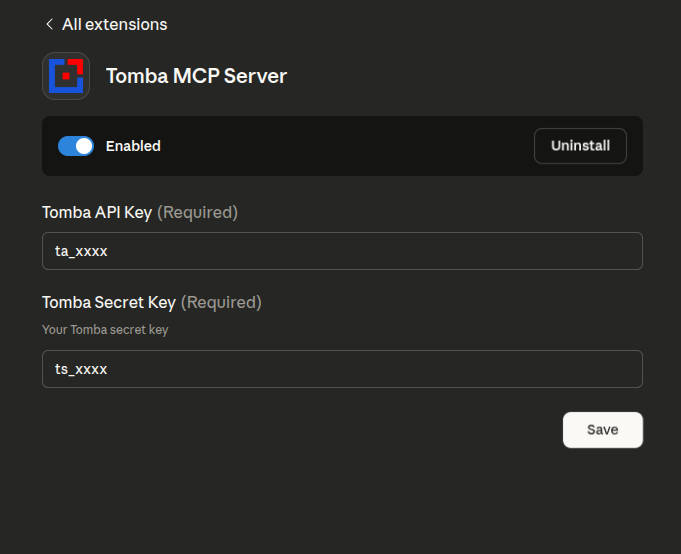
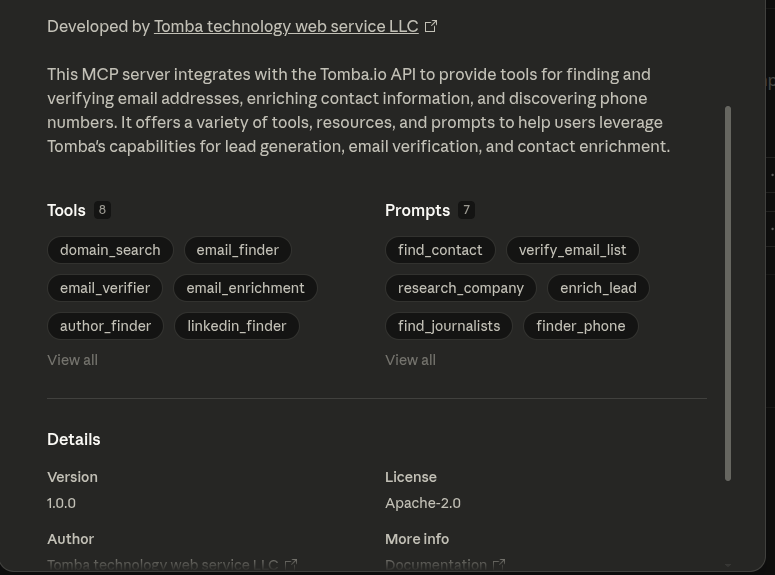
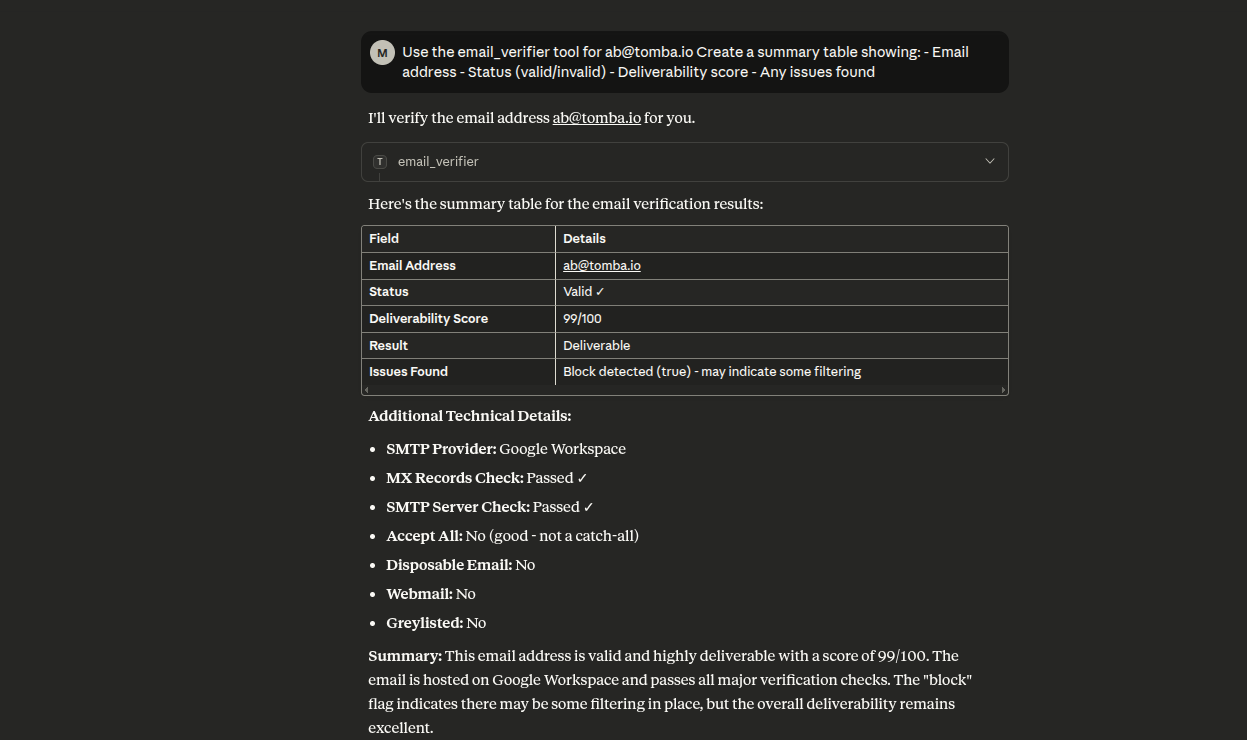
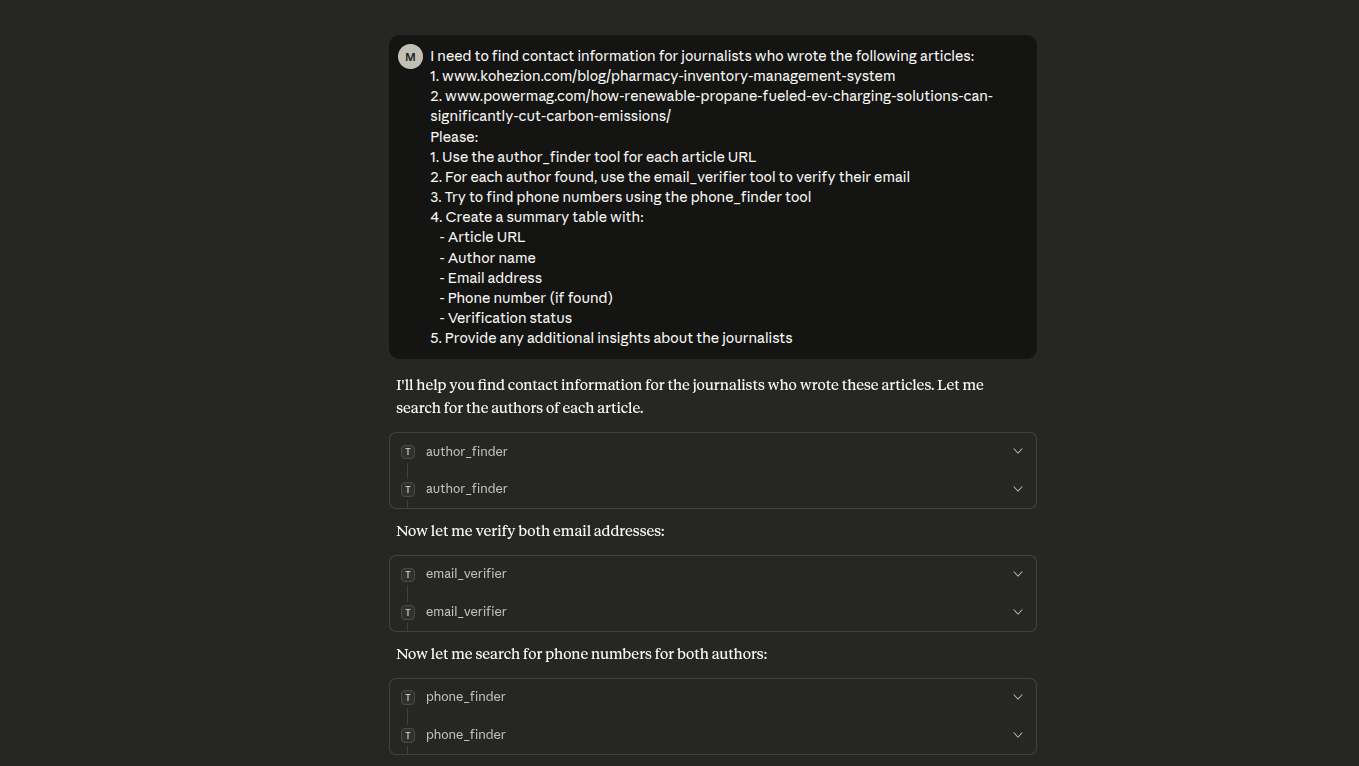
The easiest way to use the Tomba MCP server is via npx, which doesn't require cloning the repository:
Add to your claude_desktop_config.json (~/Library/Application Support/Claude/claude_desktop_config.json):
{
    "mcpServers": {
        "tomba": {
            "command": "npx",
            "args": ["-y", "tomba-mcp-server"],
            "env": {
                "TOMBA_API_KEY": "your-api-key-here",
                "TOMBA_SECRET_KEY": "your-secret-key-here"
            }
        }
    }
}
Add to your claude_desktop_config.json (%APPDATA%\Claude\claude_desktop_config.json):
{
    "mcpServers": {
        "tomba": {
            "command": "npx",
            "args": ["-y", "tomba-mcp-server"],
            "env": {
                "TOMBA_API_KEY": "your-api-key-here",
                "TOMBA_SECRET_KEY": "your-secret-key-here"
            }
        }
    }
}
Note: The -y flag automatically accepts the installation prompt, and npx will always fetch the latest version.
If you want to modify the server or contribute to development:
# Clone the repository
git clone https://github.com/tomba-io/tomba-mcp-server.git
cd tomba-mcp-server

# Install dependencies
yarn install

# Build the project
yarn build
To use this server with Claude Desktop, add the configuration to your claude_desktop_config.json file.
This method automatically uses the latest published version:
macOS/Linux (~/Library/Application Support/Claude/claude_desktop_config.json):
{
    "mcpServers": {
        "tomba": {
            "command": "npx",
            "args": ["-y", "tomba-mcp-server"],
            "env": {
                "TOMBA_API_KEY": "your-api-key-here",
                "TOMBA_SECRET_KEY": "your-secret-key-here"
            }
        }
    }
}
Windows (%APPDATA%\Claude\claude_desktop_config.json):
{
    "mcpServers": {
        "tomba": {
            "command": "npx",
            "args": ["-y", "tomba-mcp-server"],
            "env": {
                "TOMBA_API_KEY": "your-api-key-here",
                "TOMBA_SECRET_KEY": "your-secret-key-here"
            }
        }
    }
}
If you've built from source, use the absolute path to your installation:
macOS/Linux:
{
    "mcpServers": {
        "tomba": {
            "command": "node",
            "args": ["/ABSOLUTE/PATH/TO/tomba-mcp-server/server/index.js"],
            "env": {
                "TOMBA_API_KEY": "your-api-key-here",
                "TOMBA_SECRET_KEY": "your-secret-key-here"
            }
        }
    }
}
Windows:
{
    "mcpServers": {
        "tomba": {
            "command": "node",
            "args": [
                "C:\\ABSOLUTE\\PATH\\TO\\tomba-mcp-server\\server\\index.js"
            ],
            "env": {
                "TOMBA_API_KEY": "your-api-key-here",
                "TOMBA_SECRET_KEY": "your-secret-key-here"
            }
        }
    }
}
Important Notes:
your-api-key-here and your-secret-key-here with your actual Tomba API credentials/ABSOLUTE/PATH/TO/tomba-mcp-server with the full path to your installation directoryFor HTTP transport with npx:
{
    "mcpServers": {
        "tomba": {
            "command": "npx",
            "args": [
                "-y",
                "tomba-mcp-server",
                "--transport",
                "http",
                "--port",
                "3000"
            ],
            "env": {
                "TOMBA_API_KEY": "your-api-key-here",
                "TOMBA_SECRET_KEY": "your-secret-key-here"
            }
        }
    }
}
For HTTP transport with local installation:
{
    "mcpServers": {
        "tomba": {
            "command": "node",
            "args": [
                "/ABSOLUTE/PATH/TO/tomba-mcp-server/server/index.js",
                "--transport",
                "http",
                "--port",
                "3000"
            ],
            "env": {
                "TOMBA_API_KEY": "your-api-key-here",
                "TOMBA_SECRET_KEY": "your-secret-key-here"
            }
        }
    }
}
Usage: tomba-mcp-server [options]

Options:
  --transport     Transport type: 'stdio' or 'http' (default: stdio)
  --port        Port number for HTTP transport (default: 3000)
  --help                Show help message

Environment Variables:
  TOMBA_API_KEY         Your Tomba API key (required)
  TOMBA_SECRET_KEY      Your Tomba secret key (required)

Examples:
  # Run with stdio transport (default)
  node server/index.js

  # Run with HTTP transport on default port (3000)
  node server/index.js --transport http

  # Run with HTTP transport on custom port
  node server/index.js --transport http --port 8080
You can also run the server as a standalone HTTP service:
export TOMBA_API_KEY="your-api-key"
export TOMBA_SECRET_KEY="your-secret-key"
node server/index.js --transport http --port 3000
curl -X POST http://localhost:3000/mcp \
  -H "Content-Type: application/json" \
  -d '{
    "jsonrpc": "2.0",
    "method": "tools/call",
    "params": {
      "name": "email_finder",
      "arguments": {
        "domain": "stripe.com",
        "firstName": "Patrick",
        "lastName": "Collison"
      }
    },
    "id": 1
  }'
# Run in development mode
yarn dev

# Build the project
yarn build

# Run tests
yarn test

# Run tests in watch mode
yarn test:watch

# Run tests with coverage
yarn test:coverage

# Lint code
yarn lint

# Fix linting errors
yarn lint:fix
The easiest way to test and debug your MCP server:
# Build and launch MCP Inspector
yarn debug
This opens a web interface where you can:
# Debug TypeScript directly
yarn debug:dev

# Run integration tests
yarn test:integration

# Manual testing
yarn build
echo '{"jsonrpc":"2.0","id":1,"method":"tools/list"}' | node server/index.js
If using VS Code, use the included debug configurations:
See DEBUG_GUIDE.md for comprehensive debugging instructions.
Search for email addresses associated with a domain name.
{
    "name": "domain_search",
    "arguments": {
        "domain": "tomba.io",
        "limit": 10,
        "page": 1
    }
}
Response:
{
  "data": {
    "organization": {
      "website_url": "tomba.io",
      "organization": "Tomba technology web service LLC",
      "location": {
        "country": "US",
        "city": "Claymont",
        "state": "Delaware",
        "street_address": "1228 claymont",
        "postal_code": "19703"
      },
      "social_links": {
        "twitter_url": "https://twitter.com/tombaplatforum",
        "facebook_url": "https://www.facebook.com/tombaplatforum",
        "linkedin_url": "https://www.linkedin.com/company/tomba-io"
      },
      "disposable": false,
      "webmail": false,
      "phone_number": "(850) 790-5575",
      "industries": "Information Technology and Services",
      "founded": "2021",
      "company_size": "1-10",
      "company_type": "privately held",
      "revenue": "$0-$1M",
      "accept_all": false,
      "description": "the most powerful email-finding tool which is able to list all the email addresses of people who are working in a particular company.",
      "pattern": "{l}.{first}",
      "total_similar": 35,
      "keywords": [
        "lead generation software"
      ],
      "ranking": 661495,
      "whois": {
        "registrar_name": "namecheap, inc.",
        "created_date": "2020-07-07T20:54:07+02:00",
        "referral_url": "https://www.namecheap.com/"
      },
      "last_updated": "2025-09-06T00:22:01+02:00"
    },
    "emails": [
      {
        "email": "b.mohamed@tomba.io",
        "first_name": "Mohamed",
        "last_name": "Ben rebia",
        "full_name": "Mohamed Ben rebia",
        "gender": "male",
        "phone_number": false,
        "type": "personal",
        "country": "DZ",
        "position": "CEO",
        "department": "executive",
        "seniority": "senior",
        "twitter": null,
        "linkedin": "https://www.linkedin.com/in/mohamed-ben-rebia",
        "score": 100,
        "verification": {
          "date": "2025-09-22T00:00:00+02:00",
          "status": "valid"
        },
        "sources": [
          {
            "uri": "https://github.com/tomba-io/generic-emails/blob/084fc1a63d3cdaf9a34f255bedc2baea49a8e8b9/src/lib/validation/hash.ts",
            "website_url": "github.com",
            "extracted_on": "2021-02-08T20:09:54+01:00",
            "last_seen_on": "2021-02-08T22:43:40+01:00",
            "still_on_page": true
          },
          ....
        ]
      },
      ...
      ...
      ...
      ...
      ...
    ]
  },
  "meta": {
    "total": 21,
    "pageSize": 10,
    "current": 1,
    "total_pages": 3,
    "params": {
      "domain": "tomba.io",
      "page": 1,
      "limit": 10,
      "department": null,
      "country": null,
      "type": "all",
      "live": false
    }
  }
}
Generate likely email addresses from domain, first name, and last name.
{
    "name": "email_finder",
    "arguments": {
        "domain": "example.com",
        "firstName": "John",
        "lastName": "Doe"
    }
}
Response:
{
    "data": {
        "email": "b.mohamed@tomba.io",
        "first_name": "Mohamed",
        "last_name": "Ben rebia",
        "full_name": "Mohamed Ben rebia",
        "website_url": "tomba.io",
        "company": "Tomba technology web service LLC",
        "position": "CEO",
        "country": "DZ",
        "gender": "male",
        "twitter": null,
        "linkedin": "https://www.linkedin.com/in/mohamed-ben-rebia",
        "score": 100,
        "accept_all": null,
        "phone_number": false,
        "verification": {
            "date": "2025-09-22T00:00:00+02:00",
            "status": "valid"
        },
        "sources": [
            {
                "uri": "https://github.com/tomba-io/generic-emails/blob/084fc1a63d3cdaf9a34f255bedc2baea49a8e8b9/src/lib/validation/hash.ts",
                "website_url": "github.com",
                "extracted_on": "2021-02-08T20:09:54+01:00",
                "last_seen_on": "2021-02-08T22:43:40+01:00",
                "still_on_page": true
            }
        ]
    }
}
Verify email address deliverability and check database presence.
{
    "name": "email_verifier",
    "arguments": {
        "email": "b.mohamed@tomba.io"
    }
}
Response:
{
    "data": {
        "email": {
            "email": "b.mohamed@tomba.io",
            "result": "deliverable",
            "status": "valid",
            "score": 99,
            "smtp_provider": "Google Workspace",
            "mx": {
                "records": [
                    "aspmx.l.google.com",
                    "alt2.aspmx.l.google.com",
                    "alt1.aspmx.l.google.com",
                    "alt4.aspmx.l.google.com",
                    "alt3.aspmx.l.google.com"
                ]
            },
            "mx_check": true,
            "smtp_server": true,
            "smtp_check": true,
            "accept_all": false,
            "greylisted": false,
            "block": true,
            "gibberish": false,
            "disposable": false,
            "webmail": false,
            "regex": true,
            "whois": {
                "registrar_name": "namecheap, inc.",
                "referral_url": "https://www.namecheap.com/",
                "created_date": "2020-07-07T20:54:07+02:00"
            }
        },
        "sources": [
            {
                "uri": "https://github.com/tomba-io/generic-emails/blob/084fc1a63d3cdaf9a34f255bedc2baea49a8e8b9/src/lib/validation/hash.ts",
                "website_url": "github.com",
                "extracted_on": "2021-02-08T20:09:54+01:00",
                "last_seen_on": "2021-02-08T22:43:40+01:00",
                "still_on_page": true
            }
        ]
    }
}
Enrich an email address with additional contact information.
{
    "name": "email_enrichment",
    "arguments": {
        "email": "b.mohamed@tomba.io"
    }
}
Response:
{
    "data": {
        "email": "b.mohamed@tomba.io",
        "first_name": "Mohamed",
        "last_name": "Ben rebia",
        "full_name": "Mohamed Ben rebia",
        "website_url": "tomba.io",
        "company": "Tomba technology web service LLC",
        "position": "CEO",
        "country": "DZ",
        "gender": "male",
        "twitter": null,
        "linkedin": "https://www.linkedin.com/in/mohamed-ben-rebia",
        "score": 100,
        "accept_all": null,
        "phone_number": false,
        "verification": {
            "date": "2025-09-22T00:00:00+02:00",
            "status": "valid"
        },
        "sources": [
            {
                "uri": "https://github.com/tomba-io/generic-emails/blob/084fc1a63d3cdaf9a34f255bedc2baea49a8e8b9/src/lib/validation/hash.ts",
                "website_url": "github.com",
                "extracted_on": "2021-02-08T20:09:54+01:00",
                "last_seen_on": "2021-02-08T22:43:40+01:00",
                "still_on_page": true
            }
        ]
    }
}
Find email addresses of article authors from a URL.
{
    "name": "author_finder",
    "arguments": {
        "url": "https://example.com/article"
    }
}
Response:
{
    "data": {
        "email": "b.mohamed@tomba.io",
        "first_name": "Mohamed",
        "last_name": "Ben rebia",
        "full_name": "Mohamed Ben rebia",
        "website_url": "tomba.io",
        "company": "Tomba technology web service LLC",
        "position": "CEO",
        "country": "DZ",
        "gender": "male",
        "twitter": null,
        "linkedin": "https://www.linkedin.com/in/mohamed-ben-rebia",
        "score": 100,
        "accept_all": null,
        "phone_number": false,
        "verification": {
            "date": "2025-09-22T00:00:00+02:00",
            "status": "valid"
        },
        "sources": [
            {
                "uri": "https://github.com/tomba-io/generic-emails/blob/084fc1a63d3cdaf9a34f255bedc2baea49a8e8b9/src/lib/validation/hash.ts",
                "website_url": "github.com",
                "extracted_on": "2021-02-08T20:09:54+01:00",
                "last_seen_on": "2021-02-08T22:43:40+01:00",
                "still_on_page": true
            }
        ]
    }
}
Find email addresses from LinkedIn profile URLs.
{
    "name": "linkedin_finder",
    "arguments": {
        "url": "https://linkedin.com/in/johndoe"
    }
}
Response:
{
    "data": {
        "email": "b.mohamed@tomba.io",
        "first_name": "Mohamed",
        "last_name": "Ben rebia",
        "full_name": "Mohamed Ben rebia",
        "website_url": "tomba.io",
        "company": "Tomba technology web service LLC",
        "position": "CEO",
        "country": "DZ",
        "gender": "male",
        "twitter": null,
        "linkedin": "https://www.linkedin.com/in/mohamed-ben-rebia",
        "score": 100,
        "accept_all": null,
        "phone_number": false,
        "verification": {
            "date": "2025-09-22T00:00:00+02:00",
            "status": "valid"
        },
        "sources": [
            {
                "uri": "https://github.com/tomba-io/generic-emails/blob/084fc1a63d3cdaf9a34f255bedc2baea49a8e8b9/src/lib/validation/hash.ts",
                "website_url": "github.com",
                "extracted_on": "2021-02-08T20:09:54+01:00",
                "last_seen_on": "2021-02-08T22:43:40+01:00",
                "still_on_page": true
            }
        ]
    }
}
Search for phone numbers based on email, domain, or LinkedIn profile.
{
    "name": "phone_finder",
    "arguments": {
        "domain": "tomba.io"
    }
}
Response:
{
    "data": {
        "domain": "tomba.io",
        "valid": true,
        "local_format": "(850) 790-5575",
        "intl_format": "+1 850-790-5575",
        "e164_format": "+18507905575",
        "rfc3966_format": "tel:+1-850-790-5575",
        "country_code": "US",
        "line_type": "FIXED_LINE_OR_MOBILE",
        "carrier": "",
        "timezones": ["America/New_York"]
    }
}
Validate phone numbers and check carrier information.
{
    "name": "phone_validator",
    "arguments": {
        "phone": "+213667945402"
    }
}
Response:
{
    "data": {
        "valid": true,
        "local_format": "0667 94 54 02",
        "intl_format": "+213 667 94 54 02",
        "e164_format": "+213667945402",
        "rfc3966_format": "tel:+213-667-94-54-02",
        "country_code": "DZ",
        "line_type": "MOBILE",
        "carrier": "Mobilis",
        "timezones": ["Europe/Paris"]
    }
}
Get the total number of email addresses for a domain.
{
    "name": "email_count",
    "arguments": {
        "domain": "tomba.io"
    }
}
Response:
{
    "domain": "tomba.io",
    "total": 245,
    "personalEmails": 198,
    "genericEmails": 47,
    "department": {
        "engineering": 45,
        "sales": 38,
        "marketing": 32,
        "hr": 15,
        "finance": 12,
        "legal": 8,
        "executive": 25,
        "support": 28,
        "other": 42
    },
    "seniority": {
        "junior": 89,
        "senior": 125,
        "executive": 31
    },
    "source": "tomba_email_count"
}
Find similar domains based on a specific domain.
{
    "name": "similar_finder",
    "arguments": {
        "domain": "tomba.io"
    }
}
Response:
{
    "data": [
        {
            "website_url": "summit.com",
            "name": "Summit",
            "industries": "Wholesale"
        },
        {
            "website_url": "hunter.io",
            "name": "Hunter",
            "industries": "Information Technology and Services"
        },
        {
            "website_url": "voilaNorbert.com",
            "name": "VoilaNorbert",
            "industries": "Information Technology and Services"
        }
    ]
}
Instantly reveal the technology stack of any website.
{
    "name": "technology_finder",
    "arguments": {
        "domain": "tomba.io"
    }
}
Response:
{
    "domain": "tomba.io",
    "data": [
        {
            "slug": "intercom",
            "name": "Intercom",
            "icon": "Intercom.png",
            "website": "https://www.intercom.com",
            "categories": {
                "id": 10,
                "slug": "analytics",
                "name": "Analytics"
            }
        }
    ]
}
Search for companies using natural language queries with advanced filters including location, industry, size, and revenue.
{
    "name": "companies_search",
    "arguments": {
        "filters": {
            "location_city": {
                "include": ["san francisco"]
            },
            "industry": {
                "include": ["technology"]
            },
            "size": {
                "include": ["51-200", "201-500"]
            }
        },
        "page": 1,
        "limit": 10
    }
}
Response:
{
    "data": {
        "companies": [
            {
                "name": "Tech Company Inc",
                "domain": "techcompany.com",
                "industry": "Technology",
                "location": {
                    "city": "San Francisco",
                    "state": "California",
                    "country": "United States"
                },
                "size": "51-200",
                "revenue": "$10M-$50M"
            }
        ],
        "total": 150,
        "page": 1
    }
}
Available Filters:
location_city: Filter by city with include/exclude arrayslocation_state: Filter by state with include/exclude arrayslocation_country: Filter by country with include/exclude arraysindustry: Filter by industry (based on LinkedIn Industry Codes V2 - 140+ industries)type: Filter by company type: education, government, nonprofit, private, public, personalsize: Filter by company size: 1-10, 11-50, 51-250, 251-1K, 1K-5K, 5K-10K, 10K-50K, 50K-100K, 100K+revenue: Filter by revenue range: $0-$1M, $1M-$10M, $10M-$50M, $50M-$100M, $100M-$250M, $250M-$500M, $500M-$1B, $1B-$10B, $10B+founded: Filter by founding year with include/exclude arrayskeywords: Filter by keywords with include/exclude arrayssic: Filter by SIC codes with include/exclude arraysnaics: Filter by NAICS codes with include/exclude arrayssimilar: Filter by similar domains with include/exclude arraysTomba.io implements rate limiting based on your subscription plan:
Learn more about Tomba Pricing Plans.
Each API response includes rate limit information:
X-RateLimit-Limit: 1000
X-RateLimit-Remaining: 999
X-RateLimit-Reset: 1609459200
Learn more about Tomba API Rate Limits.
When you exceed your rate limit, the API returns a 429 Too Many Requests status with:
{
    "error": {
        "type": "rate_limit",
        "message": "Rate limit exceeded. Please try again in 60 seconds",
        "code": 429
    }
}
Check Node.js version: Ensure you have Node.js 18 or higher
node --version
Using NPX:
-y flag should auto-accept the installationUsing Local Installation:
server/index.js exists: ls -la server/index.jsyarn build successfullyVerify API credentials: Ensure your Tomba API keys are correct
Check Claude logs:
~/Library/Logs/Claude/mcp*.log%APPDATA%\Claude\logs\mcp*.log"npx command not found":
npm --versionnpm install -g npmPackage not found:
npm view tomba-mcp-servernpm cache clean --forceAlways downloading package:
-y flagFounded in 2020, Tomba prides itself on being the most reliable, accurate, and in-depth source of email address data available anywhere. We process terabytes of data to produce our Email finder API.
git checkout -b my-new-feature)git commit -am 'Add some feature')git push origin my-new-feature)Please see the License file for more information.
Install via CLI
npx mdskills install tomba-io/tomba-mcp-serverTomba MCP Server is a free, open-source AI agent skill. A Model Context Protocol (MCP) server for integrating with the Tomba.io API. This server provides comprehensive email discovery, verification, and enrichment capabilities through a standardized MCP interface. - Domain Search: Find all email addresses associated with a domain - Email Finder: Generate likely email addresses from names and domains - Email Verifier: Verify email deliverability and che
Install Tomba MCP Server with a single command:
npx mdskills install tomba-io/tomba-mcp-serverThis downloads the skill files into your project and your AI agent picks them up automatically.
Tomba MCP Server works with Claude Code, Claude Desktop, Cursor, Vscode Copilot, Windsurf, Continue Dev, Gemini Cli, Amp, Roo Code, Goose. Skills use the open SKILL.md format which is compatible with any AI coding agent that reads markdown instructions.