
📖 Blog Post: Learn more about this project in the detailed blog post: Telephony MCP Server for Agentic AI and Language Models This directory contains MCP (Model Context Protocol) Server tools for telephony operations, such as making voice calls and sending SMS messages using the Vonage API. These tools are designed to be integrated with Large Language Model (LLM) applications, enabling LLMs to pe
npx mdskills install khan2a/telephony-mcp-serverRelated
@khan2a? Sign in with GitHub to claim this listing.Well-documented telephony MCP server with voice and SMS tools, clear setup, but overly broad permissions
📖 Blog Post: Learn more about this project in the detailed blog post: Telephony MCP Server for Agentic AI and Language Models
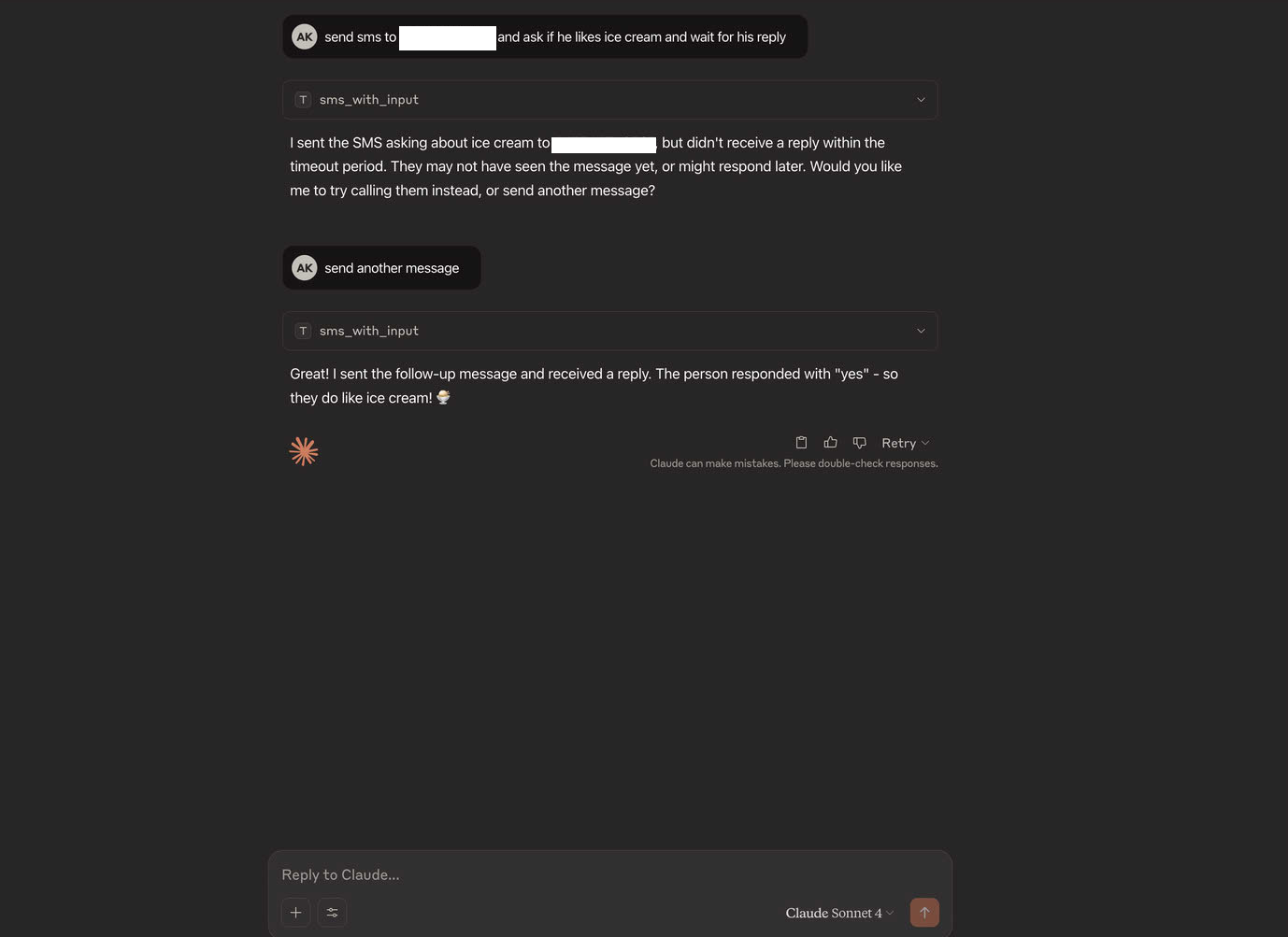
This directory contains MCP (Model Context Protocol) Server tools for telephony operations, such as making voice calls and sending SMS messages using the Vonage API. These tools are designed to be integrated with Large Language Model (LLM) applications, enabling LLMs to perform real-world actions beyond simple text generation.
LLMs (Large Language Models) are advanced token generators—they can generate text, images, or even video based on input prompts. However, their core capability is limited to generating content; they cannot access external data or perform actions in the real world on their own.
To extend their functionality, LLMs can be connected to external tools. For example, when a user asks, "What's the weather today?" the LLM can invoke a backend API tool like get_weather(city) via a system prompt, parse the response, and return the result to the user. This tool-calling mechanism transforms a basic LLM into a powerful LLM Application.
voice_call and send_sms are defined using the MCP framework. Each tool is a function that can be called by an LLM application.voice_call).mcp[cli]), FastAPI, httpx, pyjwt, python-dotenv, uvicorn, pydantic (see pyproject.toml for details)Install dependencies:
pip install -r requirements.txt
Or, if using Poetry:
poetry install
Configure environment variables:
Create a .env file with your Vonage credentials:
VONAGE_API_KEY=your_api_key
VONAGE_API_SECRET=your_api_secret
VONAGE_APPLICATION_ID=your_app_id
VONAGE_PRIVATE_KEY_PATH=path/to/private.key
VONAGE_LVN=your_virtual_number
VONAGE_API_URL=https://api.nexmo.com/v1/calls
VONAGE_SMS_URL=https://rest.nexmo.com/sms/json
CALLBACK_SERVER_URL=https://your-public-url  # URL for Vonage event callbacks
For the CALLBACK_SERVER_URL:
http://localhost:8080 (default if not specified)Run the MCP server:
python telephony_server.py
The server will start and expose the defined tools for LLM applications.
You can also run the telephony MCP server using Docker:
Build and start the Docker container:
docker compose up --build
Or to run in the background:
docker compose up --build -d
Stop the Docker container:
docker compose down
View logs from the Docker container:
docker compose logs -f
voice_call tool, passing the required parameters.voice_call tool with specific language and style parameters.send_sms tool, passing the required parameters.To configure an MCP client (like Claude Desktop) to use your telephony MCP server:
Update your MCP client configuration file (e.g., claude_desktop_config.json):
{
  "mcpServers": {
    "telephony": {
      "command": "docker",
      "args": ["run", "-i", "--rm", "--init", "-e", "DOCKER_CONTAINER=true", "telephony-mcp-server"]
    }
  }
}
Build the Docker image (if not using docker compose):
docker build -t telephony-mcp-server .
Restart your MCP client to apply the changes.
The Telephony MCP Server also includes a Vonage Callback Server that listens on port 8080. This server is used to receive event notifications from Vonage Voice API, which are sent when voice calls are initiated, completed, or encounter errors.
GET / - Health check endpointPOST /event - Main endpoint for receiving Vonage callbacksGET /events - List all stored events (with pagination)GET /events/{event_id} - Get a specific event by IDDELETE /events - Clear all stored eventsTo use the callback server with Vonage Voice API, you need to set the CALLBACK_SERVER_URL environment variable to your server's public URL. This URL will be used as the event_url parameter in Vonage API calls.
export CALLBACK_SERVER_URL="https://your-public-url"
For local development, you can use a service like ngrok to expose your local server to the internet:
ngrok http 8080
Then set the CALLBACK_SERVER_URL to the ngrok URL.
Install via CLI
npx mdskills install khan2a/telephony-mcp-serverTelephony MCP Server is a free, open-source AI agent skill. 📖 Blog Post: Learn more about this project in the detailed blog post: Telephony MCP Server for Agentic AI and Language Models This directory contains MCP (Model Context Protocol) Server tools for telephony operations, such as making voice calls and sending SMS messages using the Vonage API. These tools are designed to be integrated with Large Language Model (LLM) applications, enabling LLMs to pe
Install Telephony MCP Server with a single command:
npx mdskills install khan2a/telephony-mcp-serverThis downloads the skill files into your project and your AI agent picks them up automatically.
Telephony MCP Server works with Claude Code, Claude Desktop, Cursor, Vscode Copilot, Windsurf, Continue Dev, Gemini Cli, Amp, Roo Code, Goose. Skills use the open SKILL.md format which is compatible with any AI coding agent that reads markdown instructions.