
Spreadsheet automation for AI agents. Read, profile, edit, and recalculate .xlsx workbooks with tooling designed to be token-efficient, structurally aware, and agent-friendly. spreadsheet-kit ships two surfaces: Both share the same core engine and support .xlsx / .xlsm (read + write) and .xls / .xlsb (discovery only). Downloads a prebuilt native binary for your platform. No Rust toolchain required
npx mdskills install PSU3D0/spreadsheet-mcpRelated
@PSU3D0? Sign in with GitHub to claim this listing.Comprehensive spreadsheet automation MCP server with rich CLI and structured data operations
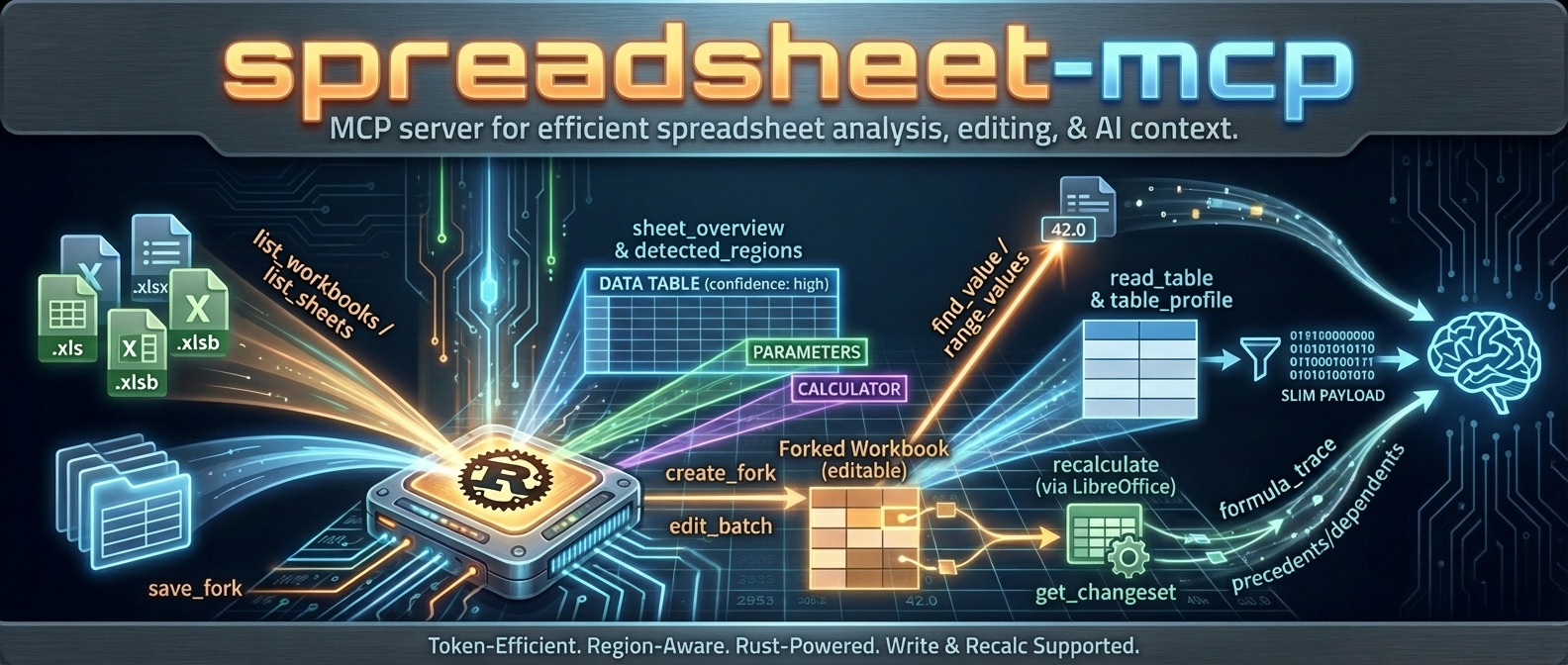
Spreadsheet automation for AI agents. Read, profile, edit, and recalculate .xlsx workbooks with tooling designed to be token-efficient, structurally aware, and agent-friendly.
spreadsheet-kit ships two surfaces:
| Surface | Binary | Mode | Best for |
|---|---|---|---|
| agent-spreadsheet | agent-spreadsheet | Stateless CLI | Scripts, pipelines, one-shot agent tasks |
| spreadsheet-mcp | spreadsheet-mcp | Stateful MCP server | Multi-turn agent sessions with caching and fork/recalc |
Both share the same core engine and support .xlsx / .xlsm (read + write) and .xls / .xlsb (discovery only).
npm i -g agent-spreadsheet
agent-spreadsheet --help
Downloads a prebuilt native binary for your platform. No Rust toolchain required.
# CLI
cargo install agent-spreadsheet

# MCP server
cargo install spreadsheet-mcp
Formualizer (native Rust recalc engine) is included by default. To build without it, use --no-default-features.
Download from GitHub Releases. Builds are published for Linux x86_64, macOS x86_64/aarch64, and Windows x86_64.
# Read-only (~15 MB)
docker pull ghcr.io/psu3d0/spreadsheet-mcp:latest

# With write/recalc support (~800 MB, includes LibreOffice)
docker pull ghcr.io/psu3d0/spreadsheet-mcp:full
The CLI is the fastest path to working with spreadsheets from code. Every command is stateless — pass a file, get JSON.
# List sheets
agent-spreadsheet list-sheets data.xlsx

# Profile structure and detected regions
agent-spreadsheet sheet-overview data.xlsx "Sheet1"

# Read a table as structured data
agent-spreadsheet read-table data.xlsx --sheet "Sheet1"

# Read one or more raw ranges
agent-spreadsheet range-values data.xlsx Sheet1 A1:C20

# Search values directly (default mode is value)
agent-spreadsheet find-value data.xlsx "Revenue" --mode value

# Label lookup: match a label cell, then read an adjacent value
agent-spreadsheet find-value data.xlsx "Net Income" --mode label --label-direction below

# Describe workbook metadata
agent-spreadsheet describe data.xlsx
# sheet-page continuation
agent-spreadsheet sheet-page data.xlsx Sheet1 --format compact --page-size 200
agent-spreadsheet sheet-page data.xlsx Sheet1 --format compact --page-size 200 --start-row 201

# read-table continuation
agent-spreadsheet read-table data.xlsx --sheet "Sheet1" --table-format values --limit 200 --offset 0
agent-spreadsheet read-table data.xlsx --sheet "Sheet1" --table-format values --limit 200 --offset 200
agent-spreadsheet copy data.xlsx /tmp/draft.xlsx
agent-spreadsheet edit /tmp/draft.xlsx Sheet1 "B2=500" "C2==B2*1.1"
agent-spreadsheet recalculate /tmp/draft.xlsx
agent-spreadsheet diff data.xlsx /tmp/draft.xlsx
--ops @...)agent-spreadsheet transform-batch data.xlsx --ops @ops.json --dry-run
agent-spreadsheet style-batch data.xlsx --ops @style_ops.json --dry-run
agent-spreadsheet apply-formula-pattern data.xlsx --ops @formula_ops.json --in-place
agent-spreadsheet structure-batch data.xlsx --ops @structure_ops.json --dry-run
agent-spreadsheet column-size-batch data.xlsx --ops @column_size_ops.json --output resized.xlsx
agent-spreadsheet sheet-layout-batch data.xlsx --ops @layout_ops.json --dry-run
agent-spreadsheet rules-batch data.xlsx --ops @rules_ops.json --output ruled.xlsx --force
--ops @file.json)All batch payloads use a top-level envelope object. Most commands require {"ops":[...]}; column-size-batch prefers {"sheet_name":"...","ops":[...]} and also accepts per-op sheet_name inside {"ops":[...]}.
@transform_ops.json){"ops":[{"kind":"fill_range","sheet_name":"Sheet1","target":{"kind":"range","range":"B2:B4"},"value":"0"}]}{"ops":[{"kind":"replace_in_range","sheet_name":"Sheet1","target":{"kind":"region","region_id":1},"find":"N/A","replace":"","match_mode":"contains","case_sensitive":false,"include_formulas":true}]}@style_ops.json){"ops":[{"sheet_name":"Sheet1","target":{"kind":"range","range":"B2:B2"},"patch":{"font":{"bold":true}}}]}{"ops":[{"sheet_name":"Sheet1","target":{"kind":"cells","cells":["B2","B3"]},"patch":{"number_format":"$#,##0.00","alignment":{"horizontal":"right"}},"op_mode":"merge"}]}@formula_ops.json){"ops":[{"sheet_name":"Sheet1","target_range":"C2:C4","anchor_cell":"C2","base_formula":"B2*2"}]}{"ops":[{"sheet_name":"Sheet1","target_range":"C2:E4","anchor_cell":"C2","base_formula":"B2*2","fill_direction":"both","relative_mode":"excel"}]}relative_mode valid values: excel, abs_cols, abs_rows@structure_ops.json){"ops":[{"kind":"rename_sheet","old_name":"Summary","new_name":"Dashboard"}]}{"ops":[{"kind":"copy_range","sheet_name":"Sheet1","dest_sheet_name":"Summary","src_range":"A1:C4","dest_anchor":"A1","include_styles":true,"include_formulas":true}]}@column_size_ops.json){"sheet_name":"Sheet1","ops":[{"range":"A:A","size":{"kind":"width","width_chars":12.0}}]}{"sheet_name":"Sheet1","ops":[{"target":{"kind":"columns","range":"A:C"},"size":{"kind":"auto","min_width_chars":8.0,"max_width_chars":24.0}}]}{"ops":[{"sheet_name":"Sheet1","range":"A:A","size":{"kind":"width","width_chars":12.0}}]}@layout_ops.json){"ops":[{"kind":"freeze_panes","sheet_name":"Sheet1","freeze_rows":1,"freeze_cols":1}]}{"ops":[{"kind":"set_page_setup","sheet_name":"Sheet1","orientation":"landscape","fit_to_width":1,"fit_to_height":1}]}@rules_ops.json){"ops":[{"kind":"set_data_validation","sheet_name":"Sheet1","target_range":"B2:B4","validation":{"kind":"list","formula1":"\"A,B,C\""}}]}{"ops":[{"kind":"set_conditional_format","sheet_name":"Sheet1","target_range":"C2:C10","rule":{"kind":"expression","formula":"C2>100"},"style":{"fill_color":"#FFF2CC","bold":true}}]}apply-formula-pattern clears cached results for touched formula cells; run recalculate to refresh computed values.
All output is JSON by default.
Use --shape canonical|compact (default: canonical) to control response shape.
Commands that tokenize or validate formulas accept --formula-parse-policy :
| Mode | Behavior | Default for |
|---|---|---|
| fail | Abort on any formula parse error | edit (single-write) |
| warn | Continue; attach formula_parse_diagnostics to the response | scan-volatiles, formula-map, formula-trace, transform-batch, structure-batch, rules-batch |
| off | Silently skip parse errors | — |
When the policy is warn (or fail with errors), the response includes a formula_parse_diagnostics object:
{
  "formula_parse_diagnostics": {
    "policy": "warn",
    "total_errors": 400,
    "groups_truncated": false,
    "groups": [
      {
        "error_code": "FORMULA_PARSE_FAILED",
        "error_message": "No matching opener for closer at position 161",
        "sheet_name": "Assessments",
        "formula_preview": "=IF(C4=\"\",\"\",IF(C4=\"N/A\",…",
        "count": 400,
        "sample_addresses": ["D4", "D5", "D10", "D11", "D12"]
      }
    ]
  }
}
Errors are grouped by structural pattern — formulas that differ only in cell references (e.g., =IF(C4=…) and =IF(C5=…)) collapse into a single group with a count and sample addresses.
Shape policy:
values: [...] when entries are present; omit values when all requested ranges are pruned (for example, invalid ranges).--include-formulas: adds a formulas matrix aligned to rows (formula cells have formula text; literal cells are null).range, payload, and optional next_start_row).values: [...] with per-entry range for correlation.next_offset, next_start_row).highlights while preserving layers and next_cursor.sheet-page machine contractformat before reading payload fields.format=full: read top-level rows plus optional header_row and next_start_row.format=compact: read compact.headers, compact.header_row, compact.rows plus optional next_start_row.format=values_only: read values_only.rows plus optional next_start_row.next_start_row when present.--shape compact preserves the active sheet-page branch; it does not flatten sheet-page payloads.Machine continuation example:
--start-row.next_start_row is present, call sheet-page again with --start-row .next_start_row is omitted.Use --compact to minimize whitespace and --quiet to suppress warnings.
Global --output-format csv is currently unsupported; use command-specific CSV options like read-table --table-format csv.
| Command | Description |
|---|---|
list-sheets | List sheets with summaries |
sheet-overview | Region detection + orientation |
describe | Workbook metadata |
read-table [--sheet S] [--range R] [--table-name T] [--region-id ID] [--limit N] [--offset N] [--sample-mode first|last|distributed] [--table-format json|values|csv] | Structured table read with deterministic offset pagination |
sheet-page --format [--start-row ROW] [--page-size N] | Deterministic row paging with next_start_row continuation |
range-values [range...] [--include-formulas] | Raw cell values, optionally with aligned formula text matrix |
inspect-cells | Unified per-cell formula/value/cached/style snapshot for triage |
find-value [--sheet S] [--mode value|label] [--label-direction right|below|any] | Search cell values (value) or match labels and return adjacent values (label) |
named-ranges [--sheet S] [--name-prefix P] | List named ranges/tables/formula items |
find-formula [--sheet S] [--limit N] [--offset N] | Formula text search with continuation |
scan-volatiles [--sheet S] [--limit N] [--offset N] [--formula-parse-policy P] | Scan formulas for volatile functions |
sheet-statistics | Per-sheet density and type stats |
formula-map [--sort-by complexity|count] [--limit N] [--formula-parse-policy P] | Formula inventory summary |
formula-trace [--depth N] [--page-size N] [--cursor-depth N --cursor-offset N] [--formula-parse-policy P] | Trace formula dependencies with cursor continuation |
table-profile [--sheet S] | Column types, cardinality, distributions |
create-workbook [--sheets Inputs,Calc,...] [--overwrite] | Create a blank workbook with configurable initial sheets |
copy | Copy workbook (for edit workflows) |
edit [--dry-run|--in-place|--output PATH] [--force] [--formula-parse-policy P] | Apply cell edits with preview/output safety modes (A1=42 literal, B2==SUM(...) formula) |
transform-batch --ops @ops.json (--dry-run|--in-place|--output PATH) [--formula-parse-policy P] | Generic stateless transform batch pipeline |
| `style-batch --ops @ops.json (--dry-run | --in-place |
| `apply-formula-pattern --ops @ops.json (--dry-run | --in-place |
structure-batch --ops @ops.json (--dry-run|--in-place|--output PATH) [--formula-parse-policy P] | Stateless structure operations (sheet rows/columns) |
| `column-size-batch --ops @ops.json (--dry-run | --in-place |
| `sheet-layout-batch --ops @ops.json (--dry-run | --in-place |
rules-batch --ops @ops.json (--dry-run|--in-place|--output PATH) [--formula-parse-policy P] | Stateless validation/conditional-format operations |
recalculate | Recalculate formulas via backend |
diff | Diff two workbook versions |
write_path_provenance)Formula-writing commands emit optional provenance metadata for troubleshooting:
written_via: write path (edit, transform_batch, apply_formula_pattern)formula_targets: sheet/cell or sheet/range targets touched by formula writesDebug compare workflow (same-target by write path):
edit vs apply-formula-pattern).write_path_provenance.written_via and formula_targets in responses.inspect-cells plus recalculate to compare resulting behavior.24–36 chars) to prevent clipping."$"#,##0.00_);[Red]("$"#,##0.00)0.0%#,##0sheet-layout-batch freeze panes after header layout stabilizes.The MCP server provides agents a stateful session with workbook caching, fork management, and recalculation. Connect any MCP-compatible client.
Add to ~/.claude.json or project .mcp.json:
{
  "mcpServers": {
    "spreadsheet": {
      "command": "spreadsheet-mcp",
      "args": ["--workspace-root", "/path/to/workbooks", "--transport", "stdio"]
    }
  }
}
Or with Docker:
{
  "mcpServers": {
    "spreadsheet": {
      "command": "docker",
      "args": [
        "run", "-i", "--rm",
        "-v", "/path/to/workbooks:/data",
        "ghcr.io/psu3d0/spreadsheet-mcp:latest",
        "--transport", "stdio"
      ]
    }
  }
}
{
  "mcp.servers": {
    "spreadsheet": {
      "command": "spreadsheet-mcp",
      "args": ["--workspace-root", "${workspaceFolder}", "--transport", "stdio"]
    }
  }
}
spreadsheet-mcp --workspace-root /path/to/workbooks
# → http://127.0.0.1:8079 — POST /mcp
More MCP client configurations
Claude Code — Docker with VBA:
{
  "mcpServers": {
    "spreadsheet": {
      "command": "docker",
      "args": ["run", "-i", "--rm", "-v", "/path/to/workbooks:/data", "ghcr.io/psu3d0/spreadsheet-mcp:latest", "--transport", "stdio", "--vba-enabled"]
    }
  }
}
Claude Code — Docker with write/recalc:
{
  "mcpServers": {
    "spreadsheet": {
      "command": "docker",
      "args": ["run", "-i", "--rm", "-v", "/path/to/workbooks:/data", "ghcr.io/psu3d0/spreadsheet-mcp:full", "--transport", "stdio", "--recalc-enabled"]
    }
  }
}
Cursor / VS Code — Docker read-only:
{
  "mcp.servers": {
    "spreadsheet": {
      "command": "docker",
      "args": ["run", "-i", "--rm", "-v", "${workspaceFolder}:/data", "ghcr.io/psu3d0/spreadsheet-mcp:latest", "--transport", "stdio"]
    }
  }
}
Cursor / VS Code — Docker write/recalc:
{
  "mcp.servers": {
    "spreadsheet": {
      "command": "docker",
      "args": ["run", "-i", "--rm", "-v", "${workspaceFolder}:/data", "ghcr.io/psu3d0/spreadsheet-mcp:full", "--transport", "stdio", "--recalc-enabled"]
    }
  }
}
| You want to… | Use |
|---|---|
| One-shot reads from scripts or pipelines | CLI (agent-spreadsheet) |
| Agent sessions with caching across calls | MCP (spreadsheet-mcp) |
| Fork → edit → recalc → diff workflows | MCP (fork lifecycle + recalc backend) |
| Embed in an LLM tool-use loop | MCP (designed for multi-turn agent use) |
| Quick CLI edits without running a server | CLI (copy → edit → diff) |
| npm/npx install with zero Rust toolchain | npm (npm i -g agent-spreadsheet) |
Dumping a 50,000-row spreadsheet into context is expensive and usually unnecessary. spreadsheet-kit tools are built around discover → profile → extract — agents get structural awareness without burning tokens on cells they don't need.
The server defaults to token-dense output:
read_table → CSV format (flat string, minimal overhead)range_values → values array (no metadata wrapper)sheet_page → compact format (no formulas/styles unless requested)table_profile / sheet_statistics → summary only (no samples unless requested)next_offset, next_start_row) only appear when more data existsSwitch to verbose output with --output-profile verbose or SPREADSHEET_MCP_OUTPUT_PROFILE=verbose.
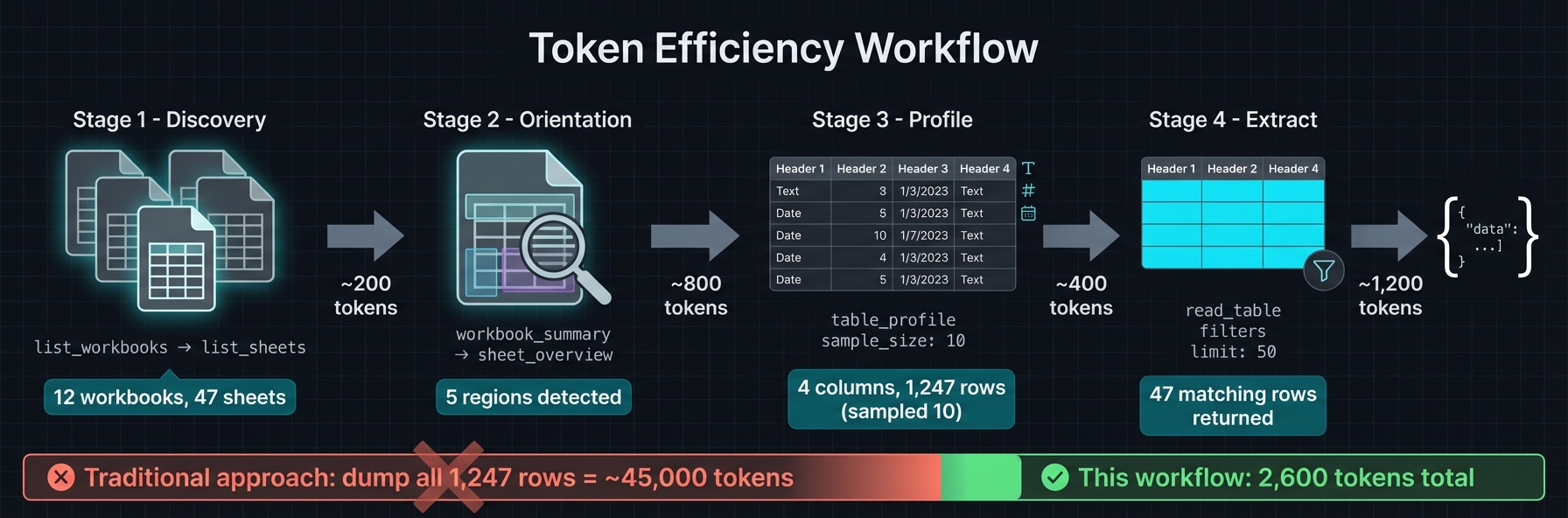
list_workbooks → list_sheets → workbook_summary for orientationsheet_overview to get detected regions (ids, bounds, kind, confidence)table_profile → read_table with region_id and small limitfind_value (label mode) or range_values for targeted pullssheet_page for unknown layouts; prefer compact format| Tool | Purpose |
|---|---|
list_workbooks | List spreadsheet files in workspace |
describe_workbook | Workbook metadata |
list_sheets | Sheets with summaries |
workbook_summary | Summary + optional entry points / named ranges |
sheet_overview | Orientation + region detection (cached) |
sheet_page | Page through cells (compact / full / values_only) |
read_table | Structured region/table read (csv / values / json) |
range_values | Raw cell values for specific ranges |
table_profile | Column types, cardinality, sample distributions |
find_value | Search values or labels |
find_formula | Search formulas with paging |
sheet_statistics | Density, nulls, duplicates |
sheet_formula_map | Formulas by complexity / count |
formula_trace | Precedent / dependent tracing |
scan_volatiles | Find volatile formulas (NOW, RAND, etc.) |
named_ranges | Defined names + tables |
sheet_styles | Style inspection (sheet-scoped) |
workbook_style_summary | Workbook-wide style summary |
get_manifest_stub | Generate SheetPort manifest scaffold |
close_workbook | Evict from cache |
--vba-enabled)| Tool | Purpose |
|---|---|
vba_project_summary | VBA project metadata + module list |
vba_module_source | Paged VBA module source extraction |
Read-only — does not execute macros, only extracts source text from .xlsm files.
--recalc-enabled)| Tool | Purpose |
|---|---|
create_fork / list_forks / discard_fork | Fork lifecycle |
checkpoint_fork / restore_checkpoint / list_checkpoints / delete_checkpoint | Snapshot + rollback |
edit_batch | Cell value / formula edits |
transform_batch | Range-first clear / fill / replace |
style_batch | Batch style edits (range / region / cells) |
apply_formula_pattern | Autofill-like formula fills |
structure_batch | Rows / cols / sheets + copy / move ranges |
column_size_batch | Column width operations |
sheet_layout_batch | Freeze panes, zoom, print area, page setup |
rules_batch | Data validation + conditional formatting |
recalculate | Trigger formula recalculation |
get_changeset | Diff fork vs original (paged, filterable) |
screenshot_sheet | Render range to PNG (max 100x30 cells) |
save_fork | Export fork to file |
list_staged_changes / apply_staged_change / discard_staged_change | Manage previewed changes |
get_edits | List applied edits on a fork |
Formula recalculation is handled by a pluggable backend. Two are supported:
| Backend | How | Default | When to use |
|---|---|---|---|
| Formualizer | Native Rust engine (320+ functions) | Yes (default feature) | Fast, zero external deps. Ships with every cargo install. |
| LibreOffice | Headless soffice process | Docker :full only | Full Excel formula compatibility. Used by the :full Docker image. |
Default behavior: cargo install includes Formualizer out of the box — recalculation works immediately with no extra setup. LibreOffice is only used in the Docker :full image, which bundles soffice with pre-configured macros for maximum formula coverage.
Compile-time feature flags:
recalc-formualizer (default) — pure Rust, bundled via Formualizerrecalc-libreoffice — uses LibreOffice (requires soffice on PATH)--no-default-features — read-only mode, no recalc supportIf recalc is disabled, all read, edit, and diff operations still work — only recalculate requires a backend.
| Mode | Binary | State | Recalc | Transport |
|---|---|---|---|---|
| CLI | agent-spreadsheet | Stateless | Yes (Formualizer, default) | stdin → stdout JSON |
| MCP (stdio) | spreadsheet-mcp | Stateful (LRU cache) | Optional (--recalc-enabled) | MCP over stdio |
| MCP (HTTP) | spreadsheet-mcp | Stateful (LRU cache) | Optional (--recalc-enabled) | Streamable HTTP POST /mcp |
| Docker slim | spreadsheet-mcp | Stateful | No | HTTP (default) or stdio |
| Docker full | spreadsheet-mcp | Stateful | Yes (LibreOffice) | HTTP (default) or stdio |
| WASM | — | — | — | Planned |
spreadsheet-kit/
├── crates/
│   ├── spreadsheet-kit/       # Shared engine + agent-spreadsheet CLI binary
│   └── spreadsheet-mcp/       # Stateful MCP server adapter
├── npm/
│   └── agent-spreadsheet/     # npm binary distribution package
├── formualizer/               # Formula recalc engine (default backend)
├── docs/                      # Architecture and design docs
└── .github/workflows/         # CI, release, Docker builds
| Crate | Role |
|---|---|
spreadsheet-kit | Shared engine + agent-spreadsheet CLI binary |
spreadsheet-mcp | MCP server adapter + transport layer |
agent-spreadsheet (npm) | npm wrapper — downloads prebuilt native binary on install |
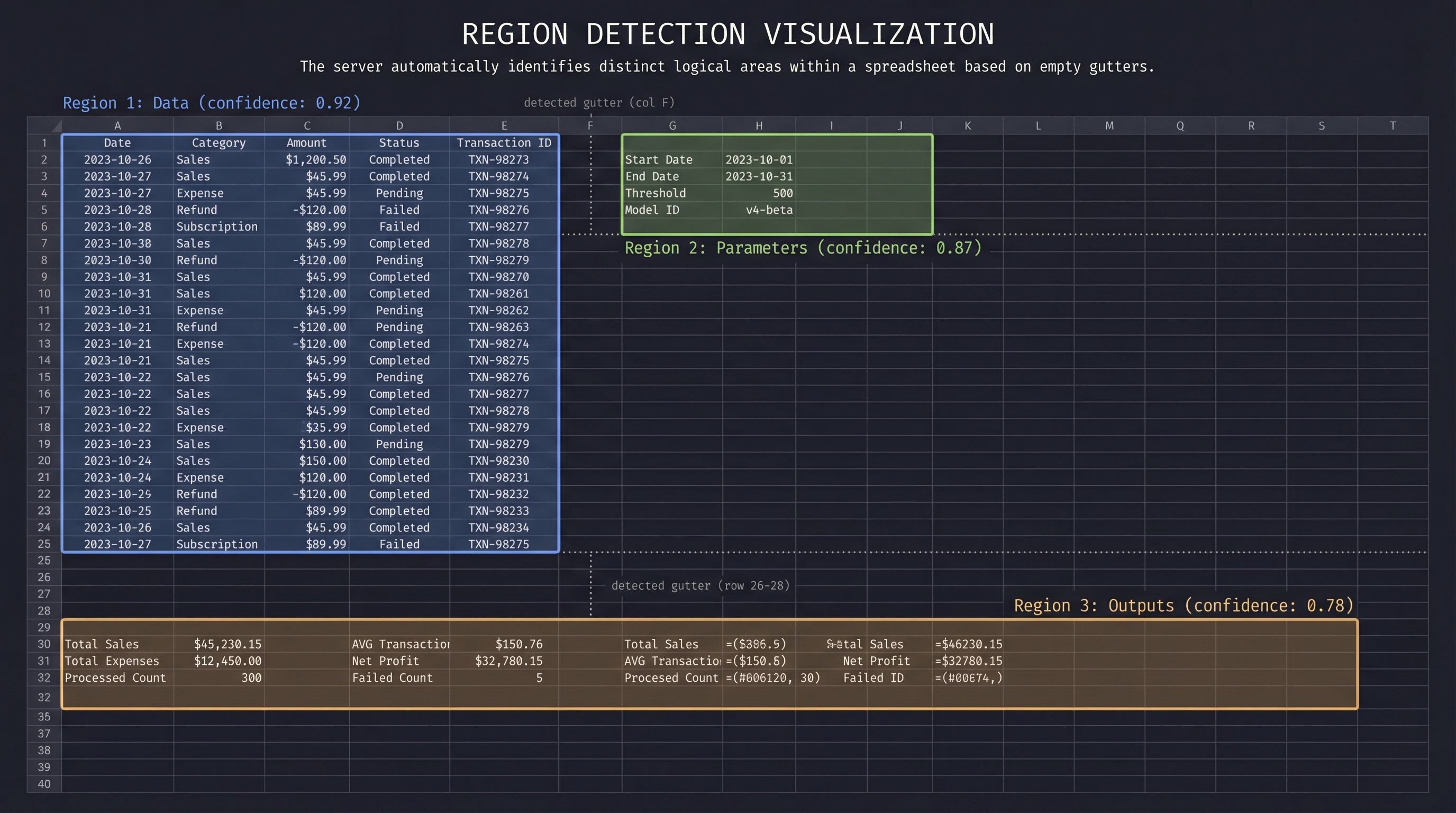
Spreadsheets often contain multiple logical tables, parameter blocks, and output areas on a single sheet. The server detects these automatically:
data, parameters, outputs, calculator, metadataRegions are cached per sheet. Tools like read_table accept a region_id to scope reads without manually specifying ranges. See docs/HEURISTICS.md for details.
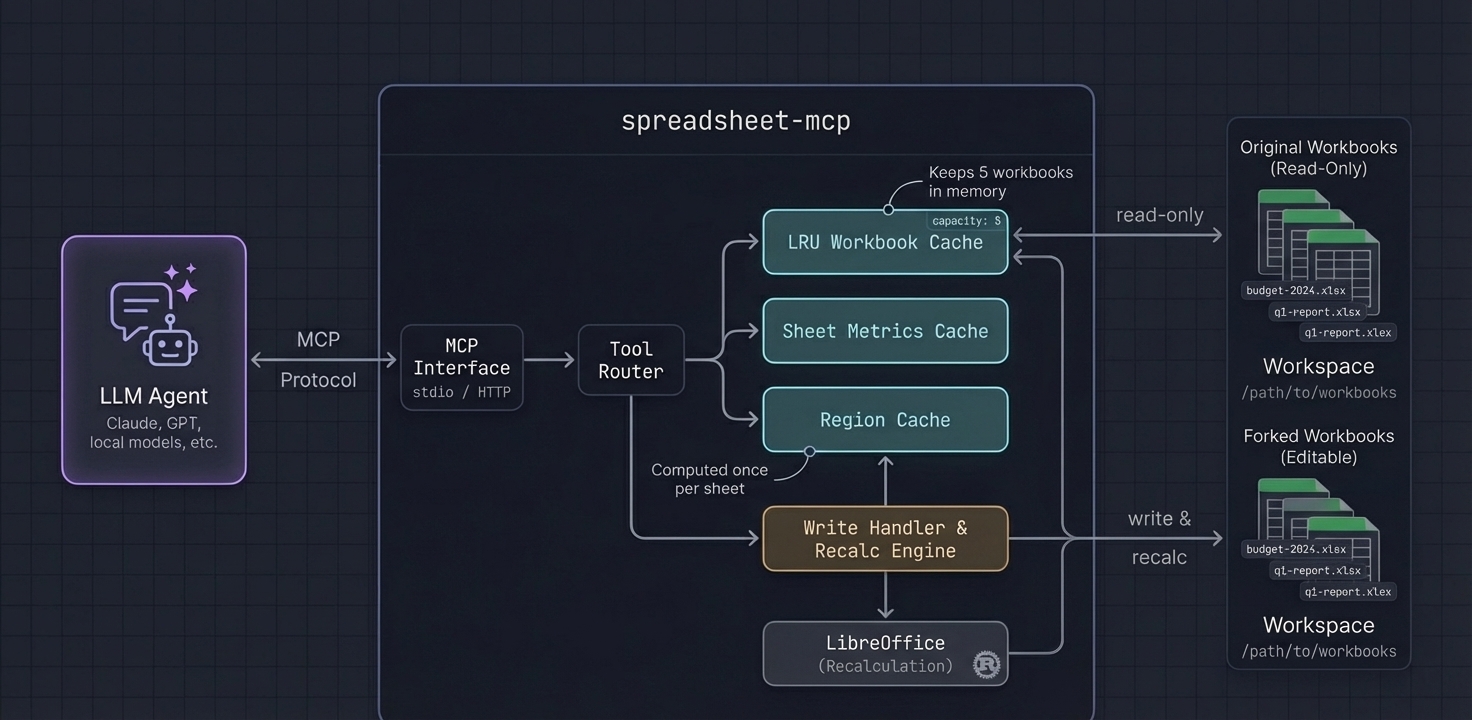
sheet_overview and is cached for region_id lookupsdistributed sampling reads evenly across rows without loading everythingAll flags can also be set via environment variables prefixed with SPREADSHEET_MCP_.
| Flag | Env | Default | Description |
|---|---|---|---|
--workspace-root | SPREADSHEET_MCP_WORKSPACE | cwd | Directory to scan for workbooks |
--cache-capacity | SPREADSHEET_MCP_CACHE_CAPACITY | 5 | LRU workbook cache size |
--extensions | SPREADSHEET_MCP_EXTENSIONS | xlsx,xlsm,xls,xlsb | Allowed file extensions |
--workbook | SPREADSHEET_MCP_WORKBOOK | — | Single-workbook mode |
--enabled-tools | SPREADSHEET_MCP_ENABLED_TOOLS | all | Whitelist exposed tools |
--transport | SPREADSHEET_MCP_TRANSPORT | http | http or stdio |
--http-bind | SPREADSHEET_MCP_HTTP_BIND | 127.0.0.1:8079 | HTTP bind address |
--output-profile | SPREADSHEET_MCP_OUTPUT_PROFILE | token-dense | token-dense or verbose |
--recalc-enabled | SPREADSHEET_MCP_RECALC_ENABLED | false | Enable write/recalc tools |
--max-concurrent-recalcs | SPREADSHEET_MCP_MAX_CONCURRENT_RECALCS | 2 | Parallel recalc limit |
--tool-timeout-ms | SPREADSHEET_MCP_TOOL_TIMEOUT_MS | 30000 | Per-tool timeout (0 = disabled) |
--max-response-bytes | SPREADSHEET_MCP_MAX_RESPONSE_BYTES | 1000000 | Max response size (0 = disabled) |
--allow-overwrite | SPREADSHEET_MCP_ALLOW_OVERWRITE | false | Allow save_fork to overwrite originals |
--vba-enabled | SPREADSHEET_MCP_VBA_ENABLED | false | Enable VBA inspection tools |
--screenshot-dir | SPREADSHEET_MCP_SCREENSHOT_DIR | /screenshots | Screenshot output directory |
--path-map | SPREADSHEET_MCP_PATH_MAP | — | Docker path remapping (/data=/host/path) |
| Image | Size | Recalc | Use case |
|---|---|---|---|
ghcr.io/psu3d0/spreadsheet-mcp:latest | ~15 MB | No | Read-only analysis |
ghcr.io/psu3d0/spreadsheet-mcp:full | ~800 MB | Yes (LibreOffice) | Write + recalc + screenshots |
# Read-only
docker run -v /path/to/workbooks:/data -p 8079:8079 \
  ghcr.io/psu3d0/spreadsheet-mcp:latest

# With VBA tools
docker run -v /path/to/workbooks:/data -p 8079:8079 \
  -e SPREADSHEET_MCP_VBA_ENABLED=true \
  ghcr.io/psu3d0/spreadsheet-mcp:latest

# Write + recalc
docker run -v /path/to/workbooks:/data -p 8079:8079 \
  ghcr.io/psu3d0/spreadsheet-mcp:full
When the server runs in Docker but your agent reads files from the host, configure path mapping so responses include host-visible paths:
docker run \
  -v /path/to/workbooks:/data \
  -e SPREADSHEET_MCP_PATH_MAP="/data=/path/to/workbooks" \
  -p 8079:8079 \
  ghcr.io/psu3d0/spreadsheet-mcp:full
This adds client_path, client_output_path, and client_saved_to fields to tool responses.
docker run \
  -v /path/to/workbooks:/data \
  -v /path/to/screenshots:/screenshots \
  -e SPREADSHEET_MCP_SCREENSHOT_DIR=/screenshots \
  -e SPREADSHEET_MCP_PATH_MAP="/data=/path/to/workbooks,/screenshots=/path/to/screenshots" \
  -p 8079:8079 \
  ghcr.io/psu3d0/spreadsheet-mcp:full
The :full image entrypoint drops privileges to match the owner of the mounted workspace directory. Override with SPREADSHEET_MCP_RUN_UID / SPREADSHEET_MCP_RUN_GID or docker run --user.
Write tools use a fork-based model for safety. Edits never mutate the original file — work on a fork, inspect changes, and export when satisfied.
create_fork → edit_batch / transform_batch → recalculate → get_changeset → save_fork
                    ↑                                              |
             checkpoint_fork ←──── restore_checkpoint ←────────────┘
edit_batch accepts both canonical objects and shorthand strings:
{
  "edits": [
    { "address": "A1", "value": "Revenue" },
    { "address": "B2", "formula": "SUM(B3:B10)" },
    "C1=100",
    "D1==SUM(A1:A2)"
  ]
}
"A1=100" sets a value. "A1==SUM(...)" sets a formula (double =).
Write tool shapes reference
edit_batch
{
  "tool": "edit_batch",
  "arguments": {
    "fork_id": "fork-123",
    "sheet_name": "Inputs",
    "edits": [
      { "address": "A1", "value": "Financial Model Inputs" },
      { "address": "B2", "formula": "SUM(B3:B10)" },
      "C1=100",
      "D1==SUM(A1:A2)"
    ]
  }
}
style_batch
{
  "tool": "style_batch",
  "arguments": {
    "fork_id": "fork-123",
    "ops": [
      {
        "sheet_name": "Accounts",
        "target": { "kind": "range", "range": "A2:F2" },
        "patch": {
          "font": { "bold": true },
          "fill": { "kind": "pattern", "pattern_type": "solid", "foreground_color": "FFF5F7FA" }
        }
      },
      {
        "sheet_name": "Accounts",
        "range": "A3:F3",
        "style": { "fill": { "color": "#F5F7FA" } }
      }
    ]
  }
}
structure_batch
{
  "tool": "structure_batch",
  "arguments": {
    "fork_id": "fork-123",
    "ops": [
      { "kind": "create_sheet", "name": "Inputs" },
      { "kind": "insert_rows", "sheet_name": "Data", "start": 5, "count": 3 },
      { "kind": "copy_range", "sheet_name": "Data", "source": "A1:D1", "target": "A5" }
    ]
  }
}
column_size_batch
{
  "tool": "column_size_batch",
  "arguments": {
    "fork_id": "fork-123",
    "sheet_name": "Accounts",
    "mode": "apply",
    "ops": [
      { "target": { "kind": "columns", "range": "A:C" }, "size": { "kind": "auto", "max_width_chars": 40.0 } },
      { "range": "D:D", "size": { "kind": "width", "width_chars": 24.0 } }
    ]
  }
}
sheet_layout_batch
{
  "tool": "sheet_layout_batch",
  "arguments": {
    "fork_id": "fork-123",
    "mode": "preview",
    "ops": [
      { "kind": "freeze_panes", "sheet_name": "Dashboard", "freeze_rows": 1, "freeze_cols": 1 },
      { "kind": "set_zoom", "sheet_name": "Dashboard", "zoom_percent": 110 },
      { "kind": "set_print_area", "sheet_name": "Dashboard", "range": "A1:G30" },
      { "kind": "set_page_setup", "sheet_name": "Dashboard", "orientation": "landscape", "fit_to_width": 1, "fit_to_height": 1 }
    ]
  }
}
rules_batch
{
  "tool": "rules_batch",
  "arguments": {
    "fork_id": "fork-123",
    "mode": "apply",
    "ops": [
      {
        "kind": "set_data_validation",
        "sheet_name": "Inputs",
        "target_range": "B3:B100",
        "validation": { "kind": "list", "formula1": "=Lists!$A$1:$A$10", "allow_blank": false }
      },
      {
        "kind": "set_conditional_format",
        "sheet_name": "Dashboard",
        "target_range": "D3:D100",
        "rule": { "kind": "cell_is", "operator": "less_than", "formula": "0" },
        "style": { "fill_color": "#FFE0E0", "font_color": "#8A0000", "bold": true }
      }
    ]
  }
}
screenshot_sheet renders a range to a cropped PNG via LibreOffice (requires :full image or --recalc-enabled).
SPREADSHEET_MCP_MAX_PNG_DIM_PX / SPREADSHEET_MCP_MAX_PNG_AREA_PX)See docs/RECALC.md for architecture details.
Request: Profile a detected region
{
  "tool": "table_profile",
  "arguments": {
    "workbook_id": "wb-23456789ab",
    "sheet_name": "Q1 Actuals",
    "region_id": 1,
    "sample_size": 10,
    "sample_mode": "distributed"
  }
}
Response:
{
  "sheet_name": "Q1 Actuals",
  "headers": ["Date", "Category", "Amount", "Notes"],
  "column_types": [
    { "name": "Date", "inferred_type": "date", "nulls": 0, "distinct": 87 },
    { "name": "Category", "inferred_type": "text", "nulls": 2, "distinct": 12, "top_values": ["Payroll", "Marketing", "Infrastructure"] },
    { "name": "Amount", "inferred_type": "number", "nulls": 0, "min": 150.0, "max": 84500.0, "mean": 12847.32 },
    { "name": "Notes", "inferred_type": "text", "nulls": 45, "distinct": 38 }
  ],
  "row_count": 1247
}
The agent now knows column types, cardinality, and value distributions — without reading 1,247 rows.
# Run tests
cargo test

# Build all crates
cargo build --release

# Test local binary with an MCP client
Point your MCP client config at the local binary:
{
  "mcpServers": {
    "spreadsheet": {
      "command": "./target/release/spreadsheet-mcp",
      "args": ["--workspace-root", "/path/to/workbooks", "--transport", "stdio"]
    }
  }
}
Or use the Docker rebuild script for live iteration:
WORKSPACE_ROOT=/path/to/workbooks ./scripts/local-docker-mcp.sh
Apache-2.0
Install via CLI
npx mdskills install PSU3D0/spreadsheet-mcpSpreadsheet Kit is a free, open-source AI agent skill. Spreadsheet automation for AI agents. Read, profile, edit, and recalculate .xlsx workbooks with tooling designed to be token-efficient, structurally aware, and agent-friendly. spreadsheet-kit ships two surfaces: Both share the same core engine and support .xlsx / .xlsm (read + write) and .xls / .xlsb (discovery only). Downloads a prebuilt native binary for your platform. No Rust toolchain required
Install Spreadsheet Kit with a single command:
npx mdskills install PSU3D0/spreadsheet-mcpThis downloads the skill files into your project and your AI agent picks them up automatically.
Spreadsheet Kit works with Claude Code, Claude Desktop, Cursor, Vscode Copilot, Windsurf, Continue Dev, Gemini Cli, Amp, Roo Code, Goose. Skills use the open SKILL.md format which is compatible with any AI coding agent that reads markdown instructions.