
A Model Context Protocol (MCP) server that enables LLMs to interact with Plane.so, allowing them to manage projects and issues through Plane's API. Using this server, LLMs like Claude can directly interact with your project management workflows while maintaining user control and security. - List all projects in your Plane workspace - Get detailed information about specific projects - Create new is
npx mdskills install kelvin6365/plane-mcp-serverRelated
@kelvin6365? Sign in with GitHub to claim this listing.Well-documented MCP server with comprehensive Plane.so integration and clear setup instructions
1# Plane MCP Server23[](https://archestra.ai/mcp-catalog/kelvin6365__plane-mcp-server)4[](https://smithery.ai/server/@kelvin6365/plane-mcp-server)56[](https://mseep.ai/app/kelvin6365-plane-mcp-server)7[](https://mseep.ai/app/0af9cef9-605a-411c-98a2-cc7156ab1e7d)89A Model Context Protocol (MCP) server that enables LLMs to interact with [Plane.so](https://plane.so), allowing them to manage projects and issues through Plane's API. Using this server, LLMs like Claude can directly interact with your project management workflows while maintaining user control and security.1011<a href="https://glama.ai/mcp/servers/@kelvin6365/plane-mcp-server">12 <img width="380" height="200" src="https://glama.ai/mcp/servers/@kelvin6365/plane-mcp-server/badge" />13</a>1415## Features1617- List all projects in your Plane workspace18- Get detailed information about specific projects19- Create new issues with customizable properties20- List and filter issues from projects21- Get detailed information about specific issues22- Update existing issues with new information2324## Prerequisites2526- Node.js 22.x or higher27- A Plane.so API key28- A Plane.so workspace2930## Installation3132### Option 1: Using Smithery3334The quickest way to get started is to use Smithery to install the server directly:3536```bash37# Install to Claude for Desktop38npx -y @smithery/cli install @kelvin6365/plane-mcp-server --client claude39```4041This command will automatically set up the Plane MCP Server for use with Claude. After installation, you'll need to configure the server with your Plane API key and workspace slug through the Claude settings.4243Valid client options are: claude, cline, windsurf, roo-cline, witsy, enconvo, cursor4445Example for installing with Cursor:4647```bash48npx -y @smithery/cli install @kelvin6365/plane-mcp-server --client cursor49```5051### Option 2: Manual Setup5253If you prefer to set up the server manually, follow these steps:54551. Clone this repository:5657```bash58git clone https://github.com/kelvin6365/plane-mcp-server.git59cd plane-mcp-server60```61622. Install dependencies:6364```bash65npm install66```67683. Build the server:6970```bash71npm run build72```7374## Usage with Claude for Desktop7576> **Note:** If you used Option 1 (Smithery) above, you can skip this section. Smithery automatically configures the MCP server for you.77781. Open your Claude for Desktop configuration file:7980 - macOS: `~/Library/Application Support/Claude/claude_desktop_config.json`81 - Windows: `%APPDATA%\Claude\claude_desktop_config.json`82832. Add the Plane MCP server configuration:8485```json86{87 "mcpServers": {88 "plane": {89 "command": "node",90 "args": ["path/to/plane-mcp-server/build/index.js"],91 "env": {92 "PLANE_API_KEY": "your_plane_api_key_here",93 "PLANE_WORKSPACE_SLUG": "your_workspace_slug_here",94 "PLANE_HOST": "optional"95 }96 }97 }98}99```1001013. Restart Claude for Desktop102103## Available Tools104105> **Note:** Tool names use hyphens (e.g., `list-projects`), not underscores. The server will automatically convert underscores to hyphens for compatibility.106107### list-projects108109Lists all projects in your Plane workspace.110111Parameters: None112113Example:114115```json116{}117```118119### get-project120121Gets detailed information about a specific project.122123Parameters:124125- `project_id`: ID of the project to retrieve126127Example:128129```json130{131 "project_id": "01abc123-4567-89de-0123-456789abcdef"132}133```134135### create-issue136137Creates a new issue in a specified project.138139Parameters:140141- `project_id`: ID of the project where the issue should be created142- `name`: Title of the issue143- `description_html`: HTML description of the issue (required by Plane API)144- `priority` (optional): Priority of the issue ("urgent", "high", "medium", "low", "none")145- `state_id` (optional): ID of the state for this issue146- `assignees` (optional): Array of user IDs to assign to this issue147148> **Note:** The `assignees` parameter must be an array of user ID strings. Common errors include providing a dictionary/object instead of an array, or accidentally nesting the entire issue data inside the assignees field. The server will attempt to handle these cases, but it's best to use the correct format.149150Example:151152```json153{154 "project_id": "01abc123-4567-89de-0123-456789abcdef",155 "name": "Implement new feature",156 "description_html": "<p>We need to implement the new reporting feature</p>",157 "priority": "high",158 "assignees": ["user-id-1", "user-id-2"]159}160```161162### list-issues163164Lists issues from a specified project with optional filtering.165166Parameters:167168- `project_id`: ID of the project to get issues from169- `state_id` (optional): Filter by state ID170- `priority` (optional): Filter by priority171- `assignee_id` (optional): Filter by assignee ID172- `limit` (optional): Maximum number of issues to return (default: 50)173174Example:175176```json177{178 "project_id": "01abc123-4567-89de-0123-456789abcdef",179 "priority": "high",180 "limit": 10181}182```183184### get-issue185186Gets detailed information about a specific issue.187188Parameters:189190- `project_id`: ID of the project containing the issue191- `issue_id`: ID of the issue to retrieve192193Example:194195```json196{197 "project_id": "01abc123-4567-89de-0123-456789abcdef",198 "issue_id": "01def456-7890-12gh-3456-789ijklmnopq"199}200```201202### update-issue203204Updates an existing issue in a project.205206Parameters:207208- `project_id`: ID of the project containing the issue209- `issue_id`: ID of the issue to update210- `name` (optional): Updated title of the issue211- `description_html` (optional): HTML description of the issue (required by Plane API)212- `priority` (optional): Updated priority of the issue213- `state_id` (optional): Updated state ID of the issue214- `assignees` (optional): Updated array of user IDs to assign to this issue215216> **Note:** The `assignees` parameter must be an array of user ID strings, following the same format guidelines as the create-issue tool.217218Example:219220```json221{222 "project_id": "01abc123-4567-89de-0123-456789abcdef",223 "issue_id": "01def456-7890-12gh-3456-789ijklmnopq",224 "priority": "urgent",225 "description_html": "<p>Updated description with <strong>more details</strong></p>"226}227```228229## Development2302311. Install development dependencies:232233```bash234npm install --save-dev typescript @types/node235```2362372. Start the server in development mode:238239```bash240npm run dev241```242243## Testing244245You can test the server using the MCP Inspector:246247```bash248npx @modelcontextprotocol/inspector node dist/index.js249```250251## Examples252253Here are some example interactions you can try with Claude after setting up the Plane MCP server:2542551. "Can you list all the projects in my Plane workspace?"2562. "Please create a new high-priority issue in the Marketing project titled 'Update social media strategy'"2573. "What are all the high-priority issues in the Development project?"2584. "Update issue #123 in the QA project to change its priority to urgent"259260Claude will use the appropriate tools to interact with Plane while asking for your approval before creating or modifying any issues.261262## Security Considerations263264- The API key requires proper Plane permissions to function265- All operations that modify data require explicit user approval266- Environment variables should be properly secured267- API keys should never be committed to version control268269## Contributing2702711. Fork the repository2722. Create your feature branch (`git checkout -b feature/amazing-feature`)2733. Commit your changes (`git commit -m 'Add some amazing feature'`)2744. Push to the branch (`git push origin feature/amazing-feature`)2755. Open a Pull Request276277## License278279This project is licensed under the MIT License - see the LICENSE file for details.280281## Support282283If you encounter any issues or have questions:2842851. Check the GitHub Issues section2862. Consult the MCP documentation at [modelcontextprotocol.io](https://modelcontextprotocol.io)2873. Open a new issue with detailed reproduction steps288289## Star History290291[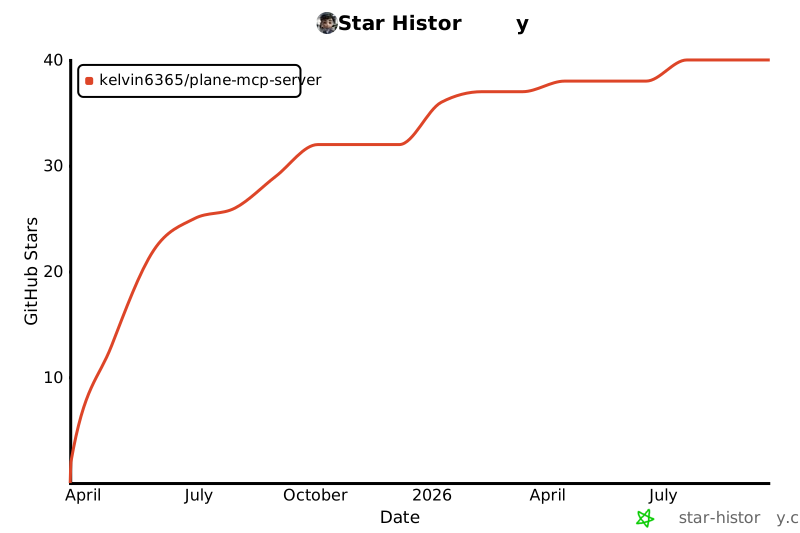](https://www.star-history.com/#kelvin6365/plane-mcp-server&Date)292
Full transparency — inspect the skill content before installing.