
A Model Context Protocol (MCP) server that queries multiple Ollama models and combines their responses, providing diverse AI perspectives on a single question. This creates a "council of advisors" approach where Claude can synthesize multiple viewpoints alongside its own to provide more comprehensive answers. - Query multiple Ollama models with a single question - Assign different roles/personas t
npx mdskills install YuChenSSR/multi-ai-advisor-mcpRelated
@YuChenSSR? Sign in with GitHub to claim this listing.Well-documented MCP server enabling multi-model consensus with clear setup and examples
1# Multi-Model Advisor2## (锵锵四人行)34[](https://smithery.ai/server/@YuChenSSR/multi-ai-advisor-mcp)56A Model Context Protocol (MCP) server that queries multiple Ollama models and combines their responses, providing diverse AI perspectives on a single question. This creates a "council of advisors" approach where Claude can synthesize multiple viewpoints alongside its own to provide more comprehensive answers.78<a href="https://glama.ai/mcp/servers/@YuChenSSR/multi-ai-advisor-mcp">9 <img width="380" height="200" src="https://glama.ai/mcp/servers/@YuChenSSR/multi-ai-advisor-mcp/badge" alt="Multi-Model Advisor MCP server" />10</a>1112```mermaid13graph TD14 A[Start] --> B[Worker Local AI 1 Opinion]15 A --> C[Worker Local AI 2 Opinion]16 A --> D[Worker Local AI 3 Opinion]17 B --> E[Manager AI]18 C --> E19 D --> E20 E --> F[Decision Made]21```2223## Features2425- Query multiple Ollama models with a single question26- Assign different roles/personas to each model27- View all available Ollama models on your system28- Customize system prompts for each model29- Configure via environment variables30- Integrate seamlessly with Claude for Desktop3132## Prerequisites3334- Node.js 16.x or higher35- Ollama installed and running (see [Ollama installation](https://github.com/ollama/ollama#installation))36- Claude for Desktop (for the complete advisory experience)3738## Installation3940### Installing via Smithery4142To install multi-ai-advisor-mcp for Claude Desktop automatically via [Smithery](https://smithery.ai/server/@YuChenSSR/multi-ai-advisor-mcp):4344```bash45npx -y @smithery/cli install @YuChenSSR/multi-ai-advisor-mcp --client claude46```4748### Manual Installation491. Clone this repository:50 ```bash51 git clone https://github.com/YuChenSSR/multi-ai-advisor-mcp.git52 cd multi-ai-advisor-mcp53 ```54552. Install dependencies:56 ```bash57 npm install58 ```59603. Build the project:61 ```bash62 npm run build63 ```64654. Install required Ollama models:66 ```bash67 ollama pull gemma3:1b68 ollama pull llama3.2:1b69 ollama pull deepseek-r1:1.5b70 ```7172## Configuration7374Create a `.env` file in the project root with your desired configuration:7576```77# Server configuration78SERVER_NAME=multi-model-advisor79SERVER_VERSION=1.0.080DEBUG=true8182# Ollama configuration83OLLAMA_API_URL=http://localhost:1143484DEFAULT_MODELS=gemma3:1b,llama3.2:1b,deepseek-r1:1.5b8586# System prompts for each model87GEMMA_SYSTEM_PROMPT=You are a creative and innovative AI assistant. Think outside the box and offer novel perspectives.88LLAMA_SYSTEM_PROMPT=You are a supportive and empathetic AI assistant focused on human well-being. Provide considerate and balanced advice.89DEEPSEEK_SYSTEM_PROMPT=You are a logical and analytical AI assistant. Think step-by-step and explain your reasoning clearly.90```9192## Connect to Claude for Desktop93941. Locate your Claude for Desktop configuration file:95 - MacOS: `~/Library/Application Support/Claude/claude_desktop_config.json`96 - Windows: `%APPDATA%\Claude\claude_desktop_config.json`97982. Edit the file to add the Multi-Model Advisor MCP server:99100```json101{102 "mcpServers": {103 "multi-model-advisor": {104 "command": "node",105 "args": ["/absolute/path/to/multi-ai-advisor-mcp/build/index.js"]106 }107 }108}109```1101113. Replace `/absolute/path/to/` with the actual path to your project directory1121134. Restart Claude for Desktop114115## Usage116117Once connected to Claude for Desktop, you can use the Multi-Model Advisor in several ways:118119### List Available Models120121You can see all available models on your system:122123```124Show me which Ollama models are available on my system125```126127This will display all installed Ollama models and indicate which ones are configured as defaults.128129### Basic Usage130131Simply ask Claude to use the multi-model advisor:132133```134what are the most important skills for success in today's job market,135you can use gemma3:1b, llama3.2:1b, deepseek-r1:1.5b to help you136```137138Claude will query all default models and provide a synthesized response based on their different perspectives.139140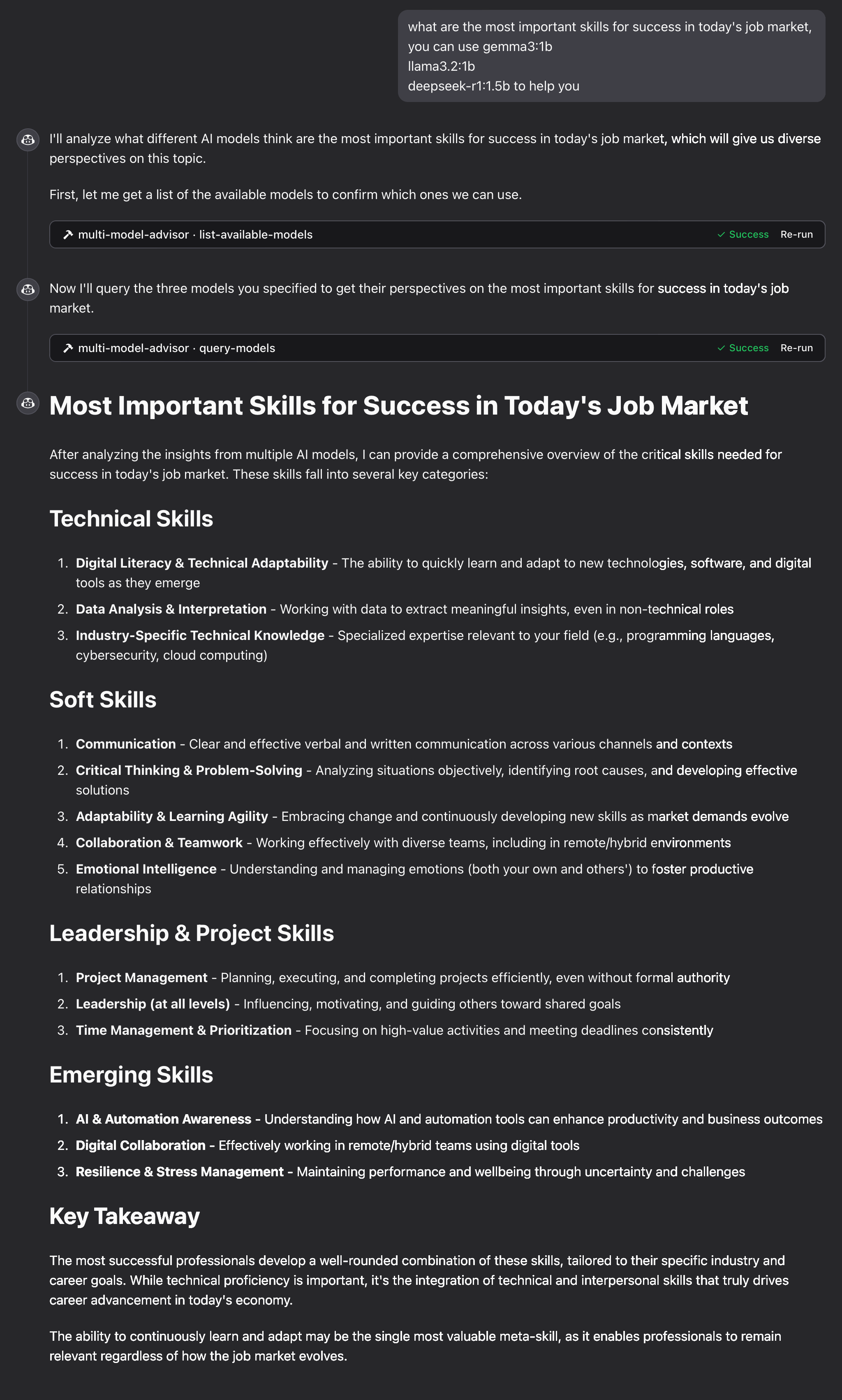141142143144## How It Works1451461. The MCP server exposes two tools:147 - `list-available-models`: Shows all Ollama models on your system148 - `query-models`: Queries multiple models with a question1491502. When you ask Claude a question referring to the multi-model advisor:151 - Claude decides to use the `query-models` tool152 - The server sends your question to multiple Ollama models153 - Each model responds with its perspective154 - Claude receives all responses and synthesizes a comprehensive answer1551563. Each model can have a different "persona" or role assigned, encouraging diverse perspectives.157158## Troubleshooting159160### Ollama Connection Issues161162If the server can't connect to Ollama:163- Ensure Ollama is running (`ollama serve`)164- Check that the OLLAMA_API_URL is correct in your .env file165- Try accessing http://localhost:11434 in your browser to verify Ollama is responding166167### Model Not Found168169If a model is reported as unavailable:170- Check that you've pulled the model using `ollama pull <model-name>`171- Verify the exact model name using `ollama list`172- Use the `list-available-models` tool to see all available models173174### Claude Not Showing MCP Tools175176If the tools don't appear in Claude:177- Ensure you've restarted Claude after updating the configuration178- Check the absolute path in claude_desktop_config.json is correct179- Look at Claude's logs for error messages180181### RAM is not enough182183Some managers' AI models may have chosen larger models, but there is not enough memory to run them. You can try specifying a smaller model (see the [Basic Usage](#basic-usage)) or upgrading the memory.184185## License186187MIT License188189For more details, please see the LICENSE file in [this project repository](https://github.com/YuChenSSR/multi-ai-advisor-mcp)190191## Contributing192193Contributions are welcome! Please feel free to submit a Pull Request.
Full transparency — inspect the skill content before installing.