
See through your agent's eyes. Visualize legacy code, inspect complex flows, understand everything. - Visualize Anything: Use your coding agent to generate on-demand architecture, code, and process diagrams to view your code from different perspectives. - Vibe Checks: AI-generated code can accumulate unused and redundant constructs. Use visualizations to spot areas that need cleanup. - Local Proce
npx mdskills install abrinsmead/mindpilot-mcpRelated
@abrinsmead? Sign in with GitHub to claim this listing.Well-documented visualization MCP with clear setup for multiple IDEs and useful diagram generation
1# Mindpilot MCP2[](https://github.com/abrinsmead/mindpilot-mcp)3[](https://www.npmjs.com/package/@mindpilot/mcp)4[](https://github.com/abrinsmead/mindpilot-mcp/blob/main/LICENSE)56See through your agent's eyes. Visualize legacy code, inspect complex flows, understand everything.78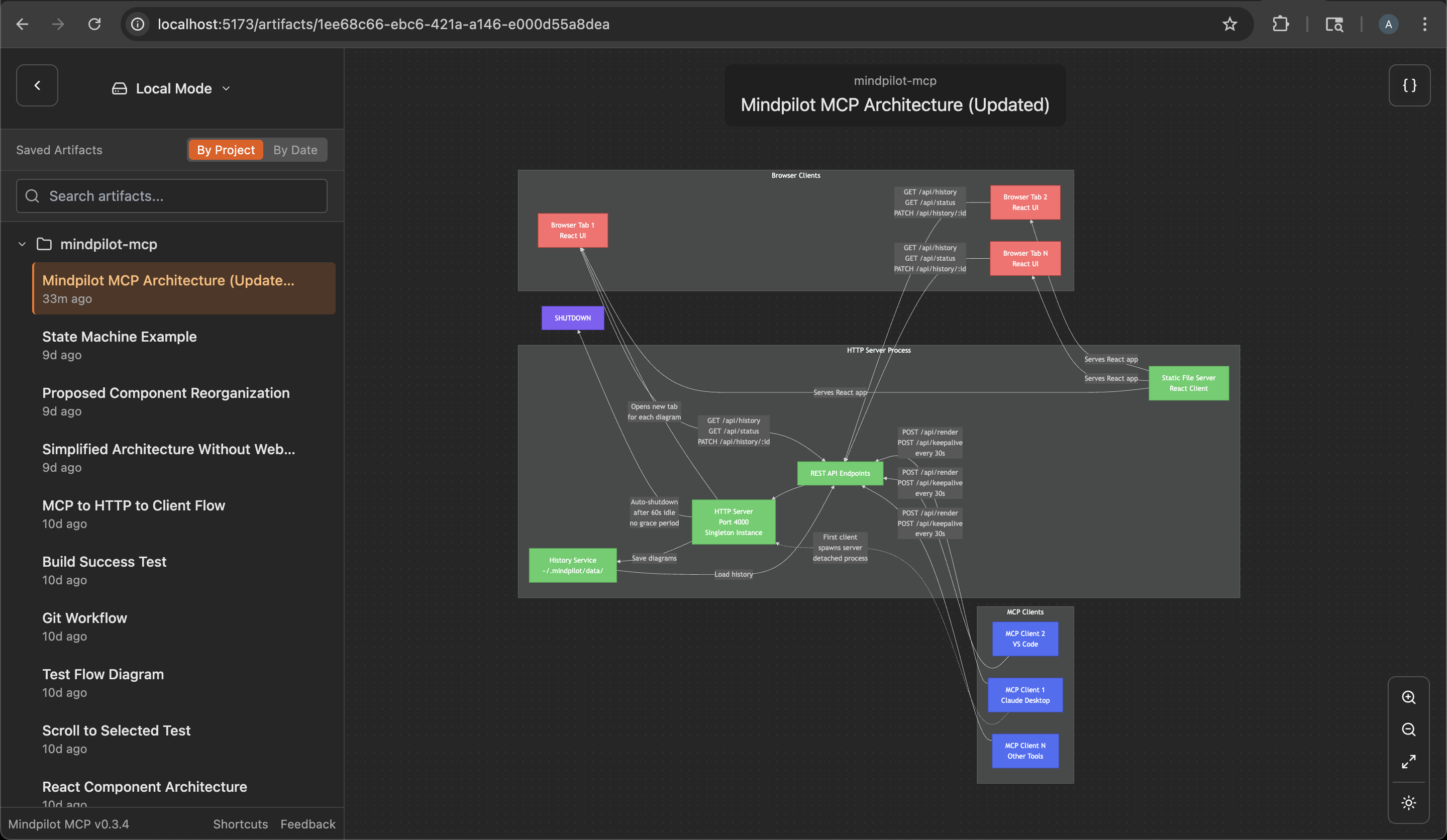910## Why Mindpilot?11- **Visualize Anything**: Use your coding agent to generate on-demand architecture, code, and process diagrams to view your code from different perspectives.12- **Vibe Checks**: AI-generated code can accumulate unused and redundant constructs. Use visualizations to spot areas that need cleanup.13- **Local Processing**: Diagrams are never sent to the cloud. Everything stays between you, your agent, and your agent's LLM provider(s).14- **Export & Share**: Export any diagram as a vector image.1516## Prerequisites1718Node.js v20.0.0 or higher.1920## Quickstart2122### Claude Code23`claude mcp add mindpilot -- npx @mindpilot/mcp@latest`2425### Cursor2627Under `Settings` > `Cursor Settings` > `MCP` > Click `Add new global MCP server` and configure mindpilot in the `mcpServers` object.2829```30{31 "mcpServers": {32 "mindpilot": {33 "command": "npx",34 "args": ["@mindpilot/mcp@latest"]35 }36 }37}38```3940### VS Code41Follow the instructions here for enabling MCPs in VS Code: https://code.visualstudio.com/docs/copilot/chat/mcp-servers4243Go to `Settings` > `Features` > `MCP`, then click `Edit in settings json`4445Then add mindpilot to your MCP configuration:4647```48{49 "mcp": {50 "servers": {51 "mindpilot": {52 "type": "stdio",53 "command": "npx",54 "args": ["@mindpilot/mcp@latest"]55 }56 }57 }58}59```6061### Windsurf6263Under `Settings` > `Windsurf Settings` > `Manage Plugins`, click `view raw config` and configure mindpilot in the `mcpServers` object:6465```66{67 "mcpServers": {68 "mindpilot": {69 "command": "npx",70 "args": ["@mindpilot/mcp@latest"]71 }72 }73}74```7576### Zed77In the AI Thread panel click on the three dots `...`, then click `Add Custom Server...`7879In the `Command to run MCPserver` field enter `npx @mindpilot/mcp@latest` and click `Add Server`.8081## Configuration Options82- **Port**: The server defaults to port 4000 but can be configured using the `--port` command line switch.83- **Data Path**: By default, diagrams are saved to `~/.mindpilot/data/`. You can specify a custom location using the `--data-path` command line switch.8485## Multi-Client Support8687Mindpilot intelligently handles multiple AI assistants running simultaneously. When you have multiple Claude Desktop windows or IDE instances open:8889- The first mcp client to use Mindpilot starts a shared web server90- Additional assistants automatically connect to the existing server91- All assistants share the same diagram history and web interface92- The server will automatically shuts down a minute after the last MCP clinet disconnects9394This means you can work with multiple MCP hosts at once without port conflicts, and they'll all contribute to the same collection of diagrams.9596## Anonymous Usage Tracking9798Mindpilot MCP collects anonymous usage data to help us understand how the product is being used and improve the user experience.99100### Disabling Analytics101If you prefer not to share anonymous usage data, you can disable analytics by adding the `--disable-analytics` flag to your MCP configuration:102103**Claude Code:**104```bash105claude mcp add mindpilot -- npx @mindpilot/mcp@latest --disable-analytics106```107108**Other IDEs:**109Add `"--disable-analytics"` to the args array in your configuration:110```json111{112 "command": "npx",113 "args": ["@mindpilot/mcp@latest", "--disable-analytics"]114}115```116117## Using the MCP server118After configuring the MCP in your coding agent you can make requests like "create a diagram about x" and it should use the MCP server to render Mermaid diagrams for you in a browser connected to the MCP server.119120You can optionally update your agent's rules file to give specific instructions about when to use mindpilot-mcp.121122### Example requests123- "Show me the state machine for WebSocket connection logic"124- "Create a C4 context diagram of this project's architecture."125- "Show me the OAuth flow as a sequence diagram"126127## How it works128Frontier LLMs are well trained to generate valid Mermaid syntax. The MCP is designed to accept Mermaid syntax and render diagrams in a web app running on http://localhost:4000 (default port).129130## Troubleshooting131132### Port Conflicts133If you use port 4000 for another service you can configure the MCP to use a different port.134135Claude Code example:136`claude mcp add mindpilot -- npx @mindpilot/mcp@latest --port 5555`137138### Custom Data Path139To save diagrams to a custom location (e.g., for syncing with cloud storage):140141Claude Code example:142`claude mcp add mindpilot -- npx @mindpilot/mcp@latest --data-path /path/to/custom/location`143144Other IDEs:145```json146{147 "command": "npx",148 "args": ["@mindpilot/mcp@latest", "--data-path", "/path/to/custom/location"]149}150```151152### asdf Issues153If you use `asdf` as a version manager and have trouble getting MCPs to work (not just mindpilot), you may need to set a "global" nodejs version from your home directory.154155```156cd157asdf set nodejs x.x.x158```159160## Development Configuration161Configure the MCP in your coding agent (using `claude` in this example)162163`claude mcp add mindpilot -- npx tsx <path to...>/src/server/server.ts`164165Run `claude` with the `--debug` flag if you need to see MCP errors166167Start the development client (Vite) to get hot module reloading while developing.168169`npm run dev`170171Open the development client172`localhost:5173`173
Full transparency — inspect the skill content before installing.