
MetaTrader MCP Server Let AI assistants trade for you using natural language Features • Quick Start • Documentation • Examples • Support MetaTrader MCP Server is a bridge that connects AI assistants (like Claude, ChatGPT) to the MetaTrader 5 trading platform. Instead of clicking buttons, you can simply tell your AI assistant what to do: The AI understands your request and executes it on MetaTrader
npx mdskills install ariadng/metatrader-mcp-serverRelated
@ariadng? Sign in with GitHub to claim this listing.Comprehensive MCP bridge to MetaTrader 5 with excellent setup docs and wide AI integration
MetaTrader MCP Server
Let AI assistants trade for you using natural language
Features • Quick Start • Documentation • Examples • Support
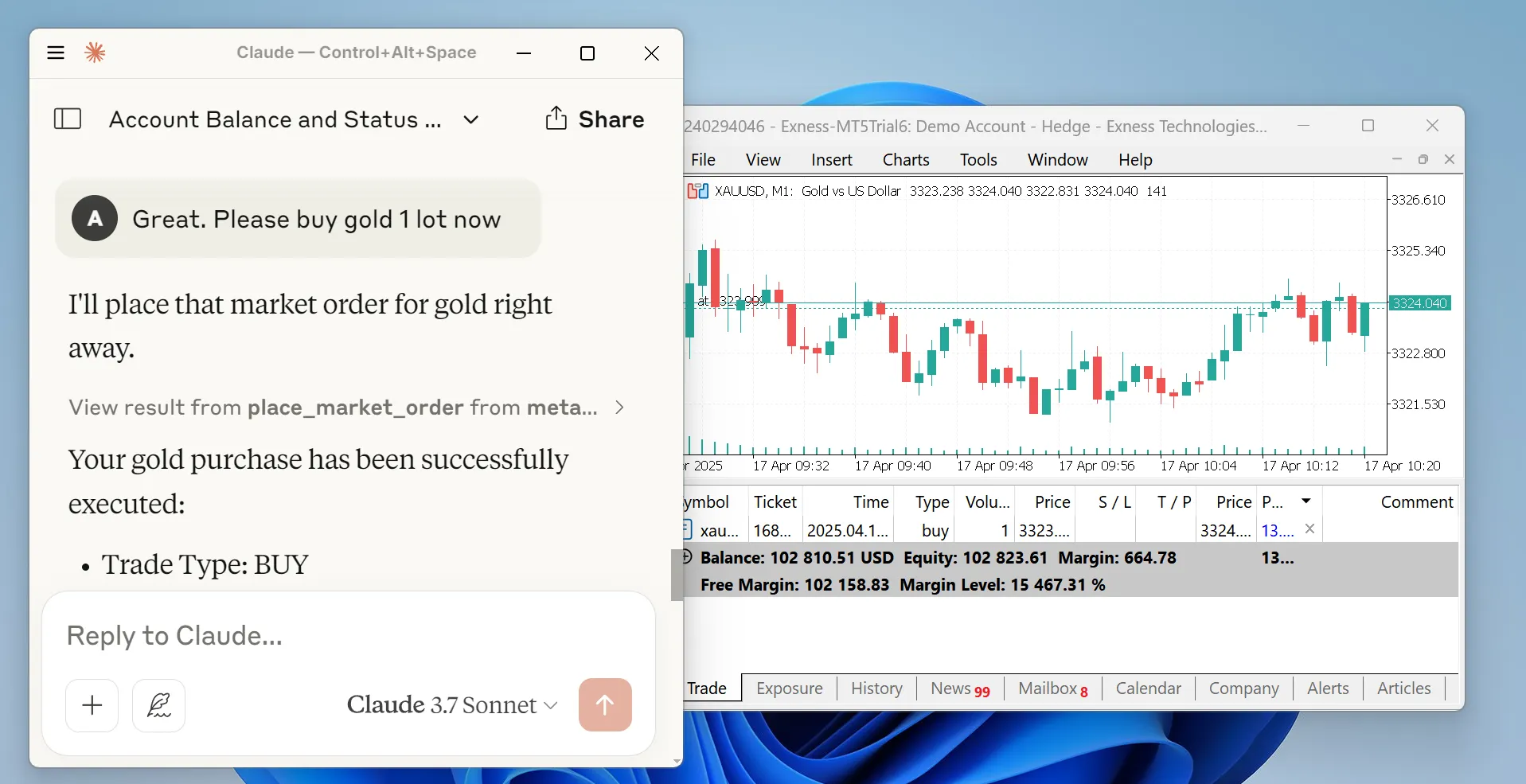
MetaTrader MCP Server is a bridge that connects AI assistants (like Claude, ChatGPT) to the MetaTrader 5 trading platform. Instead of clicking buttons, you can simply tell your AI assistant what to do:
"Show me my account balance" "Buy 0.01 lots of EUR/USD" "Close all profitable positions"
The AI understands your request and executes it on MetaTrader 5 automatically.
You → AI Assistant → MCP Server → MetaTrader 5 → Your Trades
Please read this carefully:
Trading financial instruments involves significant risk of loss. This software is provided as-is, and the developers accept no liability for any trading losses, gains, or consequences of using this software.
By using this software, you acknowledge that:
This is not financial advice. Always trade responsibly.
Before you begin, make sure you have:
Open your terminal or command prompt and run:
pip install metatrader-mcp-server
Tools → OptionsExpert Advisors tabAllow algorithmic tradingOKPick one based on how you want to use it:
Find your Claude Desktop config file:
%APPDATA%\Claude\claude_desktop_config.json~/Library/Application Support/Claude/claude_desktop_config.jsonOpen the file and add this configuration:
{
  "mcpServers": {
    "metatrader": {
      "command": "metatrader-mcp-server",
      "args": [
        "--login",    "YOUR_MT5_LOGIN",
        "--password", "YOUR_MT5_PASSWORD",
        "--server",   "YOUR_MT5_SERVER"
      ]
    }
  }
}
Optional: Specify Custom MT5 Terminal Path
If your MT5 terminal is installed in a non-standard location, add the --path argument:
{
  "mcpServers": {
    "metatrader": {
      "command": "metatrader-mcp-server",
      "args": [
        "--login",    "YOUR_MT5_LOGIN",
        "--password", "YOUR_MT5_PASSWORD",
        "--server",   "YOUR_MT5_SERVER",
        "--path",     "C:\\Program Files\\MetaTrader 5\\terminal64.exe"
      ]
    }
  }
}
Replace YOUR_MT5_LOGIN, YOUR_MT5_PASSWORD, and YOUR_MT5_SERVER with your actual credentials
Restart Claude Desktop
Start chatting! Try: "What's my account balance?"
metatrader-http-server --login YOUR_LOGIN --password YOUR_PASSWORD --server YOUR_SERVER --host 0.0.0.0 --port 8000
Optional: Specify Custom MT5 Terminal Path
If your MT5 terminal is installed in a non-standard location, add the --path argument:
metatrader-http-server --login YOUR_LOGIN --password YOUR_PASSWORD --server YOUR_SERVER --path "C:\Program Files\MetaTrader 5\terminal64.exe" --host 0.0.0.0 --port 8000
Open your browser to http://localhost:8000/docs to see the API documentation
In Open WebUI:
http://localhost:8000Now you can use trading tools in your Open WebUI chats!
Once configured, you can chat naturally:
Check Your Account:
You: "Show me my account information"
Claude: Returns balance, equity, margin, leverage, etc.
Get Market Data:
You: "What's the current price of EUR/USD?"
Claude: Shows bid, ask, and spread
Place a Trade:
You: "Buy 0.01 lots of GBP/USD with stop loss at 1.2500 and take profit at 1.2700"
Claude: Executes the trade and confirms
Manage Positions:
You: "Close all my losing positions"
Claude: Closes positions and reports results
Analyze History:
You: "Show me all my trades from last week for EUR/USD"
Claude: Returns trade history as a table
# Get account info
curl http://localhost:8000/api/v1/account/info

# Get current price
curl "http://localhost:8000/api/v1/market/price?symbol_name=EURUSD"

# Place a market order
curl -X POST http://localhost:8000/api/v1/order/market \
  -H "Content-Type: application/json" \
  -d '{
    "symbol": "EURUSD",
    "volume": 0.01,
    "type": "BUY",
    "stop_loss": 1.0990,
    "take_profit": 1.1010
  }'

# Get all open positions
curl http://localhost:8000/api/v1/positions

# Close a specific position
curl -X DELETE http://localhost:8000/api/v1/positions/12345
from metatrader_client import MT5Client

# Connect to MT5
config = {
    "login": 12345678,
    "password": "your_password",
    "server": "MetaQuotes-Demo"
}
client = MT5Client(config)
client.connect()

# Get account statistics
stats = client.account.get_trade_statistics()
print(f"Balance: ${stats['balance']}")
print(f"Equity: ${stats['equity']}")

# Get current price
price = client.market.get_symbol_price("EURUSD")
print(f"EUR/USD Bid: {price['bid']}, Ask: {price['ask']}")

# Place a market order
result = client.order.place_market_order(
    type="BUY",
    symbol="EURUSD",
    volume=0.01,
    stop_loss=1.0990,
    take_profit=1.1010
)
print(result['message'])

# Close all positions
client.order.close_all_positions()

# Disconnect
client.disconnect()
get_account_info - Get balance, equity, profit, margin level, leverage, currencyget_symbols - List all available trading symbolsget_symbol_price - Get current bid/ask price for a symbolget_candles_latest - Get recent price candles (OHLCV data)get_candles_by_date - Get historical candles for a date rangeget_symbol_info - Get detailed symbol informationplace_market_order - Execute instant BUY/SELL ordersplace_pending_order - Place limit/stop orders for future executionmodify_position - Update stop loss or take profitmodify_pending_order - Modify pending order parametersget_all_positions - View all open positionsget_positions_by_symbol - Filter positions by trading pairget_positions_by_id - Get specific position detailsclose_position - Close a specific positionclose_all_positions - Close all open positionsclose_all_positions_by_symbol - Close all positions for a symbolclose_all_profitable_positions - Close only winning tradesclose_all_losing_positions - Close only losing tradesget_all_pending_orders - List all pending ordersget_pending_orders_by_symbol - Filter pending orders by symbolcancel_pending_order - Cancel a specific pending ordercancel_all_pending_orders - Cancel all pending orderscancel_pending_orders_by_symbol - Cancel pending orders for a symbolget_deals - Get historical completed tradesget_orders - Get historical order recordsInstead of putting credentials in the command line, create a .env file:
LOGIN=12345678
PASSWORD=your_password
SERVER=MetaQuotes-Demo

# Optional: Specify custom MT5 terminal path (auto-detected if not provided)
# PATH=C:\Program Files\MetaTrader 5\terminal64.exe
Then start the server without arguments:
metatrader-http-server
The server will automatically load credentials from the .env file.
metatrader-http-server --host 127.0.0.1 --port 9000
The MT5 client supports additional configuration:
config = {
    "login": 12345678,
    "password": "your_password",
    "server": "MetaQuotes-Demo",
    "path": None,               # Path to MT5 terminal executable (default: auto-detect)
    "timeout": 60000,           # Connection timeout in milliseconds (default: 60000)
    "portable": False,          # Use portable mode (default: False)
    "max_retries": 3,           # Maximum connection retry attempts (default: 3)
    "backoff_factor": 1.5,      # Delay multiplier between retries (default: 1.5)
    "cooldown_time": 2.0,       # Seconds to wait between connections (default: 2.0)
    "debug": True               # Enable debug logging (default: False)
}
Configuration Options:
| Feature | Status |
|---|---|
| MetaTrader 5 Connection | ✅ Complete |
| Python Client Library | ✅ Complete |
| MCP Server | ✅ Complete |
| Claude Desktop Integration | ✅ Complete |
| HTTP/REST API Server | ✅ Complete |
| Open WebUI Integration | ✅ Complete |
| OpenAPI Documentation | ✅ Complete |
| PyPI Package | ✅ Published |
| Google ADK Integration | 🚧 In Progress |
| WebSocket Support | 📋 Planned |
| Docker Container | 📋 Planned |
# Clone the repository
git clone https://github.com/ariadng/metatrader-mcp-server.git
cd metatrader-mcp-server

# Install in development mode
pip install -e .

# Install development dependencies
pip install pytest python-dotenv

# Run tests
pytest tests/
metatrader-mcp-server/
├── src/
│   ├── metatrader_client/      # Core MT5 client library
│   │   ├── account/            # Account operations
│   │   ├── connection/         # Connection management
│   │   ├── history/            # Historical data
│   │   ├── market/             # Market data
│   │   ├── order/              # Order execution
│   │   └── types/              # Type definitions
│   ├── metatrader_mcp/         # MCP server implementation
│   └── metatrader_openapi/     # HTTP/REST API server
├── tests/                      # Test suite
├── docs/                       # Documentation
└── pyproject.toml             # Project configuration
Contributions are welcome! Here's how you can help:
git checkout -b feature/amazing-feature)pytest)git commit -m 'Add amazing feature')git push origin feature/amazing-feature)"Connection failed"
"Module not found"
pip install metatrader-mcp-server"Order execution failed"
This project is licensed under the MIT License - see the LICENSE file for details.
Made with ❤️ by Aria Dhanang
⭐ Star this repo if you find it useful!
Install via CLI
npx mdskills install ariadng/metatrader-mcp-serverMetaTrader MCP Server is a free, open-source AI agent skill. MetaTrader MCP Server Let AI assistants trade for you using natural language Features • Quick Start • Documentation • Examples • Support MetaTrader MCP Server is a bridge that connects AI assistants (like Claude, ChatGPT) to the MetaTrader 5 trading platform. Instead of clicking buttons, you can simply tell your AI assistant what to do: The AI understands your request and executes it on MetaTrader
Install MetaTrader MCP Server with a single command:
npx mdskills install ariadng/metatrader-mcp-serverThis downloads the skill files into your project and your AI agent picks them up automatically.
MetaTrader MCP Server works with Claude Code, Claude Desktop, Cursor, Vscode Copilot, Windsurf, Continue Dev, Gemini Cli, Amp, Roo Code, Goose. Skills use the open SKILL.md format which is compatible with any AI coding agent that reads markdown instructions.