
A lightweight MCP (Model Context Protocol) server for ODBC built with FastAPI, pyodbc, and SQLAlchemy. This server is compatible with Virtuoso DBMS and other DBMS backends that implement a SQLAlchemy provider. - Get Schemas: Fetch and list all schema names from the connected database. - Get Tables: Retrieve table information for specific schemas or all schemas. - Describe Table: Generate a detaile
npx mdskills install OpenLinkSoftware/mcp-sqlalchemy-serverRelated
@OpenLinkSoftware? Sign in with GitHub to claim this listing.Comprehensive ODBC/SQLAlchemy MCP server with extensive database tools and solid documentation
1---23# MCP Server ODBC via SQLAlchemy45A lightweight MCP (Model Context Protocol) server for ODBC built with **FastAPI**, **pyodbc**, and **SQLAlchemy**. This server is compatible with Virtuoso DBMS and other DBMS backends that implement a SQLAlchemy provider.67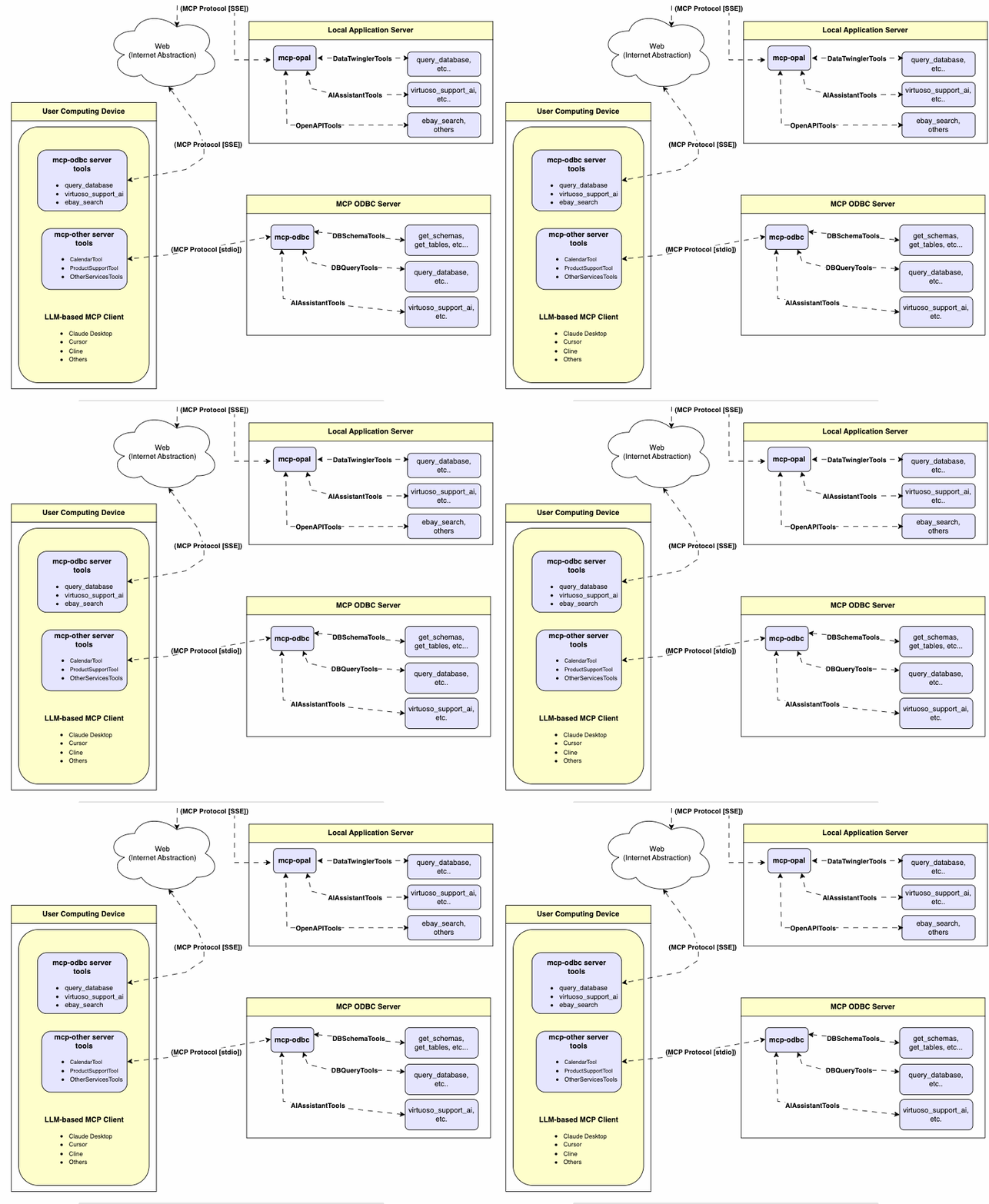89---1011## Features1213- **Get Schemas**: Fetch and list all schema names from the connected database.14- **Get Tables**: Retrieve table information for specific schemas or all schemas.15- **Describe Table**: Generate a detailed description of table structures, including:16 - Column names and data types17 - Nullable attributes18 - Primary and foreign keys19- **Search Tables**: Filter and retrieve tables based on name substrings.20- **Execute Stored Procedures**: In the case of Virtuoso, execute stored procedures and retrieve results.21- **Execute Queries**:22 - JSONL result format: Optimized for structured responses.23 - Markdown table format: Ideal for reporting and visualization.2425---2627## Prerequisites28291. **Install uv**:30 ```bash31 pip install uv32 ```33 Or use Homebrew:34 ```bash35 brew install uv36 ```37382. **unixODBC Runtime Environment Checks**:39401. Check installation configuration (i.e., location of key INI files) by running: `odbcinst -j`412. List available data source names by running: `odbcinst -q -s`42433. **ODBC DSN Setup**: Configure your ODBC Data Source Name (`~/.odbc.ini`) for the target database. Example for Virtuoso DBMS:44 ```45 [VOS]46 Description = OpenLink Virtuoso47 Driver = /path/to/virtodbcu_r.so48 Database = Demo49 Address = localhost:111150 WideAsUTF16 = Yes51 ```52533. **SQLAlchemy URL Binding**: Use the format:54 ```55 virtuoso+pyodbc://user:password@VOS56 ```5758---5960## Installation6162Clone this repository:63```bash64git clone https://github.com/OpenLinkSoftware/mcp-sqlalchemy-server.git65cd mcp-sqlalchemy-server66```67## Environment Variables68Update your `.env`by overriding the defaults to match your preferences69```70ODBC_DSN=VOS71ODBC_USER=dba72ODBC_PASSWORD=dba73API_KEY=xxx74```75---7677## Configuration7879For **Claude Desktop** users:80Add the following to `claude_desktop_config.json`:81```json82{83 "mcpServers": {84 "my_database": {85 "command": "uv",86 "args": ["--directory", "/path/to/mcp-sqlalchemy-server", "run", "mcp-sqlalchemy-server"],87 "env": {88 "ODBC_DSN": "dsn_name",89 "ODBC_USER": "username",90 "ODBC_PASSWORD": "password",91 "API_KEY": "sk-xxx"92 }93 }94 }95}96```97---98# Usage99## Database Management System (DBMS) Connection URLs100Here are the pyodbc URL examples for connecting to DBMS systems that have been tested using this mcp-server.101102| Database | URL Format |103|---------------|-----------------------------------------------|104| Virtuoso DBMS | `virtuoso+pyodbc://user:password@ODBC_DSN` |105| PostgreSQL | `postgresql://user:password@localhost/dbname` |106| MySQL | `mysql+pymysql://user:password@localhost/dbname` |107| SQLite | `sqlite:///path/to/database.db` |108Once connected, you can interact with your WhatsApp contacts through Claude, leveraging Claude's AI capabilities in your WhatsApp conversations.109110## Tools Provided111112### Overview113|name|description|114|---|---|115|podbc_get_schemas|List database schemas accessible to connected database management system (DBMS).|116|podbc_get_tables|List tables associated with a selected database schema.|117|podbc_describe_table|Provide the description of a table associated with a designated database schema. This includes information about column names, data types, nulls handling, autoincrement, primary key, and foreign keys|118|podbc_filter_table_names|List tables, based on a substring pattern from the `q` input field, associated with a selected database schema.|119|podbc_query_database|Execute a SQL query and return results in JSONL format.|120|podbc_execute_query|Execute a SQL query and return results in JSONL format.|121|podbc_execute_query_md|Execute a SQL query and return results in Markdown table format.|122|podbc_spasql_query|Execute a SPASQL query and return results.|123|podbc_sparql_query|Execute a SPARQL query and return results.|124|podbc_virtuoso_support_ai|Interact with the Virtuoso Support Assistant/Agent -- a Virtuoso-specific feature for interacting with LLMs|125126### Detailed Description127128- **podbc_get_schemas**129 - Retrieve and return a list of all schema names from the connected database.130 - Input parameters:131 - `user` (string, optional): Database username. Defaults to "demo".132 - `password` (string, optional): Database password. Defaults to "demo".133 - `dsn` (string, optional): ODBC data source name. Defaults to "Local Virtuoso".134 - Returns a JSON string array of schema names.135136- **podbc_get_tables**137 - Retrieve and return a list containing information about tables in a specified schema. If no schema is provided, uses the connection's default schema.138 - Input parameters:139 - `schema` (string, optional): Database schema to filter tables. Defaults to connection default.140 - `user` (string, optional): Database username. Defaults to "demo".141 - `password` (string, optional): Database password. Defaults to "demo".142 - `dsn` (string, optional): ODBC data source name. Defaults to "Local Virtuoso".143 - Returns a JSON string containing table information (e.g., TABLE_CAT, TABLE_SCHEM, TABLE_NAME, TABLE_TYPE).144145- **podbc_filter_table_names**146 - Filters and returns information about tables whose names contain a specific substring.147 - Input parameters:148 - `q` (string, required): The substring to search for within table names.149 - `schema` (string, optional): Database schema to filter tables. Defaults to connection default.150 - `user` (string, optional): Database username. Defaults to "demo".151 - `password` (string, optional): Database password. Defaults to "demo".152 - `dsn` (string, optional): ODBC data source name. Defaults to "Local Virtuoso".153 - Returns a JSON string containing information for matching tables.154155- **podbc_describe_table**156 - Retrieve and return detailed information about the columns of a specific table.157 - Input parameters:158 - `schema` (string, required): The database schema name containing the table.159 - `table` (string, required): The name of the table to describe.160 - `user` (string, optional): Database username. Defaults to "demo".161 - `password` (string, optional): Database password. Defaults to "demo".162 - `dsn` (string, optional): ODBC data source name. Defaults to "Local Virtuoso".163 - Returns a JSON string describing the table's columns (e.g., COLUMN_NAME, TYPE_NAME, COLUMN_SIZE, IS_NULLABLE).164165- **podbc_query_database**166 - Execute a standard SQL query and return the results in JSON format.167 - Input parameters:168 - `query` (string, required): The SQL query string to execute.169 - `user` (string, optional): Database username. Defaults to "demo".170 - `password` (string, optional): Database password. Defaults to "demo".171 - `dsn` (string, optional): ODBC data source name. Defaults to "Local Virtuoso".172 - Returns query results as a JSON string.173174- **podbc_query_database_md**175 - Execute a standard SQL query and return the results formatted as a Markdown table.176 - Input parameters:177 - `query` (string, required): The SQL query string to execute.178 - `user` (string, optional): Database username. Defaults to "demo".179 - `password` (string, optional): Database password. Defaults to "demo".180 - `dsn` (string, optional): ODBC data source name. Defaults to "Local Virtuoso".181 - Returns query results as a Markdown table string.182183- **podbc_query_database_jsonl**184 - Execute a standard SQL query and return the results in JSON Lines (JSONL) format (one JSON object per line).185 - Input parameters:186 - `query` (string, required): The SQL query string to execute.187 - `user` (string, optional): Database username. Defaults to "demo".188 - `password` (string, optional): Database password. Defaults to "demo".189 - `dsn` (string, optional): ODBC data source name. Defaults to "Local Virtuoso".190 - Returns query results as a JSONL string.191192- **podbc_spasql_query**193 - Execute a SPASQL (SQL/SPARQL hybrid) query return results. This is a Virtuoso-specific feature.194 - Input parameters:195 - `query` (string, required): The SPASQL query string.196 - `max_rows` (number, optional): Maximum number of rows to return. Defaults to 20.197 - `timeout` (number, optional): Query timeout in milliseconds. Defaults to 30000.198 - `user` (string, optional): Database username. Defaults to "demo".199 - `password` (string, optional): Database password. Defaults to "demo".200 - `dsn` (string, optional): ODBC data source name. Defaults to "Local Virtuoso".201 - Returns the result from the underlying stored procedure call (e.g., `Demo.demo.execute_spasql_query`).202203- **podbc_sparql_query**204 - Execute a SPARQL query and return results. This is a Virtuoso-specific feature.205 - Input parameters:206 - `query` (string, required): The SPARQL query string.207 - `format` (string, optional): Desired result format. Defaults to 'json'.208 - `timeout` (number, optional): Query timeout in milliseconds. Defaults to 30000.209 - `user` (string, optional): Database username. Defaults to "demo".210 - `password` (string, optional): Database password. Defaults to "demo".211 - `dsn` (string, optional): ODBC data source name. Defaults to "Local Virtuoso".212 - Returns the result from the underlying function call (e.g., `"UB".dba."sparqlQuery"`).213214- **podbc_virtuoso_support_ai**215 - Utilizes a Virtuoso-specific AI Assistant function, passing a prompt and optional API key. This is a Virtuoso-specific feature.216 - Input parameters:217 - `prompt` (string, required): The prompt text for the AI function.218 - `api_key` (string, optional): API key for the AI service. Defaults to "none".219 - `user` (string, optional): Database username. Defaults to "demo".220 - `password` (string, optional): Database password. Defaults to "demo".221 - `dsn` (string, optional): ODBC data source name. Defaults to "Local Virtuoso".222 - Returns the result from the AI Support Assistant function call (e.g., `DEMO.DBA.OAI_VIRTUOSO_SUPPORT_AI`).223224---225226## Troubleshooting227228For easier troubleshooting:2291. Install the MCP Inspector:230 ```bash231 npm install -g @modelcontextprotocol/inspector232 ```2332342. Start the inspector:235 ```bash236 npx @modelcontextprotocol/inspector uv --directory /path/to/mcp-sqlalchemy-server run mcp-sqlalchemy-server237 ```238239Access the provided URL to troubleshoot server interactions.240241
Full transparency — inspect the skill content before installing.