
Query OpenAI models directly from Claude using MCP protocol. Add to claudedesktopconfig.json: MIT License
npx mdskills install pierrebrunelle/mcp-server-openaiRelated
@pierrebrunelle? Sign in with GitHub to claim this listing.Enables querying OpenAI models from Claude but lacks tool descriptions and overscopes permissions
Query OpenAI models directly from Claude using MCP protocol.
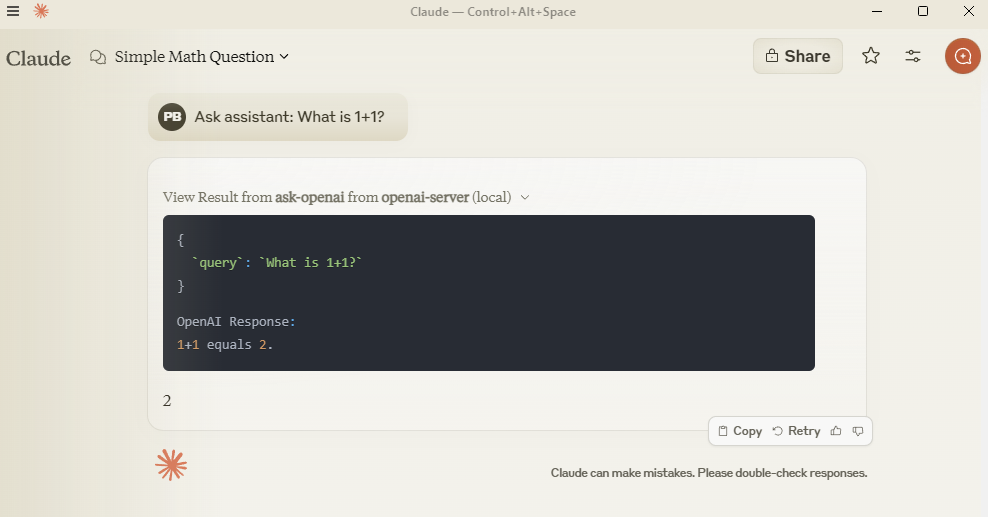
Add to claude_desktop_config.json:
{
  "mcpServers": {
    "openai-server": {
      "command": "python",
      "args": ["-m", "src.mcp_server_openai.server"],
      "env": {
        "PYTHONPATH": "C:/path/to/your/mcp-server-openai",
        "OPENAI_API_KEY": "your-key-here"
      }
    }
  }
}
git clone https://github.com/pierrebrunelle/mcp-server-openai
cd mcp-server-openai
pip install -e .
# Run tests from project root
pytest -v test_openai.py -s

# Sample test output:
Testing OpenAI API call...
OpenAI Response: Hello! I'm doing well, thank you for asking...
PASSED
MIT License
Install via CLI
npx mdskills install pierrebrunelle/mcp-server-openaiOpenAI MCP Server is a free, open-source AI agent skill. Query OpenAI models directly from Claude using MCP protocol. Add to claudedesktopconfig.json: MIT License
Install OpenAI MCP Server with a single command:
npx mdskills install pierrebrunelle/mcp-server-openaiThis downloads the skill files into your project and your AI agent picks them up automatically.
OpenAI MCP Server works with Claude Code, Claude Desktop, Cursor, Vscode Copilot, Windsurf, Continue Dev, Gemini Cli, Amp, Roo Code, Goose. Skills use the open SKILL.md format which is compatible with any AI coding agent that reads markdown instructions.