
MCP Server is a versatile tool designed for interactive data exploration. Your personal Data Scientist assistant, turning complex datasets into clear, actionable insights. 1. Download Claude Desktop - Get it here 2. Install and Set Up - On macOS, run the following command in your terminal: 3. Load Templates and Tools - Once the server is running, wait for the prompt template and tools to load in C
npx mdskills install reading-plus-ai/mcp-server-data-explorationRelated
@reading-plus-ai? Sign in with GitHub to claim this listing.Well-documented data exploration server with useful tools and excellent examples, but needs permission justification
MCP Server is a versatile tool designed for interactive data exploration.
Your personal Data Scientist assistant, turning complex datasets into clear, actionable insights.
Download Claude Desktop
Install and Set Up
python setup.py
Load Templates and Tools
Start Exploring
csv_path: Local path to the CSV filetopic: The topic of exploration (e.g., "Weather patterns in New York" or "Housing prices in California")These are examples of how you can use MCP Server to explore data without any human intervention.
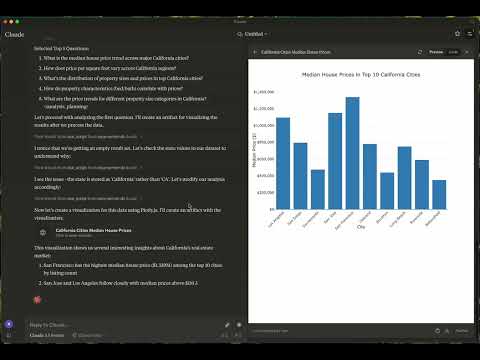
load-csv
csv_path (string, required): Path to the CSV filedf_name (string, optional): Name for the DataFrame. Defaults to df_1, df_2, etc., if not providedrun-script
script (string, required): The script to execute~/Library/Application\ Support/Claude/claude_desktop_config.json%APPDATA%/Claude/claude_desktop_config.json"mcpServers": {
"mcp-server-ds": {
"command": "uv",
"args": [
"--directory",
"/Users/username/src/mcp-server-ds",
"run",
"mcp-server-ds"
]
}
}
"mcpServers": {
  "mcp-server-ds": {
    "command": "uvx",
    "args": [
      "mcp-server-ds"
    ]
  }
}
Sync Dependencies
uv sync
Build Distributions
uv build
Generates source and wheel distributions in the dist/ directory.
Publish to PyPI
uv publish
Contributions are welcome! Whether you're fixing bugs, adding features, or improving documentation, your help makes this project better.
If you encounter bugs or have suggestions, open an issue in the issues section. Include:
This project is licensed under the MIT License. See the LICENSE file for details.
Questions? Feedback? Open an issue or reach out to the maintainers. Let's make this project awesome together!
This is an open source project run by ReadingPlus.AI LLC. and open to contributions from the entire community.
Install via CLI
npx mdskills install reading-plus-ai/mcp-server-data-explorationMCP Server for Data Exploration is a free, open-source AI agent skill. MCP Server is a versatile tool designed for interactive data exploration. Your personal Data Scientist assistant, turning complex datasets into clear, actionable insights. 1. Download Claude Desktop - Get it here 2. Install and Set Up - On macOS, run the following command in your terminal: 3. Load Templates and Tools - Once the server is running, wait for the prompt template and tools to load in C
Install MCP Server for Data Exploration with a single command:
npx mdskills install reading-plus-ai/mcp-server-data-explorationThis downloads the skill files into your project and your AI agent picks them up automatically.
MCP Server for Data Exploration works with Claude Code, Claude Desktop, Cursor, Vscode Copilot, Windsurf, Continue Dev, Gemini Cli, Amp, Roo Code, Goose. Skills use the open SKILL.md format which is compatible with any AI coding agent that reads markdown instructions.