
A Model Context Protocol server for document format conversion using pandoc. This server provides tools to transform content between different document formats while preserving formatting and structure. Please note that mcp-pandoc is currently in early development. PDF support is under development, and the functionality and available tools are subject to change and expansion as we continue to impr
npx mdskills install vivekVells/mcp-pandocRelated
@vivekVells? Sign in with GitHub to claim this listing.Well-documented document converter with comprehensive format support and clear setup instructions
1[](https://pypi.python.org/pypi/mcp-pandoc)2[](https://github.com/vivekVells/mcp-pandoc/actions/workflows/ci.yml)3<br />4567<!-- [](https://pepy.tech/project/mcp-pandoc) -->8<!--  -->910<!--11[](https://pypi.python.org/pypi/mcp-pandoc)12[](https://github.com/vivekVells/mcp-pandoc/actions/workflows/ci.yml)13<a href="https://smithery.ai/server/mcp-pandoc"><img alt="Smithery Badge" src="https://smithery.ai/badge/mcp-pandoc"></a> <a href="https://glama.ai/mcp/servers/xyzzgaj9bk"><img width="380" height="200" src="https://glama.ai/mcp/servers/xyzzgaj9bk/badge" /></a>14-->15[](https://mseep.ai/app/vivekvells-mcp-pandoc)16<a href="https://glama.ai/mcp/servers/xyzzgaj9bk"><img width="380" height="200" src="https://glama.ai/mcp/servers/xyzzgaj9bk/badge" />1718# mcp-pandoc: A Document Conversion MCP Server1920> Officially included in the [Model Context Protocol servers](https://github.com/modelcontextprotocol/servers/blob/main/README.md) open-source project. 🎉2122## Overview2324A Model Context Protocol server for document format conversion using [pandoc](https://pandoc.org/index.html). This server provides tools to transform content between different document formats while preserving formatting and structure.2526Please note that mcp-pandoc is currently in early development. PDF support is under development, and the functionality and available tools are subject to change and expansion as we continue to improve the server.2728Credit: This project uses the [Pandoc Python package](https://pypi.org/project/pandoc/) for document conversion, forming the foundation for this project.2930## 📋 Quick Reference3132**New to mcp-pandoc?** Check out **[📖 CHEATSHEET.md](CHEATSHEET.md)** for3334- ⚡ Copy-paste examples for all formats35- 🔄 Bidirectional conversion matrix36- 🎯 Common workflows and pro tips37- 🌟 Reference document styling guide3839_Perfect for quick lookups and getting started fast!_4041## Demo4243[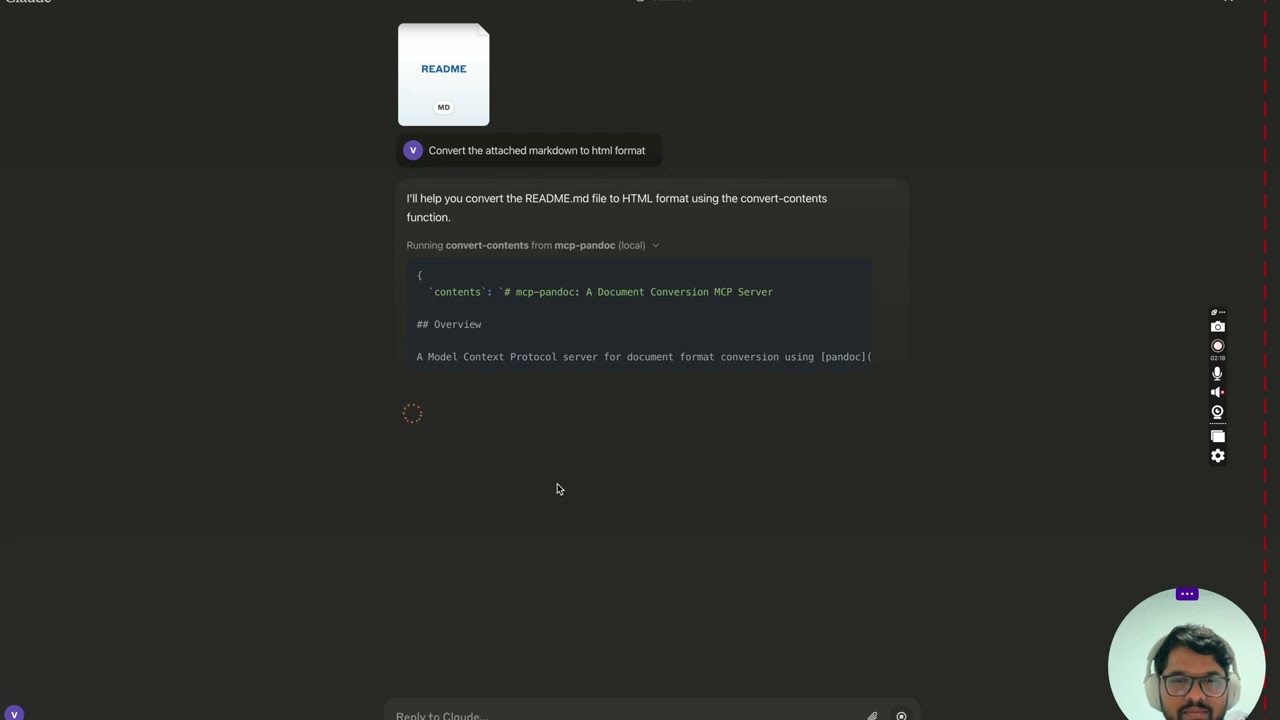](https://youtu.be/vN3VOb0rygM)4445> 🎥 [Watch on YouTube](https://youtu.be/vN3VOb0rygM)4647<details>48<summary>Screenshots</summary>4950<img width="2407" alt="Screenshot 2024-12-26 at 3 33 54 PM" src="https://github.com/user-attachments/assets/ce3f5396-252a-4bba-84aa-65b2a06b859e" />51<img width="2052" alt="Screenshot 2024-12-26 at 3 38 24 PM" src="https://github.com/user-attachments/assets/8c525ad1-b184-41ca-b068-7dd34b60b85d" />52<img width="1498" alt="Screenshot 2024-12-26 at 3 40 51 PM" src="https://github.com/user-attachments/assets/a1e0682d-fe44-40b6-9988-bf805627beeb" />53<img width="760" alt="Screenshot 2024-12-26 at 3 41 20 PM" src="https://github.com/user-attachments/assets/1d7f5998-6d7f-48fa-adcf-fc37d0521213" />54<img width="1493" alt="Screenshot 2024-12-26 at 3 50 27 PM" src="https://github.com/user-attachments/assets/97992c5d-8efc-40af-a4c3-94c51c392534" />55</details>5657More to come...5859## Tools60611. `convert-contents`62 - Transforms content between supported formats63 - Inputs:64 - `contents` (string): Source content to convert (required if input_file not provided)65 - `input_file` (string): Complete path to input file (required if contents not provided)66 - `input_format` (string): Source format of the content (defaults to markdown)67 - `output_format` (string): Target format (defaults to markdown)68 - `output_file` (string): Complete path for output file (required for pdf, docx, rst, latex, epub formats)69 - `reference_doc` (string): Path to a reference document to use for styling (supported for docx output format)70 - `defaults_file` (string): Path to a Pandoc defaults file (YAML) containing conversion options71 - `filters` (array): List of Pandoc filter paths to apply during conversion72 - Supported input/output formats:73 - markdown74 - html75 - pdf76 - docx77 - rst78 - latex79 - epub80 - txt81 - ipynb82 - odt83 - Note: For advanced formats (pdf, docx, rst, latex, epub), an output_file path is required8485### 🔧 Advanced Features8687#### Defaults Files (YAML Configuration)8889Use defaults files to create reusable conversion templates with consistent formatting:9091```yaml92# academic-paper.yaml93from: markdown94to: pdf95number-sections: true96toc: true97metadata:98 title: "Academic Paper"99 author: "Research Team"100```101102Example usage: `"Convert paper.md to PDF using defaults academic-paper.yaml and save as paper.pdf"`103104#### Pandoc Filters105106Apply custom filters for enhanced processing:107108Example usage: `"Convert docs.md to HTML with filters ['/path/to/mermaid-filter.py'] and save as docs.html"`109110> 💡 **For comprehensive examples and workflows**, see **[CHEATSHEET.md](CHEATSHEET.md)**111112## 📊 Supported Formats & Conversions113114### Bidirectional Conversion Matrix115116| From\To | MD | HTML | TXT | DOCX | PDF | RST | LaTeX | EPUB | IPYNB | ODT |117| ------------ | --- | ---- | --- | ---- | --- | --- | ----- | ---- | ----- | --- |118| **Markdown** | ✅ | ✅ | ✅ | ✅ | ✅ | ✅ | ✅ | ✅ | ✅ | ✅ |119| **HTML** | ✅ | ✅ | ✅ | ✅ | ✅ | ✅ | ✅ | ✅ | ✅ | ✅ |120| **TXT** | ✅ | ✅ | ✅ | ✅ | ✅ | ✅ | ✅ | ✅ | ✅ | ✅ |121| **DOCX** | ✅ | ✅ | ✅ | ✅ | ✅ | ✅ | ✅ | ✅ | ✅ | ✅ |122| **RST** | ✅ | ✅ | ✅ | ✅ | ✅ | ✅ | ✅ | ✅ | ✅ | ✅ |123| **LaTeX** | ✅ | ✅ | ✅ | ✅ | ✅ | ✅ | ✅ | ✅ | ✅ | ✅ |124| **EPUB** | ✅ | ✅ | ✅ | ✅ | ✅ | ✅ | ✅ | ✅ | ✅ | ✅ |125| **IPYNB** | ✅ | ✅ | ✅ | ✅ | ✅ | ✅ | ✅ | ✅ | ✅ | ✅ |126| **ODT** | ✅ | ✅ | ✅ | ✅ | ✅ | ✅ | ✅ | ✅ | ✅ | ✅ |127128### A Note on PDF Support129130This tool uses `pandoc` for conversions, which allows for generating PDF files from the formats listed above. However, converting _from_ a PDF to other formats is not supported. Therefore, PDF should be considered an **output-only** format.131132### Format Categories133134| Category | Formats | Requirements |135| ------------ | --------------------------- | ------------------------------- |136| **Basic** | MD, HTML, TXT, IPYNB, ODT | None |137| **Advanced** | DOCX, PDF, RST, LaTeX, EPUB | Must specify `output_file` path |138| **Styled** | DOCX with reference doc | Custom template support ⭐ |139140### Requirements by Format141142- **PDF (.pdf)** - requires TeX Live installation143- **DOCX (.docx)** - supports custom styling via reference documents144- **All others** - no additional requirements145146Note: For advanced formats:1471481. Complete file paths with filename and extension are required1492. **PDF conversion requires TeX Live installation** (see Critical Requirements section -> For macOS: `brew install texlive`)1503. When no output path is specified:151 - Basic formats: Displays converted content in the chat152 - Advanced formats: May save in system temp directory (/tmp/ on Unix systems)153154## Usage & configuration155156**NOTE: Ensure to complete installing required packages mentioned below under "Critical Requirements".**157158To use the published one159160```bash161{162 "mcpServers": {163 "mcp-pandoc": {164 "command": "uvx",165 "args": ["mcp-pandoc"]166 }167 }168}169```170171**💡 Quick Start**: See **[CHEATSHEET.md](CHEATSHEET.md)** for copy-paste examples and common workflows.172173### ⚠️ Important Notes174175#### Critical Requirements1761771. **Pandoc Installation**178179- **Required**: Install `pandoc` - the core document conversion engine180- Installation:181182 ```bash183 # macOS184 brew install pandoc185186 # Ubuntu/Debian187 sudo apt-get install pandoc188189 # Windows190 # Download installer from: https://pandoc.org/installing.html191 ```192193- **Verify**: `pandoc --version`1941952. **UV package installation**196197- **Required**: Install `uv` package (includes `uvx` command)198- Installation:199200 ```bash201 # macOS202 brew install uv203204 # Windows/Linux205 pip install uv206 ```207208- **Verify**: `uvx --version`2092103. **PDF Conversion Prerequisites:** Only needed if you need to convert & save pdf211212- TeX Live must be installed before attempting PDF conversion213- Installation commands:214215 ```bash216 # Ubuntu/Debian217 sudo apt-get install texlive-xetex218219 # macOS220 brew install texlive221222 # Windows223 # Install MiKTeX or TeX Live from:224 # https://miktex.org/ or https://tug.org/texlive/225 ```2262274. **File Path Requirements**228229- When saving or converting files, you MUST provide complete file paths including filename and extension230- The tool does not automatically generate filenames or extensions231232#### Examples233234✅ Correct Usage:235236```bash237# Converting content to PDF238"Convert this text to PDF and save as /path/to/document.pdf"239240# Converting between file formats241"Convert /path/to/input.md to PDF and save as /path/to/output.pdf"242243# Converting to DOCX with a reference document template244"Convert input.md to DOCX using template.docx as reference and save as output.docx"245246# Step-by-step reference document workflow247"First create a reference document: pandoc -o custom-reference.docx --print-default-data-file reference.docx" or if you already have one, use that248"Then convert with custom styling: Convert this text to DOCX using /path/to/custom-reference.docx as reference and save as /path/to/styled-output.docx"249```250251❌ Incorrect Usage:252253```bash254# Missing filename and extension255"Save this as PDF in /documents/"256257# Missing complete path258"Convert this to PDF"259260# Missing extension261"Save as /documents/story"262```263264#### Common Issues and Solutions2652661. **PDF Conversion Fails**267268 - Error: "xelatex not found"269 - Solution: Install TeX Live first (see installation commands above)2702712. **File Conversion Fails**272273 - Error: "Invalid file path"274 - Solution: Provide complete path including filename and extension275 - Example: `/path/to/document.pdf` instead of just `/path/to/`2762773. **Format Conversion Fails**278279 - Error: "Unsupported format"280 - Solution: Use only supported formats:281 - Basic: txt, html, markdown282 - Advanced: pdf, docx, rst, latex, epub2832844. **Reference Document Issues**285 - Error: "Reference document not found"286 - Solution: Ensure the reference document path exists and is accessible287 - Note: Reference documents only work with DOCX output format288 - How to create: `pandoc -o reference.docx --print-default-data-file reference.docx`289290## Quickstart291292<!-- Uncomment after smithery fix293### Install294295#### Option 1: Installing manually via claude_desktop_config.json config file296-->297298### Installing manually via claude_desktop_config.json config file299300- On MacOS: `open ~/Library/Application\ Support/Claude/claude_desktop_config.json`301- On Windows: `%APPDATA%/Claude/claude_desktop_config.json`302303a) Only for local development & contribution to this repo304305<details>306 <summary>Development/Unpublished Servers Configuration</summary>307308ℹ️ Replace <DIRECTORY> with your locally cloned project path309310```bash311"mcpServers": {312 "mcp-pandoc": {313 "command": "uv",314 "args": [315 "--directory",316 "<DIRECTORY>/mcp-pandoc",317 "run",318 "mcp-pandoc"319 ]320 }321}322```323324</details>325326b) Published Servers Configuration - Consumers should use this config327328```bash329"mcpServers": {330 "mcp-pandoc": {331 "command": "uvx",332 "args": [333 "mcp-pandoc"334 ]335 }336}337```338339<!-- Uncomment after smithery cli fix340#### Option 2: To install Published Servers Configuration automatically via Smithery341342Run the following bash command to install **published** [mcp-pandoc pypi](https://pypi.org/project/mcp-pandoc) for Claude Desktop automatically via [Smithery](https://smithery.ai/server/mcp-pandoc):343344```bash345npx -y @smithery/cli install mcp-pandoc --client claude346```347-->348349- If you face any issue, use the "Published Servers Configuration" above directly instead of this cli.350351**Note**: To use locally configured mcp-pandoc, follow "Development/Unpublished Servers Configuration" step above.352353## Development354355### Testing356357To run the comprehensive test suite and validate all supported bidirectional conversions, use the following command:358359```bash360uv run pytest tests/test_conversions.py361```362363This ensures backward compatibility and verifies the tool's core functionality.364365### Building and Publishing366367To prepare the package for distribution:3683691. Sync dependencies and update lockfile:370371```bash372uv sync373```3743752. Build package distributions:376377```bash378uv build379```380381This will create source and wheel distributions in the `dist/` directory.3823833. Publish to PyPI:384385```bash386uv publish387```388389Note: You'll need to set PyPI credentials via environment variables or command flags:390391- Token: `--token` or `UV_PUBLISH_TOKEN`392- Or username/password: `--username`/`UV_PUBLISH_USERNAME` and `--password`/`UV_PUBLISH_PASSWORD`393394### Debugging395396Since MCP servers run over stdio, debugging can be challenging. For the best debugging397experience, we strongly recommend using the [MCP Inspector](https://github.com/modelcontextprotocol/inspector).398399You can launch the MCP Inspector via [`npm`](https://docs.npmjs.com/downloading-and-installing-node-js-and-npm) with this command:400401```bash402npx @modelcontextprotocol/inspector uv --directory /Users/vivekvells/Desktop/code/ai/mcp-pandoc run mcp-pandoc403```404405Upon launching, the Inspector will display a URL that you can access in your browser to begin debugging.406407---408409## Contributing410411We welcome contributions to enhance mcp-pandoc! Here's how you can get involved:4124131. **Report Issues**: Found a bug or have a feature request? Open an issue on our [GitHub Issues](https://github.com/vivekVells/mcp-pandoc/issues) page.4142. **Submit Pull Requests**: Improve the codebase or add features by creating a pull request.415416---417
Full transparency — inspect the skill content before installing.