
A Kubernetes MCP (Model Control Protocol) server that enables interaction with Kubernetes clusters through MCP tools. - Query supported Kubernetes resource types (built-in resources and CRDs) - Kubernetes resource operations with fine-grained control - Read operations: get resource details, list resources by type with filtering options - Write operations: create, update, and delete resources (each
npx mdskills install silenceper/mcp-k8sRelated
@silenceper? Sign in with GitHub to claim this listing.Comprehensive Kubernetes and Helm MCP server with fine-grained permission control and excellent documentation
A Kubernetes MCP (Model Control Protocol) server that enables interaction with Kubernetes clusters through MCP tools.
Interaction through cursor
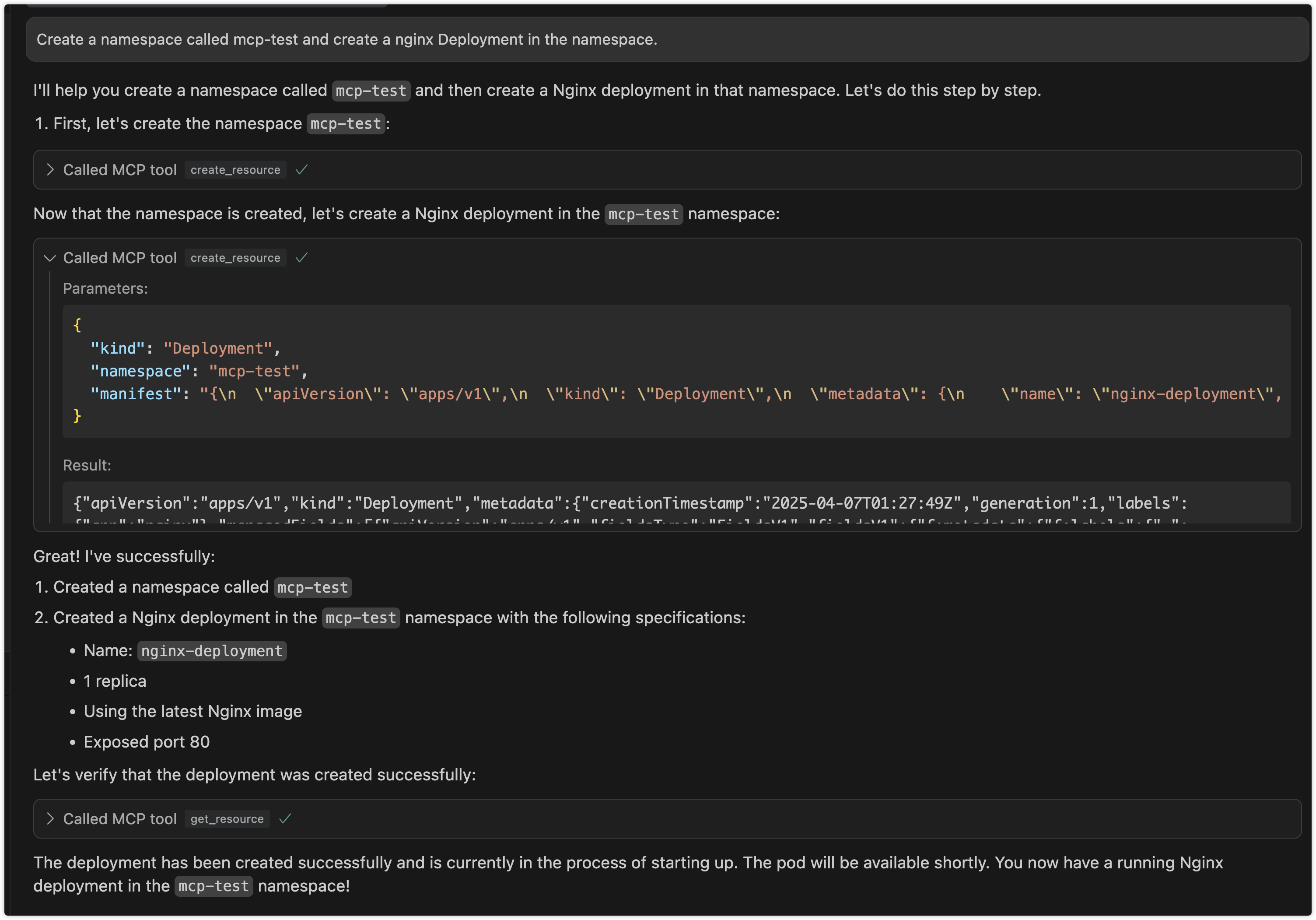
An stdio-based MCP server that connects to Kubernetes clusters and provides the following capabilities:
mcp-k8s package to create an stdio-based MCP serverget_api_resources: Get all supported API resource types in the clusterget_resource: Get detailed information about a specific resourcelist_resources: List all instances of a resource typecreate_resource: Create new resources (can be disabled)update_resource: Update existing resources (can be disabled)delete_resource: Delete resources (can be disabled)list_helm_releases: List all Helm releases in the clusterget_helm_release: Get detailed information about a specific Helm releaseinstall_helm_chart: Install a Helm chart (can be disabled)upgrade_helm_chart: Upgrade a Helm release (can be disabled)uninstall_helm_chart: Uninstall a Helm release (can be disabled)list_helm_repositories: List configured Helm repositoriesadd_helm_repository: Add a new Helm repository (can be disabled)remove_helm_repository: Remove a Helm repository (can be disabled)mcp-k8s supports three communication modes:
In stdio mode, mcp-k8s communicates with the client through standard input/output streams. This is the default mode and is suitable for most use cases.
# Run in stdio mode (default)
{
    "mcpServers":
    {
        "mcp-k8s":
        {
            "command": "/path/to/mcp-k8s",
            "args":
            [
                "--kubeconfig",
                "/path/to/kubeconfig",
                "--enable-create",
                "--enable-delete",
                "--enable-update",
                "--enable-list",
                "--enable-helm-install",
                "--enable-helm-upgrade"
            ]
        }
    }
}
In SSE (Server-Sent Events) mode, mcp-k8s exposes an HTTP endpoint to mcp client. You can deploy the service on a remote server (but you need to pay attention to security)
# Run in SSE mode
./bin/mcp-k8s --kubeconfig=/path/to/kubeconfig --transport=sse --port=8080 --host=localhost --enable-create --enable-delete --enable-list --enable-update --enable-helm-install
# This command will open all operations
mcp config
{
  "mcpServers": {
    "mcp-k8s": {
      "url": "http://localhost:8080/sse",
      "args": []
    }
  }
}
SSE mode configuration:
--transport: Set to "sse" to enable SSE mode--port: HTTP server port (default: 8080)--host: HTTP server host (default: "localhost")In Streamable HTTP mode, mcp-k8s exposes an HTTP endpoint that supports both direct HTTP responses and SSE streams. This mode provides better flexibility and supports streaming output.
# Run in Streamable HTTP mode
./bin/mcp-k8s --kubeconfig=/path/to/kubeconfig --transport=streamable-http --port=8080 --host=localhost --endpoint-path=/mcp --enable-create --enable-delete --enable-list --enable-update --enable-helm-install
mcp config
{
  "mcpServers": {
    "mcp-k8s": {
      "url": "http://localhost:8080/mcp",
      "args": []
    }
  }
}
Streamable HTTP mode configuration:
--transport: Set to "streamable-http" to enable Streamable HTTP mode--port: HTTP server port (default: 8080)--host: HTTP server host (default: "localhost")--endpoint-path: Endpoint path for the MCP server (default: "/mcp")docker run --rm -p 8080:8080 -i -v ~/.kube/config:/root/.kube/config ghcr.io/silenceper/mcp-k8s:latest --transport=sse
docker run --rm -p 8080:8080 -i -v ~/.kube/config:/root/.kube/config ghcr.io/silenceper/mcp-k8s:latest --transport=streamable-http --endpoint-path=/mcp
{
  "mcpServers": {
    "mcp-k8s": {
      "command": "docker",
      "args": [
        "run",
        "-i",
        "-v",
        "~/.kube/config:/root/.kube/config",
        "--rm",
        "ghcr.io/silenceper/mcp-k8s:latest"
      ]
    }
  }
}
You can directly download the binary for your platform from the releases page and use it immediately.
go install github.com/silenceper/mcp-k8s/cmd/mcp-k8s@latest
The Makefile automatically injects version information from the VERSION file:
git clone https://github.com/silenceper/mcp-k8s.git
cd mcp-k8s
make build
This will build with version information injected via ldflags.
git clone https://github.com/silenceper/mcp-k8s.git
cd mcp-k8s
go build -o bin/mcp-k8s cmd/mcp-k8s/main.go
Note: Direct build will show version as "dev" unless you specify ldflags manually.
You can use mcp-k8s --help to see all available options, or mcp-k8s --version to check the version.
--kubeconfig: Path to Kubernetes configuration file (uses default config if not specified)--enable-create: Enable resource creation operations (default: false)--enable-update: Enable resource update operations (default: false)--enable-delete: Enable resource deletion operations (default: false)--enable-list: Enable resource list operations (default: true)--enable-helm-release-list: Enable Helm release list operations (default: true)--enable-helm-release-get: Enable Helm release get operations (default: true)--enable-helm-install: Enable Helm chart installation (default: false)--enable-helm-upgrade: Enable Helm chart upgrade (default: false)--enable-helm-uninstall: Enable Helm chart uninstallation (default: false)--enable-helm-repo-list: Enable Helm repository list operations (default: true)--enable-helm-repo-add: Enable Helm repository add operations (default: false)--enable-helm-repo-remove: Enable Helm repository remove operations (default: false)--transport: Transport type (stdio, sse, or streamable-http) (default: "stdio")--host: Host for HTTP transport (SSE or Streamable HTTP) (default: "localhost")--port: TCP port for HTTP transport (SSE or Streamable HTTP) (default: 8080)--endpoint-path: Endpoint path for Streamable HTTP transport (default: "/mcp")--version: Display version information including version, commit hash, and build date--help or -h: Display help informationTo test if Streamable HTTP mode is working correctly, you can use the provided test script:
# Start the server in one terminal
./bin/mcp-k8s --transport=streamable-http --port=8080 --enable-list

# In another terminal, run the test script
./test_streamable_http.sh
For detailed testing instructions, see TEST_STREAMABLE_HTTP.md.
mcp-k8s is an stdio-based MCP server that can be integrated with any MCP-compatible LLM client. Refer to your MCP client's documentation for integration instructions.

Install via CLI
npx mdskills install silenceper/mcp-k8sMCP K8s is a free, open-source AI agent skill. A Kubernetes MCP (Model Control Protocol) server that enables interaction with Kubernetes clusters through MCP tools. - Query supported Kubernetes resource types (built-in resources and CRDs) - Kubernetes resource operations with fine-grained control - Read operations: get resource details, list resources by type with filtering options - Write operations: create, update, and delete resources (each
Install MCP K8s with a single command:
npx mdskills install silenceper/mcp-k8sThis downloads the skill files into your project and your AI agent picks them up automatically.
MCP K8s works with Claude Code, Claude Desktop, Cursor, Vscode Copilot, Windsurf, Continue Dev, Gemini Cli, Amp, Roo Code, Goose. Skills use the open SKILL.md format which is compatible with any AI coding agent that reads markdown instructions.