
A lightweight Java-based MCP (Model Context Protocol) server for JDBC built with Quakrus. This server is compatible with Virtuoso DBMS and any other DBMS backend that has a JDBC driver. - Get Schemas: Fetch and list all schema names from the connected database. - Get Tables: Retrieve table information for specific schemas or all schemas. - Describe Table: Generate a detailed description of table s
npx mdskills install OpenLinkSoftware/mcp-jdbc-serverRelated
@OpenLinkSoftware? Sign in with GitHub to claim this listing.Comprehensive JDBC-based MCP server with extensive database tools and clear documentation
1---2# OpenLink MCP Server for JDBC34A lightweight Java-based MCP (Model Context Protocol) server for JDBC built with **Quakrus**.5This server is compatible with Virtuoso DBMS and any other DBMS backend that has a JDBC driver.67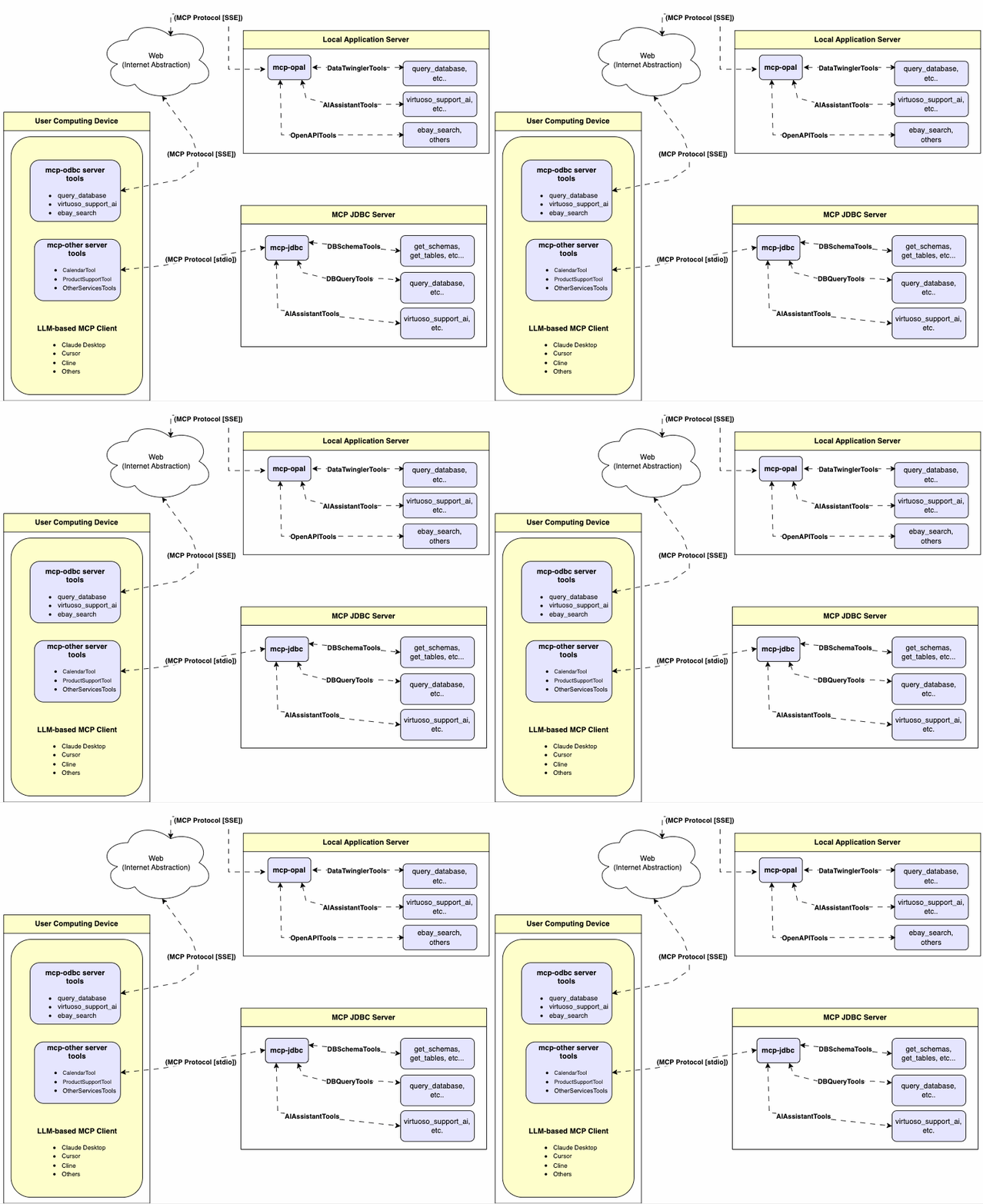89---1011## Features1213- **Get Schemas**: Fetch and list all schema names from the connected database.14- **Get Tables**: Retrieve table information for specific schemas or all schemas.15- **Describe Table**: Generate a detailed description of table structures, including:16 - Column names and data types17 - Nullable attributes18 - Primary and foreign keys19- **Search Tables**: Filter and retrieve tables based on name substrings.20- **Execute Stored Procedures**: _A Virtuoso-specific feature!_ Execute stored procedures and retrieve results.21- **Execute Queries**:22 - JSONL result format: Optimized for structured responses.23 - Markdown table format: Ideal for reporting and visualization.2425---2627## Prerequisites2829MCP server requires Java 21 or above.3031---3233## Installation3435Clone this repository:36```bash37git clone https://github.com/OpenLinkSoftware/mcp-jdbc-server.git38cd mcp-jdbc-server39```4041## Environment Variables4243Update your `.env` by overriding these defaults to match your preferences:44```45jdbc.url=jdbc:virtuoso://localhost:111146jdbc.user=dba47jdbc.password=dba48jdbc.api_key=xxx49```5051---5253## Configuration5455For **Claude Desktop** users using Virtuoso and its JDBC driver:5657Add the following to `claude_desktop_config.json`:5859```json60{61 "mcpServers": {62 "my_database": {63 "command": "java",64 "args": ["-jar", "/path/to/mcp-jdbc-server/MCPServer-1.0.0-runner.jar"],65 "env": {66 "jdbc.url": "jdbc:virtuoso://localhost:1111",67 "jdbc.user": "username",68 "jdbc.password": "password",69 "jdbc.api_key": "sk-xxx"70 }71 }72 }73}74```7576For **Claude Desktop** users using another JDBC driver or a combination of drivers:7778Add the following, edited to suit your local environment, to `claude_desktop_config.json`:7980```json81 "jdbc": {82 "command": "java",83 "args": [84 "-cp",85 "/path/to/mcp-jdbc-server/MCPServer-1.0.0-runner.jar:/path/to/jdbc_driver1.jar:/path/to/jdbc_driverN.jar",86 "io.quarkus.runner.GeneratedMain"87 ],88 "env": {89 "jdbc.url": "jdbc:virtuoso://localhost:1111",90 "jdbc.user": "dba",91 "jdbc.password": "dba"92 }93 }94```9596---9798## Use99100### Tools Provided101102After successful installation, the following tools will be available to MCP client applications.103104#### Overview105106| name | description |107|:--- |:---|108|`jdbc_get_schemas` | List database schemas accessible to connected database management system (DBMS). |109|`jdbc_get_tables` | List tables associated with a selected database schema. |110|`jdbc_describe_table` | Provide the description of a table associated with a designated database schema. This includes information about column names, data types, nulls handling, autoincrement, primary key, and foreign keys. |111|`jdbc_filter_table_names` | List tables, based on a substring pattern from the `q` input field, associated with a selected database schema. |112|`jdbc_query_database` | Execute a SQL query and return results in JSONL format. |113|`jdbc_execute_query` | Execute a SQL query and return results in JSONL format. |114|`jdbc_execute_query_md` | Execute a SQL query and return results in Markdown table format. |115|`jdbc_spasql_query` | _A Virtuoso-specific feature!_ Execute a SPASQL query and return results. |116|`jdbc_sparql_query` | _A Virtuoso-specific feature!_ Execute a SPARQL query and return results. |117|`jdbc_virtuoso_support_ai`| _A Virtuoso-specific feature!_ Interact with LLMs through the Virtuoso Support Assistant/Agent. |118119#### Detailed Description120121- **`jdbc_get_schemas`**122 - Retrieve and return a list of all schema names from the connected database.123 - Input parameters:124 - `user` (string, optional): Database username. Defaults to `"demo"`.125 - `password` (string, optional): Database password. Defaults to `"demo"`.126 - `url` (string, optional): JDBC URL connection string.127 - Returns a JSON string array of schema names.128129- **`jdbc_get_tables`**130 - Retrieve and return a list containing information about tables in a specified schema. If no schema is provided, uses the connection's default schema.131 - Input parameters:132 - `schema` (string, optional): Database schema to filter tables. Defaults to connection default.133 - `user` (string, optional): Database username. Defaults to `"demo"`.134 - `password` (string, optional): Database password. Defaults to `"demo"`.135 - `url` (string, optional): JDBC URL connection string.136 - Returns a JSON string containing table information (e.g., `TABLE_CAT`, `TABLE_SCHEM`, `TABLE_NAME`, `TABLE_TYPE`).137138- **`jdbc_filter_table_names`**139 - Filters and returns information about tables whose names contain a specific substring.140 - Input parameters:141 - `q` (string, required): The substring to search for within table names.142 - `schema` (string, optional): Database schema to filter tables. Defaults to connection default.143 - `user` (string, optional): Database username. Defaults to `"demo"`.144 - `password` (string, optional): Database password. Defaults to `"demo"`.145 - `url` (string, optional): JDBC URL connection string.146 - Returns a JSON string containing information for matching tables.147148- **`jdbc_describe_table`**149 - Retrieve and return detailed information about the columns of a specific table.150 - Input parameters:151 - `schema` (string, required): The database schema name containing the table.152 - `table` (string, required): The name of the table to describe.153 - `user` (string, optional): Database username. Defaults to `"demo"`.154 - `password` (string, optional): Database password. Defaults to `"demo"`.155 - `url` (string, optional): JDBC URL connection string.156 - Returns a JSON string describing the table's columns (e.g., `COLUMN_NAME`, `TYPE_NAME`, `COLUMN_SIZE`, `IS_NULLABLE`).157158- **`jdbc_query_database`**159 - Execute a standard SQL query and return the results in JSON format.160 - Input parameters:161 - `query` (string, required): The SQL query string to execute.162 - `user` (string, optional): Database username. Defaults to `"demo"`.163 - `password` (string, optional): Database password. Defaults to `"demo"`.164 - `url` (string, optional): JDBC URL connection string.165 - Returns query results as a JSON string.166167- **`jdbc_query_database_md`**168 - Execute a standard SQL query and return the results formatted as a Markdown table.169 - Input parameters:170 - `query` (string, required): The SQL query string to execute.171 - `user` (string, optional): Database username. Defaults to `"demo"`.172 - `password` (string, optional): Database password. Defaults to `"demo"`.173 - `url` (string, optional): JDBC URL connection string.174 - Returns query results as a Markdown table string.175176- **`jdbc_query_database_jsonl`**177 - Execute a standard SQL query and return the results in JSON Lines (JSONL) format (one JSON object per line).178 - Input parameters:179 - `query` (string, required): The SQL query string to execute.180 - `user` (string, optional): Database username. Defaults to `"demo"`.181 - `password` (string, optional): Database password. Defaults to `"demo"`.182 - `url` (string, optional): JDBC URL connection string.183 - Returns query results as a JSONL string.184185- **`jdbc_spasql_query`**186 - _A Virtuoso-specific feature!_187 - Execute a SPASQL (SQL/SPARQL hybrid) query return results.188 - Input parameters:189 - `query` (string, required): The SPASQL query string.190 - `max_rows` (number, optional): Maximum number of rows to return. Defaults to `20`.191 - `timeout` (number, optional): Query timeout in milliseconds. Defaults to `30000` (i.e., 30 seconds).192 - `user` (string, optional): Database username. Defaults to `"demo"`.193 - `password` (string, optional): Database password. Defaults to `"demo"`.194 - `url` (string, optional): JDBC URL connection string.195 - Returns the result from the underlying stored procedure call (e.g., `Demo.demo.execute_spasql_query`).196197- **`jdbc_sparql_query`**198 - _A Virtuoso-specific feature!_199 - Execute a SPARQL query and return results.200 - Input parameters:201 - `query` (string, required): The SPARQL query string.202 - `format` (string, optional): Desired result format. Defaults to `'json'`.203 - `timeout` (number, optional): Query timeout in milliseconds. Defaults to `30000` (i.e., 30 seconds).204 - `user` (string, optional): Database username. Defaults to `"demo"`.205 - `password` (string, optional): Database password. Defaults to `"demo"`.206 - `url` (string, optional): JDBC URL connection string.207 - Returns the result from the underlying function call (e.g., `"UB".dba."sparqlQuery"`).208209- **`jdbc_virtuoso_support_ai`**210 - _A Virtuoso-specific feature!_211 - Utilizes a Virtuoso-specific AI Assistant function, passing a prompt and optional API key.212 - Input parameters:213 - `prompt` (string, required): The prompt text for the AI function.214 - `api_key` (string, optional): API key for the AI service. Defaults to `"none"`.215 - `user` (string, optional): Database username. Defaults to `"demo"`.216 - `password` (string, optional): Database password. Defaults to `"demo"`.217 - `url` (string, optional): JDBC URL connection string.218 - Returns the result from the AI Support Assistant function call (e.g., `DEMO.DBA.OAI_VIRTUOSO_SUPPORT_AI`).219220---221222### Basic Use & Troubleshooting223224#### MCP Inspector Connecting to Virtuoso's ODBC Driver225226For basic MCP client use and troubleshooting, use the MCP Inspector as follows:2272281. Install the MCP Inspector:229230 ```bash231 npm install -g @modelcontextprotocol/inspector232 ```2332342. Start the inspector:235236 ```bash237 npx @modelcontextprotocol/inspector java -jar /path/to/mcp-jdbc-server/MCPServer-1.0.0-runner.jar238 ```239240Access the URL returned by the inspector to troubleshoot MCP server interactions.241242#### MCP Inspector Connecting to additional Drivers243244For basic MCP client use and troubleshooting, use the MCP Inspector as follows:2452461. Install the JDBC Driver(s), ensuring their JAR files are registered with the host operating system's Java Virtual Machine (JVM) via `$CLASSPATH`. For instance:247248 ```bash249 export CLASSPATH=$CLASSPATH:/path/to/driver1.jar:/path/to/driver2.jar:/path/to/driverN.jar250 ```2512522. Start the inspector using the following command-line arguments:253254 ```bash255 npx @modelcontextprotocol/inspector java -cp MCPServer-1.0.0-runner.jar:/path/to/driver1.jar:/path/to/driver2.jar:/path/to/driverN.jar io.quarkus.runner.GeneratedMain256 ```257258#### Use Example based on Oracle and Informix Drivers2592600. Assuming the following JDBC Driver information:261262 - **Oracle JDBC Driver URL Template**263264 ```bash265 jdbc:oracle:thin:@<hostname>:[port]:<SERVICEID>266 ```267268 - **Informix JDBC Driver URL Template**269270 ```bash271 jdbc:informix-sqli://<hostname>:<port>/<database></database>:<INFORMIXSERVER>=<SERVICEID>272 ```2732741. Install the Oracle (`ojdbc17.jar`) and/or Informix (`jdbc-15.0.0.1.1.jar`) JDBC Drivers, and ensure their JAR files are registered with the host operating system's Java Virtual Machine (JVM) via `$CLASSPATH`. For instance:275276 ```bash277 export CLASSPATH=$CLASSPATH:/path/to/Java/Extensions/jdbc-15.0.0.1.1.jar278 export CLASSPATH=$CLASSPATH:/path/to/Java/Extensions/ojdbc17.jar279 ```2802812. Start the inspector using the following command-line arguments:282283 ```bash284 npx @modelcontextprotocol/inspector java -cp MCPServer-1.0.0-runner.jar:/path/to/Java/Extensions/ojdbc17.jar:/path/to/Java/Extensions/jdbc-15.0.0.1.1.jar io.quarkus.runner.GeneratedMain285 ```2862873. Access the URL returned by the inspector and then use the `jdbc_execute_query` operation to query the target database, by providing actual values for the following input field templates:288289 - JDBC URL290 - User291 - Password292 - Query293
Full transparency — inspect the skill content before installing.