
The stable, glowing orb at the center represents the persistent context that survives across chat sessions. The flowing data streams show how ongoing conversations connect to and draw from this stable core of information, preventing context loss. A static MCP (Model Context Protocol) server that provides AI models with persistent tool context, preventing context loss between chat sessions. This se
npx mdskills install doobidoo/mcp-context-providerRelated
@doobidoo? Sign in with GitHub to claim this listing.Comprehensive MCP server providing persistent context management with intelligent learning capabilities

The stable, glowing orb at the center represents the persistent context that survives across chat sessions. The flowing data streams show how ongoing conversations connect to and draw from this stable core of information, preventing context loss.
A static MCP (Model Context Protocol) server that provides AI models with persistent tool context, preventing context loss between chat sessions. This server automatically loads and injects tool-specific rules, syntax preferences, and best practices at Claude Desktop startup.
The Context Provider acts as a persistent neural core for your AI interactions, eliminating the need to re-establish context in each new chat session by:
Just like the image depicts, your MCP Context Provider functions as:
The easiest way to install MCP Context Provider is using the provided installation scripts:
Unix/Linux/macOS:
# Clone the repository (contains latest source files)
git clone https://github.com/doobidoo/MCP-Context-Provider.git
cd MCP-Context-Provider

# Run the automated installer (builds fresh package)
./scripts/install.sh
Windows:
# Clone the repository first
git clone https://github.com/doobidoo/MCP-Context-Provider.git
cd MCP-Context-Provider

# Run the Windows installer
.\scripts\install.bat
The installation script automatically:
# Install DXT CLI (if not already installed)
npm install -g @anthropic-ai/dxt

# Download the DXT package
wget https://github.com/doobidoo/MCP-Context-Provider/raw/main/mcp-context-provider-1.2.1.dxt

# Unpack the extension to your desired location
dxt unpack mcp-context-provider-1.2.1.dxt ~/mcp-context-provider

# Navigate to the installation directory
cd ~/mcp-context-provider

# Create and activate a Python virtual environment
python -m venv venv
source venv/bin/activate  # On Windows: venv\Scripts\activate

# Install dependencies
pip install mcp>=1.9.4
# Clone the repository
git clone https://github.com/doobidoo/MCP-Context-Provider.git
cd MCP-Context-Provider

# Create and activate a Python virtual environment
python -m venv venv
source venv/bin/activate  # On Windows: venv\Scripts\activate

# Install dependencies
pip install -r requirements.txt
Update your Claude Desktop configuration file:
Configuration File Location:
~/.config/claude/claude_desktop_config.json~/Library/Application Support/Claude/claude_desktop_config.json%APPDATA%\Claude\claude_desktop_config.jsonFor Virtual Environment Installation (Recommended):
{
  "mcpServers": {
    "context-provider": {
      "command": "/path/to/mcp-context-provider/venv/bin/python",
      "args": ["/path/to/mcp-context-provider/context_provider_server.py"],
      "env": {
        "CONTEXT_CONFIG_DIR": "/path/to/mcp-context-provider/contexts",
        "AUTO_LOAD_CONTEXTS": "true"
      }
    }
  }
}
For System Python Installation:
{
  "mcpServers": {
    "context-provider": {
      "command": "python",
      "args": ["context_provider_server.py"],
      "cwd": "/path/to/MCP-Context-Provider",
      "env": {
        "CONTEXT_CONFIG_DIR": "./contexts",
        "AUTO_LOAD_CONTEXTS": "true"
      }
    }
  }
}
Important: Replace /path/to/mcp-context-provider with the actual installation path.
Run the verification script to ensure everything is configured correctly:
python scripts/verify_install.py
After updating the configuration, restart Claude Desktop to load the MCP server.
/contexts directoryStartup → Load Context Files → Register MCP Tools → Context Available in All Chats
Once loaded, the following tools are available in all chat sessions:
Core Context Tools:
get_tool_context: Get context rules for specific toolget_syntax_rules: Get syntax conversion ruleslist_available_contexts: List all loaded context categoriesapply_auto_corrections: Apply automatic syntax correctionsPhase 1 - Session Management:
execute_session_initialization: Initialize session with memory service integrationget_session_status: Retrieve detailed session initialization statusPhase 2 - Dynamic Context Management:
create_context_file: Create new context files dynamically with validationupdate_context_rules: Update existing context rules with backup and validationadd_context_pattern: Add patterns to auto-trigger sections for memory integrationPhase 3 - Intelligent Learning (v1.6.0+):
analyze_context_effectiveness: Analyze context effectiveness with memory-driven insights
suggest_context_optimizations: Generate global optimization suggestions based on usage patterns
get_proactive_suggestions: Provide proactive context suggestions for workflow improvement
auto_optimize_context: Automatically optimize contexts based on learning engine recommendations
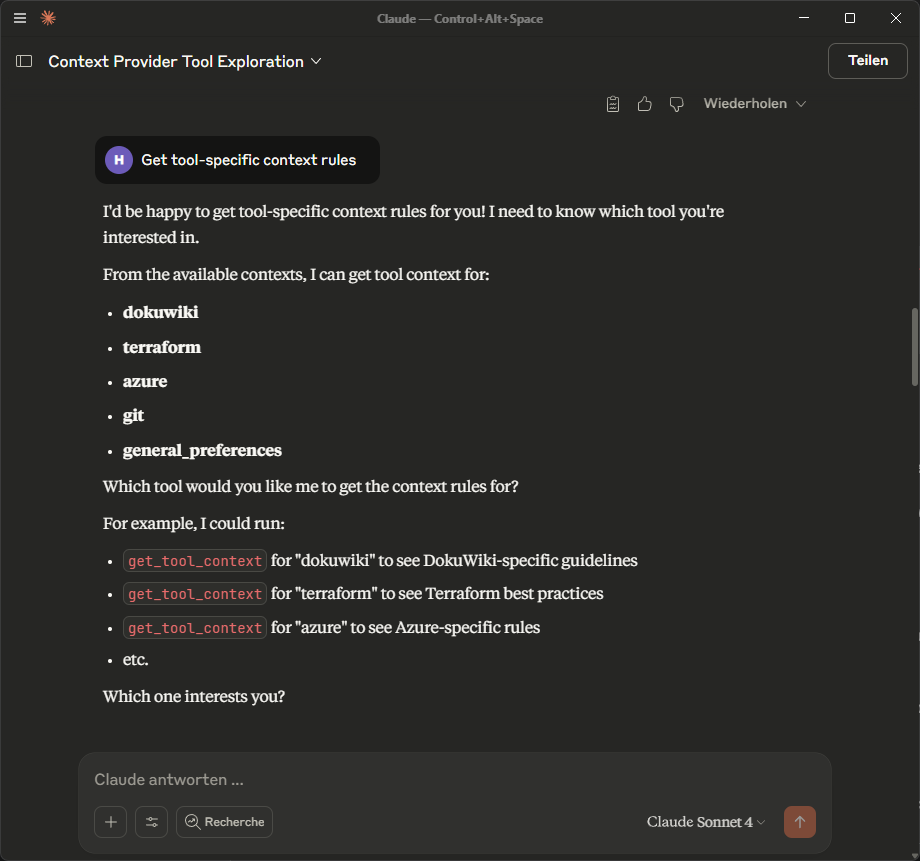
Screenshot showing the MCP Context Provider in action within Claude Desktop. The tool automatically detects and lists all available context categories (dokuwiki, terraform, azure, git, general_preferences) and provides interactive access to tool-specific rules and guidelines.
The server loads context files from the /contexts directory:
dokuwiki_context.json: DokuWiki syntax rules and preferencesterraform_context.json: Terraform naming conventions and best practicesazure_context.json: Azure resource naming and compliance rulesgit_context.json: Git commit conventions and workflow patternsgeneral_preferences.json: Cross-tool preferences and standardsEach context file follows this pattern:
{
  "tool_category": "toolname",
  "description": "Tool-specific context rules",
  "auto_convert": true,
  "syntax_rules": {
    "format_rules": "conversion patterns"
  },
  "preferences": {
    "user_preferences": "settings"
  },
  "auto_corrections": {
    "regex_patterns": "automatic fixes"
  },
  "metadata": {
    "version": "1.0.0",
    "applies_to_tools": ["tool:*"]
  }
}
Input (Markdown):
# My Header
This is `inline code` and here's a [link](http://example.com).
Auto-converted to DokuWiki:
====== My Header ======
This is ''inline code'' and here's a [[http://example.com|link]].
Input: storage_account_logs_prod
Auto-corrected to: stlogsprod (following Azure naming conventions)
Input: Fixed the login bug
Auto-corrected to: fix: resolve login authentication issue
To add support for a new tool:
contexts/{toolname}_context.jsonThe server automatically detects and loads any *_context.json files in the contexts directory.
Version 1.6.0 introduces the Synergistic Integration with Intelligent Learning system, transforming the MCP Context Provider from a static configuration tool into an intelligent, self-improving context evolution platform.
mcp-memory-service for persistent learning data4 new intelligent tools for context management:
analyze_context_effectiveness: Memory-driven effectiveness analysissuggest_context_optimizations: Global optimization recommendationsget_proactive_suggestions: Workflow improvement suggestionsauto_optimize_context: Automatic context optimization based on learningContext Usage → Memory Storage → Pattern Analysis → Optimization Suggestions → Auto-Improvement
↓ ↓ ↓ ↓ ↓
Session Data → Learning Engine → Effectiveness Score → Proactive Recommendations → Enhanced Contexts
The system tracks and analyzes:
Prerequisites: Requires mcp-memory-service integration
.mcp.json):{
"mcpServers": {
"memory": {
"command": "/path/to/uv",
"args": ["--directory", "/path/to/mcp-memory-service", "run", "memory"],
"env": {
"MCP_MEMORY_STORAGE_BACKEND": "sqlite_vec",
"MCP_MEMORY_SQLITE_PATH": "/path/to/memory.db"
}
},
"context-provider": {
"command": "python",
"args": ["context_provider_server.py"],
"env": {
"CONTEXT_CONFIG_DIR": "./contexts",
"AUTO_LOAD_CONTEXTS": "true"
}
}
}
}
# Run comprehensive Phase 3 tests
python tests/test_phase3_learning.py

# Check learning engine health
python -c "
from context_provider_server import ContextProvider
import asyncio
async def test():
    provider = ContextProvider()
    stats = await provider.memory_service.get_memory_stats()
    print(f'Learning system status: {stats}')
asyncio.run(test())
"
✅ Phase 1: Session initialization with memory service integration ✅ Phase 2: Dynamic context file creation and management ✅ Phase 3: Synergistic integration with intelligent learning
The MCP Context Provider now offers enterprise-ready intelligent context evolution with self-improving contexts that learn from usage patterns and automatically optimize through real memory service integration.
Create your own context files by following the established pattern. The server supports:
Use environment variables to load different context sets:
{
  "env": {
    "CONTEXT_CONFIG_DIR": "./contexts/production",
    "ENVIRONMENT": "prod"
  }
}
See TROUBLESHOOTING.md for detailed solutions.
Explore advanced integrations and real-world use cases in our Community Wiki:
The wiki demonstrates how the Context Provider transforms from simple rule storage into intelligent, self-improving workflow automation.
The MCP Context Provider is available as a Desktop Extension (DXT) package for easy distribution and installation:
mcp-context-provider-1.0.0.dxt (18.6 MB)To build your own DXT package from source:
# Install DXT CLI
npm install -g @anthropic-ai/dxt

# Build the package
cd dxt
dxt pack

# The package will be created as mcp-context-provider-1.0.0.dxt
git checkout -b feature/new-context/contextsMIT License - see LICENSE file for details.
Install via CLI
npx mdskills install doobidoo/mcp-context-providerMCP Context Provider is a free, open-source AI agent skill. The stable, glowing orb at the center represents the persistent context that survives across chat sessions. The flowing data streams show how ongoing conversations connect to and draw from this stable core of information, preventing context loss. A static MCP (Model Context Protocol) server that provides AI models with persistent tool context, preventing context loss between chat sessions. This se
Install MCP Context Provider with a single command:
npx mdskills install doobidoo/mcp-context-providerThis downloads the skill files into your project and your AI agent picks them up automatically.
MCP Context Provider works with Claude Code, Claude Desktop, Cursor, Vscode Copilot, Windsurf, Continue Dev, Gemini Cli, Amp, Roo Code, Goose. Skills use the open SKILL.md format which is compatible with any AI coding agent that reads markdown instructions.