
A Python bridge for interacting with the macOS Messages app using MCP (Multiple Context Protocol). Click the button above to automatically add Mac Messages MCP to Cursor See the Integration section below for setup instructions. - Universal Message Sending: Automatically sends via iMessage or SMS/RCS based on recipient availability - Smart Fallback: Seamless fallback to SMS when iMessage is unavail
npx mdskills install carterlasalle/mac-messages-mcpRelated
@carterlasalle? Sign in with GitHub to claim this listing.Well-documented MCP server for macOS Messages with smart iMessage/SMS fallback and comprehensive setup
1# Mac Messages MCP23A Python bridge for interacting with the macOS Messages app using MCP (Multiple Context Protocol).45[](https://pepy.tech/projects/mac-messages-mcp)67[](https://archestra.ai/mcp-catalog/carterlasalle__mac_messages_mcp)891011[](https://mseep.ai/app/fdc62324-6ac9-44e2-8926-722d1157759a)121314<a href="https://glama.ai/mcp/servers/gxvaoc9znc">15 <img width="380" height="200" src="https://glama.ai/mcp/servers/gxvaoc9znc/badge" />16</a>1718## Quick Install1920### For Cursor Users2122[](https://cursor.com/install-mcp?name=mac-messages-mcp&config=eyJjb21tYW5kIjoidXZ4IG1hYy1tZXNzYWdlcy1tY3AifQ%3D%3D)2324*Click the button above to automatically add Mac Messages MCP to Cursor*2526### For Claude Desktop Users2728See the [Integration section](#integration) below for setup instructions.2930## Features3132- **Universal Message Sending**: Automatically sends via iMessage or SMS/RCS based on recipient availability33- **Smart Fallback**: Seamless fallback to SMS when iMessage is unavailable (perfect for Android users)34- **Message Reading**: Read recent messages from the macOS Messages app35- **Contact Filtering**: Filter messages by specific contacts or phone numbers36- **Fuzzy Search**: Search through message content with intelligent matching37- **iMessage Detection**: Check if recipients have iMessage before sending38- **Cross-Platform**: Works with both iPhone/Mac users (iMessage) and Android users (SMS/RCS)3940## Prerequisites4142- macOS (tested on macOS 11+)43- Python 3.10+44- **uv package manager**4546### Installing uv4748If you're on Mac, install uv using Homebrew:4950```bash51brew install uv52```5354Otherwise, follow the installation instructions on the [uv website](https://github.com/astral-sh/uv).5556⚠️ **Do not proceed before installing uv**5758## Installation5960### Full Disk Access Permission6162⚠️ This application requires **Full Disk Access** permission for your terminal or application to access the Messages database.6364To grant Full Disk Access:651. Open **System Preferences/Settings** > **Security & Privacy/Privacy** > **Full Disk Access**662. Click the lock icon to make changes673. Add your terminal app (Terminal, iTerm2, etc.) or Claude Desktop/Cursor to the list684. Restart your terminal or application after granting permission6970## Integration7172### Claude Desktop Integration73741. Go to **Claude** > **Settings** > **Developer** > **Edit Config** > **claude_desktop_config.json**752. Add the following configuration:7677```json78{79 "mcpServers": {80 "messages": {81 "command": "uvx",82 "args": [83 "mac-messages-mcp"84 ]85 }86 }87}88```8990### Cursor Integration9192#### Option 1: One-Click Install (Recommended)9394[](https://cursor.com/install-mcp?name=mac-messages-mcp&config=eyJjb21tYW5kIjoidXZ4IG1hYy1tZXNzYWdlcy1tY3AifQ%3D%3D)9596#### Option 2: Manual Setup9798Go to **Cursor Settings** > **MCP** and paste this as a command:99100```101uvx mac-messages-mcp102```103104⚠️ Only run one instance of the MCP server (either on Cursor or Claude Desktop), not both105106### Docker Container Integration107108If you need to connect to `mac-messages-mcp` from a Docker container, you'll need to use the `mcp-proxy` package to bridge the stdio-based server to HTTP.109110#### Setup Instructions1111121. **Install mcp-proxy on your macOS host:**113```bash114npm install -g mcp-proxy115```1161172. **Start the proxy server:**118```bash119# Using the published version120npx mcp-proxy uvx mac-messages-mcp --port 8000 --host 0.0.0.0121122# Or using local development (if you encounter issues)123npx mcp-proxy uv run python -m mac_messages_mcp.server --port 8000 --host 0.0.0.0124```1251263. **Connect from Docker:**127Your Docker container can now connect to:128- URL: `http://host.docker.internal:8000/mcp` (on macOS/Windows)129- URL: `http://<host-ip>:8000/mcp` (on Linux)1301314. **Docker Compose example:**132```yaml133version: '3.8'134services:135 your-app:136 image: your-image137 environment:138 MCP_MESSAGES_URL: "http://host.docker.internal:8000/mcp"139 extra_hosts:140 - "host.docker.internal:host-gateway" # For Linux hosts141```1421435. **Running multiple MCP servers:**144```bash145# Terminal 1 - Messages MCP on port 8001146npx mcp-proxy uvx mac-messages-mcp --port 8001 --host 0.0.0.0147148# Terminal 2 - Another MCP server on port 8002149npx mcp-proxy uvx another-mcp-server --port 8002 --host 0.0.0.0150```151152**Note:** Binding to `0.0.0.0` exposes the service to all network interfaces. In production, consider using more restrictive host bindings and adding authentication.153154155### Option 1: Install from PyPI156157```bash158uv pip install mac-messages-mcp159```160161### Option 2: Install from source162163```bash164# Clone the repository165git clone https://github.com/carterlasalle/mac_messages_mcp.git166cd mac_messages_mcp167168# Install dependencies169uv install -e .170```171172173## Usage174175### Smart Message Delivery176177Mac Messages MCP automatically handles message delivery across different platforms:178179- **iMessage Users** (iPhone, iPad, Mac): Messages sent via iMessage180- **Android Users**: Messages automatically fall back to SMS/RCS181- **Mixed Groups**: Optimal delivery method chosen per recipient182183```python184# Send to iPhone user - uses iMessage185send_message("+1234567890", "Hey! This goes via iMessage")186187# Send to Android user - automatically uses SMS188send_message("+1987654321", "Hey! This goes via SMS")189190# Check delivery method before sending191check_imessage_availability("+1234567890") # Returns availability status192```193194### As a Module195196```python197from mac_messages_mcp import get_recent_messages, send_message198199# Get recent messages200messages = get_recent_messages(hours=48)201print(messages)202203# Send a message (automatically chooses iMessage or SMS)204result = send_message(recipient="+1234567890", message="Hello from Mac Messages MCP!")205print(result) # Shows whether sent via iMessage or SMS206```207208### As a Command-Line Tool209210```bash211# Run the MCP server directly212mac-messages-mcp213```214215## Development216217### Versioning218219This project uses semantic versioning. See [VERSIONING.md](VERSIONING.md) for details on how the versioning system works and how to release new versions.220221To bump the version:222223```bash224python scripts/bump_version.py [patch|minor|major]225```226227## Security Notes228229This application accesses the Messages database directly, which contains personal communications. Please use it responsibly and ensure you have appropriate permissions.230231[](https://mseep.ai/app/carterlasalle-mac-messages-mcp)232233## License234235MIT236237## Contributing238239Contributions are welcome! Please feel free to submit a Pull Request.240## Star History241242[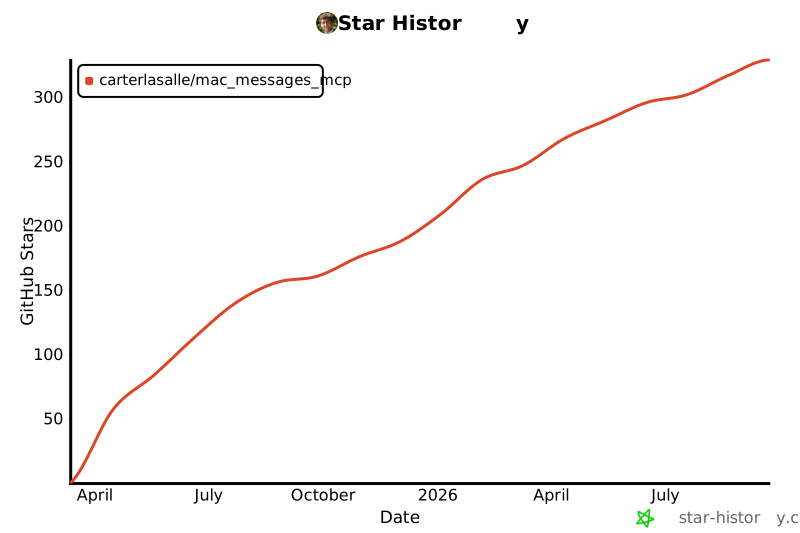](https://www.star-history.com/#carterlasalle/mac_messages_mcp&Date)243
Full transparency — inspect the skill content before installing.