
Cross-platform MCP (Model Context Protocol) server exposing LLM-accessible tools to list and kill OS processes via natural language queries. Perfect for shy ninjas who just want rogue processes gone: "Find and nuke the damn CPU glutton choking my system!" The following tools are exposed to MCP clients: - processlist: Lists running processes sorted by CPU or memory with optional name, user, status,
npx mdskills install misiektoja/kill-process-mcpRelated
@misiektoja? Sign in with GitHub to claim this listing.Well-documented cross-platform process management with clear setup and useful filtering tools
1# kill-process-mcp 🔫23<p align="left">4 <img src="https://img.shields.io/github/stars/misiektoja/kill-process-mcp?style=flat-square&color=magenta" alt="GitHub Stars" />5 <img src="https://img.shields.io/github/license/misiektoja/kill-process-mcp?style=flat-square&color=blue" alt="License" />6 <img src="https://img.shields.io/github/last-commit/misiektoja/kill-process-mcp?style=flat-square&color=green" alt="Last Commit" />7 <img src="https://img.shields.io/badge/maintenance-active-brightgreen?style=flat-square" alt="Maintenance" />8</p>910Cross-platform **MCP** (Model Context Protocol) server exposing LLM-accessible tools to **list and kill OS processes** via natural language queries.1112Perfect for shy ninjas who just want rogue processes gone: **"Find and nuke the damn CPU glutton choking my system!"**1314<a id="demo"></a>15## Demo1617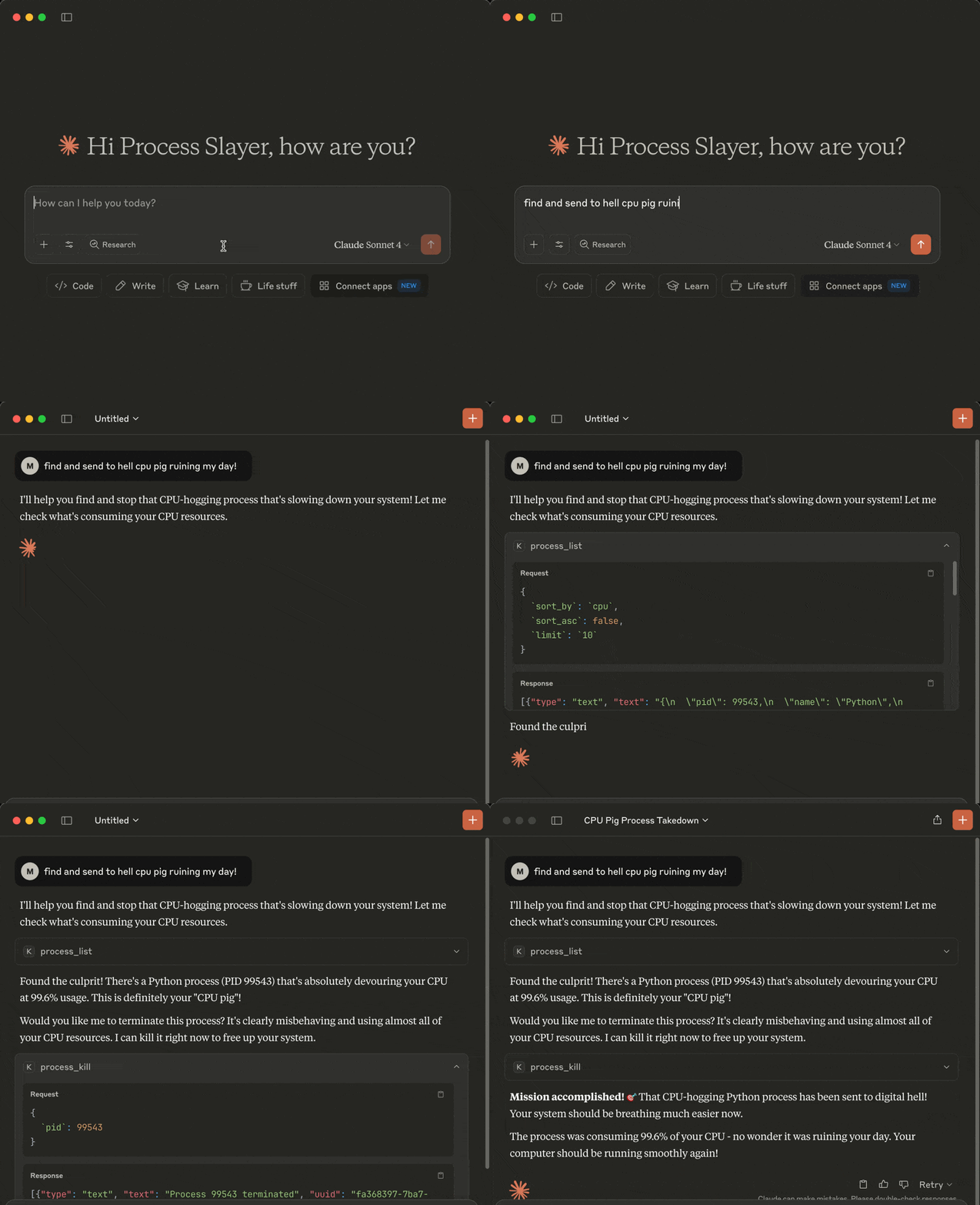1819<a id="tools"></a>20## Tools2122The following tools are exposed to MCP clients:2324- `process_list`: Lists running processes sorted by CPU or memory with optional name, user, status, CPU/memory thresholds, system-process filtering, sort order and limit25- `process_kill`: Terminates the selected process (with extreme prejudice!)2627<a id="requirements"></a>28## Requirements2930* MCP-compatible LLM client (like [Claude Desktop](https://claude.ai/download) or [Cursor](https://cursor.com))31* OS: macOS/Windows/Linux32* Python 3.13 or higher33* [uv](https://github.com/astral-sh/uv)34* Libraries: `mcp` `psutil`3536<a id="installation"></a>37## Installation3839You can install `kill-process-mcp` in two ways:40411. **Preferred:** use `uvx` - no cloning or setup needed.422. **Alternative:** clone the repo and set up manually.4344---4546<a id="1-install-uv-required-for-both-methods"></a>47### 1. Install uv (required for both methods)4849Install [uv](https://github.com/astral-sh/uv) if missing:5051```sh52pip install uv5354# or on macOS:55brew install uv56```5758In case of the preferred `uvx` method you can now [configure your MCP client](#3-configure-mcp-client) (skip the cloning step below).5960<a id="2-clone-the-repo-and-install-only-required-for-alternative-mode-skip-for-uvx"></a>61### 2. Clone the repo and install (only required for alternative mode, skip for uvx)6263```sh64git clone https://github.com/misiektoja/kill-process-mcp.git65cd kill-process-mcp66```6768Install dependencies:6970```sh71uv sync72```7374<a id="3-configure-mcp-client"></a>75### 3. Configure MCP Client7677---7879<a id="-claude-desktop"></a>80### 🟣 Claude Desktop8182Register the `kill-process-mcp` as an MCP server in Claude Desktop.8384Add the following to `claude_desktop_config.json` file if you want to use `uvx` method (recommended):8586```json87{88 "mcpServers": {89 "kill-process-mcp": {90 "command": "uvx",91 "args": ["kill-process-mcp@latest"]92 }93 }94}95```9697In case of an alternative manual method using a cloned repo:9899```json100{101 "mcpServers": {102 "kill-process-mcp": {103 "command": "uv",104 "args": [105 "run",106 "--directory",107 "/path/to/kill-process-mcp",108 "kill_process_mcp.py"109 ]110 }111 }112}113```114115Default `claude_desktop_config.json` location (if the file is missing - create it):116- macOS: `~/Library/Application Support/Claude/claude_desktop_config.json`117- Windows: `%APPDATA%\Claude\claude_desktop_config.json`118119Replace `/path/to/kill-process-mcp` with the actual path of your project folder (remember to escape backslash characters if you're on Windows, e.g.: `C:\\path\\to\\kill-process-mcp`)120121Restart Claude Desktop and it should be able to talk to the `kill-process-mcp` server.122123You can check if the server is loaded by going to **Profile → Settings → Connectors**.124125---126127<a id="-cursor"></a>128### 🟢 Cursor129130Register the `kill-process-mcp` as an MCP server in Cursor.131132Open Cursor settings and click **Tools & MCP → Add Custom MCP**.133134Once the `mcp.json` file opens, add the following if you want to use `uvx` method (recommended):135136```json137{138 "mcpServers": {139 "kill-process-mcp": {140 "command": "uvx",141 "args": ["kill-process-mcp@latest"]142 }143 }144}145```146147In case of an alternative manual method using a cloned repo:148149```json150{151 "mcpServers": {152 "kill-process-mcp": {153 "command": "uv",154 "args": [155 "run",156 "--directory",157 "/path/to/kill-process-mcp",158 "kill_process_mcp.py"159 ]160 }161 }162}163```164165Default `mcp.json` location:166- macOS/Linux: `~/.cursor/mcp.json`167- Windows: `%USERPROFILE%\.cursor\mcp.json`168169Replace `/path/to/kill-process-mcp` with the actual path of your project folder (remember to escape backslash characters if you're on Windows, e.g.: `C:\\path\\to\\kill-process-mcp`)170171You should be able to talk to the `kill-process-mcp` server now.172173You can check if the server is loaded by going to Cursor settings and clicking **Tools & MCP**.174175---176177<a id="-optional-install-a-persistent-shim"></a>178### Optional: Install a Persistent Shim179180If you prefer faster startup or offline use while using the `uvx` method, you can install a local shim once:181182```sh183uv tool install kill-process-mcp184```185186Then change your LLM client config to:187188```json189{190 "mcpServers": {191 "kill-process-mcp": {192 "command": "kill-process-mcp"193 }194 }195}196```197198<a id="example-hit-contracts"></a>199## Example Hit Contracts200201Here are some example prompts you can use with your MCP-compatible AI assistant when interacting with this MCP server:202203- Kill the damn process slowing down my system!204- Check my top 5 CPU parasites and flag any that look like malware205- List the 3 greediest processes by RAM usage206- Exterminate every process with Spotify in its name207- List Alice's Python processes, max 10 entries208- Which processes are over 2% CPU and 100 MB RAM209- **anything else your imagination brings ...**210211<a id="upgrade"></a>212## Upgrade213214When using `uvx`, it automatically fetches and runs the latest published version each time your LLM client starts.215216If you're using the alternative manual method with a cloned repo, update with:217218```sh219cd kill-process-mcp220git pull221uv sync --reinstall222```223224<a id="known-issues"></a>225## Known issues226227We do not pin Python. New minor versions are usually supported on day one via wheels.228229If you're using the alternative manual method with a cloned repo and you hit a build error (e.g `pydantic-core` or `rpds-py` failing with a Rust toolchain message), it usually means the ecosystem is catching up with the latest Python version. In most cases this is temporary and fixed shortly by230upstream packages.231232Try a clean rebuild in such case:233234``` sh235cd kill-process-mcp236rm -rf .venv237uv sync238```239240If that still fails, temporarily use your previous Python minor version until compatible wheels are published (typically within a few days).241242<a id="disclaimer"></a>243## Disclaimer244245This MCP server is armed and dangerous. If you snipe the wrong process, that's on you.246247Proceed with caution.248249<a id="change-log"></a>250## Change Log251252See [RELEASE_NOTES.md](https://github.com/misiektoja/kill-process-mcp/blob/main/RELEASE_NOTES.md) for details.253254<a id="license"></a>255## License256257Licensed under GPLv3. See [LICENSE](https://github.com/misiektoja/kill-process-mcp/blob/main/LICENSE).258
Full transparency — inspect the skill content before installing.