
AI-powered debugging and inspection for Kubernetes clusters using Inspektor Gadget. - AI-powered interface for Kubernetes troubleshooting and monitoring - One-click Inspektor Gadget deployment and removal - Intelligent output summarization and analysis - Automatic gadget discovery from Artifact Hub 1. Ensure you have Docker and a valid kubeconfig file 2. Configure the MCP server in VS Code (see IN
npx mdskills install inspektor-gadget/ig-mcp-serverRelated
@inspektor-gadget? Sign in with GitHub to claim this listing.Well-documented MCP server providing powerful Kubernetes debugging via Inspektor Gadget with dynamic tool registration
AI-powered debugging and inspection for Kubernetes clusters using Inspektor Gadget.
https://github.com/user-attachments/assets/86367982-c0aa-455c-ac9e-ca43348899df
kubeconfig fileYou can use the following commands to quickly configure the Inspektor Gadget MCP server using either Docker or a binary in your VS Code settings.
Install Inspektor Gadget MCP Server - Artifact Hub Discovery
code --add-mcp '{
"name": "inspektor-gadget", "command": "docker", "args": [ "run", "-i", "--rm", "--volume", "ig-mcp-cache:/root/.cache/ig-mcp-server", "--mount", "type=bind,src=${env:HOME}/.kube/config,dst=/kubeconfig", "ghcr.io/inspektor-gadget/ig-mcp-server:latest", "-gadget-discoverer=artifacthub" ] }'
Install Inspektor Gadget MCP Server - Specific Gadgets
code --add-mcp '{
"name": "inspektor-gadget", "command": "docker", "args": [ "run", "-i", "--rm", "--volume", "ig-mcp-cache:/root/.cache/ig-mcp-server", "--mount", "type=bind,src=${env:HOME}/.kube/config,dst=/kubeconfig", "ghcr.io/inspektor-gadget/ig-mcp-server:latest", "-gadget-images=trace_dns:latest,trace_tcp:latest,snapshot_process:latest,snapshot_socket:latest" ] }'
You can head to the Releases page and download the latest binary for your platform:
Linux
MCP_VERSION=$(curl -s https://api.github.com/repos/inspektor-gadget/ig-mcp-server/releases/latest | jq -r .tag_name)
MCP_ARCH=amd64 curl -sL https://github.com/inspektor-gadget/ig-mcp-server/releases/download/${MCP_VERSION}/ig-mcp-server-linux-${MCP_ARCH}.tar.gz | sudo tar -C /usr/local/bin -xzf - ig-mcp-server
macOS
MCP_VERSION=$(curl -s https://api.github.com/repos/inspektor-gadget/ig-mcp-server/releases/latest | jq -r .tag_name)
MCP_ARCH=arm64 curl -sL https://github.com/inspektor-gadget/ig-mcp-server/releases/download/${MCP_VERSION}/ig-mcp-server-darwin-${MCP_ARCH}.tar.gz | sudo tar -C /usr/local/bin -xzf - ig-mcp-server
Windows
$MCP_VERSION = (curl.exe -s https://api.github.com/repos/inspektor-gadget/ig-mcp-server/releases/latest | ConvertFrom-Json).tag_name
$MCP_ARCH = "amd64" curl.exe -L "https://github.com/inspektor-gadget/ig-mcp-server/releases/download/$MCP_VERSION/ig-mcp-server-windows-$MCP_ARCH.tar.gz" -o "ig-mcp-server.tar.gz" $destPath = "C:\Program Files\ig-mcp-server" if (-Not (Test-Path $destPath -PathType Container)) { mkdir $destPath} tar.exe -xzf "ig-mcp-server.tar.gz" -C "$destPath" rm ig-mcp-server.tar.gz Write-Host "✅ Extracted to $destPath" Write-Host "👉 Please add '$destPath' to your PATH environment variable manually."
After downloading, you can run the following command to add it to your VS Code MCP configuration.
Install Inspektor Gadget MCP Server - Artifact Hub Discovery
code --add-mcp '{
"name": "inspektor-gadget", "command": "ig-mcp-server", "args": [ "-gadget-discoverer=artifacthub" ] }'
Install Inspektor Gadget MCP Server - Specific Gadgets
code --add-mcp '{
"name": "inspektor-gadget",
"command": "ig-mcp-server",
"args": [
  "-gadget-images=trace_dns:latest,trace_tcp:latest"
]
}'
Each gadget is registered as its own MCP tool (e.g., gadget_trace_dns, gadget_trace_tcp, etc.) and supports running gadgets in foreground mode, which is useful for debugging/development and also in background mode for observability.
Also, You can control which gadgets are available by configuring the MCP server with the -gadget-discoverer or -gadget-images options, allowing you to limit the tools to only those you need.
Gadget discovery allows controlling which gadgets are available for use. You can choose between two methods:
-gadget-discoverer=artifacthub)-gadget-images=trace_dns:latest)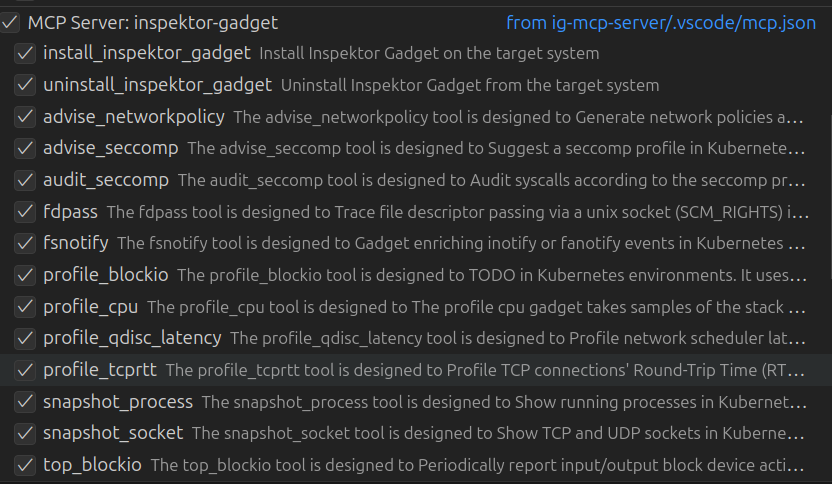
See INSTALL.md for configuration options.
Apache License 2.0 - see LICENSE for details.
Install via CLI
npx mdskills install inspektor-gadget/ig-mcp-serverInspektor Gadget MCP Server is a free, open-source AI agent skill. AI-powered debugging and inspection for Kubernetes clusters using Inspektor Gadget. - AI-powered interface for Kubernetes troubleshooting and monitoring - One-click Inspektor Gadget deployment and removal - Intelligent output summarization and analysis - Automatic gadget discovery from Artifact Hub 1. Ensure you have Docker and a valid kubeconfig file 2. Configure the MCP server in VS Code (see IN
Install Inspektor Gadget MCP Server with a single command:
npx mdskills install inspektor-gadget/ig-mcp-serverThis downloads the skill files into your project and your AI agent picks them up automatically.
Inspektor Gadget MCP Server works with Claude Code, Claude Desktop, Cursor, Vscode Copilot, Windsurf, Continue Dev, Gemini Cli, Amp, Roo Code, Goose. Skills use the open SKILL.md format which is compatible with any AI coding agent that reads markdown instructions.
