
A Model Context Protocol (MCP) server that provides access to Fantasy Premier League (FPL) data and tools. This server allows you to interact with FPL data in Claude for Desktop and other MCP-compatible clients. Demo of the Fantasy Premier League MCP Server in action - Claude Desktop - Other MCP Compatible Desktop LLMs Mobile is currently not supported. - Rich Player Data: Access comprehensive pla
npx mdskills install rishijatia/fantasy-pl-mcpRelated
@rishijatia? Sign in with GitHub to claim this listing.Well-documented MCP server with rich FPL data access, tools, and authentication support
1# Fantasy Premier League MCP Server23[](https://badge.fury.io/py/fpl-mcp)4[](https://github.com/rishijatia/fantasy-pl-mcp/actions/workflows/package-check.yml)5[](https://pypi.org/project/fpl-mcp/)6[](https://opensource.org/licenses/MIT)7[](https://pepy.tech/project/fpl-mcp)89[](https://archestra.ai/mcp-catalog/rishijatia__fantasy-pl-mcp)10<a href="https://glama.ai/mcp/servers/2zxsxuxuj9">11 <img width="380" height="200" src="https://glama.ai/mcp/servers/2zxsxuxuj9/badge" />1213A Model Context Protocol (MCP) server that provides access to Fantasy Premier League (FPL) data and tools. This server allows you to interact with FPL data in Claude for Desktop and other MCP-compatible clients.1415*Demo of the Fantasy Premier League MCP Server in action*1617[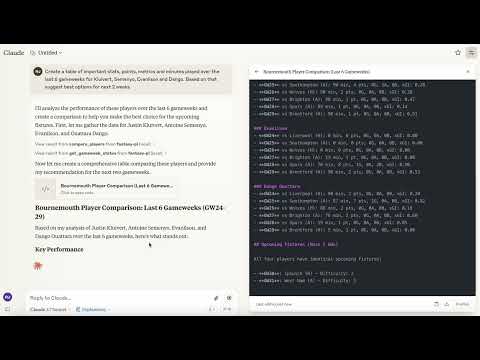](https://youtu.be/QfOOOQ_jeMA)181920## Supported Platforms2122- Claude Desktop23- Cursor24- Windsurf25- Other MCP Compatible Desktop LLMs2627Mobile is currently not supported.2829## Features3031- **Rich Player Data**: Access comprehensive player statistics from the FPL API32- **Team Information**: Get details about Premier League teams33- **Gameweek Data**: View current and past gameweek information34- **Player Search**: Find players by name or team35- **Player Comparison**: Compare detailed statistics between any two players3637## Requirements3839- Python 3.10 or higher40- Claude Desktop (for AI integration)4142## Installation4344### Option 1: Install from PyPI (Recommended)4546```bash47pip install fpl-mcp48```4950### Option 1b: Install with Development Dependencies5152```bash53pip install "fpl-mcp[dev]"54```5556### Option 2: Install from GitHub5758```bash59pip install git+https://github.com/rishijatia/fantasy-pl-mcp.git60```6162### Option 3: Clone and Install Locally6364```bash65git clone https://github.com/rishijatia/fantasy-pl-mcp.git66cd fantasy-pl-mcp67pip install -e .68```6970## Running the Server7172After installation, you have several options to run the server:7374### 1. Using the CLI command7576```bash77fpl-mcp78```7980### 2. Using the Python module8182```bash83python -m fpl_mcp84```8586### 3. Using with Claude Desktop8788Configure Claude Desktop to use the installed package by editing your `claude_desktop_config.json` file:8990**Method 1: Using the Python module directly (most reliable)**9192```json93{94 "mcpServers": {95 "fantasy-pl": {96 "command": "python",97 "args": ["-m", "fpl_mcp"]98 }99 }100}101```102103**Method 2: Using the installed command with full path (if installed with pip)**104105```json106{107 "mcpServers": {108 "fantasy-pl": {109 "command": "/full/path/to/your/venv/bin/fpl-mcp"110 }111 }112}113```114115Replace `/full/path/to/your/venv/bin/fpl-mcp` with the actual path to the executable. You can find this by running `which fpl-mcp` in your terminal after activating your virtual environment.116117> **Note:** Using just `"command": "fpl-mcp"` may result in a `spawn fpl-mcp ENOENT` error since Claude Desktop might not have access to your virtual environment's PATH. Using the full path or the Python module approach helps avoid this issue.118119## Usage120121### In Claude for Desktop1221231. Start Claude for Desktop1242. You should see FPL tools available via the hammer icon1253. Example queries:126 - "Compare Mohamed Salah and Erling Haaland over the last 5 gameweeks"127 - "Find all Arsenal midfielders"128 - "What's the current gameweek status?"129 - "Show me the top 5 forwards by points"130131#### Fantasy-PL MCP Usage Instructions132133#### Basic Commands:134- Compare players: "Compare [Player1] and [Player2]"135- Find players: "Find players from [Team]" or "Search for [Player Name]"136- Fixture difficulty: "Show upcoming fixtures for [Team]"137- Captain advice: "Who should I captain between [Player1] and [Player2]?"138139#### Advanced Features:140- Statistical analysis: "Compare underlying stats for [Player1] and [Player2]"141- Form check: "Show me players in form right now"142- Differential picks: "Suggest differentials under 10% ownership"143- Team optimization: "Rate my team and suggest transfers"144145#### Tips:146- Be specific with player names for accurate results147- Include positions when searching (FWD, MID, DEF, GK)148- For best captain advice, ask about form, fixtures, and underlying stats149- Request comparison of specific metrics (xG, shots in box, etc.150151### MCP Inspector for Development152153For development and testing:154155```bash156# If you have mcp[cli] installed157mcp dev -m fpl_mcp158159# Or use npx160npx @modelcontextprotocol/inspector python -m fpl_mcp161```162163## Available Resources164- `fpl://static/players` - All player data with comprehensive statistics165- `fpl://static/players/{name}` - Player data by name search166- `fpl://static/teams` - All Premier League teams167- `fpl://static/teams/{name}` - Team data by name search168- `fpl://gameweeks/current` - Current gameweek data169- `fpl://gameweeks/all` - All gameweeks data170- `fpl://fixtures` - All fixtures for the current season171- `fpl://fixtures/gameweek/{gameweek_id}` - Fixtures for a specific gameweek172- `fpl://fixtures/team/{team_name}` - Fixtures for a specific team173- `fpl://players/{player_name}/fixtures` - Upcoming fixtures for a specific player174- `fpl://gameweeks/blank` - Information about upcoming blank gameweeks175- `fpl://gameweeks/double` - Information about upcoming double gameweeks176177## Available Tools178- `get_gameweek_status` - Get precise information about current, previous, and next gameweeks179- `analyze_player_fixtures` - Analyze upcoming fixtures for a player with difficulty ratings180- `get_blank_gameweeks` - Get information about upcoming blank gameweeks181- `get_double_gameweeks` - Get information about upcoming double gameweeks182- `analyze_players` - Filter and analyze FPL players based on multiple criteria183- `analyze_fixtures` - Analyze upcoming fixtures for players, teams, or positions184- `compare_players` - Compare multiple players across various metrics185- `check_fpl_authentication` - Check if FPL authentication is working correctly186- `get_my_team` - View your authenticated team (requires authentication)187- `get_team` - View any team with a specific ID (requires authentication)188- `get_manager_info` - Get manager details (requires authentication)189190## Prompt Templates191- `player_analysis_prompt` - Create a prompt for analyzing an FPL player in depth192- `transfer_advice_prompt` - Get advice on player transfers based on budget and position193- `team_rating_prompt` - Create a prompt for rating and analyzing an FPL team194- `differential_players_prompt` - Create a prompt for finding differential players with low ownership195- `chip_strategy_prompt` - Create a prompt for chip strategy advice196197## Development198199### Adding Features200201To add new features:2022031. Add resource handlers in the appropriate file within `fpl_mcp/fpl/resources/`2042. Add tool handlers in the appropriate file within `fpl_mcp/fpl/tools/`2053. Update the `__main__.py` file to register new resources and tools2064. Test using the MCP Inspector before deploying to Claude for Desktop207208## Authentication209210To use features requiring authentication (like accessing your team or private leagues), you need to set up your FPL credentials:211212```bash213# Run the credential setup tool214fpl-mcp-config setup215```216217This interactive tool will:2181. Prompt for your FPL email, password, and team ID2192. Let you choose between storing in config.json or .env file2203. Save credentials securely to ~/.fpl-mcp/221222You can test your authentication with:223```bash224fpl-mcp-config test225```226227Alternatively, you can manually configure authentication:2281. Create `~/.fpl-mcp/.env` file with:229 ```230 FPL_EMAIL=your_email@example.com231 FPL_PASSWORD=your_password232 FPL_TEAM_ID=your_team_id233 ```2342352. Or create `~/.fpl-mcp/config.json`:236 ```json237 {238 "email": "your_email@example.com",239 "password": "your_password",240 "team_id": "your_team_id"241 }242 ```2432443. Or set environment variables:245 ```bash246 export FPL_EMAIL=your_email@example.com247 export FPL_PASSWORD=your_password248 export FPL_TEAM_ID=your_team_id249 ```250251## Limitations252253- The FPL API is not officially documented and may change without notice254- Only read operations are currently supported255256## Troubleshooting257258### Common Issues259260#### 1. "spawn fpl-mcp ENOENT" error in Claude Desktop261262This occurs because Claude Desktop cannot find the `fpl-mcp` executable in its PATH.263264**Solution:** Use one of these approaches:265266- Use the full path to the executable in your config file267 ```json268 {269 "mcpServers": {270 "fantasy-pl": {271 "command": "/full/path/to/your/venv/bin/fpl-mcp"272 }273 }274 }275 ```276277- Use Python to run the module directly (preferred method)278 ```json279 {280 "mcpServers": {281 "fantasy-pl": {282 "command": "python",283 "args": ["-m", "fpl_mcp"]284 }285 }286 }287 ```288289#### 2. Server disconnects immediately290291If the server starts but immediately disconnects:292293- Check logs at `~/Library/Logs/Claude/mcp*.log` (macOS) or `%APPDATA%\Claude\logs\mcp*.log` (Windows)294- Ensure all dependencies are installed295- Try running the server manually with `python -m fpl_mcp` to see any errors296297#### 3. Server not showing in Claude Desktop298299If the hammer icon doesn't appear:300301- Restart Claude Desktop completely302- Verify your `claude_desktop_config.json` has correct JSON syntax303- Ensure the path to Python or the executable is absolute, not relative304305## License306307This project is licensed under the MIT License - see the LICENSE file for details.308309## Contributing310311Contributions are welcome! Please feel free to submit a Pull Request.3123131. Fork the repository3142. Create your feature branch (`git checkout -b feature/amazing-feature`)3153. Commit your changes (`git commit -m 'Add some amazing feature'`)3164. Push to the branch (`git push origin feature/amazing-feature`)3175. Open a Pull Request318319For more details, please refer to the [CONTRIBUTING.md](CONTRIBUTING.md) file.320321## Acknowledgments322323- [Fantasy Premier League API](https://fantasy.premierleague.com/api/) for providing the data324- [Model Context Protocol](https://modelcontextprotocol.io/) for the connectivity standard325- [Claude](https://claude.ai/) for the AI assistant capabilities326327## Citation328329If you use this package in your research or project, please consider citing it:330331```bibtex332@software{fpl_mcp,333 author = {Jatia, Rishi and Fantasy PL MCP Contributors},334 title = {Fantasy Premier League MCP Server},335 url = {https://github.com/rishijatia/fantasy-pl-mcp},336 version = {0.1.0},337 year = {2025},338}339```340
Full transparency — inspect the skill content before installing.