
A comprehensive Model Context Protocol (MCP) server for Apache Druid that provides extensive tools, resources, and prompts for managing and analyzing Druid clusters. Developed by iunera - Advanced AI and Data Analytics Solutions This MCP server implements a feature-based architecture where each package represents a distinct functional area of Druid management. The server provides three main types
npx mdskills install iunera/druid-mcp-serverRelated
@iunera? Sign in with GitHub to claim this listing.Comprehensive MCP server for Apache Druid with 30+ tools, resources, and OAuth security
A comprehensive Model Context Protocol (MCP) server for Apache Druid that provides extensive tools, resources, and prompts for managing and analyzing Druid clusters.
Developed by iunera - Advanced AI and Data Analytics Solutions
This MCP server implements a feature-based architecture where each package represents a distinct functional area of Druid management. The server provides three main types of MCP components:
Learn how to integrate AI agents with Apache Druid using the MCP server. This tutorial demonstrates time series data exploration, statistical analysis, and data ingestion using natural language with AI assistants like Claude, ChatGPT, and Gemini.

Click the thumbnail above to watch the video on YouTube
Experience your data like never before with Data Philter, a local-first AI gateway designed by iunera. It leverages this Druid MCP Server to provide a seamless, conversational interface for your Druid cluster.
When connected to an MCP client, you can inspect the available tools, resources, and prompts through the MCP inspector interface:
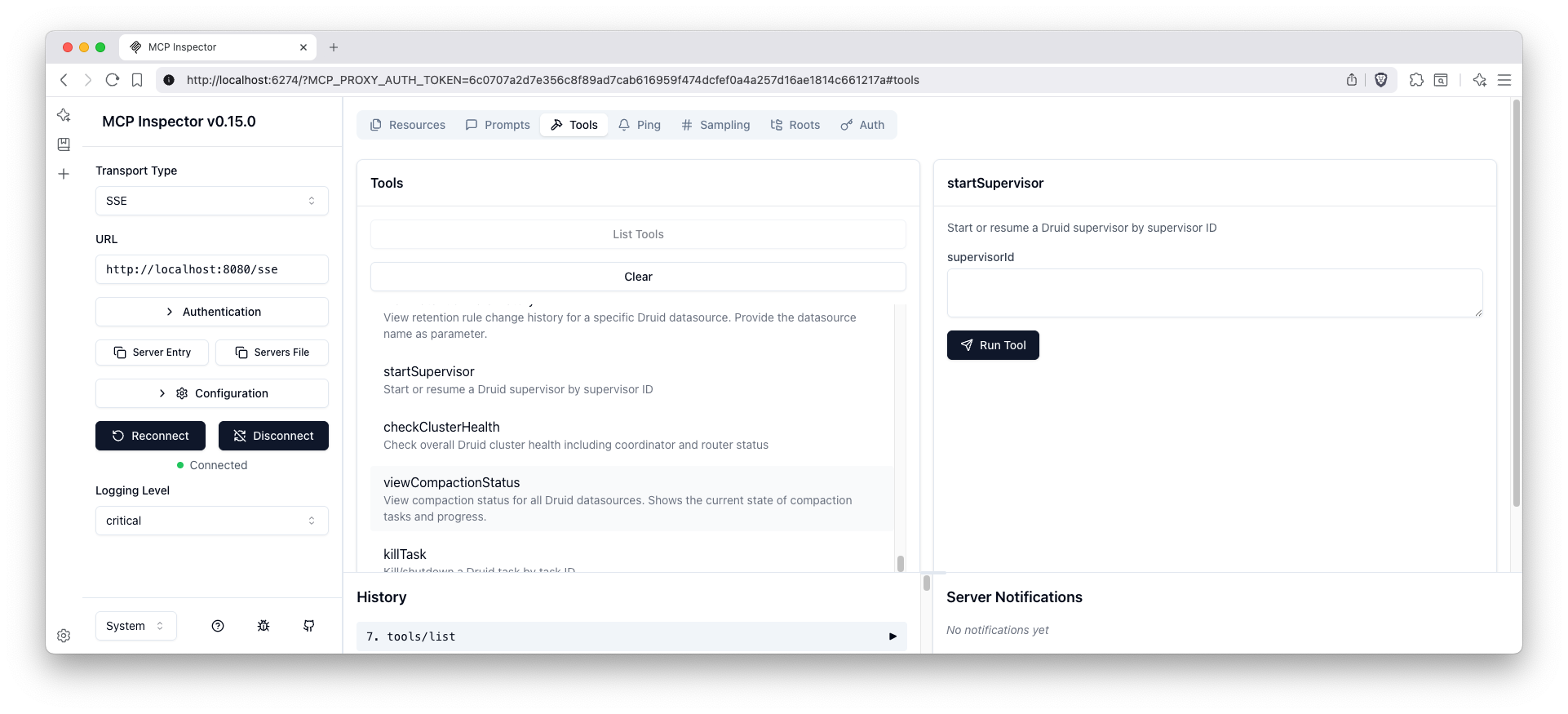
The tools interface shows all available Druid management functions organized by feature areas including data management, ingestion management, and monitoring & health.
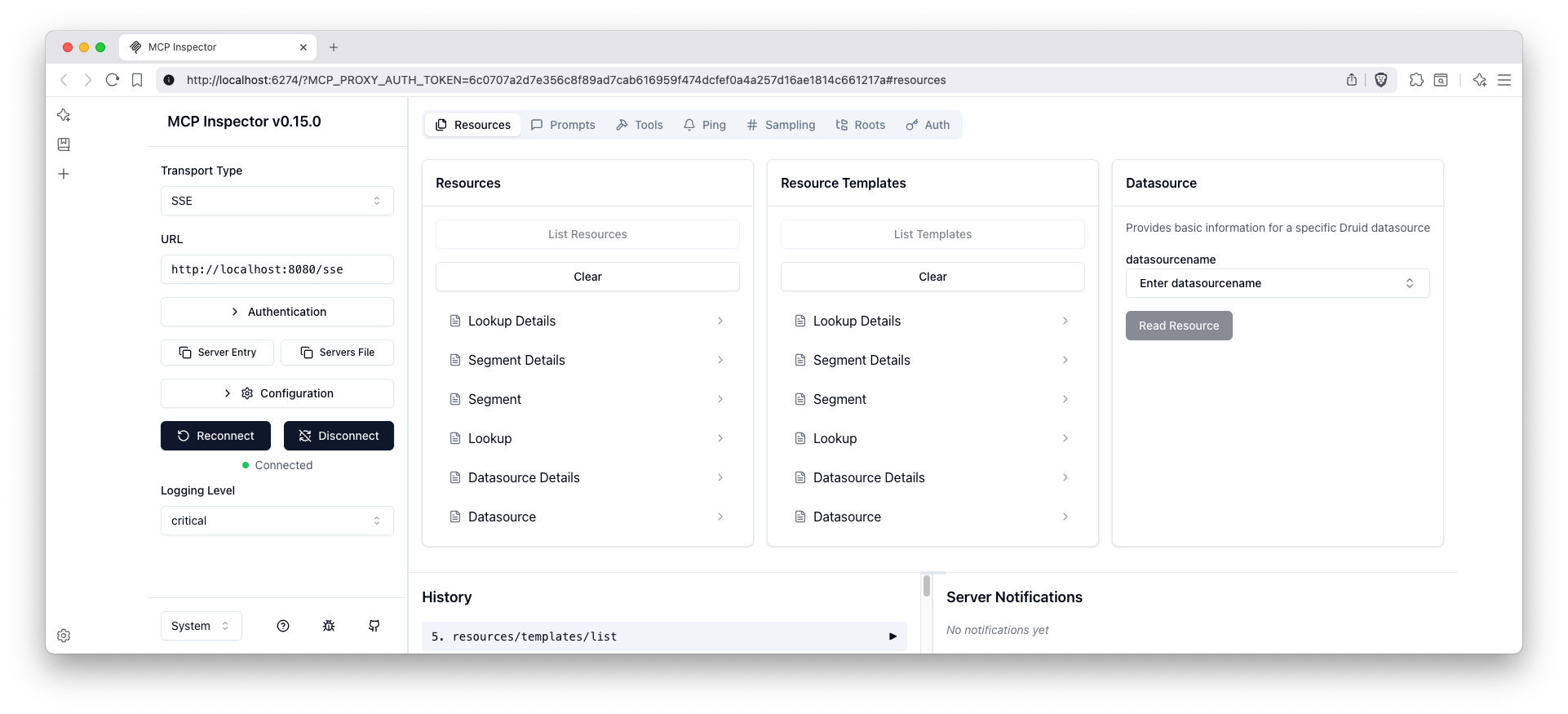
The resources interface displays all accessible Druid data sources and metadata that can be retrieved through the MCP protocol.
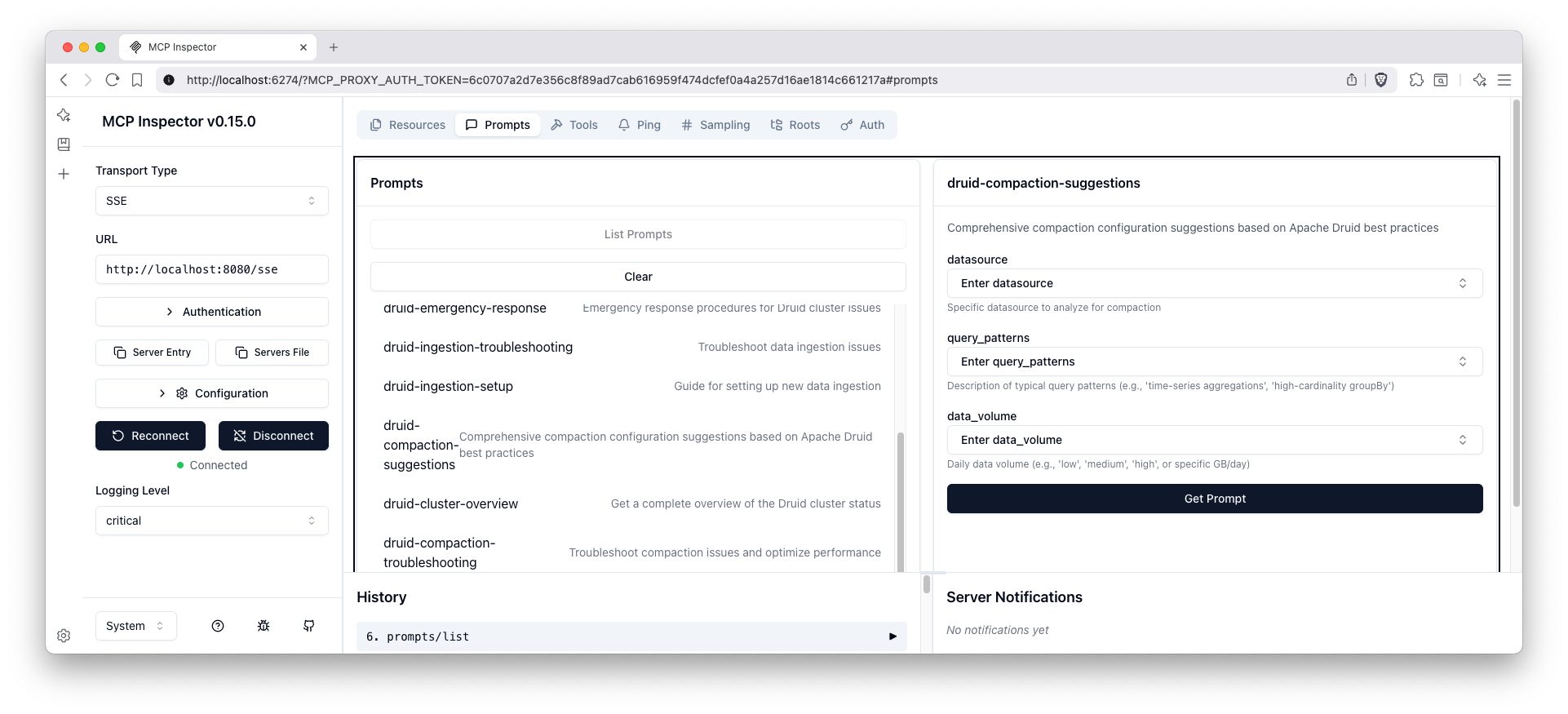
The prompts interface shows all AI-assisted guidance templates available for various Druid management tasks and data analysis workflows.
A ready-to-use MCP configuration file is provided at mcp-servers-config.json that can be used with LLM clients to connect to this Druid MCP server.
The configuration includes both transport options:
# STDIO mode (default)
docker run --rm -i \
  -e DRUID_ROUTER_URL=http://your-druid-router:8888 \
  -e DRUID_COORDINATOR_URL=http://your-druid-coordinator:8081 \
  iunera/druid-mcp-server:latest

# HTTP mode (enable profile 'http' and expose /mcp)
docker run -p 8080:8080 \
  -e SPRING_PROFILES_ACTIVE=http \
  -e DRUID_ROUTER_URL=http://your-druid-router:8888 \
  -e DRUID_COORDINATOR_URL=http://your-druid-coordinator:8081 \
  iunera/druid-mcp-server:latest
Note on Spring profiles:
# Build the application
mvn clean package -DskipTests

# Run the application
java -jar target/druid-mcp-server-1.7.0.jar
The server will start on port 8080 by default.
For detailed build instructions, testing, Docker setup, and development guidelines, see development.md.
DRUID_MCP_SECURITY_OAUTH2_ENABLED:
true (OAuth2 is enabled by default as per the text above)false to disable OAuth2 authentication. When disabled, clients can access the server without providing OAuth2 tokens.If you prefer to use the pre-built JAR without building from source, you can download and run it directly from Maven Central.
Download the JAR from Maven Central https://repo.maven.apache.org/maven2/com/iunera/druid-mcp-server/
# STDIO mode (default)
java -jar target/druid-mcp-server-1.7.0.jar

# HTTP mode (profile: http) - exposes /mcp on port 8080
java -Dspring.profiles.active=http \
     -jar target/druid-mcp-server-1.7.0.jar
For detailed development information including build instructions, testing guidelines, architecture details, and contributing guidelines, see development.md.
The MCP server auto-discovers all tools via annotations. In Read-only mode, any tool that would modify the Druid cluster is not registered and will not appear in the MCP client. The lists below reflect the current implementation.
| Feature | Tool | Description | Parameters |
|---|---|---|---|
| Datasource | listDatasources | List all available Druid datasource names | None |
| Datasource | showDatasourceDetails | Show detailed information for a specific datasource including column information | datasourceName (String) |
| Datasource | killDatasource | Kill a datasource permanently, removing all data and metadata | datasourceName (String), interval (String) |
| Lookup | listLookups | List all available Druid lookups from the coordinator | None |
| Lookup | getLookupConfig | Get configuration for a specific lookup | tier (String), lookupName (String) |
| Lookup | updateLookupConfig | Update configuration for a specific lookup | tier (String), lookupName (String), config (String) |
| Segments | listAllSegments | List all segments across all datasources | None |
| Segments | getSegmentMetadata | Get metadata for specific segments | datasourceName (String), segmentId (String) |
| Segments | getSegmentsForDatasource | Get all segments for a specific datasource | datasourceName (String) |
| Query | queryDruidSql | Execute a SQL query against Druid datasources | sqlQuery (String) |
| Retention | viewRetentionRules | View retention rules for all datasources or a specific one | datasourceName (String, optional) |
| Retention | updateRetentionRules | Update retention rules for a datasource | datasourceName (String), rules (String) |
| Compaction | viewAllCompactionConfigs | View compaction configurations for all datasources | None |
| Compaction | viewCompactionConfigForDatasource | View compaction configuration for a specific datasource | datasourceName (String) |
| Compaction | editCompactionConfigForDatasource | Edit compaction configuration for a datasource | datasourceName (String), config (String) |
| Compaction | deleteCompactionConfigForDatasource | Delete compaction configuration for a datasource | datasourceName (String) |
| Compaction | viewCompactionStatus | View compaction status for all datasources | None |
| Compaction | viewCompactionStatusForDatasource | View compaction status for a specific datasource | datasourceName (String) |
| Feature | Tool | Description | Parameters |
|---|---|---|---|
| Ingestion Spec | createBatchIngestionTemplate | Create a batch ingestion template | datasourceName (String), inputSource (String), timestampColumn (String) |
| Ingestion Spec | createIngestionSpec | Create and submit an ingestion specification | specJson (String) |
| Supervisors | listSupervisors | List all streaming ingestion supervisors | None |
| Supervisors | getSupervisorStatus | Get status of a specific supervisor | supervisorId (String) |
| Supervisors | suspendSupervisor | Suspend a streaming supervisor | supervisorId (String) |
| Supervisors | startSupervisor | Start or resume a streaming supervisor | supervisorId (String) |
| Supervisors | terminateSupervisor | Terminate a streaming supervisor | supervisorId (String) |
| Tasks | listTasks | List all ingestion tasks | None |
| Tasks | getTaskStatus | Get status of a specific task | taskId (String) |
| Tasks | shutdownTask | Shutdown a running task | taskId (String) |
| Feature | Tool | Description | Parameters |
|---|---|---|---|
| Basic Health | checkClusterHealth | Check overall cluster health status | None |
| Basic Health | getServiceStatus | Get status of specific Druid services | serviceType (String) |
| Basic Health | getClusterConfiguration | Get cluster configuration information | None |
| Diagnostics | runDruidDoctor | Run comprehensive cluster diagnostics | None |
| Diagnostics | analyzePerformanceIssues | Analyze cluster performance issues | None |
| Diagnostics | generateHealthReport | Generate detailed health report | None |
| Functionality | testQueryFunctionality | Test query functionality across services | None |
| Functionality | testIngestionFunctionality | Test ingestion functionality | None |
| Functionality | validateClusterConnectivity | Validate connectivity between cluster components | None |
| Feature | Tool | Description | Parameters |
|---|---|---|---|
| Authentication | listAuthenticationUsers | List all users in the Druid authentication system for a specific authenticator | authenticatorName (String) |
| Authentication | getAuthenticationUser | Get details of a specific user from the Druid authentication system | authenticatorName (String), userName (String) |
| Authentication | createAuthenticationUser | Create a new user in the Druid authentication system | authenticatorName (String), userName (String) |
| Authentication | deleteAuthenticationUser | Delete a user from the Druid authentication system. Use with caution as this action cannot be undone. | authenticatorName (String), userName (String) |
| Authentication | setUserPassword | Set or update the password for a user in the Druid authentication system | authenticatorName (String), userName (String), password (String) |
| Authorization | listAuthorizationUsers | List all users in the Druid authorization system for a specific authorizer | authorizerName (String) |
| Authorization | getAuthorizationUser | Get details of a specific user from the Druid authorization system including their roles | authorizerName (String), userName (String) |
| Authorization | listRoles | List all roles in the Druid authorization system for a specific authorizer | authorizerName (String) |
| Authorization | getRole | Get details of a specific role from the Druid authorization system including its permissions | authorizerName (String), roleName (String) |
| Authorization | createAuthorizationUser | Create a new user in the Druid authorization system | authorizerName (String), userName (String) |
| Authorization | deleteAuthorizationUser | Delete a user from the Druid authorization system. Use with caution as this action cannot be undone. | authorizerName (String), userName (String) |
| Authorization | createRole | Create a new role in the Druid authorization system | authorizerName (String), roleName (String) |
| Authorization | deleteRole | Delete a role from the Druid authorization system. Use with caution as this action cannot be undone. | authorizerName (String), roleName (String) |
| Authorization | setRolePermissions | Set permissions for a role in the Druid authorization system. Provide permissions as JSON array. | authorizerName (String), roleName (String), permissions (String) |
| Authorization | assignRoleToUser | Assign a role to a user in the Druid authorization system | authorizerName (String), userName (String), roleName (String) |
| Authorization | unassignRoleFromUser | Unassign a role from a user in the Druid authorization system | authorizerName (String), userName (String), roleName (String) |
| Configuration | getAuthenticatorChainAndAuthorizers | Get configured authenticatorChain and authorizers form the Basic Auth configuration. This information is important for any other security tool and LLMs need to call this tool first. | None |
| Feature | Resource URI Pattern | Description | Parameters |
|---|---|---|---|
| Datasource | druid://datasource/{datasourceName} | Access datasource information and metadata | datasourceName (String) |
| Datasource | druid://datasource/{datasourceName}/details | Access detailed datasource information including schema | datasourceName (String) |
| Lookup | druid://lookup/{tier}/{lookupName} | Access lookup configuration and data | tier (String), lookupName (String) |
| Segments | druid://segment/{segmentId} | Access segment metadata and information | segmentId (String) |
| Feature | Prompt Name | Description | Parameters |
|---|---|---|---|
| Data Analysis | data-exploration | Guide for exploring data in Druid datasources | datasource (String, optional) |
| Data Analysis | query-optimization | Help optimize Druid SQL queries for better performance | query (String) |
| Cluster Management | health-check | Comprehensive cluster health assessment guidance | None |
| Cluster Management | cluster-overview | Overview and analysis of cluster status | None |
| Ingestion Management | ingestion-troubleshooting | Troubleshoot ingestion issues | issue (String, optional) |
| Ingestion Management | ingestion-setup | Guide for setting up new ingestion pipelines | dataSource (String, optional) |
| Retention Management | retention-management | Manage data retention policies | datasource (String, optional) |
| Compaction | compaction-suggestions | Optimize segment compaction configuration | datasource (String, optional), currentConfig (String, optional), performanceMetrics (String, optional) |
| Compaction | compaction-troubleshooting | Troubleshoot compaction issues | issue (String), datasource (String, optional) |
| Operations | emergency-response | Emergency response procedures and guidance | None |
| Operations | maintenance-mode | Cluster maintenance procedures | None |
The application can be configured using environment variables, which is the recommended approach for production environments. Below is a comprehensive list of supported environment variables derived from the application.yaml configuration file.
DRUID_ROUTER_URL: The URL of the Druid router.DRUID_AUTH_USERNAME: The username for Druid authentication.DRUID_AUTH_PASSWORD: The password for Druid authentication.DRUID_SSL_ENABLED: Enables or disables SSL for Druid connections (true/false).DRUID_SSL_SKIP_VERIFICATION: Skips SSL certificate verification (true/false).DRUID_MCP_SECURITY_OAUTH2_ENABLED: Enables or disables OAuth2 security for client authentication (true/false).DRUID_MCP_READONLY_ENABLED: Enables or disables read-only mode (true/false).DRUID_EXTENSION_DRUID_BASIC_SECURITY_ENABLED: Enables or disables the basic security feature (true/false). When disabled, basic security tools are not registered.SPRING_AI_MCP_SERVER_NAME: The name of the MCP server.SPRING_AI_MCP_SERVER_PROTOCOL: The protocol used by the MCP server (e.g., streamable).SERVER_PORT: The port the server listens on.SERVER_SERVLET_SESSION_COOKIE_NAME: The name of the session cookie.SPRING_APPLICATION_NAME: The name of the application.SPRING_CONFIG_IMPORT: Imports additional configuration files.SPRING_MAIN_BANNER_MODE: The mode for the startup banner (e.g., off).LOGGING_FILE_NAME: The name of the log file.LOGGING_LEVEL_ORG_SPRINGFRAMEWORK_SECURITY: The log level for Spring Security (e.g., DEBUG).This section provides comprehensive guidance on connecting to SSL-encrypted Druid clusters with username and password authentication.
Set the following environment variables before starting the MCP server:
# Druid cluster URL with HTTPS
export DRUID_ROUTER_URL="https://your-druid-cluster.example.com:8888"

# Authentication credentials
export DRUID_AUTH_USERNAME="your-username"
export DRUID_AUTH_PASSWORD="your-password"

# SSL configuration
export DRUID_SSL_ENABLED="true"
export DRUID_SSL_SKIP_VERIFICATION="false"  # Use "true" only for testing

# Start the MCP server
java -jar target/druid-mcp-server-1.7.0.jar
Pass configuration as JVM system properties:
java -Ddruid.router.url="http://localhost:8888" \
     -Ddruid.auth.username="admin" \
     -Ddruid.auth.password="password" \
     -jar target/druid-mcp-server-1.7.0.jar
For production environments with valid SSL certificates:
export DRUID_ROUTER_URL="https://druid-prod.company.com:8888"
export DRUID_SSL_ENABLED="true"
export DRUID_SSL_SKIP_VERIFICATION="false"
The server will use the system's default truststore to validate SSL certificates.
The MCP server supports HTTP Basic Authentication with username and password:
DRUID_AUTH_USERNAME or druid.auth.usernameDRUID_AUTH_PASSWORD or druid.auth.passwordThe credentials are automatically encoded using Base64 and sent with each request using the Authorization: Basic header.
Update your mcp-servers-config.json to include environment variables:
{
  "mcpServers": {
    "druid-mcp-server": {
      "command": "docker",
      "args": [
        "run",
        "--rm",
        "-i",
        "-e",
        "DRUID_ROUTER_URL",
        "-e",
        "DRUID_COORDINATOR_URL",
        "-e",
        "DRUID_AUTH_USERNAME",
        "-e",
        "DRUID_AUTH_PASSWORD",
        "-e",
        "DRUID_SSL_ENABLED",
        "-e",
        "DRUID_SSL_SKIP_VERIFICATION",
        "-e",
        "DRUID_MCP_READONLY_ENABLED",
        "iunera/druid-mcp-server:1.7.0"
      ],
      "env": {
        "DRUID_ROUTER_URL": "http://host.docker.internal:8888",
        "DRUID_COORDINATOR_URL": "http://host.docker.internal:8081",
        "DRUID_AUTH_USERNAME": "",
        "DRUID_AUTH_PASSWORD": "",
        "DRUID_SSL_ENABLED": "false",
        "DRUID_SSL_SKIP_VERIFICATION": "true",
        "DRUID_MCP_READONLY_ENABLED": "false"
      }
    }
  }
}
The server provides extensive prompt customization capabilities through the prompts.properties file located in src/main/resources/.
The prompts.properties file contains:
You can override any prompt template using Java system properties with the -D flag:
java -Dprompts.druid-data-exploration.template="Your custom template here" \
     -jar target/druid-mcp-server-1.7.0.jar
custom-prompts.properties):# Custom prompt template
prompts.druid-data-exploration.template=My custom data exploration prompt:\n\
1. Custom step one\n\
2. Custom step two\n\
{datasource_section}\n\
Environment: {environment}
java -Dspring.config.additional-location=classpath:custom-prompts.properties \
     -jar target/druid-mcp-server-1.7.0.jar
All prompt templates support these variables:
| Variable | Description | Example |
|---|---|---|
{environment} | Current environment name | production, staging, dev |
{organizationName} | Organization name | Your Organization |
{contactInfo} | Contact information | your-team@company.com |
{watermark} | Generated watermark | Generated by Druid MCP Server v1.0.0 |
{datasource} | Datasource name (context-specific) | sales_data |
{query} | SQL query (context-specific) | SELECT * FROM sales_data |
prompts.druid-data-exploration.template=Welcome to {organizationName} Druid Analysis!\n\n\
Please help me explore our data:\n\
{datasource_section}\n\
Environment: {environment}\n\
Contact: {contactInfo}\n\n\
{watermark}
prompts.druid-query-optimization.template=Query Performance Analysis for {organizationName}\n\n\
Query to optimize: {query}\n\n\
Please provide:\n\
1. Performance bottleneck analysis\n\
2. Optimization recommendations\n\
3. Best practices for our {environment} environment\n\n\
{watermark}
You can disable individual prompts by setting their enabled flag to false:
mcp.prompts.data-exploration.enabled=false
mcp.prompts.query-optimization.enabled=false
Or disable all prompts globally:
mcp.prompts.enabled=false
This server uses Spring AI's MCP Server framework and supports both STDIO and SSE transports. The tools, resources, and prompts are automatically registered and exposed through the MCP protocol.
The Druid MCP Server supports multiple transport modes compliant with MCP 2025-06-18 specification:
The new Streamable HTTP transport provides enhanced performance and scalability with support for multiple concurrent clients:
# Default configuration with Streamable HTTP

java -Dspring.profiles.active=http \
     -jar target/druid-mcp-server-1.7.0.jar
# Server available at http://localhost:8080/mcp (configurable endpoint)
Features:
Security
Perfect for LLM clients and desktop applications:
java -jar target/druid-mcp-server-1.7.0.jar
Still supported for backwards compatibility. It is no longer the default and may be removed in a future version.
Note: The SSE endpoint is secured with OAuth by default. Clients must include a valid bearer token when connecting. For SSO integration support, see Contact & Support.
Read-only mode prevents any operation that could mutate your Druid cluster while still allowing safe read operations and SQL queries. When enabled:
You can enable it using any of the following methods:
druid.mcp.readonly.enabled=true
export DRUID_MCP_READONLY_ENABLED=true
java -Ddruid.mcp.readonly.enabled=true -jar target/druid-mcp-server-1.7.0.jar
docker run --rm -p 8080:8080 \
  -e DRUID_MCP_READONLY_ENABLED=true \
  iunera/druid-mcp-server:latest
createAuthenticationUser, deleteAuthenticationUser, setUserPassword, createAuthorizationUser, deleteAuthorizationUser, createRole, deleteRole, setRolePermissions, assignRoleToUser, unassignRoleFromUser)To enhance the product and understand usage patterns, this server collects anonymous usage metrics. This data helps prioritize new features and improvements. You can opt-out of anonymous metrics collection by setting the druid.mcp.metrics.enabled to `false.
For local development, testing, and learning, a complete Docker Compose setup for running a full Apache Druid cluster is available at iunera/druid-local-cluster-installer.
This setup is the recommended way to get a Druid cluster running for use with this MCP server.
Key Features:
admin/password).iunera/data-philter.This Druid MCP Server is part of a comprehensive ecosystem of Apache Druid tools and extensions developed by iunera. These complementary projects enhance different aspects of Druid cluster management and data ingestion:
Advanced configuration management and deployment tools for Apache Druid clusters. This project provides:
Integration with Druid MCP Server: The cluster configurations provided by this project work seamlessly with the monitoring and management capabilities of the Druid MCP Server, enabling comprehensive cluster lifecycle management.
A specialized Apache Druid extension for ingesting and analyzing code-related data and metrics. This extension enables:
Integration with Druid MCP Server: This extension expands the ingestion capabilities that can be managed through the MCP server's ingestion management tools, providing specialized support for code analytics use cases.
This Druid MCP Server is developed and maintained by iunera, a leading provider of advanced AI and data analytics solutions.
iunera specializes in:
As veterans in Apache Druid iunera deployed and maintained a large number of solutions based on Apache Druid in productive enterprise grade scenarios.
Maximize your return on data with professional Druid implementation and optimization services. From architecture design to performance tuning and AI integration, our experts help you navigate Druid's complexity and unlock its full potential.
ENTERPRISE AI INTEGRATION & CUSTOM MCP (MODEL CONTEXT PROTOCOL) SERVER DEVELOPMENT
Iunera specializes in developing production-grade AI agents and enterprise-grade LLM solutions, helping businesses move beyond generic AI chatbots. They build secure, scalable, and future-ready AI infrastructure, underpinned by the Model Context Protocol (MCP), to connect proprietary data, legacy systems, and external APIs to advanced AI models.
Get Enterprise MCP Server Development Consulting →
For more information about our services and solutions, visit www.iunera.com.
Need help? Let
© 2024 iunera. Licensed under the Apache License 2.0.
Install via CLI
npx mdskills install iunera/druid-mcp-serverDruid MCP Server is a free, open-source AI agent skill. A comprehensive Model Context Protocol (MCP) server for Apache Druid that provides extensive tools, resources, and prompts for managing and analyzing Druid clusters. Developed by iunera - Advanced AI and Data Analytics Solutions This MCP server implements a feature-based architecture where each package represents a distinct functional area of Druid management. The server provides three main types
Install Druid MCP Server with a single command:
npx mdskills install iunera/druid-mcp-serverThis downloads the skill files into your project and your AI agent picks them up automatically.
Druid MCP Server works with Claude Code, Claude Desktop, Cursor, Vscode Copilot, Windsurf, Continue Dev, Gemini Cli, Amp, Roo Code, Goose. Skills use the open SKILL.md format which is compatible with any AI coding agent that reads markdown instructions.