
Renders diagram source files to PNG/SVG using Kroki. No runtime dependencies — uses only Node.js built-ins. Two usage modes: - CLI — drop source files into src/, run make render, get images in diagrams/ - MCP server — AI tools (renderdiagram, renderfile) render on demand and return a one-click preview URL Output lands in diagrams/. Format is detected from the file extension. Unsupported extensions
npx mdskills install Dev-Dipesh/canopyRelated
@Dev-Dipesh? Sign in with GitHub to claim this listing.Well-documented MCP server providing comprehensive diagram rendering across 25+ formats with local and remote Kroki support
Renders diagram source files to PNG/SVG using Kroki. No runtime dependencies — uses only Node.js built-ins.
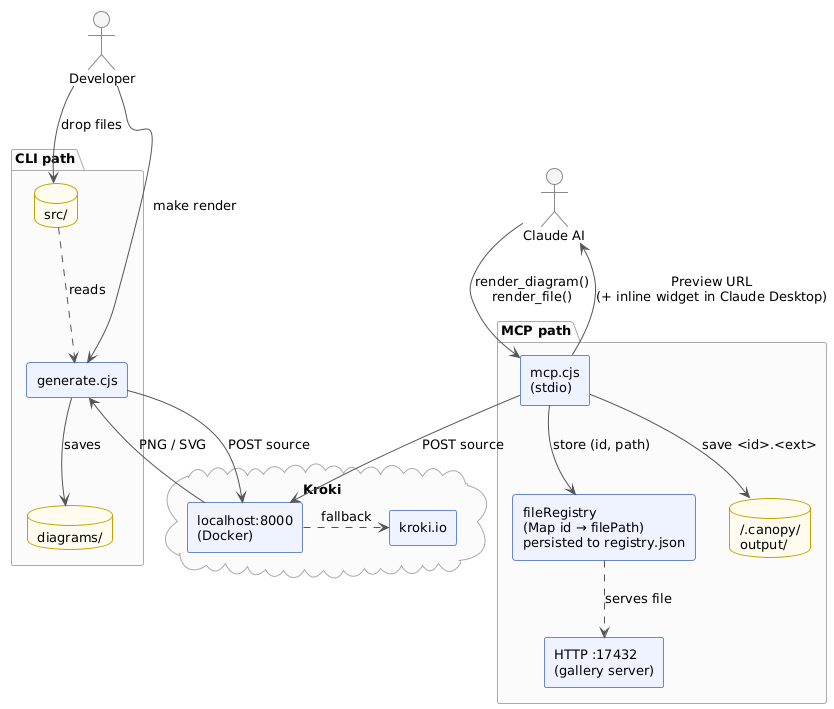
Two usage modes:
src/, run make render, get images in diagrams/render_diagram, render_file) render on demand and return a one-click preview URLmake up # start local Kroki (Docker)
make render # render all files in src/ → diagrams/
Output lands in diagrams/.
make render                                  # render everything in src/
make render FILE=public/flow.puml            # single file
make render DIR=src/public                   # subdirectory → diagrams/public/
make render DIR=src/public OUT=out/pub       # custom output directory
Format is detected from the file extension. Unsupported extensions are skipped.
| Extension(s) | Kroki type |
|---|---|
.puml, .plantuml | plantuml |
.c4puml | c4plantuml |
.mmd, .mermaid | mermaid |
.dot, .gv | graphviz |
.d2 | d2 |
.dbml | dbml |
.ditaa | ditaa |
.erd | erd |
.excalidraw | excalidraw |
.blockdiag | blockdiag |
.seqdiag | seqdiag |
.actdiag | actdiag |
.nwdiag | nwdiag |
.packetdiag | packetdiag |
.rackdiag | rackdiag |
.bpmn | bpmn |
.bytefield | bytefield |
.nomnoml | nomnoml |
.pikchr | pikchr |
.dsl | structurizr |
.bob | svgbob |
.symbolator | symbolator |
.tikz | tikz |
.vega | vega |
.vegalite | vegalite |
.wavedrom | wavedrom |
.wireviz | wireviz |
To add a format, edit the KROKI_TYPE map in generate.cjs. Full list: https://kroki.io/#support
Embed diagrams as fenced code blocks using the diagram type as the language name. Each block is rendered individually and saved to a sub-directory named after the .md file.
Add a title after the language name on the opening fence line:
```plantuml "User Registration Flow"
@startuml
Alice -> Bob: hello
@enduml
```
→ diagrams/architecture/User Registration Flow.png
```plantuml user-flow
```
→ diagrams/architecture/user-flow.png
Without a title, files are named by type and sequence number: plantuml-01.png, mermaid-01.png, etc.
```plantuml "Sequence Overview"
@startuml
...
@enduml
```

```mermaid data-flow
graph TD
    A --> B
```
Render a markdown file:
make render FILE=src/architecture.md
Output for src/architecture.md:
diagrams/
└── architecture/
    ├── Sequence Overview.png
    └── data-flow.png
canopy/
├── generate.cjs        # CLI renderer
├── mcp.cjs             # MCP server + HTTP preview server
├── lib/renderer.cjs    # shared rendering logic
├── Makefile
├── docker-compose.yml
├── src/
│   ├── public/         # committed — shared diagrams
│   └── private/        # gitignored — sensitive diagrams
└── diagrams/
    ├── public/         # committed
    └── private/        # gitignored
Sub-directory structure is mirrored from src/ to diagrams/ automatically:
src/public/flow.puml     →  diagrams/public/flow.png
src/public/arch.md       →  diagrams/public/arch/sequence.png
Run your own Kroki instance via Docker to avoid sending diagrams to the public server.
make up        # start all containers (detached)
make down      # stop and remove containers
make restart   # restart containers
make status    # show container status
The script checks http://localhost:8000 automatically on every run:
Kroki: checking http://localhost:8000 ... ok
If unavailable, it asks before falling back to https://kroki.io.
Containers started by docker-compose.yml:
| Service | Image | Covers |
|---|---|---|
kroki | yuzutech/kroki | Core (PlantUML, C4, GraphViz, D2, Mermaid, etc.) |
mermaid | yuzutech/kroki-mermaid | Mermaid |
blockdiag | yuzutech/kroki-blockdiag | BlockDiag, SeqDiag, ActDiag, NwDiag, PacketDiag, RackDiag |
bpmn | yuzutech/kroki-bpmn | BPMN |
excalidraw | yuzutech/kroki-excalidraw | Excalidraw |
wireviz | yuzutech/kroki-wireviz | WireViz |
The MCP server exposes diagram rendering as AI tools. It starts an HTTP file server on port 17432 (auto-increments if taken) alongside the MCP stdio transport.
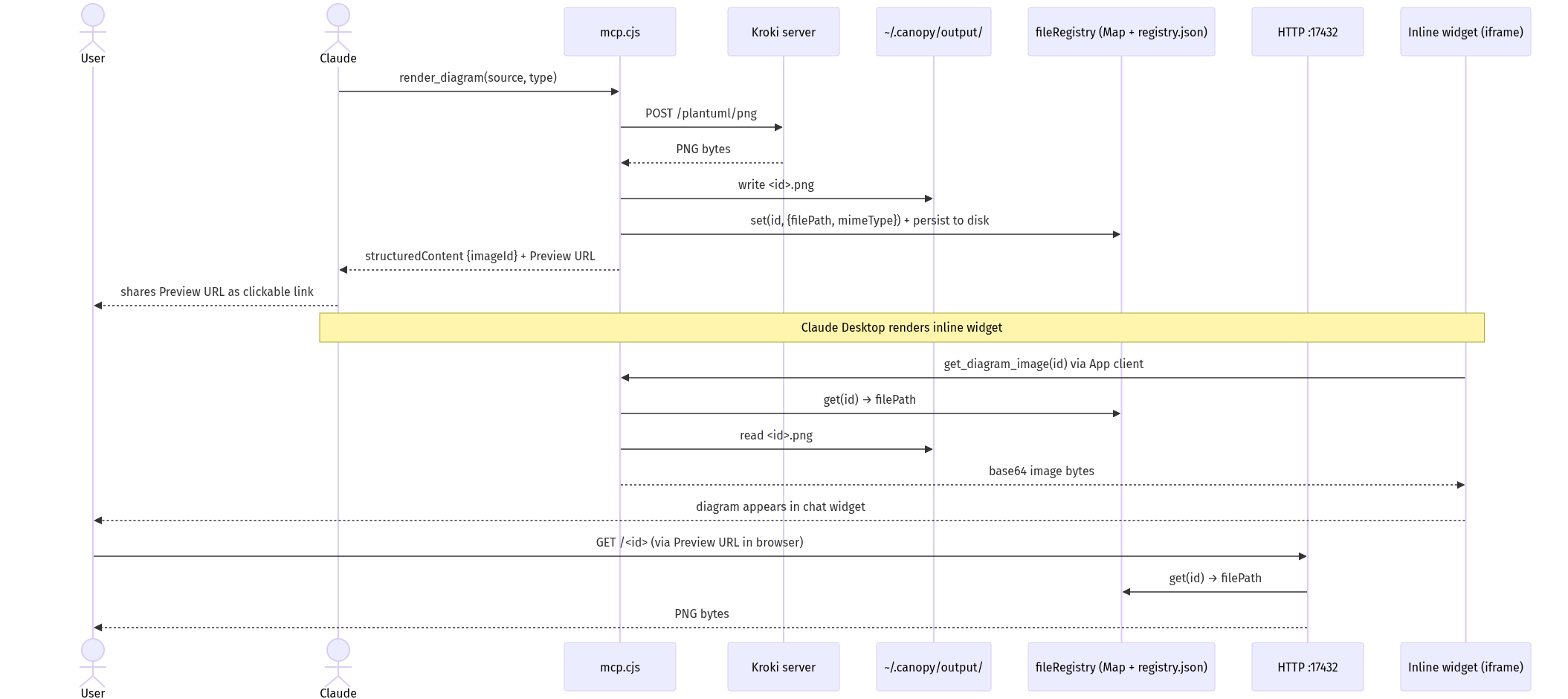
Available tools:
| Tool | Description |
|---|---|
render_diagram | Render diagram source text → returns a preview URL |
render_file | Render a source file from disk → returns preview URL(s) |
list_supported_types | List all supported Kroki types and extensions |
The preview URL (e.g. http://127.0.0.1:17432/a1b2c3) opens directly in your browser.
Add globally so it's available in every project:
claude mcp add canopy -s user node /path/to/canopy/mcp.cjs
Or let Claude Code auto-discover it when you open this repo — .mcp.json is already included.
Add to ~/Library/Application Support/Claude/claude_desktop_config.json:
{
  "mcpServers": {
    "canopy": {
      "command": "node",
      "args": ["/path/to/canopy/mcp.cjs"]
    }
  }
}
Restart Claude Desktop after editing. The MCP server starts automatically when the app launches.
diagrams/private/ and src/private/ are gitignored — use them for sensitive diagrams..md files are silently skipped.~/.canopy/output/ and persist across reboots. The registry is persisted to ~/.canopy/registry.json and reloaded on each server start, so preview URLs remain valid indefinitely as long as the image file exists on disk.Install via CLI
npx mdskills install Dev-Dipesh/canopyCanopy is a free, open-source AI agent skill. Renders diagram source files to PNG/SVG using Kroki. No runtime dependencies — uses only Node.js built-ins. Two usage modes: - CLI — drop source files into src/, run make render, get images in diagrams/ - MCP server — AI tools (renderdiagram, renderfile) render on demand and return a one-click preview URL Output lands in diagrams/. Format is detected from the file extension. Unsupported extensions
Install Canopy with a single command:
npx mdskills install Dev-Dipesh/canopyThis downloads the skill files into your project and your AI agent picks them up automatically.
Canopy works with Claude Code, Claude Desktop, Cursor, Vscode Copilot, Windsurf, Continue Dev, Gemini Cli, Amp, Roo Code, Goose. Skills use the open SKILL.md format which is compatible with any AI coding agent that reads markdown instructions.