
mcp.apify.com The Apify Model Context Protocol (MCP) server at mcp.apify.com enables your AI agents to extract data from social media, search engines, maps, e-commerce sites, and any other website using thousands of ready-made scrapers, crawlers, and automation tools from the Apify Store. It supports OAuth, allowing you to connect from clients like Claude.ai or Visual Studio Code using just the UR
npx mdskills install apify/actors-mcp-serverRelated
@apify? Sign in with GitHub to claim this listing.Provides extensive web scraping and automation tools via thousands of Apify Actors with OAuth support
1<h1 align="center">2 <a href="https://mcp.apify.com">3 <picture>4 <source media="(prefers-color-scheme: dark)" srcset="https://raw.githubusercontent.com/apify/apify-mcp-server/refs/heads/master/docs/apify_mcp_server_dark_background.png">5 <img alt="Apify MCP Server" src="https://raw.githubusercontent.com/apify/apify-mcp-server/refs/heads/master/docs/apify_mcp_server_white_background.png" width="500">6 </picture>7 </a>8 <br>9 <small><a href="https://mcp.apify.com">mcp.apify.com</a></small>10</h1>1112<p align=center>13 <a href="https://www.npmjs.com/package/@apify/actors-mcp-server" rel="nofollow"><img src="https://img.shields.io/npm/v/@apify/actors-mcp-server.svg" alt="NPM latest version" data-canonical-src="https://img.shields.io/npm/v/@apify/actors-mcp-server.svg" style="max-width: 100%;"></a>14 <a href="https://www.npmjs.com/package/@apify/actors-mcp-server" rel="nofollow"><img src="https://img.shields.io/npm/dm/@apify/actors-mcp-server.svg" alt="Downloads" data-canonical-src="https://img.shields.io/npm/dm/@apify/actors-mcp-server.svg" style="max-width: 100%;"></a>15 <a href="https://github.com/apify/actors-mcp-server/actions/workflows/check.yaml"><img src="https://github.com/apify/actors-mcp-server/actions/workflows/check.yaml/badge.svg?branch=master" alt="Build Status" style="max-width: 100%;"></a>16 <a href="https://smithery.ai/server/@apify/mcp"><img src="https://smithery.ai/badge/@apify/mcp" alt="smithery badge"></a>17</p>181920The Apify Model Context Protocol (MCP) server at [**mcp.apify.com**](https://mcp.apify.com) enables your AI agents to extract data from social media, search engines, maps, e-commerce sites, and any other website using thousands of ready-made scrapers, crawlers, and automation tools from the [Apify Store](https://apify.com/store). It supports OAuth, allowing you to connect from clients like Claude.ai or Visual Studio Code using just the URL.2122> **🚀 Use the hosted Apify MCP Server!**23>24> For the best experience, connect your AI assistant to our hosted server at **[`https://mcp.apify.com`](https://mcp.apify.com)**. The hosted server supports the latest features - including output schema inference for structured Actor results - that are not available when running locally via stdio.2526💰 The server also supports [Skyfire agentic payments](#-skyfire-agentic-payments), allowing AI agents to pay for Actor runs without an API token.2728Apify MCP Server is compatible with `Claude Code, Claude.ai, Cursor, VS Code` and any client that adheres to the Model Context Protocol.29Check out the [MCP clients section](#-mcp-clients) for more details or visit the [MCP configuration page](https://mcp.apify.com).3031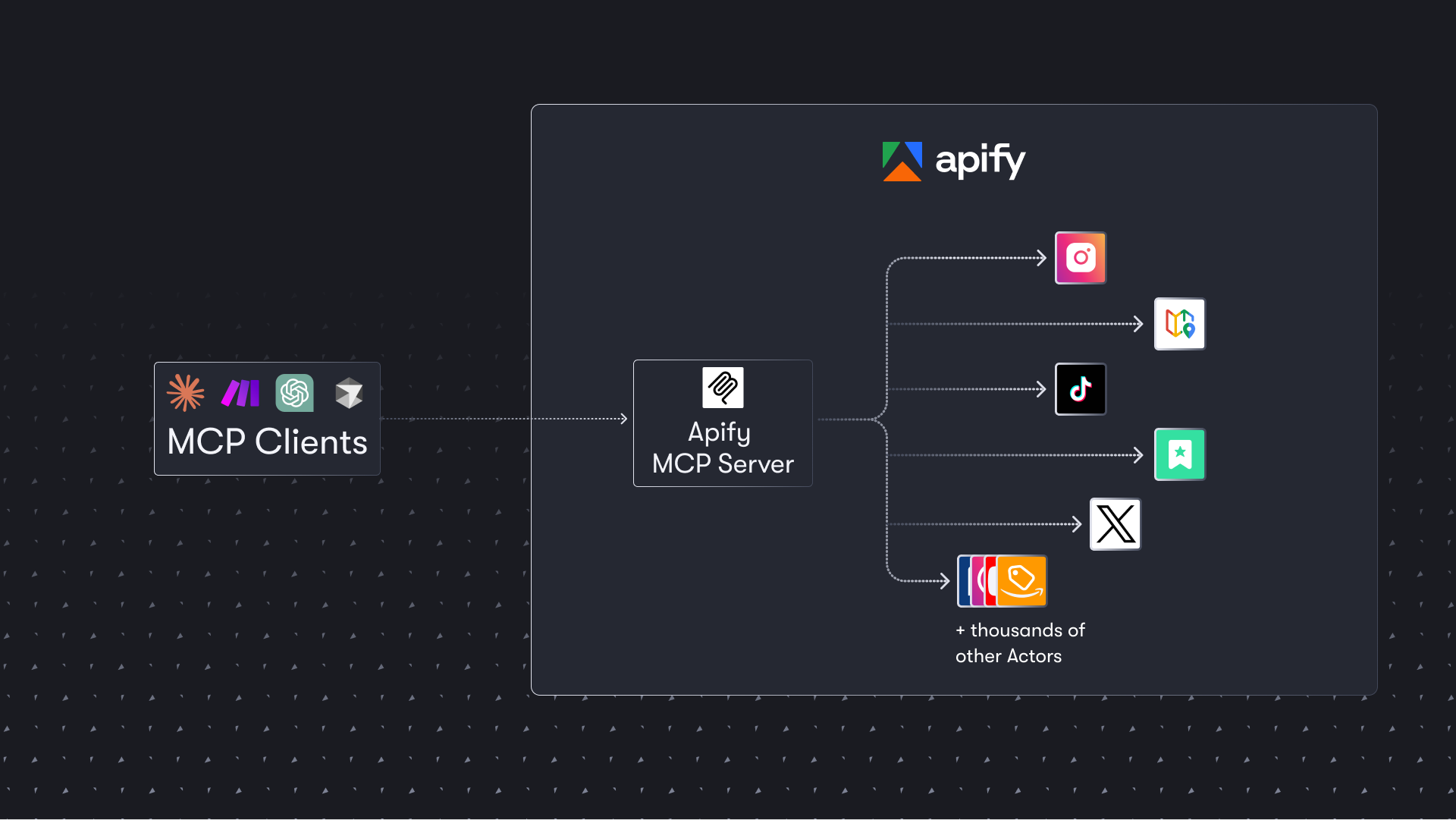3233## Table of Contents34- [🌐 Introducing the Apify MCP server](#-introducing-the-apify-mcp-server)35- [🚀 Quickstart](#-quickstart)36- [⚠️ SSE transport deprecation](#%EF%B8%8F-sse-transport-deprecation)37- [🤖 MCP clients](#-mcp-clients)38- [🪄 Try Apify MCP instantly](#-try-apify-mcp-instantly)39- [💰 Skyfire agentic payments](#-skyfire-agentic-payments)40- [🛠️ Tools, resources, and prompts](#%EF%B8%8F-tools-resources-and-prompts)41- [📊 Telemetry](#-telemetry)42- [🐛 Troubleshooting (local MCP server)](#-troubleshooting-local-mcp-server)43- [⚙️ Development](#%EF%B8%8F-development)44- [🤝 Contributing](#-contributing)45- [📚 Learn more](#-learn-more)4647# 🌐 Introducing the Apify MCP server4849The Apify MCP Server allows an AI assistant to use any [Apify Actor](https://apify.com/store) as a tool to perform a specific task.50For example, it can:51- Use [Facebook Posts Scraper](https://apify.com/apify/facebook-posts-scraper) to extract data from Facebook posts from multiple pages/profiles.52- Use [Google Maps Email Extractor](https://apify.com/lukaskrivka/google-maps-with-contact-details) to extract contact details from Google Maps.53- Use [Google Search Results Scraper](https://apify.com/apify/google-search-scraper) to scrape Google Search Engine Results Pages (SERPs).54- Use [Instagram Scraper](https://apify.com/apify/instagram-scraper) to scrape Instagram posts, profiles, places, photos, and comments.55- Use [RAG Web Browser](https://apify.com/apify/web-scraper) to search the web, scrape the top N URLs, and return their content.5657**Video tutorial: Integrate 8,000+ Apify Actors and Agents with Claude**5859[](https://www.youtube.com/watch?v=BKu8H91uCTg)6061# 🚀 Quickstart6263You can use the Apify MCP Server in two ways:6465**HTTPS Endpoint (mcp.apify.com)**: Connect from your MCP client via OAuth or by including the `Authorization: Bearer <APIFY_TOKEN>` header in your requests. This is the recommended method for most use cases. Because it supports OAuth, you can connect from clients like [Claude.ai](https://claude.ai) or [Visual Studio Code](https://code.visualstudio.com/) using just the URL: `https://mcp.apify.com`.66- `https://mcp.apify.com` streamable transport6768**Standard Input/Output (stdio)**: Ideal for local integrations and command-line tools like the Claude for Desktop client.69- Set the MCP client server command to `npx @apify/actors-mcp-server` and the `APIFY_TOKEN` environment variable to your Apify API token.70- See `npx @apify/actors-mcp-server --help` for more options.7172You can find detailed instructions for setting up the MCP server in the [Apify documentation](https://docs.apify.com/platform/integrations/mcp).7374# ⚠️ SSE transport deprecation on April 1, 20267576Update your MCP client config before April 1, 2026.77The Apify MCP server is dropping Server-Sent Events (SSE) transport in favor of Streamable HTTP, in line with the official MCP spec.7879Go to [mcp.apify.com](https://mcp.apify.com/) to update the installation for your client of choice, with a valid endpoint.8081# 🤖 MCP clients8283Apify MCP Server is compatible with any MCP client that adheres to the [Model Context Protocol](https://modelcontextprotocol.org/), but the level of support for dynamic tool discovery and other features may vary between clients.84<!--Therefore, the server uses [mcp-client-capabilities](https://github.com/apify/mcp-client-capabilities) to detect client capabilities and adjust its behavior accordingly.-->8586To interact with the Apify MCP server, you can use clients such as: [Claude Desktop](https://claude.ai/download), [Visual Studio Code](https://code.visualstudio.com/), or [Apify Tester MCP Client](https://apify.com/jiri.spilka/tester-mcp-client).8788Visit [mcp.apify.com](https://mcp.apify.com) to configure the server for your preferred client.8990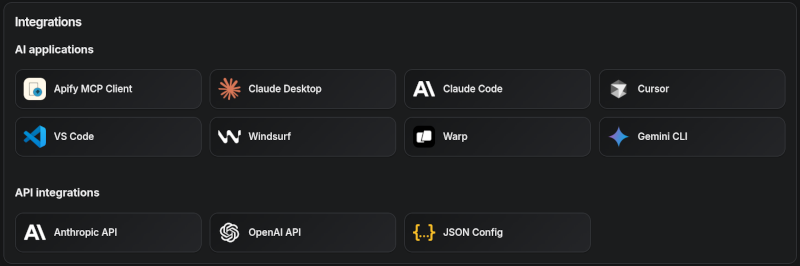9192### Supported clients matrix9394The following table outlines the tested MCP clients and their level of support for key features.9596| Client | Dynamic Tool Discovery | Notes |97|-----------------------------|------------------------|------------------------------------------------------|98| **Claude.ai (web)** | 🟡 Partial | Tools mey need to be reloaded manually in the client |99| **Claude Desktop** | 🟡 Partial | Tools may need to be reloaded manually in the client |100| **VS Code (Genie)** | ✅ Full | |101| **Cursor** | ✅ Full | |102| **Apify Tester MCP Client** | ✅ Full | Designed for testing Apify MCP servers |103| **OpenCode** | ✅ Full | |104105106**Smart tool selection based on client capabilities:**107108When the `actors` tool category is requested, the server intelligently selects the most appropriate Actor-related tools based on the client's capabilities:109110- **Clients with dynamic tool support** (e.g., Claude.ai web, VS Code Genie): The server provides the `add-actor` tool instead of `call-actor`. This allows for a better user experience where users can dynamically discover and add new Actors as tools during their conversation.111112- **Clients with limited dynamic tool support** (e.g., Claude Desktop): The server provides the standard `call-actor` tool along with other Actor category tools, ensuring compatibility while maintaining functionality.113114# 🪄 Try Apify MCP instantly115116Want to try Apify MCP without any setup?117118Check out [Apify Tester MCP Client](https://apify.com/jiri.spilka/tester-mcp-client)119120This interactive, chat-like interface provides an easy way to explore the capabilities of Apify MCP without any local setup.121Just sign in with your Apify account and start experimenting with web scraping, data extraction, and automation tools!122123Or use the MCP bundle file (formerly known as Anthropic Desktop extension file, or DXT) for one-click installation: [Apify MCP server MCPB file](https://github.com/apify/apify-mcp-server/releases/latest/download/apify-mcp-server.mcpb)124125# 💰 Skyfire agentic payments126127The Apify MCP Server integrates with [Skyfire](https://www.skyfire.xyz/) to enable agentic payments - AI agents can autonomously pay for Actor runs without requiring an Apify API token. Instead of authenticating with `APIFY_TOKEN`, the agent uses Skyfire PAY tokens to cover billing for each tool call.128129**Prerequisites:**130- A [Skyfire account](https://www.skyfire.xyz/) with a funded wallet131- An MCP client that supports multiple servers (e.g., Claude Desktop, OpenCode, VS Code)132133**Setup:**134135Configure both the Skyfire MCP server and the Apify MCP server in your MCP client. Enable payment mode by adding the `payment=skyfire` query parameter to the Apify server URL:136137```json138{139 "mcpServers": {140 "skyfire": {141 "url": "https://api.skyfire.xyz/mcp/sse",142 "headers": {143 "skyfire-api-key": "<YOUR_SKYFIRE_API_KEY>"144 }145 },146 "apify": {147 "url": "https://mcp.apify.com?payment=skyfire"148 }149 }150}151```152153**How it works:**154155When Skyfire mode is enabled, the agent handles the full payment flow autonomously:1561571. The agent discovers relevant Actors via `search-actors` or `fetch-actor-details` (these remain free).1582. Before executing an Actor, the agent creates a PAY token using the `create-pay-token` tool from the Skyfire MCP server (minimum $5.00 USD).1593. The agent passes the PAY token in the `skyfire-pay-id` input property when calling the Actor tool.1604. Results are returned as usual. Unused funds on the token remain available for future runs or are returned upon expiration.161162To learn more, see the [Skyfire integration documentation](https://docs.apify.com/platform/integrations/skyfire) and the [Agentic Payments with Skyfire](https://blog.apify.com/agentic-payments-skyfire/) blog post.163164# 🛠️ Tools, resources, and prompts165166The MCP server provides a set of tools for interacting with Apify Actors.167Since the Apify Store is large and growing rapidly, the MCP server provides a way to dynamically discover and use new Actors.168169### Actors170171Any [Apify Actor](https://apify.com/store) can be used as a tool.172By default, the server is pre-configured with one Actor, `apify/rag-web-browser`, and several helper tools.173The MCP server loads an Actor's input schema and creates a corresponding MCP tool.174This allows the AI agent to know exactly what arguments to pass to the Actor and what to expect in return.175176177For example, for the `apify/rag-web-browser` Actor, the input parameters are:178179```json180{181 "query": "restaurants in San Francisco",182 "maxResults": 3183}184```185You don't need to manually specify which Actor to call or its input parameters; the LLM handles this automatically.186When a tool is called, the arguments are automatically passed to the Actor by the LLM.187You can refer to the specific Actor's documentation for a list of available arguments.188189### Helper tools190191One of the most powerful features of using MCP with Apify is dynamic tool discovery.192It allows an AI agent to find new tools (Actors) as needed and incorporate them.193Here are some special MCP operations and how the Apify MCP Server supports them:194195- **Apify Actors**: Search for Actors, view their details, and use them as tools for the AI.196- **Apify documentation**: Search the Apify documentation and fetch specific documents to provide context to the AI.197- **Actor runs**: Get lists of your Actor runs, inspect their details, and retrieve logs.198- **Apify storage**: Access data from your datasets and key-value stores.199200### Overview of available tools201202Here is an overview list of all the tools provided by the Apify MCP Server.203204| Tool name | Category | Description | Enabled by default |205| :--- | :--- | :--- | :---: |206| `search-actors` | actors | Search for Actors in the Apify Store. | ✅ |207| `fetch-actor-details` | actors | Retrieve detailed information about a specific Actor, including its input schema, README, pricing, and Actor output schema. | ✅ |208| `call-actor`* | actors | Call an Actor and get its run results. Use fetch-actor-details first to get the Actor's input schema. | ❔ |209| `get-actor-run` | runs | Get detailed information about a specific Actor run. | |210| `get-actor-output`* | - | Retrieve the output from an Actor call which is not included in the output preview of the Actor tool. | ✅ |211| `search-apify-docs` | docs | Search the Apify documentation for relevant pages. | ✅ |212| `fetch-apify-docs` | docs | Fetch the full content of an Apify documentation page by its URL. | ✅ |213| [`apify-slash-rag-web-browser`](https://apify.com/apify/rag-web-browser) | Actor (see [tool configuration](#tools-configuration)) | An Actor tool to browse the web. | ✅ |214| `get-actor-run-list` | runs | Get a list of an Actor's runs, filterable by status. | |215| `get-actor-log` | runs | Retrieve the logs for a specific Actor run. | |216| `get-dataset` | storage | Get metadata about a specific dataset. | |217| `get-dataset-items` | storage | Retrieve items from a dataset with support for filtering and pagination. | |218| `get-dataset-schema` | storage | Generate a JSON schema from dataset items. | |219| `get-key-value-store` | storage | Get metadata about a specific key-value store. | |220| `get-key-value-store-keys`| storage | List the keys within a specific key-value store. | |221| `get-key-value-store-record`| storage | Get the value associated with a specific key in a key-value store. | |222| `get-dataset-list` | storage | List all available datasets for the user. | |223| `get-key-value-store-list`| storage | List all available key-value stores for the user. | |224| `add-actor`* | experimental | Add an Actor as a new tool for the user to call. | ❔ |225226> **Note:**227>228> When using the `actors` tool category, clients that support dynamic tool discovery (like Claude.ai web and VS Code) automatically receive the `add-actor` tool instead of `call-actor` for enhanced Actor discovery capabilities.229>230> The `get-actor-output` tool is automatically included with any Actor-related tool, such as `call-actor`, `add-actor`, or any specific Actor tool like `apify-slash-rag-web-browser`. When you call an Actor - either through the `call-actor` tool or directly via an Actor tool (e.g., `apify-slash-rag-web-browser`) - you receive a preview of the output. The preview depends on the Actor's output format and length; for some Actors and runs, it may include the entire output, while for others, only a limited version is returned to avoid overwhelming the LLM. To retrieve the full output of an Actor run, use the `get-actor-output` tool (supports limit, offset, and field filtering) with the `datasetId` provided by the Actor call.231232### Tool annotations233234All tools include metadata annotations to help MCP clients and LLMs understand tool behavior:235236- **`title`**: Short display name for the tool (e.g., "Search Actors", "Call Actor", "apify/rag-web-browser")237- **`readOnlyHint`**: `true` for tools that only read data without modifying state (e.g., `get-dataset`, `fetch-actor-details`)238- **`openWorldHint`**: `true` for tools that access external resources outside the Apify platform (e.g., `call-actor` executes external Actors, `get-html-skeleton` scrapes external websites). Tools that interact only with the Apify platform (like `search-actors` or `fetch-apify-docs`) do not have this hint.239240### Tools configuration241242The `tools` configuration parameter is used to specify loaded tools - either categories or specific tools directly, and Apify Actors. For example, `tools=storage,runs` loads two categories; `tools=add-actor` loads just one tool.243244When no query parameters are provided, the MCP server loads the following `tools` by default:245246- `actors`247- `docs`248- `apify/rag-web-browser`249250If the tools parameter is specified, only the listed tools or categories will be enabled - no default tools will be included.251252> **Easy configuration:**253>254> Use the [UI configurator](https://mcp.apify.com/) to configure your server, then copy the configuration to your client.255256**Configuring the hosted server:**257258The hosted server can be configured using query parameters in the URL. For example, to load the default tools, use:259260```261https://mcp.apify.com?tools=actors,docs,apify/rag-web-browser262```263264265For minimal configuration, if you want to use only a single Actor tool - without any discovery or generic calling tools, the server can be configured as follows:266267```268https://mcp.apify.com?tools=apify/my-actor269```270271This setup exposes only the specified Actor (`apify/my-actor`) as a tool. No other tools will be available.272273**Configuring the CLI:**274275The CLI can be configured using command-line flags. For example, to load the same tools as in the hosted server configuration, use:276277```bash278npx @apify/actors-mcp-server --tools actors,docs,apify/rag-web-browser279```280281The minimal configuration is similar to the hosted server configuration:282283```bash284npx @apify/actors-mcp-server --tools apify/my-actor285```286287As above, this exposes only the specified Actor (`apify/my-actor`) as a tool. No other tools will be available.288289> **⚠️ Important recommendation**290>291> **The default tools configuration may change in future versions.** When no `tools` parameter is specified, the server currently loads default tools, but this behavior is subject to change.292>293> **For production use and stable interfaces, always explicitly specify the `tools` parameter** to ensure your configuration remains consistent across updates.294295### UI mode configuration296297The `uiMode` parameter enables OpenAI-specific widget rendering in tool responses. When enabled, tools like `search-actors` return interactive widget responses optimized for OpenAI clients.298299**Configuring the hosted server:**300301Enable UI mode using the `ui` query parameter:302303```304https://mcp.apify.com?ui=openai305```306307You can combine it with other parameters:308309```310https://mcp.apify.com?tools=actors,docs&ui=openai311```312313**Configuring the CLI:**314315The CLI can be configured using command-line flags. For example, to enable UI mode:316317```bash318npx @apify/actors-mcp-server --ui openai319```320321You can also set it via the `UI_MODE` environment variable:322323```bash324export UI_MODE=openai325npx @apify/actors-mcp-server326```327328### Backward compatibility329330The v2 configuration preserves backward compatibility with v1 usage. Notes:331332- `actors` param (URL) and `--actors` flag (CLI) are still supported.333 - Internally they are merged into `tools` selectors.334 - Examples: `?actors=apify/rag-web-browser` ≡ `?tools=apify/rag-web-browser`; `--actors apify/rag-web-browser` ≡ `--tools apify/rag-web-browser`.335- `enable-adding-actors` (CLI) and `enableAddingActors` (URL) are supported but deprecated.336 - Prefer `tools=experimental` or including the specific tool `tools=add-actor`.337 - Behavior remains: when enabled with no `tools` specified, the server exposes only `add-actor`; when categories/tools are selected, `add-actor` is also included.338- `enableActorAutoLoading` remains as a legacy alias for `enableAddingActors` and is mapped automatically.339- Defaults remain compatible: when no `tools` are specified, the server loads `actors`, `docs`, and `apify/rag-web-browser`.340 - If any `tools` are specified, the defaults are not added (same as v1 intent for explicit selection).341- `call-actor` is now included by default via the `actors` category (additive change). To exclude it, specify an explicit `tools` list without `actors`.342- `preview` category is deprecated and removed. Use specific tool names instead.343344Existing URLs and commands using `?actors=...` or `--actors` continue to work unchanged.345346### Prompts347348The server provides a set of predefined example prompts to help you get started interacting with Apify through MCP. For example, there is a `GetLatestNewsOnTopic` prompt that allows you to easily retrieve the latest news on a specific topic using the [RAG Web Browser](https://apify.com/apify/rag-web-browser) Actor.349350### Resources351352The server does not yet provide any resources.353354## 📡 Telemetry355356The Apify MCP Server collects telemetry data about tool calls to help Apify understand usage patterns and improve the service.357By default, telemetry is **enabled** for all tool calls.358359The stdio transport also uses [Sentry](https://sentry.io) for error tracking, which helps us identify and fix issues faster.360Sentry is automatically disabled when telemetry is opted out.361362### Opting out of telemetry363364You can opt out of telemetry (including Sentry error tracking) by setting the `--telemetry-enabled` CLI flag to `false` or the `TELEMETRY_ENABLED` environment variable to `false`.365CLI flags take precedence over environment variables.366367#### Examples368369**For the remote server (mcp.apify.com)**:370```text371# Disable via URL parameter372https://mcp.apify.com?telemetry-enabled=false373```374375**For the local stdio server**:376```bash377# Disable via CLI flag378npx @apify/actors-mcp-server --telemetry-enabled=false379380# Or set environment variable381export TELEMETRY_ENABLED=false382npx @apify/actors-mcp-server383```384385# ⚙️ Development386387Please see the [CONTRIBUTING.md](./CONTRIBUTING.md) guide for contribution guidelines and commit message conventions.388389For detailed development setup, project structure, and local testing instructions, see the [DEVELOPMENT.md](./DEVELOPMENT.md) guide.390391## Prerequisites392393- [Node.js](https://nodejs.org/en) (v18 or higher)394395Create an environment file, `.env`, with the following content:396```text397APIFY_TOKEN="your-apify-token"398```399400Build the `actor-mcp-server` package:401402```bash403npm run build404```405406## Start HTTP streamable MCP server407408Run using Apify CLI:409410```bash411export APIFY_TOKEN="your-apify-token"412export APIFY_META_ORIGIN=STANDBY413apify run -p414```415416Once the server is running, you can use the [MCP Inspector](https://github.com/modelcontextprotocol/inspector) to debug the server exposed at `http://localhost:3001`.417418## Start standard input/output (stdio) MCP server419420You can launch the MCP Inspector with this command:421422```bash423export APIFY_TOKEN="your-apify-token"424npx @modelcontextprotocol/inspector node ./dist/stdio.js425```426427Upon launching, the Inspector will display a URL that you can open in your browser to begin debugging.428429## Unauthenticated access430431When the `tools` query parameter includes only tools explicitly enabled for unauthenticated use, the hosted server allows access without an API token.432Currently allowed tools: `search-actors`, `search-apify-docs`, `fetch-apify-docs`.433Example: `https://mcp.apify.com?tools=search-actors`.434435## 🐦 Canary PR releases436437Apify MCP is split across two repositories: this one for core MCP logic and the private `apify-mcp-server-internal` for the hosted server.438Changes must be synchronized between both.439440To create a canary release, add the `beta` tag to your PR branch.441This publishes the package to [pkg.pr.new](https://pkg.pr.new/) for staging and testing before merging.442See [the workflow file](.github/workflows/pre_release.yaml) for details.443444## 🐋 Docker Hub integration445The Apify MCP Server is also available on [Docker Hub](https://hub.docker.com/mcp/server/apify-mcp-server/overview), registered via the [mcp-registry](https://github.com/docker/mcp-registry) repository. The entry in `servers/apify-mcp-server/server.yaml` should be deployed automatically by the Docker Hub MCP registry (deployment frequency is unknown). **Before making major changes to the `stdio` server version, be sure to test it locally to ensure the Docker build passes.** To test, change the `source.branch` to your PR branch and run `task build -- apify-mcp-server`. For more details, see [CONTRIBUTING.md](https://github.com/docker/mcp-registry/blob/main/CONTRIBUTING.md).446447# 🐛 Troubleshooting (local MCP server)448449- Make sure you have `node` installed by running `node -v`.450- Make sure the `APIFY_TOKEN` environment variable is set.451- Always use the latest version of the MCP server by using `@apify/actors-mcp-server@latest`.452453### Debugging the NPM package454455To debug the server, use the [MCP Inspector](https://github.com/modelcontextprotocol/inspector) tool:456457```shell458export APIFY_TOKEN="your-apify-token"459npx @modelcontextprotocol/inspector npx -y @apify/actors-mcp-server460```461462## 💡 Limitations463464The Actor input schema is processed to be compatible with most MCP clients while adhering to [JSON Schema](https://json-schema.org/) standards. The processing includes:465- **Descriptions** are truncated to 500 characters (as defined in `MAX_DESCRIPTION_LENGTH`).466- **Enum fields** are truncated to a maximum combined length of 2000 characters for all elements (as defined in `ACTOR_ENUM_MAX_LENGTH`).467- **Required fields** are explicitly marked with a `REQUIRED` prefix in their descriptions for compatibility with frameworks that may not handle the JSON schema properly.468- **Nested properties** are built for special cases like proxy configuration and request list sources to ensure the correct input structure.469- **Array item types** are inferred when not explicitly defined in the schema, using a priority order: explicit type in items > prefill type > default value type > editor type.470- **Enum values and examples** are added to property descriptions to ensure visibility, even if the client doesn't fully support the JSON schema.471- **Rental Actors** are only available for use with the hosted MCP server at https://mcp.apify.com. When running the server locally via stdio, you can only access Actors that are already added to your local toolset. To dynamically search for and use any Actor from the Apify Store—including rental Actors—connect to the hosted endpoint.472473# 🤝 Contributing474475We welcome contributions to improve the Apify MCP Server! Here's how you can help:476477- **🐛 Report issues**: Find a bug or have a feature request? [Open an issue](https://github.com/apify/apify-mcp-server/issues).478- **🔧 Submit pull requests**: Fork the repo and submit pull requests with enhancements or fixes.479- **📚 Documentation**: Improvements to docs and examples are always welcome.480- **💡 Share use cases**: Contribute examples to help other users.481482For major changes, please open an issue first to discuss your proposal and ensure it aligns with the project's goals.483484# 📚 Learn more485486- [Model Context Protocol](https://modelcontextprotocol.org/)487- [What are AI Agents?](https://blog.apify.com/what-are-ai-agents/)488- [What is MCP and why does it matter?](https://blog.apify.com/what-is-model-context-protocol/)489- [How to use MCP with Apify Actors](https://blog.apify.com/how-to-use-mcp/)490- [Tester MCP Client](https://apify.com/jiri.spilka/tester-mcp-client)491- [Webinar: Building and Monetizing MCP Servers on Apify](https://www.youtube.com/watch?v=w3AH3jIrXXo)492- [How to build and monetize an AI agent on Apify](https://blog.apify.com/how-to-build-an-ai-agent/)493
Full transparency — inspect the skill content before installing.