
I wrote 8 Agent Skills for agents that edit real Figma files. Most rules came from something that broke in a real file. They tell your agent what to inspect before editing and how to check the result. Install and try it · Your agent's setup · Leia em português 90 gotchas · a handoff gate with 17 checks Install the skills: Connect your agent to Figma through Figma's official MCP server or figma-con
npx mdskills install thiagoxikota/figma-maxxingRelated
I wrote 8 Agent Skills for agents that edit real Figma files.
Most rules came from something that broke in a real file. They tell your agent what to inspect before editing and how to check the result.
Install and try it · Your agent's setup · Leia em português
90 gotchas · a handoff gate with 17 checks
Install the skills:
npx skills add thiagoxikota/figma-maxxing
Connect your agent to Figma through Figma's official MCP server or figma-console-mcp (setup). Then paste a frame link and ask: "Run figma-slop-check and figma-handoff-gate on this frame. Report what needs fixing."
You need a coding agent that loads skills and Node.js for npx. Installation ran in Claude Code, Codex, Copilot CLI and Gemini CLI. Cursor and the Claude desktop and web apps were not tested. Without a coding agent, use this prompt to ask for checks you can do yourself.
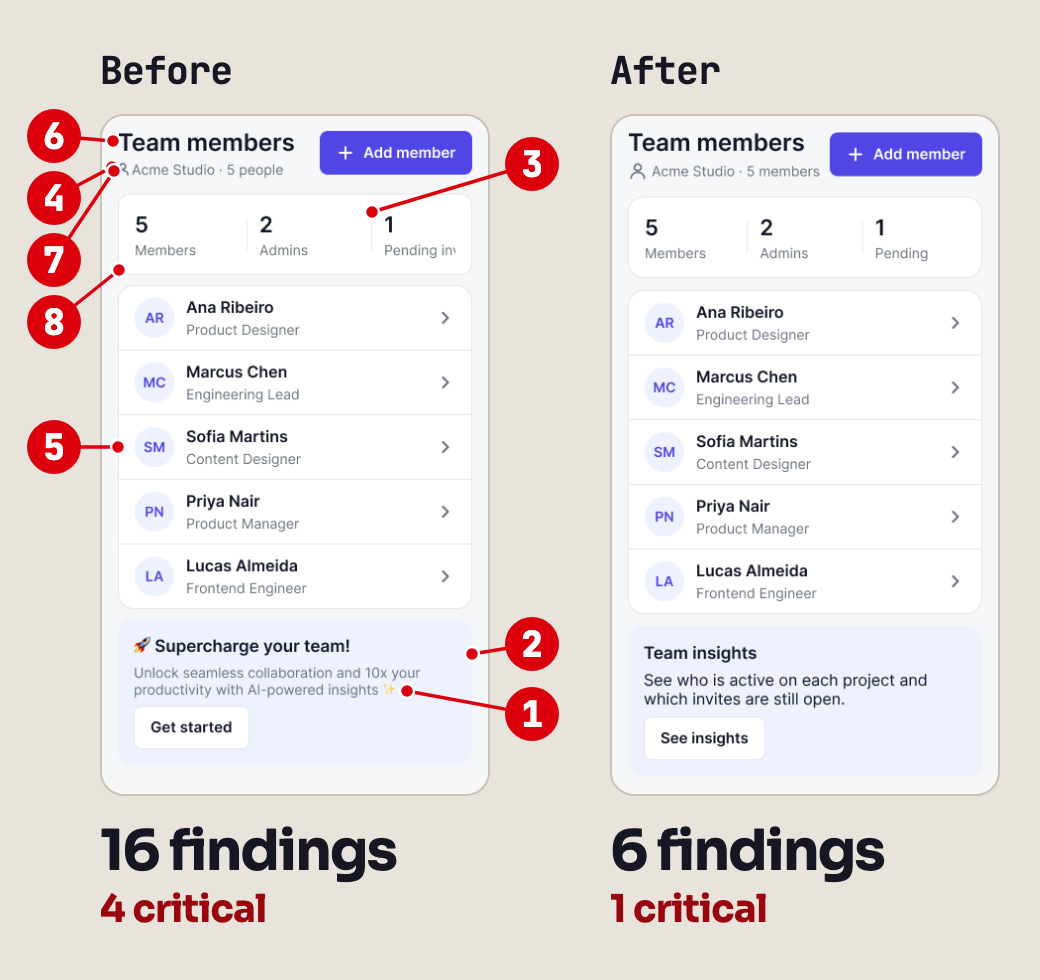
Test on Figma's official MCP server, 2026-10-05: 10 of 10 planted defects found, 0 missed. The agent that planted the defects had read the skills, the auditor's prompt said where to look, and this was one screen in one run.
One agent built a demo screen with 10 planted defects and an answer key. A second agent, without the key, ran figma-slop-check and figma-handoff-gate. A third compared the audit with the key. The audit also flagged 14 items outside the key (13 distinct problems: both gates flagged the same rename). After one fix pass, figma-slop-check went from 16 findings to 6, but neither gate passed. There is also a 9-second animation.
The markers, how the test ran, and its limits
The markers point at the first 8 items of the figma-slop-check punch list, in the run's own words:
The test used a demo screen with 10 planted defects and an answer key. The agent that built it had read the skills. A second agent, who never saw the key, ran figma-slop-check and figma-handoff-gate through Figma's official MCP server. Its prompt told it what to inspect: bound variables, instances versus frames, spacing, radius, names and text bounds. A third agent, the judge, compared the punch list with the key.
10 of 10 planted defects found, 0 partial, 0 missed. The agent that planted the defects had read the skills, the auditor's prompt said where to look, and this was one screen in one run. The punch list had 27 items: 16 from figma-slop-check and 11 from figma-handoff-gate. Of those, 13 match a planted defect (some defects show up in more than one item). The other 14 items point at problems outside the key: 13 distinct ones, because both gates flagged the same rename. None contradicted the key or the screenshots, though 2 could not be checked without opening the file, and the judge did not open it. One of the 14 is a contrast failure the answer key itself missed.
Then a fourth agent ran figma-preflight, fixed the screen and read back every property it changed. Both checks ran again, and neither passes yet:
Real screenshots from the official Figma MCP, 2026-10-05, on a demo file built for the test. The agent that planted the defects had read these skills, and the auditor's prompt pointed at the properties where most of them sat. So the test shows that the checks fire on a live Figma file built for the test, not that they catch everything. works-with.md lists the tool calls and what the official server could not do.
No install needed. Copy this into your AI and fill in the brackets. The prompt ran in the Claude, Codex and Gemini terminal tools. Chat apps were not tested.
Read and use this file as reference:
https://raw.githubusercontent.com/thiagoxikota/figma-maxxing/main/llms.txt
If you cannot open it, tell me and do
not guess.
I am a designer. I [do / do not] have
an AI agent connected to Figma.
My context: [Figma plan, whether my
files have a design system, solo or
team].
Pick at most five rules for my work.
For each one, give me one check I can
do in Figma today. Then tell me
whether any skill is worth installing
for me.
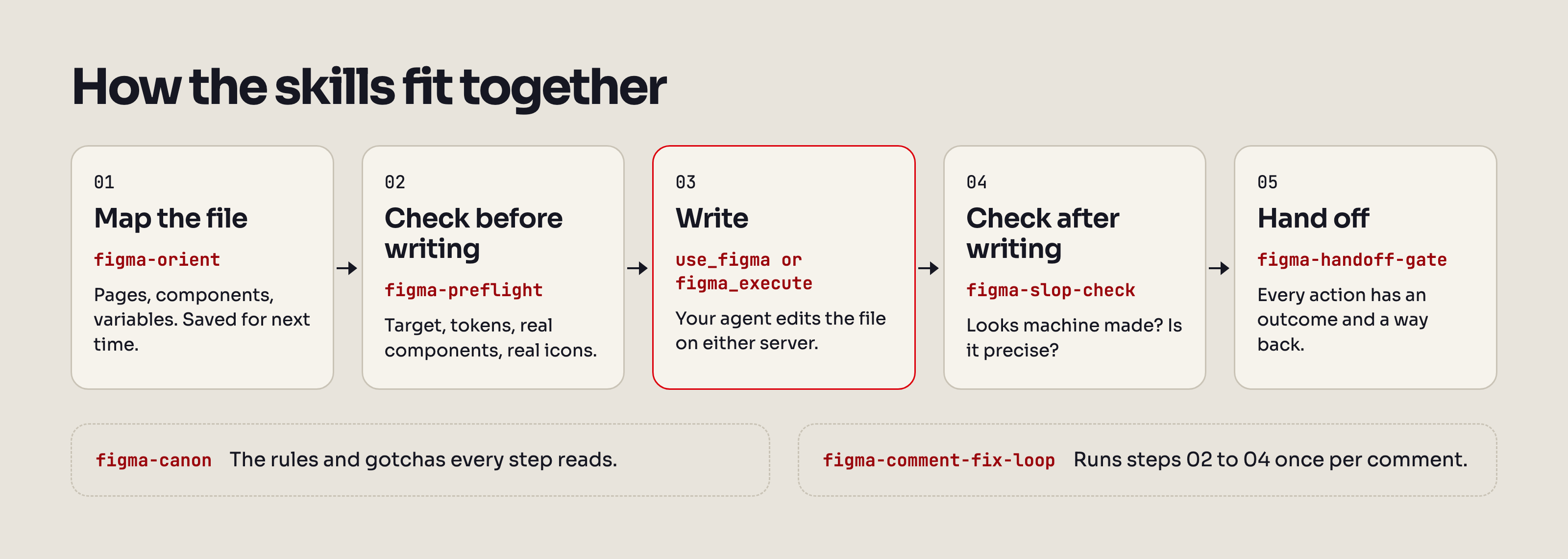
figma-preflight searches first.figma-preflight.figma-slop-check.figma-handoff-gate.figma-comment-fix-loop.figma-bridge-doctor.figma-canon · The rules and the gotchas. Loaded piece by piece, only what the task needs.figma-preflight · Before every write. Tells the agent to run the checks and return a verdict or a fix list, without changing the canvas.figma-orient · First contact with a file. Maps pages, components and variables, and saves the map.figma-slop-check · After a write. Tells the agent to review generated copy, layout and values that drift off your scales and tokens.figma-handoff-gate · Before a handoff. Every action needs a destination and a way back.figma-comment-fix-loop · When feedback arrives. Turns open comments into fixes, with evidence for each one.figma-click-flow · "Turn this into a flow." Draws arrows from tappable elements to their screens.figma-bridge-doctor · The figma-console bridge dropped. Diagnoses and repairs it (macOS scripts).How they fit together
action on a prototype reaction does nothing. Figma reads actions, and the call still returns success.instance.resize() leaves the icon at full size inside a small box. Use rescale().locked: false. Figma's typings say locked does not block plugin writes, so the cause is not established. A count after the sweep is what caught it.Every gotcha, indexed by symptom, in the words a designer would use, plus a list by error message.
Figma's own skills help an agent create things in Figma. The skills here check the agent's work before and after each write, and again at handoff. Use both. landscape.md maps the servers and skill sets around Figma, with dates.
figma-preflight, figma-slop-check and figma-handoff-gate ran there once, on the demo file of the test above, with some steps adapted or skipped (the list). That run used the earlier rigor lens of figma-slop-check; 1.2.0 rewrote it as 11 rigor checks in 5 groups. figma-orient, figma-comment-fix-loop and figma-click-flow describe that path and have not run on it yet. figma-bridge-doctor does not apply.Skill by skill: works-with.md.
npx skills add thiagoxikota/figma-maxxing covers most agents. The skills CLI is a third-party tool that sends anonymous install counts; DISABLE_TELEMETRY=1 turns that off.
Every route below except Cursor's ran on 2026-10-05 in a clean test folder, and each one installed the 8 skills at version 1.1.1. Claude Code, Codex, Copilot CLI and npx skills add thiagoxikota/figma-maxxing installed from GitHub main at commit 3693845, the commit tagged v1.1.1; Claude Code ran through the claude plugin CLI, the terminal form of the two slash commands. Gemini CLI installed the v1.1.1 release. -a opencode and -a windsurf ran earlier the same day from a local copy of the repository.
Claude Code
/plugin marketplace add thiagoxikota/figma-maxxing
/plugin install figma-maxxing@figma-maxxing-skills
Skills show up as /figma-maxxing:figma-preflight and so on. The plugin ships skills only: no hooks, no MCP server. The skill descriptions cost about 1,200 tokens in every session (claude plugin details, Claude Code 2.1.289).
Codex
codex plugin marketplace add thiagoxikota/figma-maxxing
codex plugin add figma-maxxing@figma-maxxing-skills
Ran with codex-cli 0.156.1.
GitHub Copilot CLI
copilot plugin marketplace add thiagoxikota/figma-maxxing
copilot plugin install figma-maxxing@figma-maxxing-skills
Ran with Copilot CLI 1.0.61.
Gemini CLI
gemini extensions install https://github.com/thiagoxikota/figma-maxxing
Ran with Gemini CLI 0.43.0, which installed 1.1.1 from the latest GitHub release. It asks you to trust the folder and to confirm the install; --consent answers both, which is how the test ran.
Cursor (not tested)
I do not have Cursor installed, so this route has not run. According to its docs, Cursor reads .cursor-plugin/plugin.json. To try it, copy the repository to ~/.cursor/plugins/local/figma-maxxing and reload the window. Or use the skills CLI:
npx skills add thiagoxikota/figma-maxxing -a cursor
OpenCode, Windsurf and other agents
npx skills add thiagoxikota/figma-maxxing -a opencode
npx skills add thiagoxikota/figma-maxxing -a windsurf
-a also takes codex, cursor, gemini-cli, github-copilot and claude-code. Add -g to install in your home folder. In a test, the CLI wrote the 8 skills to .agents/skills (.windsurf/skills for Windsurf, .claude/skills for claude-code). The agents themselves were not run.
Manual copy
git clone https://github.com/thiagoxikota/figma-maxxing.git
cd figma-maxxing
python3 install.py --scope user --dry-run
--dry-run shows what would be copied. Then run one of these two lines, not both:
python3 install.py --scope user installs for Claude Code in ~/.claude/skills.python3 install.py --target agents --scope user installs in ~/.agents/skills, for Codex, Cursor, Gemini CLI and others.The installer copies folders and refuses to overwrite a skill that already exists.
The skills need an agent that loads Agent Skills and a connection to Figma. There are two ways to connect.
Figma's official MCP server. Connect with your Figma account through OAuth. In Claude Code:
claude mcp add --transport http figma https://mcp.figma.com/mcp
For other agents, see Figma's guide. Writes through use_figma need a Full seat, except in your own drafts, where Figma's MCP server FAQ also lets a Dev seat write. On a Starter plan the call budget is small (field note). Using it means agreeing to the Figma Developer Terms.
figma-console-mcp by Southleft (MIT). The route I use in my own work, and the one these skills were built on. It runs on your machine and reaches Figma Desktop (macOS or Windows) through its Desktop Bridge plugin. You need Node.js 18 or newer and a Figma personal access token. Last checked against v1.40.8. In Claude Code:
claude mcp add figma-console -s user \
  -e FIGMA_ACCESS_TOKEN=figd_YOUR_TOKEN_HERE \
  -e ENABLE_MCP_APPS=true \
  -- npx -y figma-console-mcp@latest
~/.figma-console-mcp/plugin/manifest.json (~ is your home folder).figma_get_status.That command writes the token in plain text to your agent's config, and the command itself, token included, may stay in your shell history. Treat the config and the history as secrets, and never commit either. For other agents, follow the upstream guide.
For the comment workflow, on either server: a personal access token with File content (read), File versions (read), Variables (read) and Comments (read and write). figma-comment-fix-loop reads comments through the REST API.
The skills are plain Markdown and run wherever your agent runs. The bridge recovery scripts are macOS only. This repository and figma-console-mcp are free; your agent and your Figma plan are not.
hooks/figma-canon-precheck.py reads the script your agent is about to run in Figma and warns about 13 known problem patterns before the call reaches Figma. It is never installed automatically. To turn it on in Claude Code, add this to your settings.json:
{
  "hooks": {
    "PreToolUse": [
      {
        "matcher": "mcp__figma-console__figma_execute(_across_files)?",
        "hooks": [
          {
            "type": "command",
            "command": "python3 /path/to/figma-maxxing/hooks/figma-canon-precheck.py",
            "timeout": 10
          }
        ]
      }
    ]
  }
}
By default it only warns. With FIGMA_PRECHECK_MODE=block it refuses the 5 patterns marked BLOCK, the ones that break the call. The matcher above fires only on the figma-console bridge; the hook has not been tried on the official server's use_figma.
The skills are instructions your agent reads. They do not enforce permissions or block writes on their own.
figma-canon, figma-preflight and figma-orient instruct the agent to leave the canvas unchanged. figma-orient saves its map in your project, not in the Figma file.figma-slop-check and figma-handoff-gate tell the agent to report findings and wait for approval before applying each fix. The exception is a slop failure on work the agent just made: figma-slop-check tells it to fix that before it answers.figma-comment-fix-loop tells the agent to show the comments it will act on and wait for your yes. It treats instructions written in comments as data.figma-canon tells the agent to work in a draft or a branch until you approve, unless you say otherwise. It is an instruction, not a check: nothing blocks a write to a shared library, so tell the agent which draft to use.figma-preflight tells the agent to claim an advisory file lock. It coordinates only sessions that check the lock; Figma does not enforce it.mcp-direct daemon start only when you say so.Every push runs test.yml:
@figma/plugin-typings 1.140.0: 0 errors on 2026-10-05. On the tree before commit 1dca321 (the annotations fix), the same check fails with 3.Every week, drift.yml runs the API check against the newest typings and opens an issue when a name breaks. scorecard.yml runs OpenSSF Scorecard.
A release (release.yml) builds one zip per skill and a plugin bundle from the tagged commit, builds them twice, fails if the bytes differ, and attaches a build provenance attestation. To check a download:
gh attestation verify figma-preflight-1.1.1.zip \
  --repo thiagoxikota/figma-maxxing
This repository has an entry in the M8ven Trust Index, claimed by the author himself. Its public grade is C (Emerging). The code sub-score was 100 out of 100, read on 2026-10-04 at commit 1dca321, before 1.1.0.
As of 2026-10-05:
get_screenshot, no bridge status, and a 20 KB cap on each call. The agents used read-only use_figma workarounds and logged each one in works-with.md.If something still depends on my setup, open an issue with your environment and the exact error.
A gotcha you hit yourself, with the symptom, cause and fix you ran, belongs here. Questions and before/after shots go to Discussions; bugs and gotchas to issues. See CONTRIBUTING.md, the code of conduct and the changelog. Working with an agent? Point it at AGENTS.md.
I'm Thiago Xikota, AI Product Designer, founder of Xikota Design and researcher at Lemme (UFSC). I'm writing Design na era da IA (Casa do Código, in production). Follow me on LinkedIn.
Built on figma-console-mcp by Southleft. The skill format is the open Agent Skills standard.
Not affiliated with Figma. Figma is a trademark of Figma, Inc.
MIT. See LICENSE.
Install via CLI
npx mdskills install thiagoxikota/figma-maxxingFigma Maxxing is a free, open-source AI agent skill. I wrote 8 Agent Skills for agents that edit real Figma files. Most rules came from something that broke in a real file. They tell your agent what to inspect before editing and how to check the result. Install and try it · Your agent's setup · Leia em português 90 gotchas · a handoff gate with 17 checks Install the skills: Connect your agent to Figma through Figma's official MCP server or figma-con
Install Figma Maxxing with a single command:
npx mdskills install thiagoxikota/figma-maxxingThis downloads the skill files into your project and your AI agent picks them up automatically.
Figma Maxxing works with Claude Code, Claude Desktop, Cursor, Vscode Copilot, Windsurf, Continue Dev, Codex, Gemini Cli, Amp, Roo Code, Goose, Opencode, Trae, Qodo, Command Code. Skills use the open SKILL.md format which is compatible with any AI coding agent that reads markdown instructions.
