
Mission Control for Claude Code. Native desktop app to browse, search, and drive Claude Code sessions with live status and diff review.
npx mdskills install zenolab124/monetRelated
@zenolab124? Sign in with GitHub to claim this listing.
Monet
Multi-engine mission control for Claude Code and Codex
Features • Install • Build • Privacy • FAQ
Don't feel like reading? Hand this line to your AI — it will assess, install, and troubleshoot for you:
Read https://raw.githubusercontent.com/zenolab124/monet/main/llms.txt
If you are that AI: read the llms.txt above and follow its guidance to serve your user.
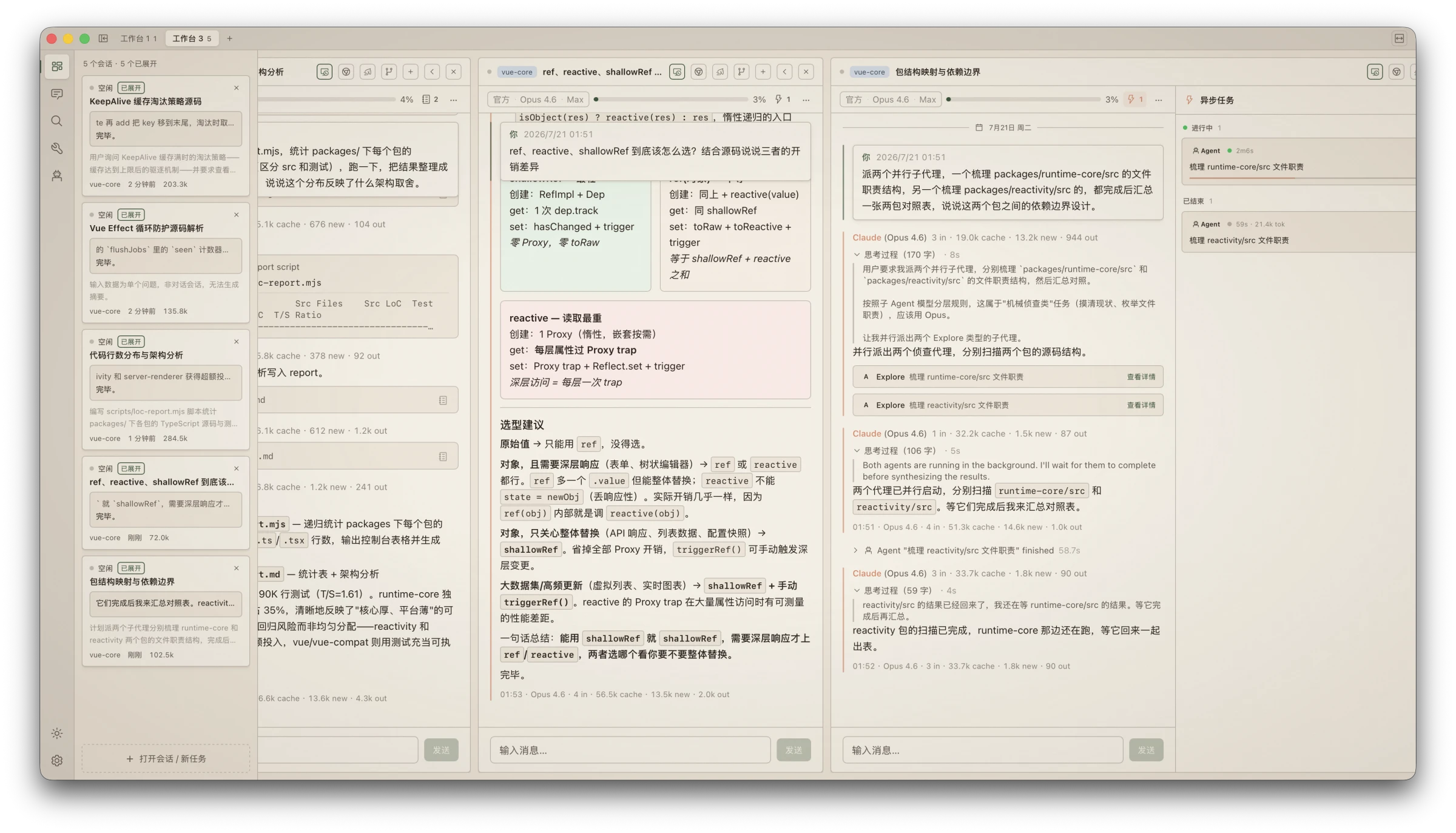
Every conversation you have with a coding agent is scattered across terminal windows — close one and it's gone, run several and you can't keep up, start a long task and all you can do is wait.
Monet gathers Claude Code, Codex, and future engines onto one wall: every session browsable, searchable, and commandable in parallel. The agent does the work; Monet gives you eyes and hands.
Command your agents like a trader watches the market. Unlimited parallel session columns spread out horizontally; the monitor rail shows every session's status, output, and token spend at a glance. Approve permissions, answer questions, retry failures — one click on the card. You stop being the person alt-tabbing between terminals and become the one at the command desk.
A home for multi-channel players. Official subscription, third-party APIs, self-hosted proxies, local models — each session on its own channel, hot-switchable mid-conversation: a strong model for the hard turn, a cheap channel for the chores. "Follow CLI" and "Official Direct" stand side by side, and the settings page shows exactly where your CLI config points.
Your data stays yours. Engine transcripts are read-only by architecture: Claude Code JSONL and Codex session files are never written. Codex runtime operations use the local official App Server when its CLI is installed, without rewriting rollouts. Zero telemetry and no Monet account system; titles, tags, stars, and soft-delete markers live separately in ~/.monet/, so uninstalling leaves original sessions untouched.
It works while you sleep. Scheduled tasks run through the OS scheduler even with Monet closed; your Mac can wake itself on time, run the task, and go back to sleep. System notifications call you back whenever needed — you can walk away, the work doesn't stop.
codex app-server adds create/resume, streaming, sending while a turn is running, interruption, command/file/permission approvals, and dynamic model/effort discoveryNo cap on column count; when the screen runs out, scroll horizontally — wheel input glides like a native trackpad
Monitor rail overviews every session: live status, tail output, token usage; approve/retry/answer right on the card
Permission requests as GUI cards: dangerous commands flagged in red, AI annotates the risk in plain language; Enter to allow, Esc to deny
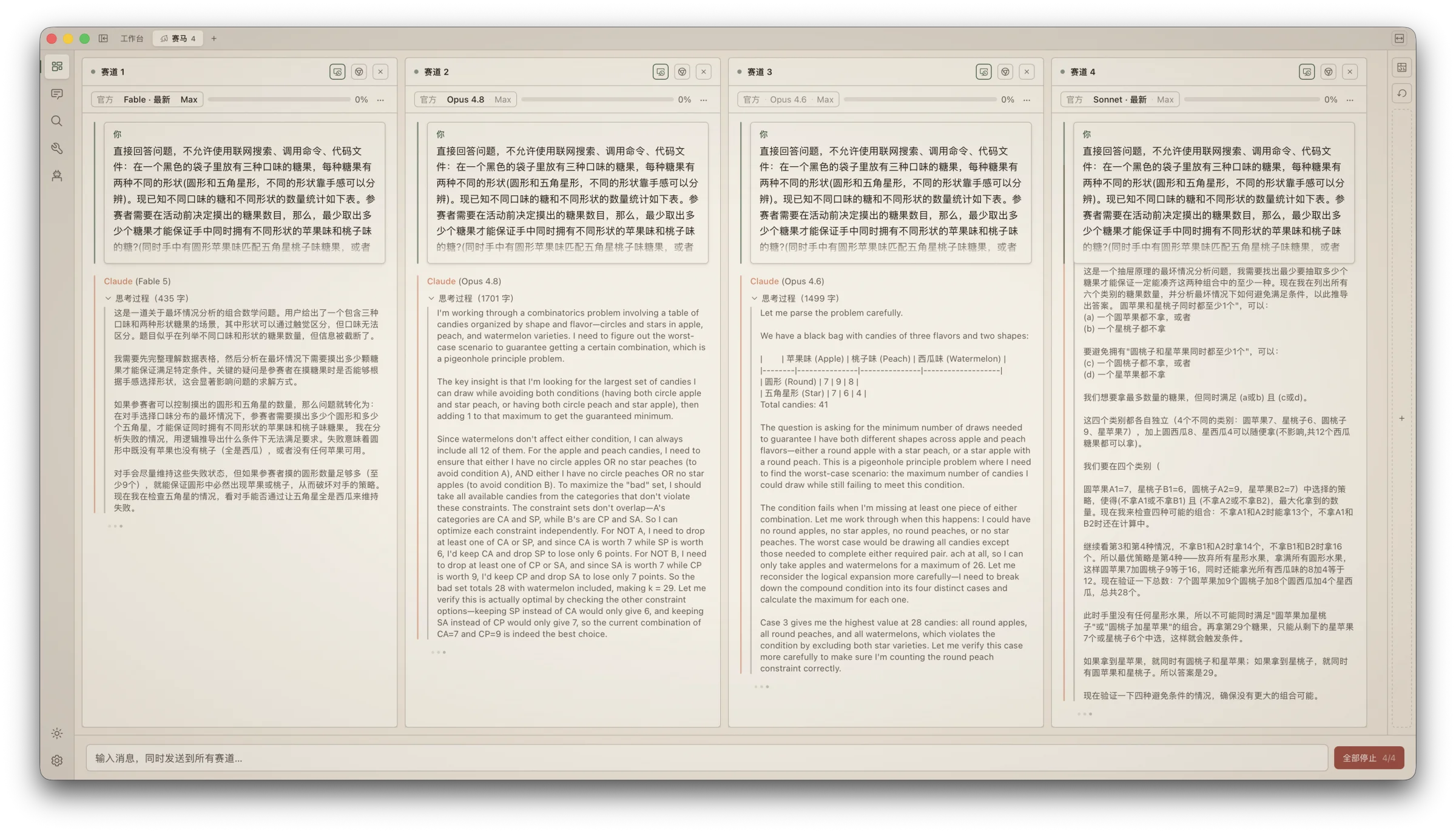
Race mode: broadcast one question to different models/channels, compare answers and cost side by side
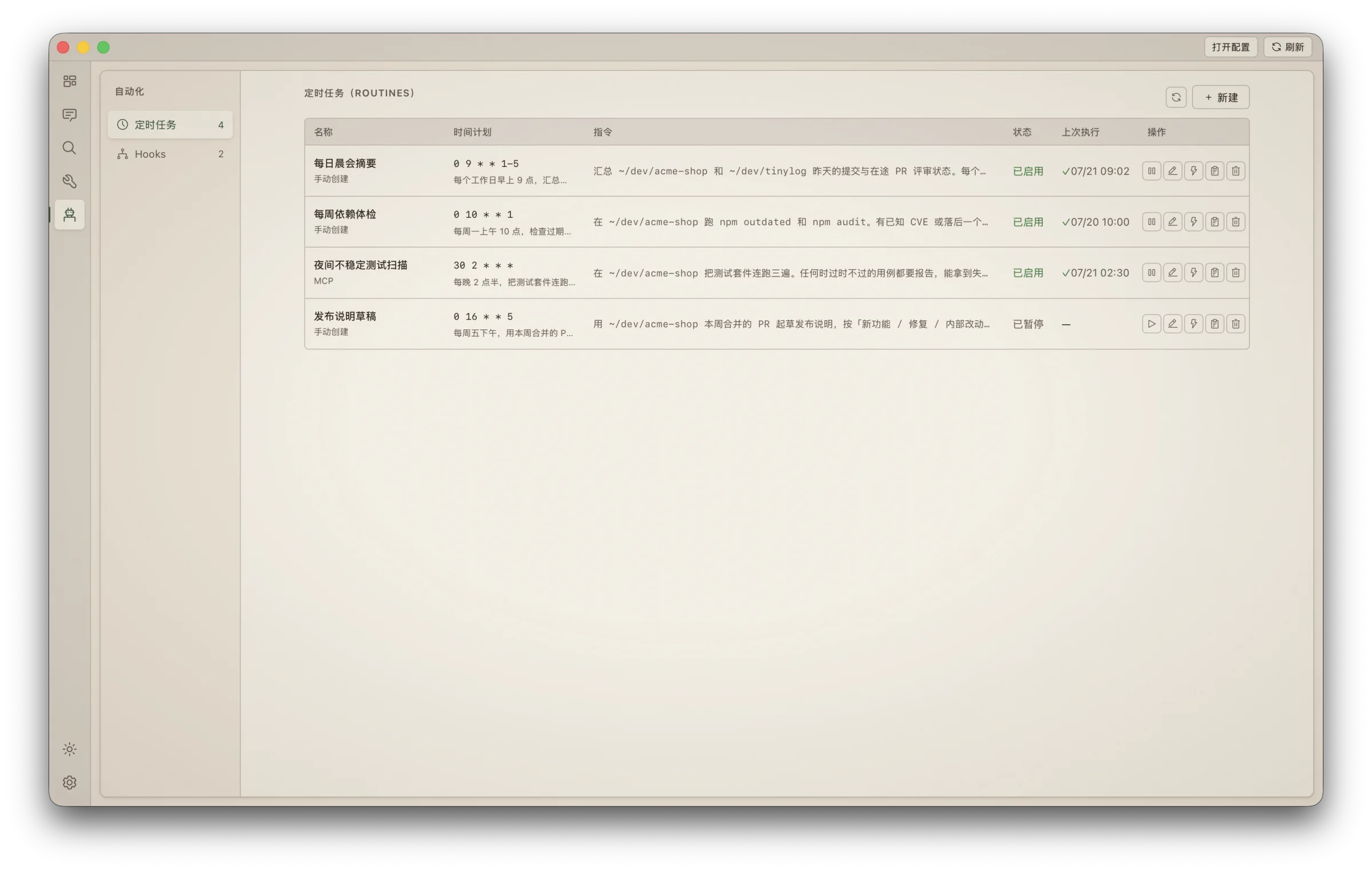
"Summarize yesterday's sessions every morning at nine" — natural language becomes a scheduled task
Wakes the machine from sleep, runs, puts it back to sleep; authorize once, silent thereafter
Real hooks statistics: configured ≠ working — see which hooks actually ran in the last 7 days
Menu-bar subscription quota: Claude Code and Codex appear as vertically ordered provider sections, preserving the windows, groups, and reset countdowns each upstream actually supplies — visible with the main app closed
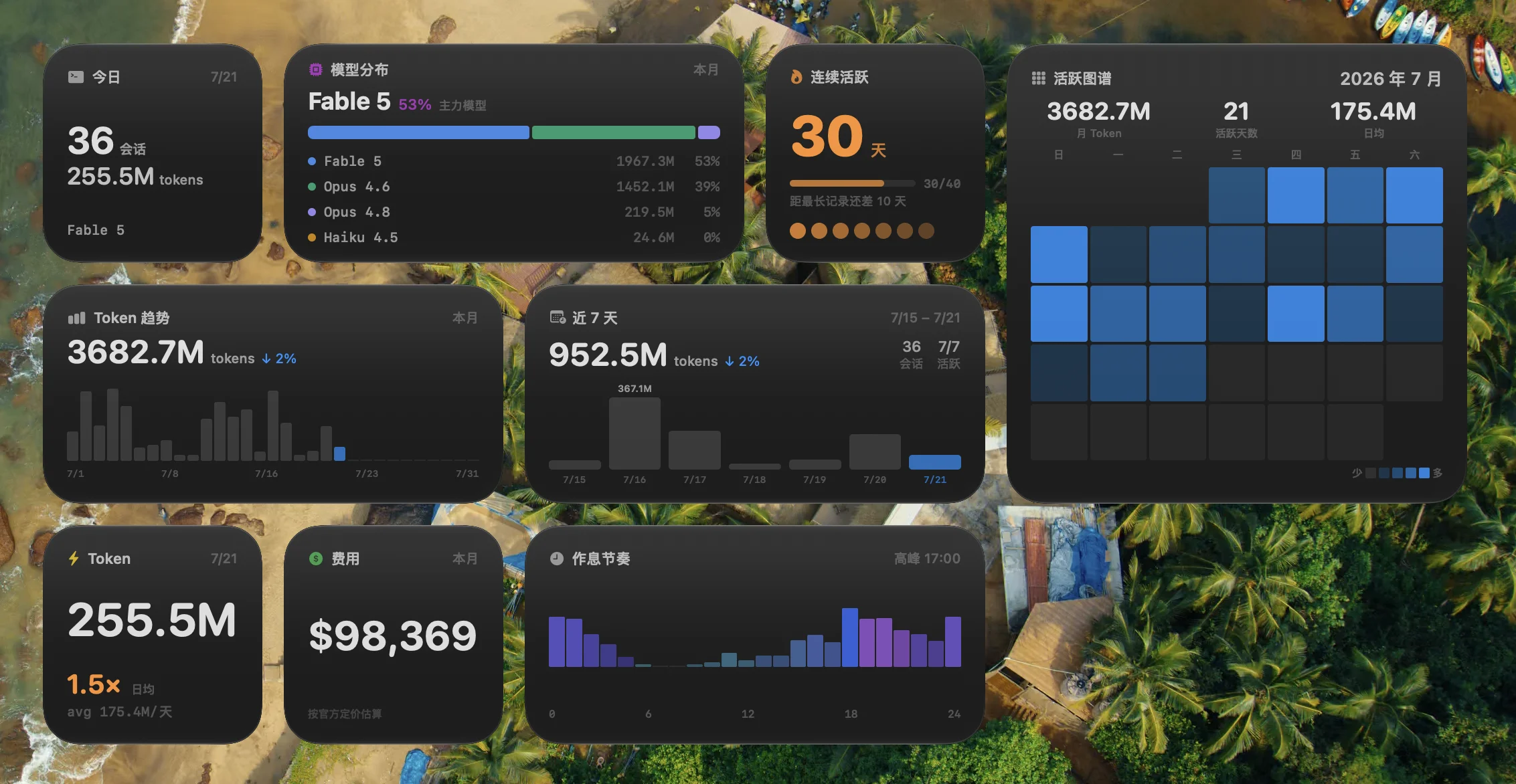
Desktop widgets: streaks, token pulse, 28-day heatmap, model mix
Cost estimation prices four token classes separately; unknown models are honestly labeled "unpriced" — never guessed
Paper design language: warm, matte, ink-on-paper; a dark Ink theme included
No startup flash, ProMotion high refresh, virtual scrolling for huge sessions — details taken seriously, with a performance HUD (Cmd+Shift+M) keeping everything transparent
Homebrew (macOS):
brew install --cask zenolab124/tap/monet
The fully qualified name makes Homebrew 6 trust only the Monet cask, so no separate brew trust command is needed.
Or download from Releases: macOS .dmg / Windows installer.
macOS 11+ (Apple Silicon) gets the full experience; Windows covers the core features, with system-level integrations (widgets, menu bar, wake-from-sleep) being macOS-only.
First launch (macOS 15+): Monet is signed but not yet notarized by Apple. Open Monet once from Applications and dismiss the warning, then immediately go to System Settings → Privacy & Security, click Open Anyway in the Security section, confirm, and enter your login password. The button appears only after a launch attempt and remains available for about an hour. Do not run xattr to remove macOS security attributes. In-app updates work normally afterwards.
Works out of the box, zero import: local Claude Code and Codex history is detected automatically and appears in one Archive, even when the corresponding CLI is not installed. Installing the Codex CLI adds interactive runtime features; inspect each engine under Settings → Engines.
git clone https://github.com/zenolab124/monet.git
cd monet
pnpm install
pnpm tauri dev
pnpm release
This runs tauri build, compiles the macOS widget extension, embeds it into the app bundle, signs everything, and creates a .dmg.
To set up a local signing identity (recommended — keeps TCC permissions stable across rebuilds):
scripts/setup-signing.sh
Without it, the build falls back to ad-hoc signing — functional, but TCC permissions reset on each rebuild and widgets may not register.
| What | Where | Access |
|---|---|---|
| Claude Code sessions | ~/.claude/projects/ | Read-only |
| Codex sessions | $CODEX_HOME/sessions/ and $CODEX_HOME/archived_sessions/ (default ~/.codex/) | Read-only; runtime actions use the official CLI App Server when available |
| Monet metadata (titles, tags, routines) | ~/.monet/ | Read-write |
| MCP registration | ~/.claude/settings.json | Adds monet entry under mcpServers |
Local session features work offline, with zero telemetry and no Monet account system. Subscription quota contacts only the official Claude/Codex services and reuses the official clients' existing sign-in state; Monet never proactively refreshes or writes OAuth credentials. Credential discipline: API tokens never enter command-line arguments, and temporary files are deleted right after use.
On upgrade, legacy metadata.json is migrated idempotently to the engine-scoped metadata-v2.json; the old file is never deleted or overwritten. Search cache is rebuilt under search/v2/, partitioned by engine and project. Rolling back leaves the original Claude data usable, and upgrading again does not overwrite newer state.
Something broken? Skip the docs — hand this to your AI:
Read https://raw.githubusercontent.com/zenolab124/monet/main/llms.txt and help me troubleshoot Monet. It can self-diagnose common issues and, if it's a real bug, file a report with diagnostics attached (no GitHub account needed).
Does Monet replace the Claude Code CLI? No — it's a companion. The CLI does the work; Monet gives you eyes and hands. Sessions started in either show up in both.
Is my session data safe? Read-only by architecture, verifiable in the open source. Delete Monet and your Claude Code data is untouched.
Anything to configure after install? No. If the CLI runs, Monet runs; multi-channel and AI value-add are optional upgrades.
Why does Gatekeeper warn on first launch?
Signed but not yet notarized. Try opening once, then grant the one-time exception under System Settings → Privacy & Security → Open Anyway; do not run xattr. Updates are silent afterwards.
Windows / Linux? Windows is supported (core features complete, minus macOS system integrations); Linux has no near-term plans.
Which agents are supported? Claude Code and Codex are supported today. Monet is an engine system rather than two platform-specific branches; another production adapter implements only its protocol and capability declaration. See the Engine Adapter guide.
Install via CLI
npx mdskills install zenolab124/monetMonet is a free, open-source AI agent skill. Mission Control for Claude Code. Native desktop app to browse, search, and drive Claude Code sessions with live status and diff review.
Install Monet with a single command:
npx mdskills install zenolab124/monetThis downloads the skill files into your project and your AI agent picks them up automatically.
Monet works with Claude Code. Skills use the open SKILL.md format which is compatible with any AI coding agent that reads markdown instructions.