
Use when user requests diagrams, flowcharts, architecture charts, or visualizations. Also use proactively when explaining systems with 3+ components, complex data flows, or relationships that benefit from visual representation. Generates .excalidraw files and exports to PNG/SVG via Kroki API or locally using excalidraw-brute-export-cli.
npx mdskills install Agents365-ai/excalidraw-skillRelated
@Agents365-ai? Sign in with GitHub to claim this listing.Comprehensive diagram generation with design system, export automation, and proactive triggers
自然语言生成手绘风格图表,自动导出为 PNG/SVG 的 Claude Code 技能。
curl,无需 npm、Docker 或浏览器自动化工具。max(160, charCount * 9)),CJK 字符自适应,杜绝文字截断。.excalidraw 文件可在 excalidraw.com 中打开编辑,箭头交互绑定完整保留。| 能力 | 本技能 | 原生 Claude Code | 其他技能 |
|---|---|---|---|
| 生成 Excalidraw JSON | ✓ 有设计体系引导 | ✓ 能写但无布局规范 | ✓ 各有侧重 |
| 导出 PNG/SVG | ✓ 自动完成 | ✗ 需手动要求 | 部分支持 |
| 零安装导出(Kroki API) | ✓ 仅需 curl | ✗ 无备选方案 | 不支持 |
| 主动触发(自动检测) | ✓ 3+组件自动触发 | ✗ 仅在明确要求时 | 不支持 |
| 语义色彩系统 | ✓ 60-30-10 法则 | ✗ 无设计规范 | 部分支持 |
| 精确间距规则 | ✓ 像素级规范 | ✗ 凭感觉布局 | 部分支持 |
| 反模式防护 | ✓ 内置陷阱文档 | ✗ 无防护 | 不支持 |
| 智能尺寸计算(中文感知) | ✓ 自动适配 | ✗ 容易截断 | 不支持 |
| 箭头路由(直线/折线/曲线) | ✓ 3 种模式 | ✗ 仅直线 | 部分支持 |
| 双向箭头绑定 | ✓ 完整交互 | ✗ 静态连线 | 部分支持 |
| 中英双语 | ✓ 关键词触发 | ✗ 无关键词触发 | 不支持 |
| 端到端工作流 | ✓ 生成→导出→报告 | ✗ 仅生成代码 | 部分支持 |
| 单文件自包含 | ✓ 一个 SKILL.md | 不适用 | 否(4-6 个文件) |
相比原生 Claude Code 的核心优势:
Excalidraw 的 JSON 格式就是一个元素数组,每个元素有 x/y/width/height —— Claude 天然就能写。Skill 教 Claude「怎么画」,MCP 给 Claude「一个画笔」。当 LLM 自己就能画的时候,教它怎么画更好。
| 维度 | Skill | MCP Server |
|---|---|---|
| 原理 | 提示词注入到 Claude 上下文 | 独立运行的服务进程 |
| 生成方式 | Claude 直接写 JSON(LLM 原生能力) | 需要代码处理 JSON 生成逻辑 |
| 灵活性 | Claude 理解语义,自由布局 | API 参数固定,灵活性受限 |
| 安装 | 复制一个文件 | 启动服务、配置 MCP |
| 依赖 | 零 | Node.js / Python 运行时 |
| 导出 | 调用现有工具(curl / CLI) | 需内置导出逻辑或仍然调 curl |
MCP 的价值在于提供 Claude 自身做不到的能力 —— 数据库访问、浏览器自动化、带认证的 API。图表生成的核心是 设计布局 + 写 JSON,恰恰是 LLM 最擅长的。
.excalidraw JSON 文件curlexcalidraw-brute-export-cli 本地导出为 PNG/SVG(基于 Firefox)8 种语义色彩类别 — 主要(蓝)、成功(绿)、警告(黄)、错误(红)、外部(紫)、流程(天蓝)、触发(橙)、中性(灰蓝)。遵循 60-30-10 法则:60% 留白、30% 主色调、10% 强调色。
| 模式 | 布局 | 适用场景 |
|---|---|---|
| 流程图 | 左右或上下,200px 间距 | 流程、决策树 |
| 架构图 | 列式布局,精确间距规则 | 系统设计、微服务 |
| 时序图 | 参与者间 200px | API 流程、协议 |
| 思维导图 | 放射状,逐级缩小 | 头脑风暴、概念图 |
| 泳道图 | 水平泳道 + 跨道箭头 | 跨团队工作流 |
| 场景 | 间距 |
|---|---|
| 有标签箭头间距 | 150–200px |
| 无标签箭头间距 | 100–120px |
| 列间距(有标签) | 400px |
| 列间距(无标签) | 340px |
| 区域内边距 | 50–60px |
3 种模式:直线(默认)、L 形折线(points 直角转折)、曲线弯折(roundness: { type: 2 })。
| 样式 | 含义 |
|---|---|
| 实线 | 主流程 |
| 虚线 | 响应、异步 |
| 点线 | 可选、弱依赖 |
根据标签文字自动计算宽度:西文字符 max(160, charCount * 9),中日韩字符 max(160, charCount * 18)。避免生成图表中的文字截断问题。
标题(28px)→ 组标题(24px)→ 标签(20px)→ 描述(16px)→ 注释(14px)
内置常见陷阱文档 — 区域文字居中重叠、跨区域箭头面条化、短箭头标签碰撞、容器透明度规则 — 让 Claude 在生成前就规避错误。
| 工具 | 用途 |
|---|---|
curl | 将 .excalidraw 发送到 Kroki API 渲染为 SVG |
excalidraw-brute-export-cli | 本地导出 .excalidraw → PNG/SVG 的命令行工具 |
Playwright + Firefox | 本地 CLI 使用的无头浏览器 |
curl 在 macOS、Linux、Windows(Git Bash/WSL)上已预装。
Claude Code(全局):
git clone https://github.com/Agents365-ai/excalidraw-skill.git ~/.claude/skills/excalidraw
Claude Code(仅当前项目):
git clone https://github.com/Agents365-ai/excalidraw-skill.git .claude/skills/excalidraw
OpenClaw:
git clone https://github.com/Agents365-ai/excalidraw-skill.git skills/excalidraw
SkillsMP: 在 skillsmp.com 搜索 excalidraw,一键安装。
# curl 已预装,验证即可:
curl --version
无需额外配置,SVG 通过 https://kroki.io 渲染。
npm install -g excalidraw-brute-export-cli
npx playwright install firefox
| 平台 | 额外步骤 |
|---|---|
| macOS | 需要打一次补丁(见下方) |
| Windows | 无需额外操作 |
| Linux | 无需额外操作 |
CLI 使用 Control+O / Control+Shift+E,但 macOS 需要 Meta(Cmd)键:
CLI_MAIN=$(npm root -g)/excalidraw-brute-export-cli/src/main.js
sed -i '' 's/keyboard.press("Control+O")/keyboard.press("Meta+O")/' "$CLI_MAIN"
sed -i '' 's/keyboard.press("Control+Shift+E")/keyboard.press("Meta+Shift+E")/' "$CLI_MAIN"
直接描述你想要的图表:
画一个微服务电商架构图,包含 Mobile/Web/Admin 客户端,API Gateway,
Auth/User/Order/Product/Payment 微服务,Kafka 消息队列,Notification 服务,
以及各自独立的数据库
Claude 会自动生成 .excalidraw 文件并导出为 PNG。
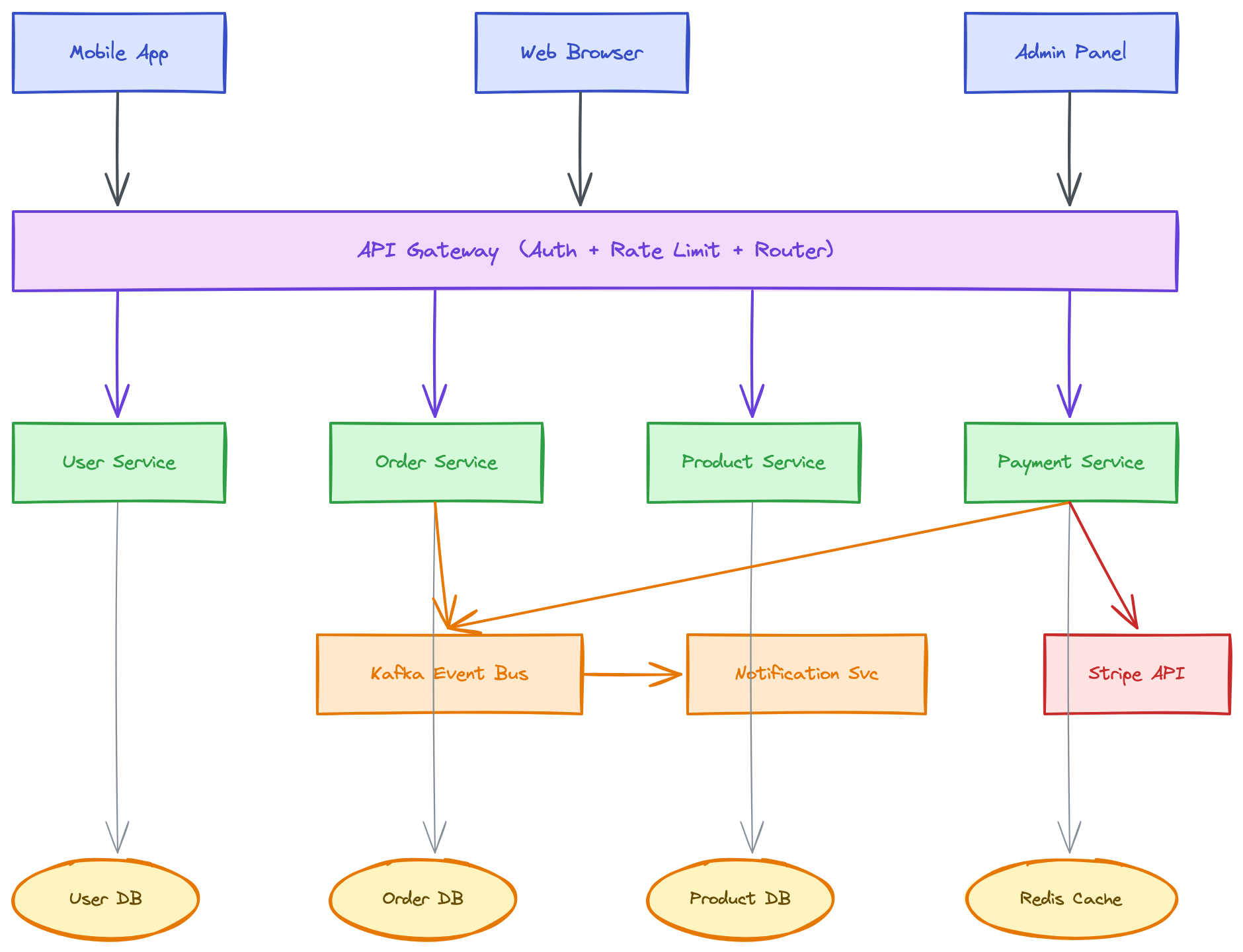
提示词:
画一个微服务电商架构图,包含 Mobile/Web/Admin 客户端,API Gateway(含认证+限流+路由), Auth/User/Order/Product/Payment 微服务,Kafka 消息队列,Notification 服务, User DB / Order DB / Product DB / Redis Cache / Stripe API
输出效果:
SKILL.md — Claude Code 加载的技能指令文件README.md — 本文件(中文)README_EN.md — 英文说明assets/ — 示例图表MIT
如果这个 skill 对你有帮助,欢迎支持作者:

微信支付

支付宝

Buy Me a Coffee
Agents365-ai
Install via CLI
npx mdskills install Agents365-ai/excalidraw-skillExcalidraw 图表技能 is a free, open-source AI agent skill. Use when user requests diagrams, flowcharts, architecture charts, or visualizations. Also use proactively when explaining systems with 3+ components, complex data flows, or relationships that benefit from visual representation. Generates .excalidraw files and exports to PNG/SVG via Kroki API or locally using excalidraw-brute-export-cli.
Install Excalidraw 图表技能 with a single command:
npx mdskills install Agents365-ai/excalidraw-skillThis downloads the skill files into your project and your AI agent picks them up automatically.
Excalidraw 图表技能 works with Claude Code, Claude Desktop, Cursor, Vscode Copilot, Windsurf, Continue Dev, Gemini Cli, Amp, Roo Code, Goose. Skills use the open SKILL.md format which is compatible with any AI coding agent that reads markdown instructions.