
After setup, you can usually just say: The goal is that you only install this MCP server, and it handles the rest (searching servers, selecting servers, configuring servers, etc.). Choose one of the following: 1. Remote (simplest & fastest ⚡💨) 2. Local (prebuilt) — Docker, uvx, or npx 3. Local (from source) — run this repo directly Use the hosted endpoint (recommended for the simplest setup). Doc
npx mdskills install particlefuture/1mcpserverRelated
@particlefuture? Sign in with GitHub to claim this listing.Well-documented meta-MCP server that discovers and configures other MCP servers with flexible deployment options
1# [1 MCP Server](https://mcp.1mcpserver.com/) 🚀23[](https://mcp.1mcpserver.com/)45> **MCP of MCPs** — automatically discover and configure MCP servers on your machine (remote or local).67After setup, you can usually just say:89> “I want to perform . Call the `deep_search` tool and follow the outlined steps.”1011The goal is that you only install **this** MCP server, and it handles the rest (searching servers, selecting servers, configuring servers, etc.).1213### Demo video 🎥: [https://youtu.be/W4EAmaTTb2A](https://youtu.be/W4EAmaTTb2A)1415## Quick Setup16Choose **one** of the following:17181. **Remote** (simplest & fastest ⚡💨)192. **Local (prebuilt)** — **Docker**, **uvx**, or **npx**203. **Local (from source)** — run this repo directly2122### 1) Remote 🌍⚡💨2324Use the hosted endpoint (recommended for the simplest setup).2526**Docs + guided setup:** [https://mcp.1mcpserver.com/](https://mcp.1mcpserver.com/)2728#### Configure your MCP client2930Add the following entry to your client config file:3132* **Cursor**: `./.cursor/mcp.json`33* **Gemini CLI**: `./gemini/settings.json` (see Gemini docs)34* **Claude Desktop**:35 * macOS: `~/Library/Application Support/Claude/claude_desktop_config.json`36 * Windows: `%APPDATA%\Claude\claude_desktop_config.json`37* **Codex**:38 * macOS: `~/.codex/config.toml`39 * Windows: `%USERPROFILE%\.codex\config.toml`4041**Remote config (JSON):**4243```json44{45 "mcpServers": {46 "1mcpserver": {47 "url": "https://mcp.1mcpserver.com/mcp/",48 "headers": {49 "Accept": "text/event-stream",50 "Cache-Control": "no-cache"51 }52 }53 }54}55```5657If you already have other servers configured, just merge this entry under `mcpServers` For example:5859```json60{61 "mcpServers": {62 "1mcpserver": {63 "url": "https://mcp.1mcpserver.com/mcp/",64 "headers": {65 "Accept": "text/event-stream",66 "Cache-Control": "no-cache"67 }68 },69 "file-system": {70 "command": "npx",71 "args": ["-y", "@modelcontextprotocol/server-filesystem", "."]72 }73 }74}75```7677**Tip:** If your client supports it, move the config file into your **home directory** to apply globally.7879---8081### 2) Local (prebuilt) 💻8283Use this when you want everything local, or when your MCP client only supports **STDIO**.8485#### 2A) Docker 🐳86```bash87 docker run -p 8080:8080 ghcr.io/particlefuture/1mcpserver:latest88```89Running on other host ports:90```bash91 docker run -p <FREE_HOST_PORT_NUM>:8080 ghcr.io/particlefuture/1mcpserver:latest92```93Running with stdio instead of streamable-http (You might see some delays when trying to connect):94```bash95run --rm -i ghcr.io/particlefuture/1mcpserver:latest --local96```9798```json99{100 "mcpServers": {101 "1mcpserver": {102 "url": "https://mcp.1mcpserver.com/mcp/"103 }104 }105}106```107108#### 2B) npx 📦109```bash110npx -y @1mcpserver/1mcpserver111```112113---114115### 3) Local (from source) 🧩116117Clone this repo and run directly.118119```bash120git clone https://github.com/particlefuture/MCPDiscovery.git121cd MCPDiscovery122uv sync123uv run server.py --local124```125126```json127{128 "mcpServers": {129 "1mcpserver": {130 "command": "/path/to/uv",131 "args": [132 "--directory",133 "<PATH_TO_CLONED_REPO>",134 "run",135 "server.py",136 "--local"137 ]138 }139 }140}141```142143> If your client supports remote `url` servers, you can use the **Remote** setup instead.144145#### Optional: grant file-system access 📁146147If you want your LLM to have file-system access, add an MCP filesystem server and point it at the directory you want to allow:148149```json150{151 "mcpServers": {152 "file-system": {153 "command": "npx",154 "args": ["-y", "@modelcontextprotocol/server-filesystem", "~/"]155 }156 }157}158```159160---161162## Architecture 🧠163164There are two search modes:165166### Quick Search ⚡167168For explicit requests like: “I want an MCP server that handles payments.”169170Returns a shortlist of relevant MCP servers.171172### Deep Search 🌊173174For higher-level or complex goals like: “Build a website that analyzes other websites.”175176The LLM breaks the goal into components/steps, finds MCP servers for each part, and if something is missing, it asks whether to:177178* ignore that part,179* break it down further, or180* implement it ourselves.181182Deep Search stages:1831841. **Planning** — identify servers, keys, and config changes1852. **Testing** — verify servers (via `test_server_template_code`)1863. **Acting** — execute the workflow using the configured servers187188---189190## Change Log 🕒191192* July 31 2025: Upgrade to 0.2.0. Added agentic planning.193* Dec 12 2025: Support for Gemini + Codex194* Dec 13 2025: Easier local setup with docker and npm.195196## Future 🔮197198* Better demo videos (new domain, narrated walkthrough)199* Model Context Communication Protocol (MCCP): standard server-to-server messaging200* Avoid calling tools with an `internal_` prefix unless instructed201* Improve MCP server database schema: server, description, url, config json, extra setup (docker/api key/etc)202203## Credits 🙏204205Data sources:206207* wong2/awesome-mcp-servers208* metorial/mcp-containers209* punkpeye/awesome-mcp-servers210* modelcontextprotocol/servers211212Published to:213214* [https://mcpservers.org/](https://mcpservers.org/)215* [https://glama.ai/mcp/servers](https://glama.ai/mcp/servers)216217## Troubleshooting 🧰218219* If using a venv and you get `ModuleNotFoundError` even after installing: delete the venv and recreate it.220221Please create an issue or directly contact me zjia71@gatech.edu if you encounter ANY issue of frustration. I really hope the setup is as smooth as possible!!222223## Star History224[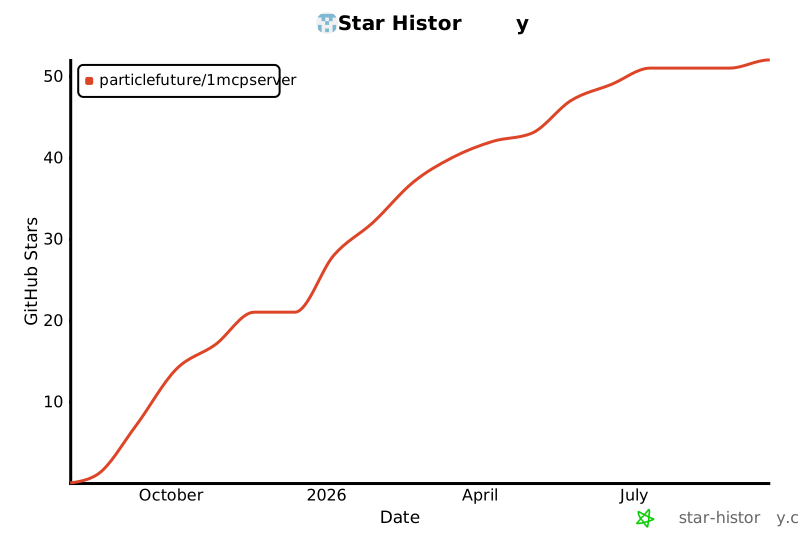](https://star-history.com/#particlefuture/1mcpserver&Date)225
Full transparency — inspect the skill content before installing.